Cloudwards.net may earn a small commission from some purchases made through our site. However, any earnings do not affect how we review services. Learn more about our editorial integrity and research process.

🎅 Christmas Deals 🎄
Up to 66 % OFF
1-10 TB Lifetime Plan + Encryption
+ Password Manager

Box vs Dropbox Cloud Storage: Which Is Best in2026?

This Box vs Dropbox review pits two popular cloud storage and collaboration platforms against each other. In this analysis, I compare their affordability, range of integrations, features and size limits to understand the best use cases for each.

Adeyomola KazeemKate HawkinsIgor Kurtz

Written by Adeyomola Kazeem (Writer)

Reviewed by Kate Hawkins (Editor, Writer)

Facts checked by Igor Kurtz (Fact-checking editor)

Last Updated:

All our content is written fully by humans; we do not publish AI writing. Learn more here.

4.05
4.15
  • Third-party integrations
  • Robust sharing features
  • Strong security
  • Office 365 & Google Workspace integration
  • Smart storage usage with “Smart Sync”
  • Block-level transfer
$5 / month(save 28%)(All Plans)
$9.99 / month(save 16%)(All Plans)

Key Takeaways: Box vs Dropbox

  • The main difference between Box and Dropbox is that Box is tailored for enterprise usage while Dropbox is preferable for individual users.
  • If you need generous file upload and sharing size limits and unlimited storage, Box is a better choice than Dropbox. However, Dropbox allows you to transfer and upload larger files.
  • Dropbox is better than Box for people on a budget because its plans are generally cheaper.

Facts & Expert Analysis About Dropbox and Box Cloud Storage

  • File transfers: Dropbox supports transfers as large as 250GB, and it lets you see who’s viewing your shared files and add custom branding like a logo or website.
  • Admin dashboard: Box’s admin dashboard is more comprehensive than Dropbox’s, so it can handle more granular access management.
  • Creative integration: Thanks to its built-in video and image tools, Dropbox eases the workflow for visual creatives. It also supports seamless integration with services like Canva and Adobe for extended functionality.
Winner
100GB – Unlimited GB$5 / month
(save 28%) (All Plans)

The cloud-based file storage industry is stacked with plenty of excellent options. If you’re in the market, you have a tough decision to make. In this Box vs Dropbox review, I delve into two of the best cloud storage services for business with secure storage and remote collaboration.

Although Box and Dropbox share some similarities, such as file sharing and folder structure, they are popular among different types of users. Furthermore, they have distinct pricing structures, and different privacy and security measures.

  • 07/25/2023 Facts checked

    This article was rewritten to include updated feature comparisons and pricing plans.

  • 09/12/2023 Facts checked

    Updated to reflect Dropbox Advanced changing from unlimited to 5TB of storage per user.

  • 11/23/2025 Facts checked

    This comparison was rewritten with updates on feature limits, pricing, privacy and security.

Cloudwards’ Choice: Box Is the Winner

Adeyomola
Cloudwards’ Choice: Box Is the Winner

Adeyomola is an experienced technical writer specializing in cloud computing and cloud solutions.

In certain cases, I’d opt for Dropbox instead of Box because it lets me upload and transfer files and folders in a single operation. In addition, I had various built-in features like Paper and Sign so I could manage my documents without integrating another application.

However, for businesses, I wouldn’t think twice before choosing Box — it was as easy to use as Dropbox and it has unlimited storage on most business plans. Moreover, I’d have an easier time with compliance and third-party integrations (especially for less popular apps).

100GB – Unlimited GB$5 / month
(save 28%) (All Plans)

Which Is Better: Box vs Dropbox?

The choice between Box and Dropbox comes down to your personal preferences and specific needs. To figure out which would suit you best, you can start by estimating your budget, analyzing your storage needs and checking for compatibility with your current tools.

Best Use Cases: We Recommend Dropbox For…

  • Large uploads and file transfers: Dropbox allows you to upload files as large as 2TB with the desktop app. It also supports file transfers of up to 250GB on the Business Plus and Enterprise plans or with the Replay add-on, making it a top choice for sending large files.
  • Seamless video management: With Dropbox, you can carry out certain video edits (such as generating closed captions, cropping and trimming) in your cloud storage without having to integrate a third-party tool.
  • Document Management: Dropbox has inbuilt apps like Paper, PDF Editor and Sign, which make it easy to manage documents without third-party integrations.
2TB – 5TB$9.99 / month
(save 16%) (All Plans)

Best Use Cases: We Recommend Box For…

  • Enterprises: Box integrates with over 1500 enterprise applications, including Slack, Okta, Adobe Express and Microsoft Office (Microsoft 365). Aligning your current set of tools to work with Box shouldn’t be complicated.
  • More generous storage: Box offers unlimited storage on most business plans, which is ideal for businesses that collect and store large volumes of data.
  • Granular Access Control: Box’s admin dashboard allows you to define highly specific access limits and gives you visibility into access patterns.
100GB – Unlimited GB$5 / month
(save 28%) (All Plans)

Our Detailed Comparison Methodology

I tested both cloud storage providers thoroughly, exploring their speed, performance, ease of use and accessibility. I also analyzed their security features, compared available and missing tools on each platform, reviewed their privacy policies, and consulted user reviews across social media, including Reddit.

10,000+ Trust Our Free Cloud Storage Tips. Join Today!

  • Demystify cloud storage terminology and key concepts in plain language
  • Discover easy-to-implement techniques to securely backup and sync your data across devices
  • Learn money-saving strategies to optimize your cloud storage costs and usage

In addition, I assessed both services’ plans and pricing, weighing the features and limits on equivalent plans against each other. I also looked into the availability of third-party integrations and native apps.

Dropbox vs Box: Comparison at a Glance

Features
100GB – Unlimited GB$5 / month(All Plans)2TB – 5TB$9.99 / month(All Plans)
ReviewReview
Sync
Sync Folder
Block-Level Sync
Selective Sync
Bandwidth Throttling
Sync Any Folder
Max File Size 150 GB
Network Drive
File Sharing
File Link Sharing
Link Passwords
Link Expiry Dates
Folder Sharing
Folder Permissions
Link Download Limits
Upload Links
User Management
User Groups
Set User Roles
Monitor User Activity
Restrict User Storage
Remote Device Wipe
Productivity
File Previews
Edit Files
In-App Collaboration
Office IntegrationsOffice365, Google Workspace
Notes App
Media Playback
Mobile Apps
Deleted File Retention
Versioning
WebDAV
Security
At-Rest Encryption
In-Transit Encryption
Two-Factor Authentication
Client-Side Encryption
Data Residency
SSO Integration
Custom Password Requirements
Support
24/7 Support
Live Chat Support
Telephone Support
Email Support
User Forum
Knowledgebase
Misc
Free Plan

Box Key Features:

  • Large file transfer limit: Box allows you transfer files as large as 150GB in a single operation, depending on the plan.
  • Enterprise app integration: Box comes with built-in integration for enterprise apps, like Slack, Google Workspace, Microsoft 365, Salesforce and Okta.
  • Data loss protection: Box offers data loss protection through features such as encryption, access control, content centralization, file versioning and proactive threat detection.
  • Electronic signature: With any Box plan, you can send documents out for signatures from the Box website or via third-party apps like HubSpot, VersaFile or Jotform.
  • Box AI: Box AI helps analyze and summarize documents, which can aid in answering any questions you have about them. You can also use Box AI to create content, and it integrates with other AI tools like Microsoft Copilot and Gemini.

Dropbox Key Features:

  • Large file transfer limit: Dropbox supports large file transfers, with limits of between 2GB (on the free plan) up to 250GB.
  • File backup: You can back up files to Dropbox and access those files on any device that supports Dropbox. If you set files as available for offline use, any changes you make will sync once you’re back online.
  • Data protection: Dropbox has features like file versioning, file recovery (up to one year), remote wipe, encryption, access control and threat detection. These features can recover files after accidental deletion and help prevent data leak and data loss.
  • PDF editing: With Dropbox, you can edit PDF text and delete, add, reorder and rotate pages on both the mobile app and the web app.
  • Video management: Dropbox not only supports large video transfers but also has various video features, including a video editor, AI-powered video transcription, closed caption generation and the option to leave time-stamped comments.

Dropbox vs Box Pricing & Storage Capacity

When it comes to pricing, Dropbox is generally more affordable than Box for equivalent plans. However, some of Box’s business plans have unlimited storage, while Dropbox’s business plans limit storage capacity.

Dropbox Pricing

Dropbox has a free plan (Basic) and eight paid plans, including Plus, Professional, Standard and Advanced, which can be paid monthly or annually. The annual plans offer discounts of around 15%-20% over the monthly plans, making them a better option for long-term usage.

Dropbox offers a 30-day free trial of its business plans (Professional, Standard and Advanced). The Plus and Professional plans have no minimum user requirements, while the Standard and Advanced plans require at least three users.

Dropbox plans are cheaper than equivalent Box plans but more expensive than competitors like Google Drive and OneDrive. If you’re a freelancer, the Professional plan offers the best value.

Plan:Storage CapOther FeaturesMonthly PriceAnnual Price
Basic2GB-2GB file transferFreeFree
Plus2TB-50GB file transfer
-eSignature & PDF Editing
$11.99$119.88
Professional3TB-100GB file transfer
-Branded file sharing
-Password-protected files
$19.99$199
Family2TB-50GB file transfer
-Shared family folder
-Up to six users
$19.99$203.88
Standard5TB-100GB file transfer
-Groups & roles
-Team folder
$18 per user$180 per user
Advanced15 – 1000TB-100GB file transfer
-One year version history
-Compliance tracking
$30 per user$288 per user
EnterpriseCustom storage-250GB file transfer
-Domain insights
-Network control
Contact DropboxContact Dropbox
Education15GB per user-100GB file transfer
-120 days version history
-Minimum of 300 licenses
Contact DropboxContact Dropbox

Box Pricing

Box has a free plan (Individual) and six paid plans, including Personal Pro, Business Starter, Business, Business Plus, Enterprise and Enterprise Plus.

Apart from the Enterprise Plus plan (which supports annual billing only), all plans can be paid for monthly or annually. Annual plans are around 25% cheaper than monthly rates. You can get a 14-day free trial of all paid plans except Personal Pro. All paid plans also require at least three users, with the exception of Personal Pro.

Box’s plans are generally more expensive than Dropbox, OneDrive and Google Drive. However, I consider some of its business plans the best value plans because of their unlimited storage.

Plan:Storage CapOther FeaturesMonthly PriceAnnual Price
Individual10GB-250MB file upload
-One file version
-Five Box signature requests per month
FreeFree
Personal Pro100GB-5GB file upload
-10 file versions
-15 Box signature requests per month
$14$120
Business Starter100GB-2GB file upload
-25 file versions
-10 Box signature requests per month
$7 per user$60 per user
BusinessUnlimited-5GB file upload
-50,000 API calls monthly
-Box AI
$20 per user$180 per user
Business PlusUnlimited-15GB file upload
-Unlimited external collaborators
$33 per user$300 per user
EnterpriseUnlimited-50GB file upload
-100,000 API calls monthly
-1000 Box AI units per month
$47 per user$420 per user
Enterprise PlusUnlimited-150GB file upload
-200,000 API calls monthly
-20,000 Box AI units per month
-Box AI Extract Agents
N/A$600 per user

Box vs Dropbox: Similarities

Box and Dropbox have similar security features and device compatibility. Both cloud storage services allow for collaboration and offline access, and they provide data loss protection.

Security Features

Security on Box and Dropbox is multi-layered, with both services using the AES-256 algorithm for encryption at rest and in transit. Both services also support end-to-end encryption, multi-factor authentication, secure shared links, access control, device trust and password-protected files and folders.

Supported Platforms

Box and Dropbox are available on Windows, Mac, iOS and Android. When you’re not using them on a laptop or desktop, you can continue managing files anywhere with your mobile device.

Collaboration

With both Dropbox and Box, authorized account users can access the same files remotely and simultaneously. This fosters collaboration between team members, even if they’re located in different parts of the world.

Offline Access

Dropbox and Box both allow you to set files and folders as available offline. Enabling offline access ensures that you can still work on your documents even without internet access. When you’re able to reconnect to the internet, any changes made offline are updated to the cloud.

Data Loss Protection

Features like file versioning, granular access control, the trash folder and threat detection help prevent data loss on both Dropbox and Box. They allow for easy data recovery in case of accidental deletion and help prevent data theft as a result of ransomware.

Dropbox vs Box: Differences

The key differences between Dropbox vs Box are storage size limits, upload limits, file transfer limits, integrations and built-in features. Box presents a diverse ecosystem of integrations, while Dropbox allows you to upload larger files and folders.

Box vs Dropbox: Storage, Upload & File Transfer Limits

Box offers unlimited data storage on its business plans, with the exception of Business Starter. Dropbox, on the other hand, limits storage capacity on similar plans. Furthermore, its free plan offers 2GB of storage capacity, which is less than the 10GB on Box’s free plan. However, Dropbox offers up to 3TB on paid plans for individual users — more than Box’s 100GB.

If you need to upload large files or folders to your cloud storage, Dropbox’s 2TB upload limit on the desktop app comes in handy. This applies to large file transfers as well: Dropbox can transfer files as large as 250GB, while Box accommodates a maximum of only 150GB.

Box vs Dropbox: Third-Party Integrations
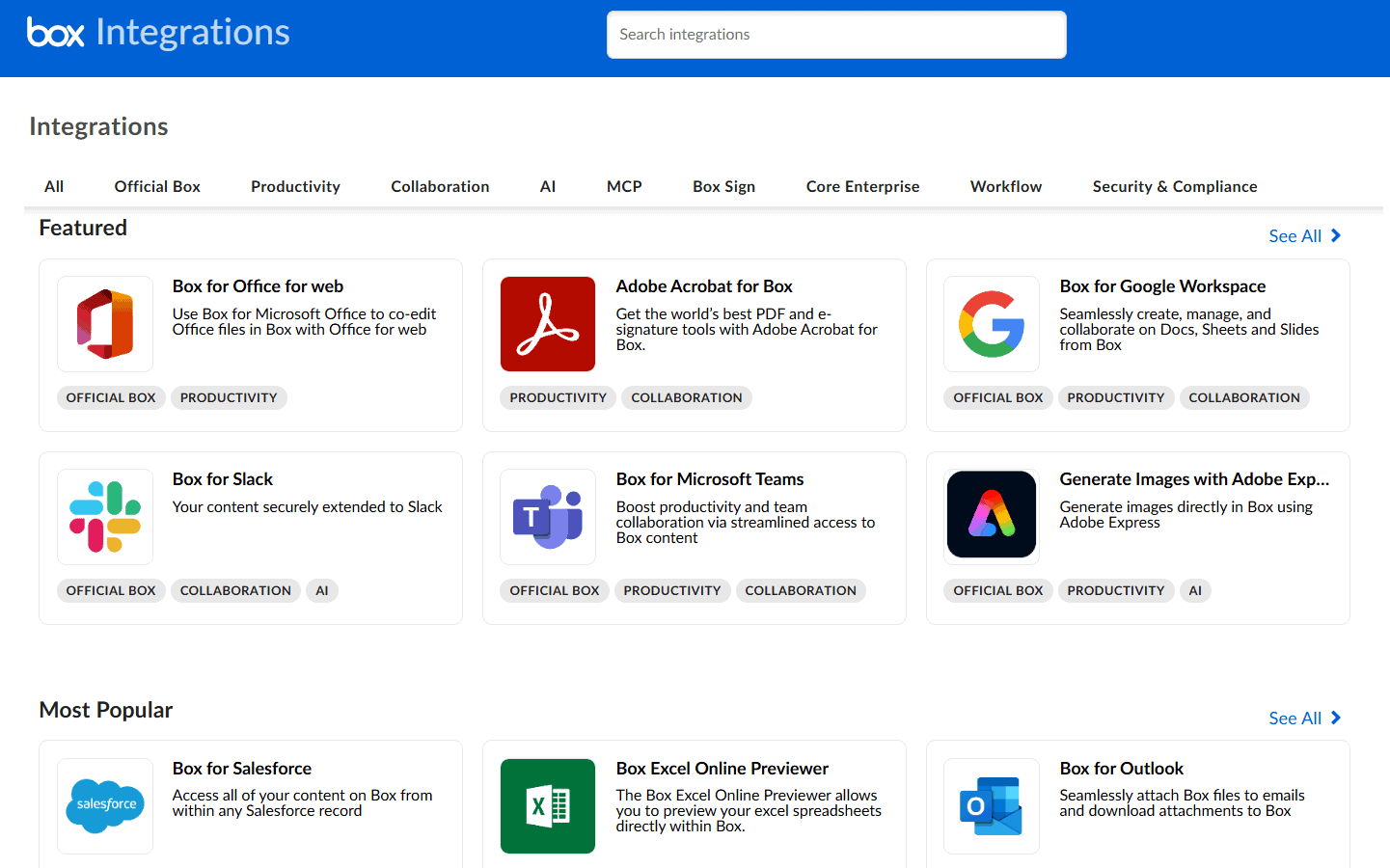
box integrations
Box integrations are categorized, making the catalog easier to navigate.

Box is the clear winner when it comes to third-party integrations. It integrates with more than 1,500 third-party applications, including Okta, Slack, Microsoft 365, Google Workspace and Zoom.

Dropbox also integrates with popular third-party applications, including GitHub, Yahoo Mail, Canva, Adobe and some of the platforms mentioned above. However, it has a smaller catalog of third-party integrations (less than 200) than Box.

Box vs Dropbox: Security

Although both Box and Dropbox allow you to store data securely, their implementation of security features like end-to-end encryption (E2EE) differs.

For example, Dropbox’s end-to-end encryption is a built-in feature available only to users on the Advanced plan. Box, on the other hand, offers E2EE through its paid KeySafe add-on, which is available on all Box business plans except for Business Starter.

Both services allow you to set up multi-factor authentication via text messages and authenticator apps; however, Box also offers the option to receive codes via email.

Box and Dropbox have had various security incidents with some coming in recent years. In December 2023, Box had an outage that prevented users from logging into their accounts. In April 2024, Dropbox detected unauthorized access to customer data on Dropbox Sign.

So far in 2025, Dropbox has reported fewer critical issues and outages than Box. However, historically, Box has experienced less security incidents.

Dropbox vs Box: Native Apps

dropbox native apps
Dropbox Transfer is tailored for large file transfers.

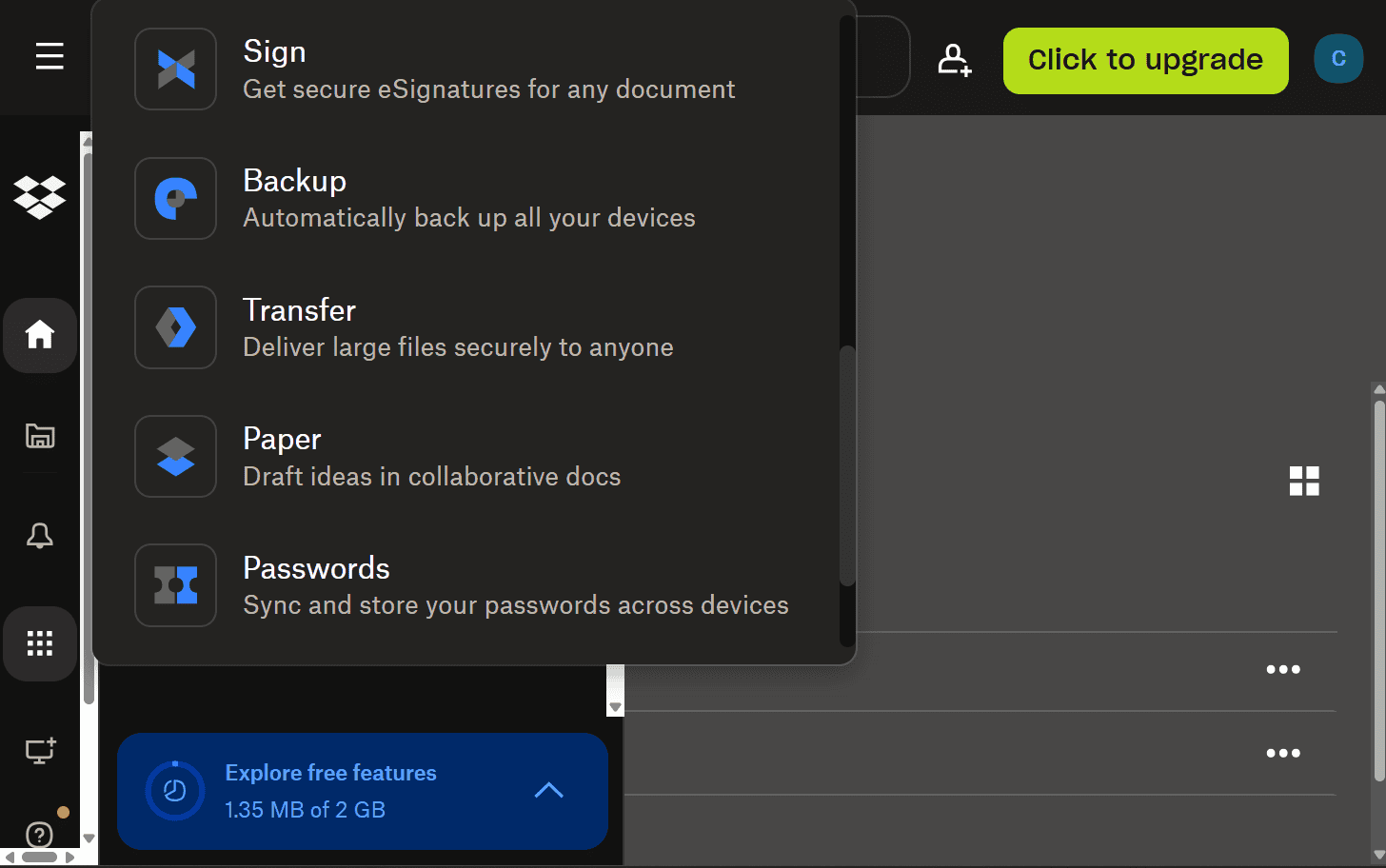
Box and Dropbox have some native apps in common, such as Box Notes and Dropbox Paper, which are collaboration tools for document creation and brainstorming. In addition to those two, each platform has e-signature apps (Dropbox Sign and Box Sign), document scanners and data governance apps.

Dropbox has a built-in app that lets you edit videos, images and PDFs. Box, on the other hand, requires integration with Adobe Express, ClipChamp, PDFiller and similar apps to fulfill the same function.

On the flip side, Box has Box Canvas (a virtual whiteboard) and Box Relay (a workflow automation system), for which Dropbox has no direct alternatives. Nonetheless, Dropbox integrations like Miro Intelligent Canvas and Relay.app serve similar purposes.

In addition, while Box has Box Shield (a threat detection app), Dropbox has built-in threat detection features, including ransomware monitoring and data classification.

Box and Dropbox File-Sharing Features
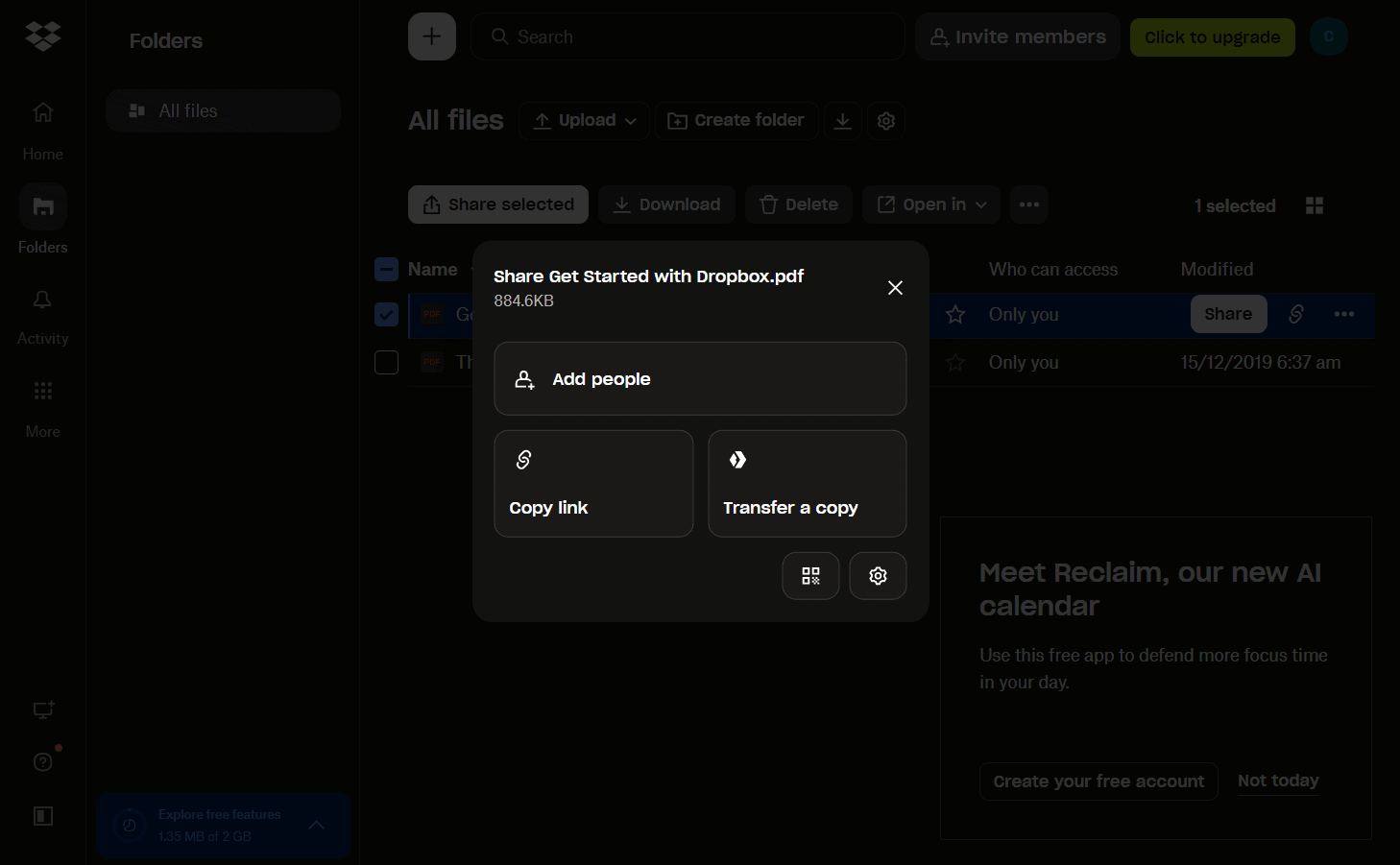
dropbox file sharing
Share files in Dropbox by adding users to a folder,
sending a link or sharing a QR code.

Many file-sharing features on Dropbox are similar to those on Box. Both services allow you to create links for file or folder sharing, protect shared links with passwords, set an expiration date, configure link actions and control link access. However, Dropbox offers better performance when synchronizing files because it updates files at the block level.

In addition to its built-in file-sharing features, Dropbox has a dedicated file-sharing app, Dropbox Transfer, which allows you to share files that do not require collaboration. Box does not have an equivalent app.

Dropbox vs Box: Speed & Performance

We tested the upload and download speeds of both Dropbox and Box using a 5GB folder containing various files, including text documents, images and videos. There wasn’t much difference between the two; however, Box was slightly faster for uploads.

Dropbox did better on downloads and both providers had low CPU usage, but Dropbox may throttle speeds based on ISP and location.

Cloud StorageAverage UploadAverage Download
7 minutes, 9 seconds7 minutes, 36 seconds
7 minutes, 21 seconds7 minutes, 20 seconds

Box vs Dropbox for Business

For business, Box trumps Dropbox for many reasons, including storage size limits. On Box, all business plans except for Business Starter offer unlimited storage. Dropbox, on the other hand, offers a maximum storage capacity of 1000TB on its Advanced plan, starting at 15TB and growing by 5TB for each active license.

In addition to providing generous storage, Box conforms with industry standards for compliance and risks, including FINRA, ITAR, FedRAMP High and StateRAMP. Dropbox doesn’t have the same compliance, so it may not be the best for federal organizations or broker-dealer firms.

That said, Dropbox offers a lower financial barrier to entry — its plans are generally more affordable than Box’s.

Dropbox and Box Privacy

Dropbox and Box collect similar information from their users (such as name, email and payment information). They also offer the same control and rights over data access and deletion. 

Both services have similar security features, especially when it comes to data encryption, and they do not sell data to advertisers. However, both platforms share information with third parties such as payment processors.

Box’s compliance efforts are geared toward enterprises, and its data residency is more flexible. For example, its Box Zones service allows you to choose the geographical region where your data is stored such as the United Kingdom, Canada, France, Japan and Australia.

Dropbox also allows you to change data residency with data centers in Japan, Europe, Australia and the United Kingdom. However, requests are reviewed individually and require at least 10 licenses on a paid annual plan. In addition, users have raised privacy concerns about Dropbox’s ability to detect and take action against copyright infringement. However, there’s no indication that this leads to data exposure.

The Verdict: Why We Think Box Wins Overall

The gap between these two services is narrow, but I think Box wins overall because it offers broader industry compliance and unlimited storage on most business plans. It also has more business plan options, advanced security features, more third-party integrations and faster speeds.

Dropbox is great at the basics of cloud storage: It has generous upload limits, can transfer larger files, features a user-friendly interface and offers large storage limits on its non-enterprise plans. It also offers lower rates and serves a broader user base. However, for businesses and enterprises, Box remains the better choice.

Winner
www.box.com
100GB – Unlimited GB$5 / month
(save 28%) (All Plans)
Visit BoxReview

Box and Dropbox Alternatives

Let’s take a look at some Box and Dropbox alternatives, including Google Drive, Sync and OneDrive, and discuss their best use cases:


Best for AI Features
www.google.com
100GB – 30TB$1.67 / month
(save 16%) (All Plans)
Visit Google DriveReview

Google Drive offers various advanced AI features, including data classification and folder and file suggestion. It also integrates with Gemini and other core apps in Google Workspace.

Best for Zero-Knowledge Encryption
www.sync.com
200GB$2.65 / month
(save 40%) (All Plans)
Visit Sync.comReview

Sync.com stands out for its client-side encryption; it allows users to encrypt files locally before uploading them to the cloud. This means that anyone who wants to decrypt, view or change these files must first use a locally stored encryption key.

Best for Seamless Microsoft 365 Integration
www.onedrive.com
100GB – 6TB$1.67 / month
(save 16%) (All Plans)
Visit OneDriveReview

Businesses that are deeply enmeshed with the Microsoft ecosystem, especially Microsoft 365, will have a seamless experience integrating OneDrive with other services. However, this comes with the risk of vendor lock-in.

  1. 1
    • :
    • :
    • :
    • :
    200GB$2.65 / month(save 40%)(All Plans) 30-days money-back guarantee
  2. 2
    • :
    • :
    • :
    • :
  3. 3
    • :
    • :
    • :
    • :
    2TB$4.17 / month(save 24%)(All Plans)
  4. 4
    • :
    • :
    • :
    • :
    1TB – 5TB$4.92 / month(save 17%)(All Plans) 14-days money-back guarantee
  5. 5
    • :
    • :
    • :
    • :
    100GB – 30TB$1.67 / month(save 16%)(All Plans)
  6. 6
    • :
    • :
    • :
    • :
    2TB – 5TB$9.99 / month(save 16%)(All Plans)
  7. 7
    • :
    • :
    • :
    • :
    3TB – 100TB$9.78 / month(save 16%)(All Plans)
  8. 8
    • :
    • :
    • :
    • :
    1TB – 5TB$1.30 / month(save 87%)(All Plans)
  9. 9
    • :
    • :
    • :
    • :
    100GB – 6TB$1.67 / month(save 16%)(All Plans)
  10. 10
    • :
    • :
    • :
    • :
    30GB – 5TB$7 / month(save 16%)(All Plans)
  11. 11
    • :
    • :
    • :
    • :
    Unlimited GB$17.50 / month(save 30%)(All Plans)
  12. 12
    • :
    • :
    • :
    • :
    10GB – 20TB$0.50 / month(All Plans)
  13. 13
    • :
    • :
    • :
    • :
    50GB – 12TB$0.99 / month(All Plans)
  14. 14
    • :
    • :
    • :
    • :
    100GB – 10TB$0.83 / month(save 17%)(All Plans) 14-days money-back guarantee
  15. 15
    • :
    • :
    • :
    • :
    100GB – 30TB$1.67 / month(save 16%)(All Plans)
  16. 16
    • :
    • :
    • :
    • :
    Unlimited GB$4.17 / month(save 16%)(All Plans)
  17. 17
    • :
    • :
    • :
    • :
    2TB – 3TB$12 / month(save 20%)(All Plans)
  18. 18
    • :
    • :
    • :
    • :
    1GB – 100GB$1.50 / month(All Plans)
  19. 19
    • :
    • :
    • :
    • :
    1TB – 2TB$8.33 / month(save 16%)(All Plans) 15-days money-back guarantee
  20. 20
    • :
    • :
    • :
    • :
    500GB – 2TB$7.08 / month(save 11%)(All Plans)
  21. 21
    • :
    • :
    • :
    • :
    500GB – 2TB$2.99 / month(save 62%)(All Plans) 30-days money-back guarantee
  22. 22
    • :
    • :
    • :
    • :
    10GB – 1TB$1.67 / month(All Plans)
    Review
  23. 23
    • :
    • :
    • :
    • :
    200GB – 3TB$1 / month(save 87%)(All Plans)
  24. 24
    • :
    • :
    • :
    • :
    100GB – 5TB$6.90 / month(All Plans)
  25. 25
    • :
    • :
    • :
    • :
    1TB$8.25 / month(All Plans)
  26. 26
    • :
    • :
    • :
    • :
    10GB – 500GB$5.83 / month(All Plans)
  27. 27
    • :
    • :
    • :
    • :
    200GB – 3TB$1.38 / month(save 44%)(All Plans)
  28. 28
    • :
    • :
    • :
    • :
    2TB$3 / month(save 14%)(All Plans)
  29. 29
    • :
    • :
    • :
    • :
    1TB – 4TB$8.33 / month(save 16%)(All Plans)
    Review
  30. 30
    • :
    • :
    • :
    • :
    100GB – 5TB$1.67 / month(save 33%)(All Plans)
  31. 31
    • :
    • :
    • :
    • :
    150GB – 10TB$1.25 / month(save 16%)(All Plans)
  32. 32
    • :
    • :
    • :
    • :
    100GB – 1TB$7.49 / month(All Plans)
  33. 33
    • :
    • :
    • :
    • :
    50GB – 1TB$3 / month(All Plans)
  34. 34
    • :
    • :
    • :
    • :
    50GB – 1TB$5.83 / month(save 16%)(All Plans)
  35. 35
    • :
    • :
    • :
    • :
    500GB – 2TB$5 / month(All Plans)
    Review
  36. 36
    • :
    • :
    • :
    • :
    100GB – 10TB$0.93 / month(save 16%)(All Plans)
    Review
  37. 37
    • :
    • :
    • :
    • :
    250GB – 4TB$30.44 / month(save 28%)(All Plans)
    Review

FAQ: Box vs Dropbox

↑ Top