Jira vs monday.com: Project and Work Management Features Compared in 2026
If you can’t decide between monday.com and Jira, or don’t even know where to start comparing these tools, my Jira vs monday.com analysis is for you.


Written by Sofia Oliber (Writer)
Reviewed by Kate Hawkins (Editor, Writer)
Facts checked by Igor Kurtz (Fact-checking editor)
Last Updated:
All our content is written fully by humans; we do not publish AI writing. Learn more here.
Key Takeaways: Jira vs monday.com
- The main difference between monday.com and Jira is that monday.com excels in accessibility and creativity, while Jira dominates in technical depth and Agile project structure.
- For managers who prioritize customizable dashboards and value an easier learning curve, monday.com offers better flexibility.
- If your team relies on Agile methodologies or needs robust development tools for software projects, Jira is the stronger option.
Facts & Expert Analysis About Choosing the Right PM Tool:
- AI adoption is accelerating and could future-proof workflows: More than 80% of leaders plan to use AI for project management within the next five years.1
- Teams are juggling tools: More than half of employees are using more project management tools than last year, reinforcing the importance of choosing the right project management solution.2
- Jira users love customization: Large Jira deployments average around 900 custom fields, which is great for power users and complex teams but can overwhelm smaller groups that need a simpler solution.3
Both monday.com and Jira rank in our best project management tools guide, and at first glance, both platforms seem to provide similar project management solutions. However, in reality when comparing Jira vs monday.com, you’ll realize that they serve quite different purposes.
monday.com is designed for organizing project progress, tasks and customizable workflows across teams on an interactive and responsive platform. Alternatively, Jira offers a more in-depth approach, which could be a natural fit for teams with technical skills. Keep reading for a full comparison of these project management software.
-
03/27/2024 Facts checked
Our Jira vs monday.com guide has been rewritten with an easier-to-read format and new information.
-
04/03/2025 Facts checked
We added more information about monday.com’s new features and offerings.
-
07/26/2025 Facts checked
We added more details on useful features for each provider.
-
04/27/2026 Facts checked
This article has been fully rewritten, including the latest updates and changes for both monday.com and Jira.
Cloudwards’ Choice: monday.com Is the Winner
 Cloudwards’ Choice: monday.com Is the Winner
I think monday.com is one of the most flexible project management tools. Its user-friendly interface makes project management feel organic and easy, helping teams adopt new software quickly and stay productive.
While Jira is a strong choice for highly technical teams, monday.com offers a smoother user experience. It’s a better fit for organizations that want a simple but powerful solution. Try monday.com’s Pro plan free for 14 days to see how well it supports your workflow.
Which Is Better: Jira vs monday.com?
Although I consider monday.com to be the better project management software overall, your team may have specific needs that align better with one or the other. Ultimately, you need to choose the best fit for your team’s workflow. For more in-depth information about each tools, read the monday.com review and the Jira review.
Who Is monday For?
- Growing teams: monday.com’s scalability and friendliness make it a strong choice for small teams growing in scale or complexity.
- Creative and marketing teams: monday.com’s visual clarity is great for teams that value good design, and it also includes powerful data analysis features.
- General operations teams: Even non-technical users can build processes and automate repetitive tasks with ease. monday.com’s overall flexibility makes it great for multiple teams.
Who Is Jira For?
- IT and engineering tasks: Jira includes features like issue tracking, bug tracking and sprint management so development teams in coding cycles can easily manage custom workflows.
- Data-driven organizations: Jira’s focus on metrics and insights makes it a strong choice for teams that rely heavily on key performance indicators (KPIs) and data.
- Agile teams: If your team’s workflows rely heavily on Agile development, Jira will be a great fit — it was built especially for the Agile methodology.
Our Detailed Comparison Methodology
Even though I’ve used these services before, I created new projects from scratch to test them for this comparison. I examined each platform’s templates, flexibility, interface, integrations and overall ease of use. I also read through user reviews and forums to get the scoop from real uses cases.
Avoid Costly Project Management Mistakes – Get Free Tips Today!

- Discover 10 fundamentals of project management
- Understand step-by-step plans for PM execution
- Learn tips to avoid 5 common mistakes by beginners
monday.com vs Jira: Comparison at a Glance
| Features |  |  |
|---|---|---|
| $9.05 / month(All Plans) | $9 / month(All Plans) | |
| Review | Review | |
| Kanban board | ||
| List | ||
| Calendar | ||
| Timeline | ||
| Spreadsheet view | ||
| Gantt charts | ||
| Workload planning | ||
| Long-term planning | ||
| Multiple project management | ||
| Dependency management | ||
| Native scrum management | ||
| Set user permissions | ||
| File storage | ||
| Time-tracking | ||
| Built-in integrations | ||
| Reporting features | ||
| Free plan | ||
| Free Trial | 14 days | |
| Web app | ||
| Windows | ||
| MacOS | ||
| Android | ||
| iOS | ||
| AI Tools | ||
| Ticket-based support | ||
| Tutorials | ||
| Knowledgebase | ||
| Forum | ||
| Live chat | ||
| Phone support |
monday vs Jira Pricing Comparison: Which One Offers Better Options?
Pricing can be a determining factor when choosing a project management tool. Take a look at this chart to quickly identify which platform offers the better value for your budget.
| Plan Type: | | |
|---|---|---|
| Free tier | Yes, supports 2 users. Includes 3 boards, a kanban view and basic tools. | Yes, unlimited projects and tasks, 10 users and basic tools. Includes backlog, list, board, timeline, calendar and summary views. |
| Basic tier | Basic: $9 per user per month, annually. Includes unlimited boards, 5GB and trial AI credits. | N/A |
| Middle tier | Standard plan: $12 per user per month, annually. Includes 20GB of storage, 250 automations per month and timeline, calendar and map views, along with monday AI. | Standard plan: $9.05 per user per month. Includes 250GB of storage, 1,700 automations and 25 AI credits. |
| High tier | Pro tier: $19 per user per month, annually. Includes 100GB of storage and 25,000 automations per month. | Premium tier: $18.30 per user per month. Includes unlimited storage, 1,000 automations per user per month and 70 AI credits. |
| Enterprise | Pricing on request. Includes every functionality. | Pricing on request. Includes every functionality. |
Overall, Jira can be more cost-efficient for larger teams, though its pricing can get confusing because pricing starts at 10 users. Additionally, some of the lower plans might not have the features to make the paid plan worthwhile.
For example, monday.com’s features don’t become powerful until you subscribe to the Standard plan. Meanwhile, Jira’s Standard plan is the best option for more advanced teams in need of automations and administrative control.
Both platforms offer free trials so you can test them in real life. Additionally, monday.com offers eligibility for partial refunds for new users, while Jira allows refunds within the first 30 days.
monday.com Pricing
- Maximum users: 2
- Minimum users: 3; All prices per user
- Minimum users: 3; All prices per user
More plans
- Minimum users: 3; All prices per user
- Enterprise-level features.
Jira Pricing
- Max. 10 users. unlimited boards, reports and insights; backlog; basic roadmaps; 2GB of storage; community support
- Monthly pricing starts from 11 users, pricing changes based on the number of users. Monthly pricing changes with teams over 110. Annual pricing shown is for 1-10 users
- Monthly pricing starts from 11 users, pricing changes based on the number of users. Monthly pricing changes with teams over 114. Annual pricing shown is for 1-10 users
- Enterprise plan pricing is available when you enter 801 or more users above; User tier: 801 – 1,000
monday.com vs Jira: Similarities
monday.com and Jira have impressive core project management functionality. Both offer task management tools, views, automation capabilities, integrations and AI options.
Workflow & Automations
monday.com and Jira have comparable approaches to organizing workflows, and they offer similar views and functionalities for task management. Each one includes kanban board, timeline and table views to visualize projects multiple ways. Each platform also offers tools to track dependencies, progress and time spent on tasks, plus calendar options.
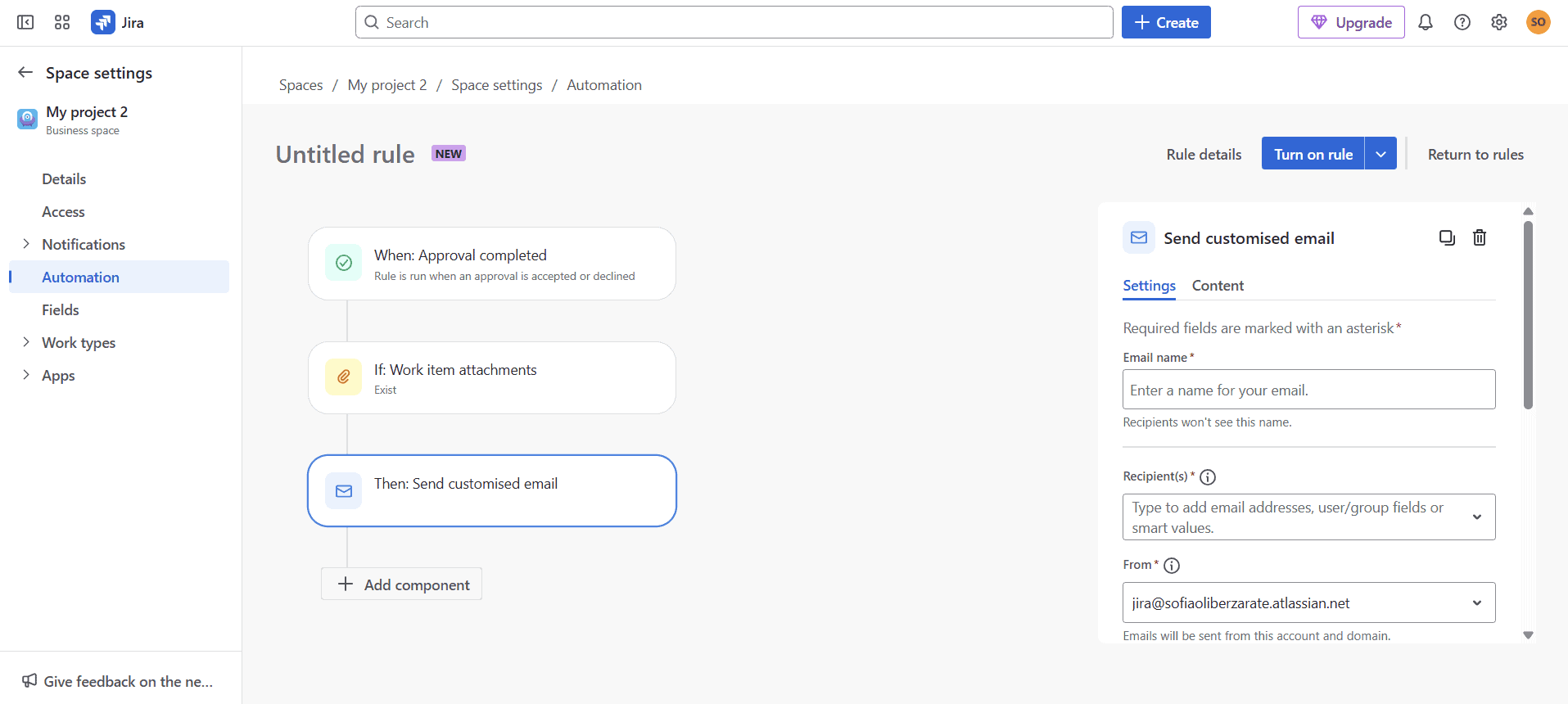
as well as any other automation tool.
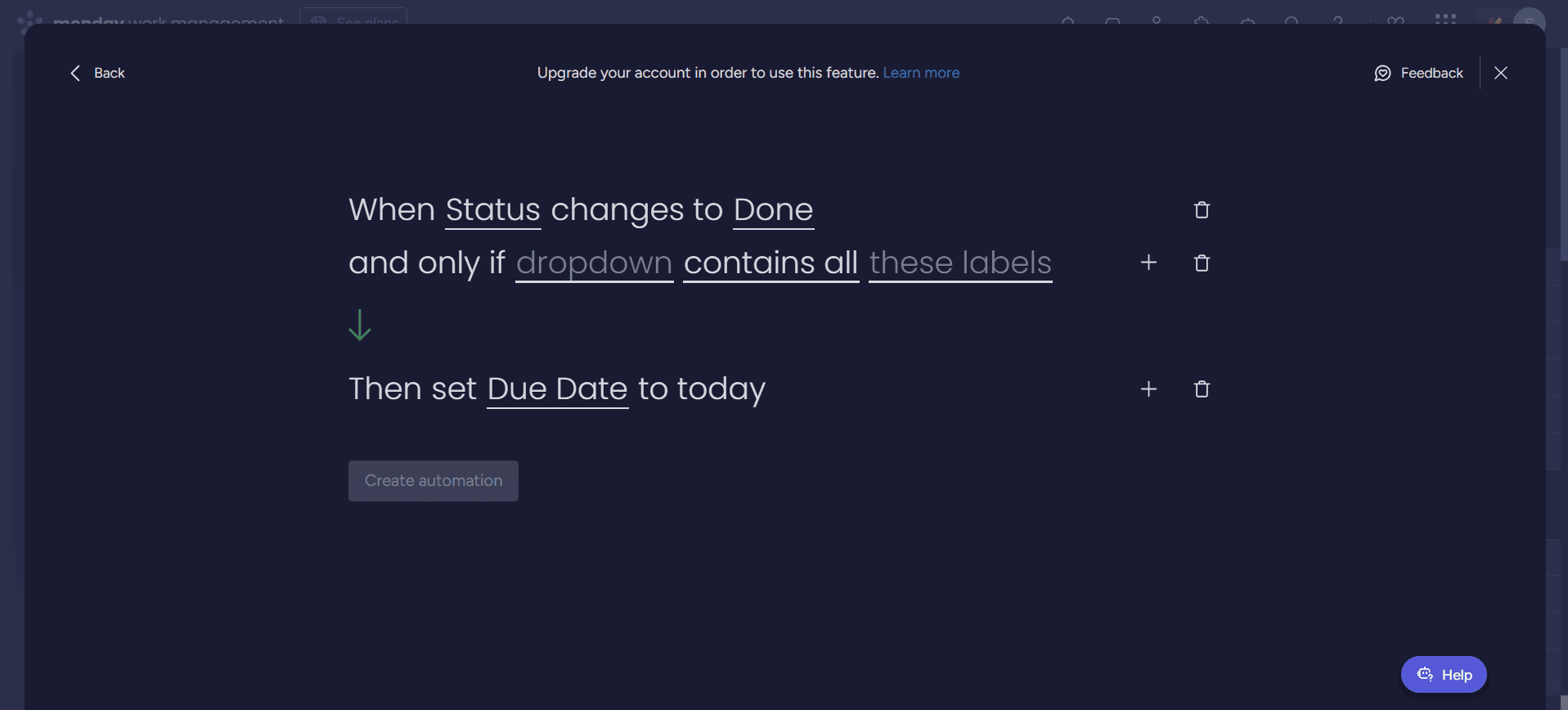
Automations are another important part of good project management. Each platform’s automation tools are comprehensive; you can set exclusions and expectations with both. Jira’s automation tool is a bit more complex since it uses more programming language for software development, but in the end, both are robust and well rounded.
Collaboration Tools
Users can comment, tag, attach files and collaborate with other teammates in real time in both tools. However, monday.com makes the process more straightforward with its more basic options.
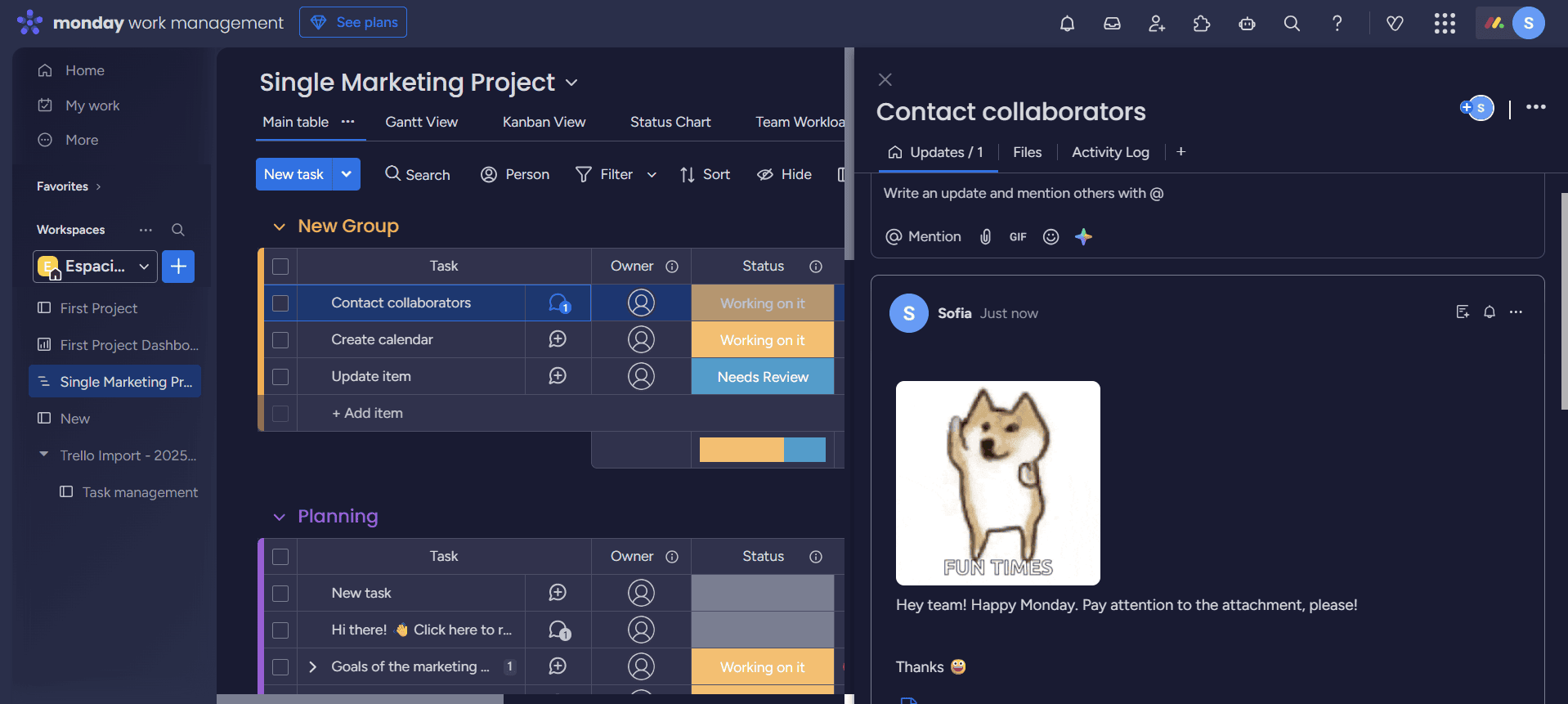
and summarize comments using AI.
Jira, on the other hand, takes a more professional approach, with advanced workflows, robust issue tracking and tools to support Agile software development teams.
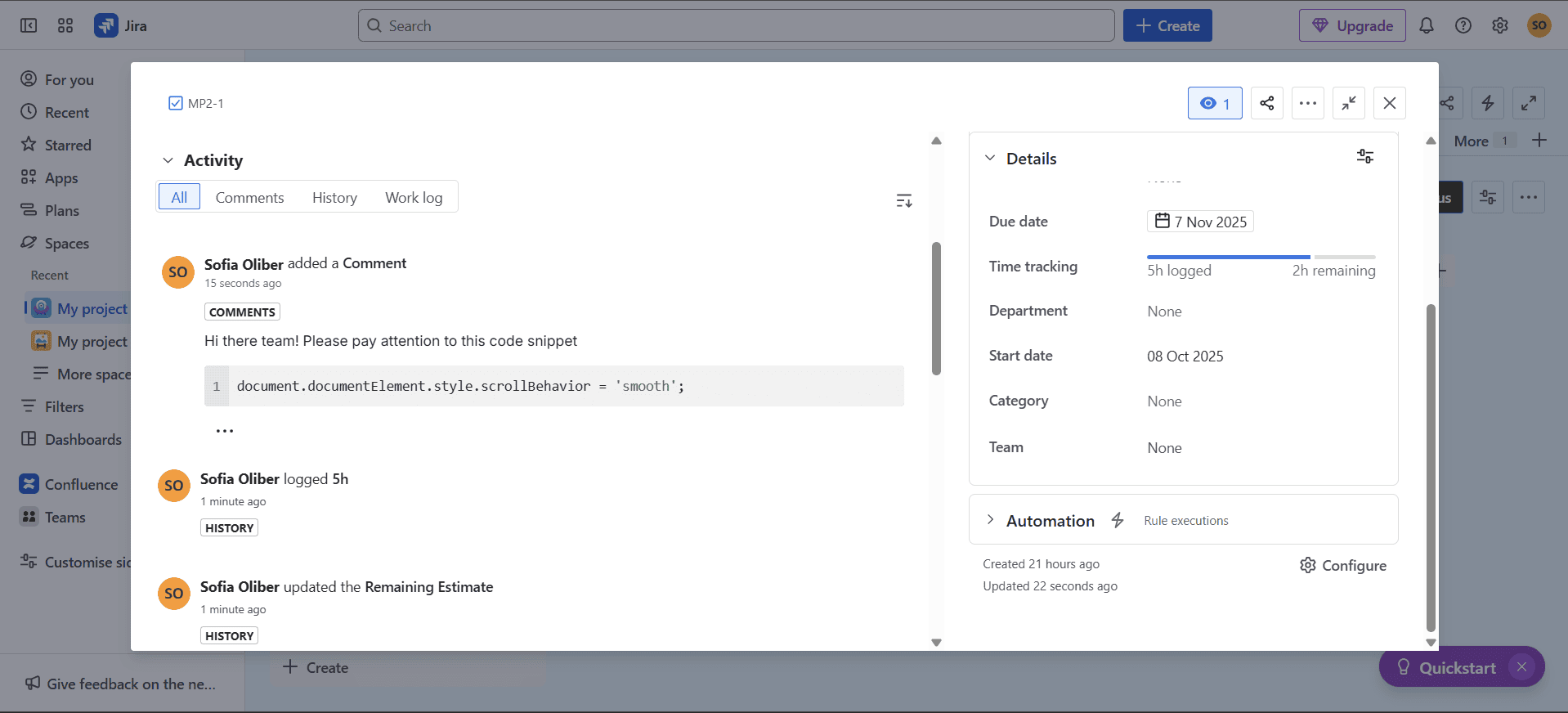
programming languages as comments.
Jira vs monday.com: Differences
Naturally, these two platforms are built with different purposes in mind and differ in substantial ways. Let’s dive deeper into each service’s unique approach.
General Structure & Interface
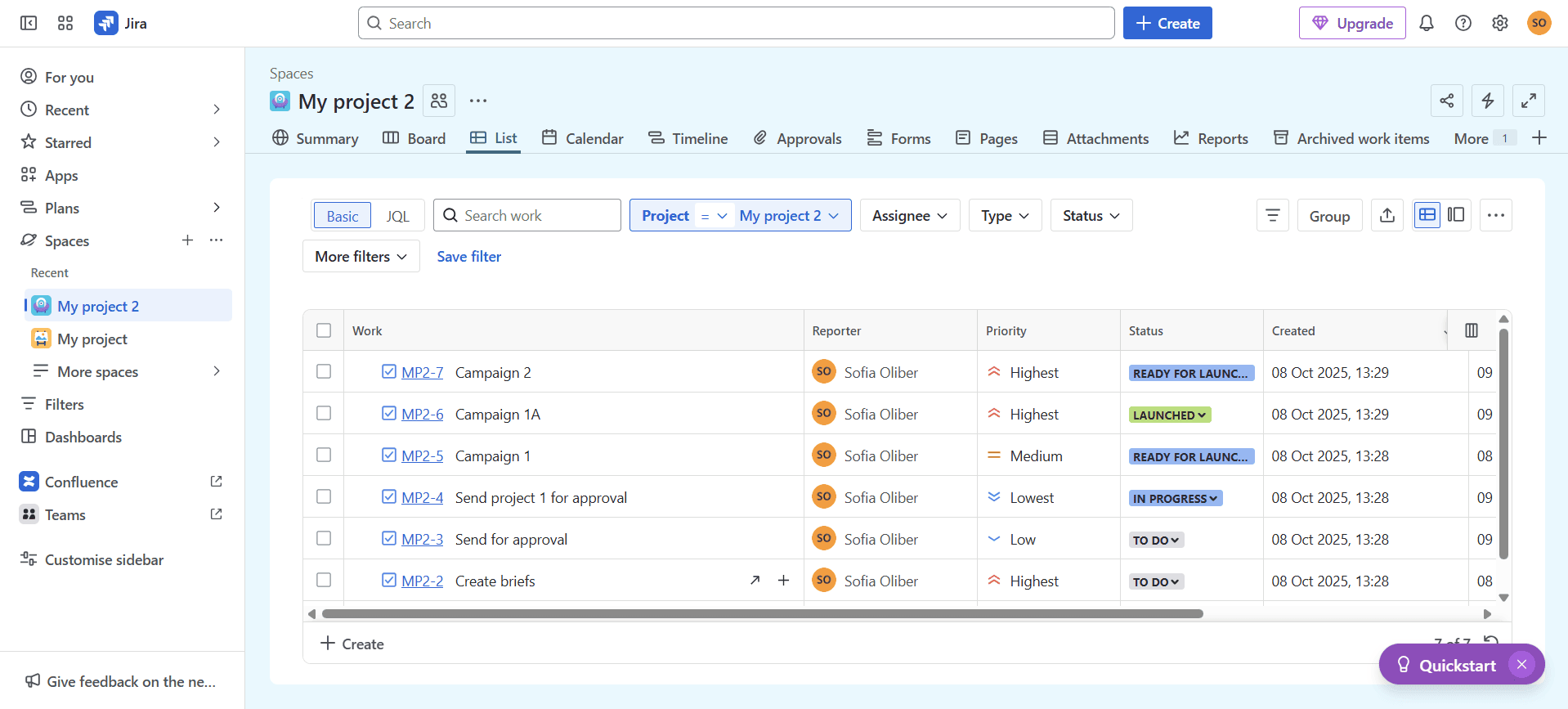
I’ve mentioned that both platforms support simple workflows, but the way they structure their project management tools is quite different. monday.com allows for more customizations and has an incredibly flexible interface, whereas Jira has more rigid structures as a result of its highly professional approach.
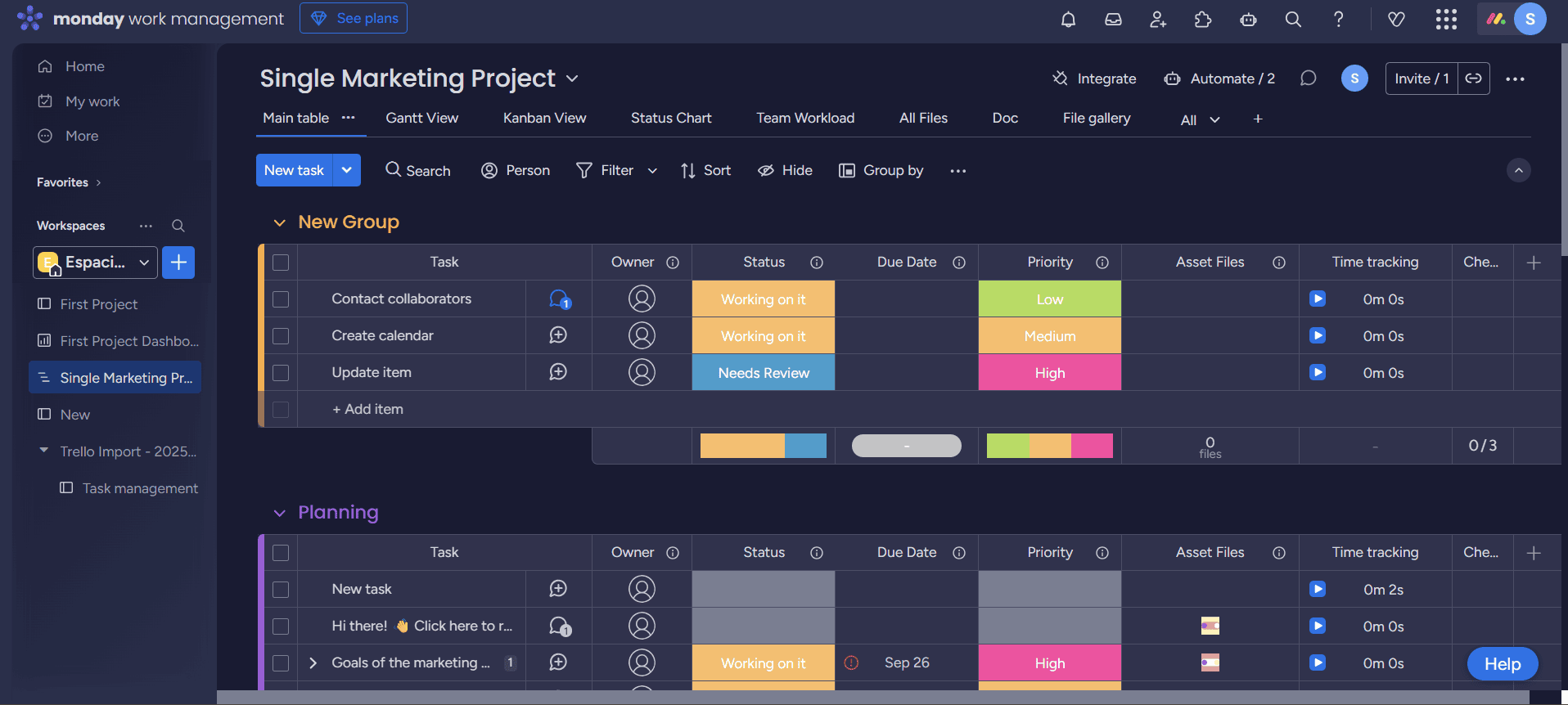
Because the two tools are designed so differently, monday.com feels more user-friendly and intuitive, which makes it a great fit for creative teams. Jira, on the other hand, enforces tight dependencies and workflows, which is ideal for software teams but can result in a steep learning curve.
Reporting & Analytics
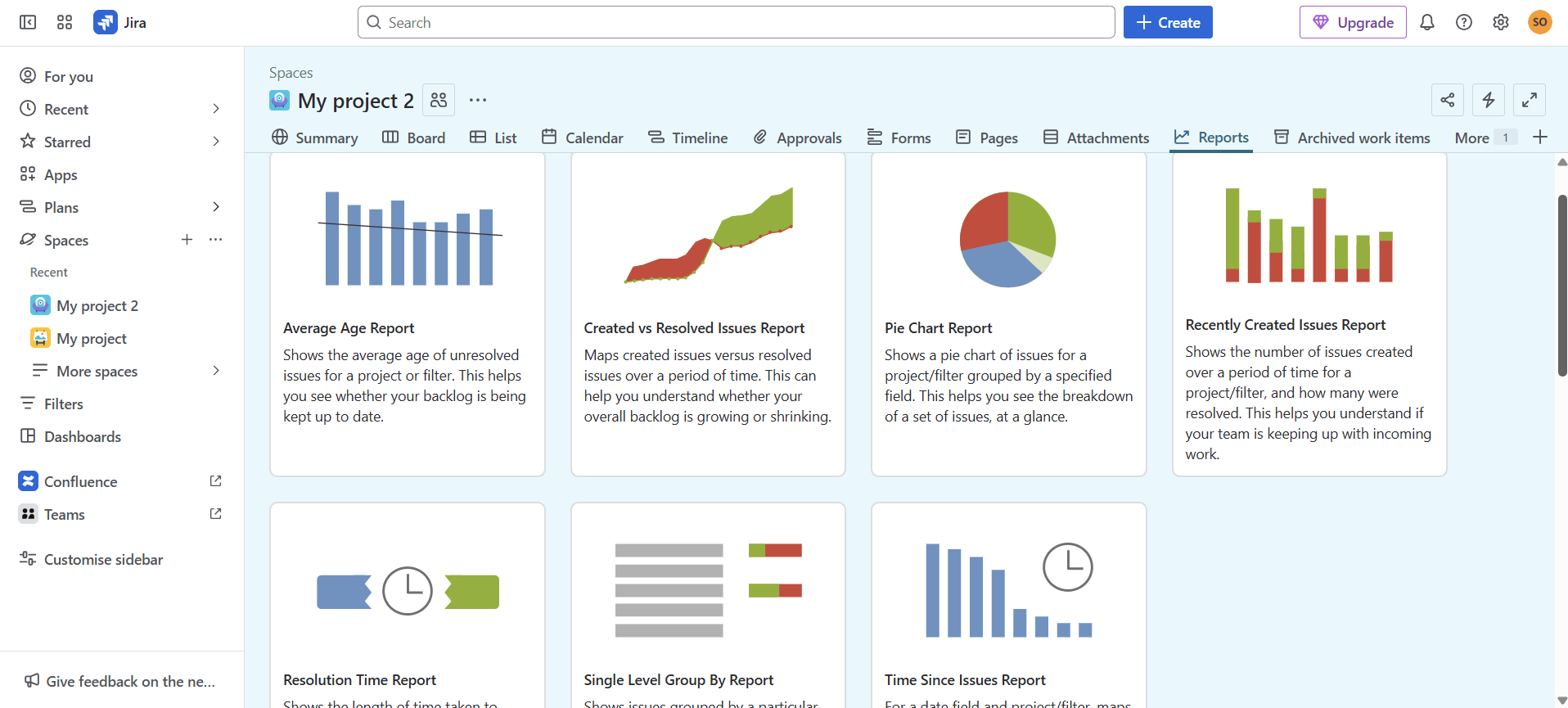
Jira excels when it comes to reporting team capacity, and users can access burndown charts, velocities, sprint metrics, forecasts and even customizable dashboards. There’s also an advanced roadmap feature for portfolio-level project managers.
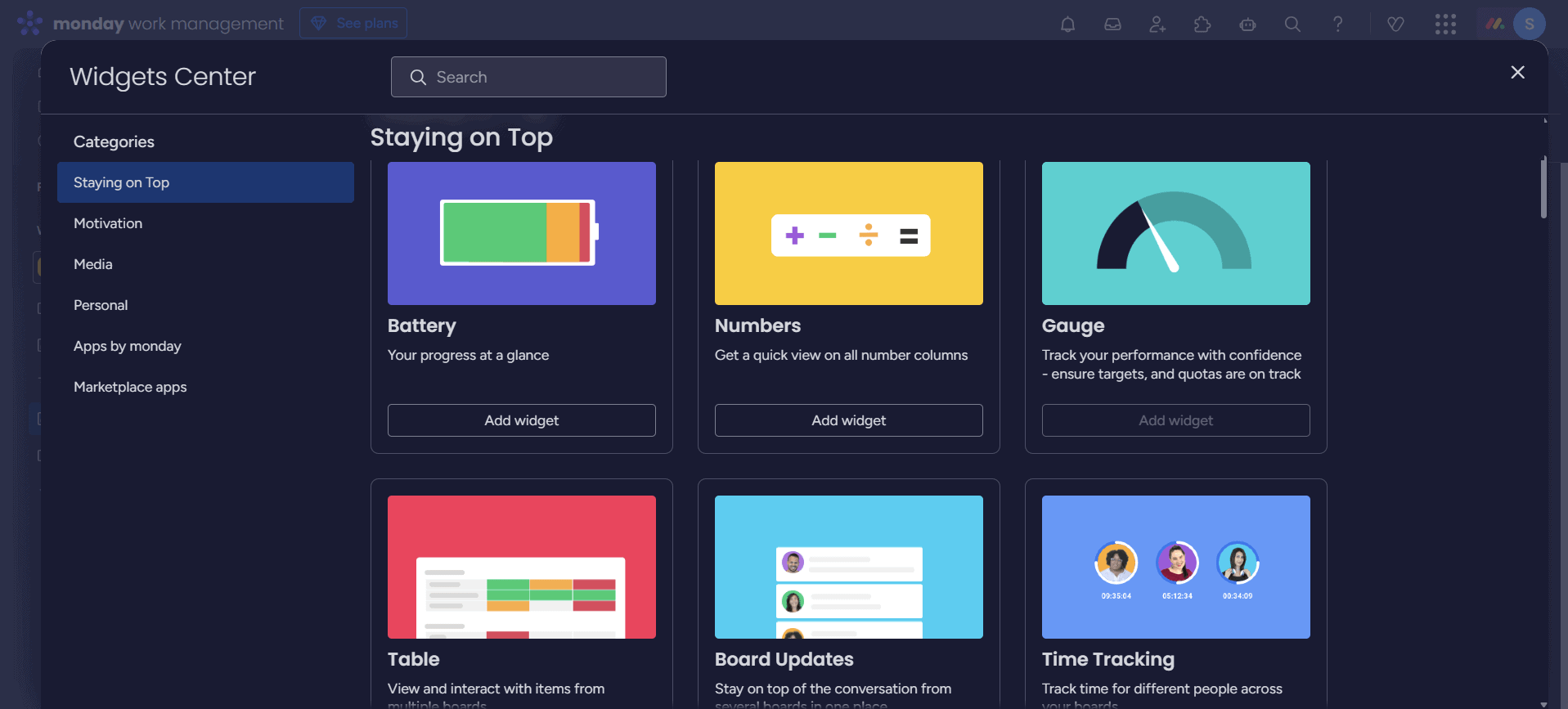
monday.com takes a different approach, prioritizing visibility over data-heavy metrics. Its custom dashboards are perfect for effortlessly maintaining visibility for better team coordination. It’s a simple but high-level solution to access valuable insights
The Verdict: Why We Think monday.com Wins Overall
monday.com is my top pick for most teams thanks to its balance of flexibility, functionality and ease of use. Plus, the easy learning curve and minimal training requirements make adopting it a breeze. If you want to try the software yourself, monday.com has a 14-day free trial for any of its paid plans.
If You Want to Consider Other Services, Check Out…



FAQ: monday.com vs Jira for Project Management
Jira is generally cheaper than monday.com, though users have to pay for extra add-ons or additional seats to make extensive use of the platform.
monday.com is one of Jira’s main competitors, but other platforms, like Wrike and Zoho Projects, are high on the list of competitors.
Yes, monday.com can support Agile teams, as it includes scrum, kanban and backlog boards, as well as sprint-planning features. It’s not specifically designed for Agile project management, but it’s flexible enough to adapt to it.

