Asana vs ClickUp: Which Is the Better Project Management Tool?
ClickUp and Asana are both great project management tools with similar features and competitive pricing. However, some key differences can help you choose the right service for your needs. Keep reading this Asana vs ClickUp comparison to find out more.


Written by Mehak Siddiqui (Writer)
Reviewed by Kate Hawkins (Editor, Writer)
Facts checked by Igor Kurtz (Fact-checking editor)
Last Updated:
All our content is written fully by humans; we do not publish AI writing. Learn more here.
Key Takeaways: Asana vs ClickUp
- The main difference between Asana and ClickUp is that Asana focuses on simplicity and structured workflows, while ClickUp offers deep customization and all-in-one functionality.
- If you need an easy-to-use tool with comprehensive features that teams can learn quickly, Asana is a solid choice.
- ClickUp is better for those on a tight budget. It offers more features and customization options at lower price points but has a bit of a learning curve.
Facts & Expert Analysis About Asana vs ClickUp:
- Well-known companies use ClickUp and Asana: ClickUp’s user base includes Paramount, Logitech, AT&T and Cartoon Network, while Asana serves giants like Spotify, Uber, Amazon and HelloFresh.
- ClickUp offers over 1,000 integrations: ClickUp supports a broader ecosystem for complex workflows compared to Asana, which integrates with around 400 other tools.
- Asana is easier but pricier: Asana is very user-friendly, but its Advanced plan is twice as expensive as ClickUp’s equivalent Business plan. This makes scalability costlier for larger teams.
Asana and ClickUp are two excellent project management tools that offer powerful features at competitive prices. When deciding which one is right for you, it’s important to understand the similarities and differences between the two services. That’s exactly what I’ll help you do in this detailed comparison of Asana vs ClickUp.
If you’re looking for a clean, intuitive interface and straightforward task management, try Asana. If you prefer a more customizable all-in-one workspace, then ClickUp may be the better choice. Both tools offer free plans, which makes them easy to test before committing. Learn more about both services in our full Asana review and ClickUp review.
-
03/19/2023 Facts checked
Our ClickUp vs Asana software showdown has been rewritten with new information and in a new format.
-
09/25/2023 Facts checked
Removed reference to discontinued ClickUp Business Plus plan.
-
05/11/2025 Facts checked
Updated information about Asana’s plans name change.
-
11/26/2025 Facts checked
We’ve completely rewritten the article after retesting Asana and ClickUp.
Cloudwards’ Choice: ClickUp Is the Winner
 Cloudwards’ Choice: ClickUp Is the Winner
I believe ClickUp ultimately offers more value and flexibility than Asana, which makes it the better choice for most teams. I appreciate its built-in tools for collaboration, docs, time tracking, goal setting and advanced automation. However, it really shines in its customization options.
Its generous Free Forever plan could be enough for freelancers, solopreneurs and small businesses, though its paid plans are also very affordable. For teams still on the fence, I recommend browsing our other project management software comparisons to see how these tools fare against other competitors.
Which Is Better: Asana vs ClickUp?
Although I consider ClickUp to be the stronger project management tool, the best choice really depends on your team’s needs and work style. If you prioritize ease of use and want to get started quickly, Asana may be the better fit. However, if you need deep customization, ClickUp takes the lead. The right tool is the one that best aligns with how your team works.
While Asana and ClickUp are powerful general-purpose contenders, teams in highly regulated industries may require more specialized workflows. For example, if you are looking for the best project management software for accountants, you might find that industry-specific tools offer better out-of-the-box support for tax compliance and client document management than either of these mainstream options.
Avoid Costly Project Management Mistakes – Get Free Tips Today!

- Discover 10 fundamentals of project management
- Understand step-by-step plans for PM execution
- Learn tips to avoid 5 common mistakes by beginners
Who Is Asana For?
- Creative agencies: Agencies managing projects for multiple clients will appreciate Asana’s organized task structure and easy collaboration tools for achieving deliverables.
- Teams new to project management: With its intuitive interface and minimal setup, Asana is perfect for beginners who want a simple, visual way to stay organized.
- Individuals or small businesses that value simplicity: Asana is ideal for users who need an easy way to organize tasks without too many complex settings.
Who Is ClickUp For?
- Agile teams: ClickUp is great for Agile teams because its customizable workflows, Sprints and goal-tracking features support iterative development.
- Remote and hybrid teams: Distributed teams benefit from ClickUp’s built-in chat, document sharing and whiteboards that centralize communication.
- Power users and tech-savvy managers: ClickUp offers deep customization and advanced options that make it a powerful tool for managing all kinds of workflows.
Our Detailed Comparison Methodology
In my comparison of Asana vs ClickUp, I evaluated both tools across key categories such as ease of use, pricing, collaboration, native integrations, automation, artificial intelligence (AI) capabilities, and overall value for different types of users. Both platforms share key features for task management, team collaboration, resource planning and time tracking.
However, they differ in their approach. ClickUp is an all-in-one tool with deep customization. On the other hand, Asana emphasizes simplicity while still offering great features. In this guide, I’ll compare and contrast both tools to help you decide which platform best fits your workflow.
ClickUp vs Asana: Comparison at a Glance
| Features |  |  |
|---|---|---|
| Kanban board | ||
| List | ||
| Calendar | ||
| Timeline | ||
| Spreadsheet view | ||
| Gantt charts | ||
| Workload planning | ||
| Long-term planning | ||
| Multiple project management | ||
| Dependency management | ||
| Native scrum management | ||
| Set user permissions | ||
| File storage | ||
| Time-tracking | ||
| Built-in integrations | ||
| Reporting features | ||
| Free plan | ||
| Free Trial | 30 days | |
| Web app | ||
| Windows | ||
| MacOS | ||
| Android | ||
| iOS | ||
| AI Tools | ||
| Ticket-based support | ||
| Tutorials | ||
| Knowledgebase | ||
| Forum | ||
| Live chat | ||
| Phone support |
What Are the Similarities Between Asana and ClickUp?
As two of the best project management tools, Asana and ClickUp share several core strengths. Both software solutions work well to streamline workflows, improve team collaboration and boost productivity through task tracking, automation and reporting. Let’s have a closer look at these similarities below.
Core Features
Both Asana and ClickUp offer a robust set of core project management tools designed to help teams plan, organize and execute work efficiently. You can create multiple projects, assign tasks and subtasks, and set due dates. Moreover, in Asana’s Starter plan and ClickUp’s Unlimited plan, you can create custom fields to personalize the task data.
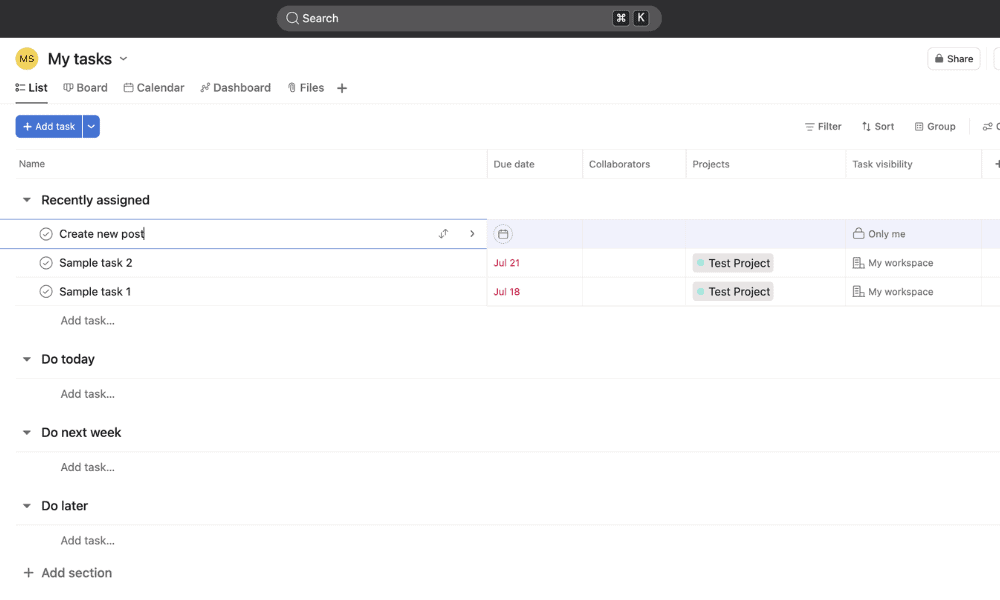
At the same time, both tools allow you to visualize progress using multiple views, such as lists, boards, calendars and timelines. However, ClickUp offers more view options, such as mind maps, in its higher-tier plans. It also provides greater flexibility. For instance, you can assign a task to multiple team members, which is not possible in Asana.
Automations & Integrations
Both Asana and ClickUp have robust automation options to help reduce manual work and streamline repetitive processes. Each platform lets users create custom automation rules to automatically assign recurring tasks, manage task dependencies, update statuses or send notifications. This helps teams maintain consistency and save time.
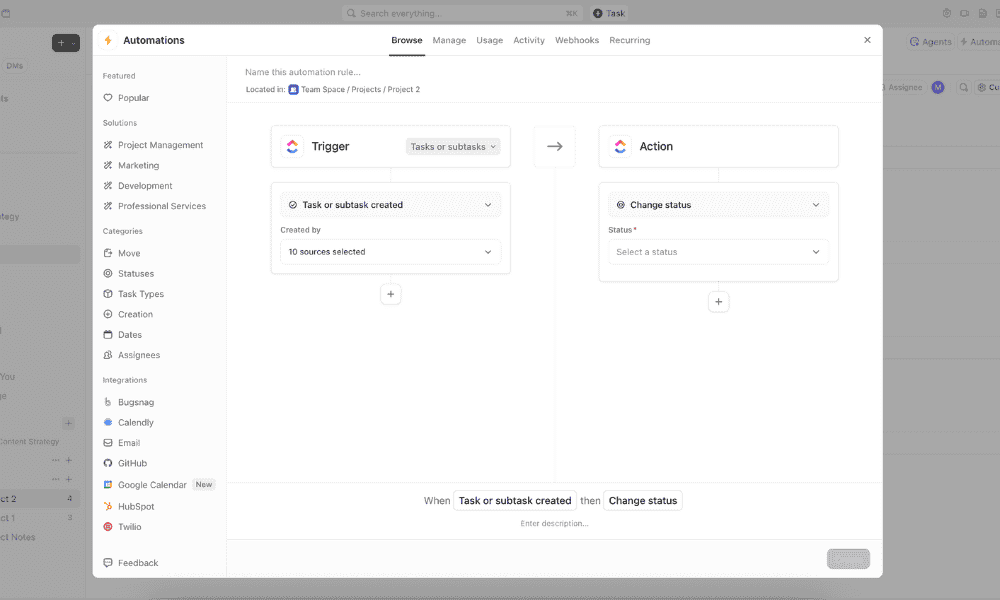
Both tools also integrate with a wide range of third-party apps; Overall, ClickUp offers more than 1,000 integrations, while Asana offers 400. They connect seamlessly with popular platforms like Slack, Google Calendar, Microsoft Teams, Zoom and cloud storage services, enabling smooth collaboration across tools. This makes it simple to add them to your current workflows with minimal setup.
Reporting & Dashboards
Project management dashboards are essential to visualize progress and track project metrics. Asana and ClickUp offer similar functionality, making it easy to create customizable dashboards with widgets that track tasks, deadlines, workloads and project health in real time. This helps you ensure that projects stay aligned with goals.
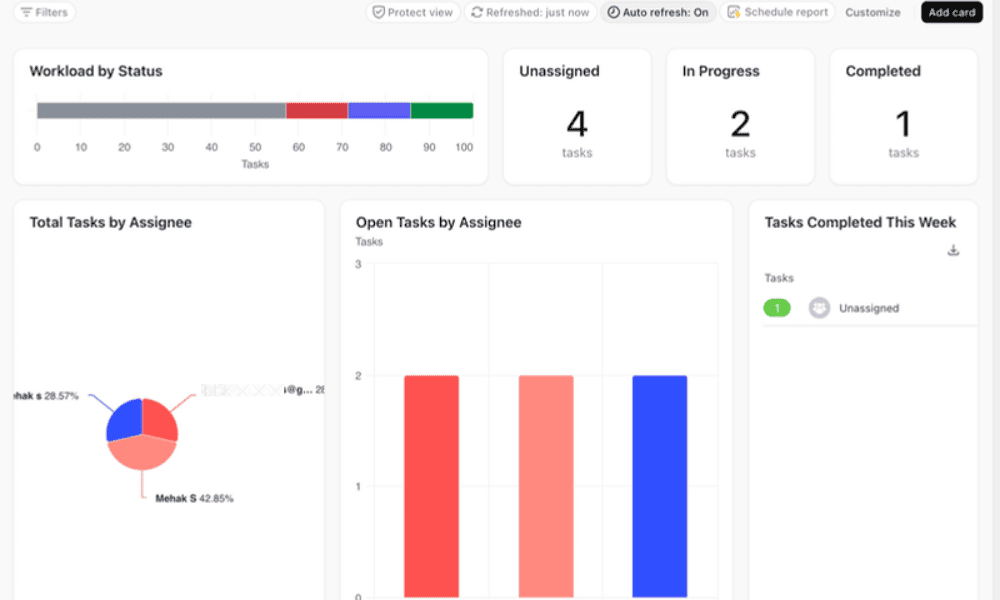
Additionally, both tools provide detailed reporting options that let project managers pull data on productivity, task completion rates and team performance. ClickUp offers slightly deeper customization, while Asana’s reports are known for their clean, easy-to-read design. Both platforms equip users with key data needed for effective decision-making and efficiency.
What Are the Key Differences Between ClickUp and Asana?
The key differences between ClickUp and Asana become apparent once you dig deeper into each software. Each tool caters to distinct user needs, with Asana focusing on simplicity and ClickUp offering advanced customization. Below, we’ll break down the key differences to help you choose the ideal tool for your needs.
Collaboration Tools
At first glance, ClickUp and Asana seem to offer similar collaboration features, such as comments on tasks, @mentions and file attachments to centralize communication. Each platform has an “inbox” feature that helps you stay on top of updates without getting overwhelmed. This makes them both ideal for combining task management and messaging.

However, ClickUp offers a more feature-rich approach to collaboration because it includes built-in chat, collaborative documents and whiteboards. This makes it easier for different teams to brainstorm, plan and execute without needing external tools. Although this abundance of options can feel overwhelming, they’re incredibly useful to have.
User-Friendliness
It’s important for a project management software to be easy to use so that teams can quickly adopt it. Asana stands out in this regard with its clean, intuitive interface that’s simple to navigate, even for beginners. Its minimalist design focuses on clarity, guiding users through task creation, project setup and progress tracking with minimal clutter.
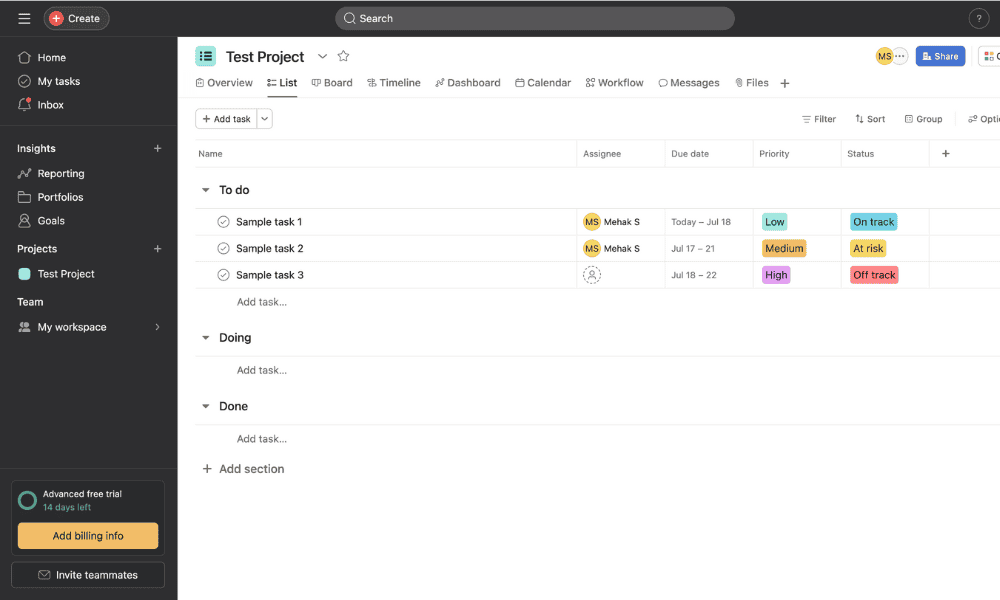
Meanwhile, ClickUp can feel overwhelming for those new to project management software. It offers far more customization options, which can be both a strength and a challenge. Users can tailor almost every aspect of their workspace, from task views to automations and permissions. This flexibility is great for power users but does involve a learning curve.
Time Tracking
Time management is vital to keep track of billable hours and productivity. ClickUp offers this feature in its cheapest Unlimited plan, while Asana reserves it for its much pricier Advanced plan. Since ClickUp eliminates the need for third-party time-tracking software, it can simplify a team’s overall workflow.
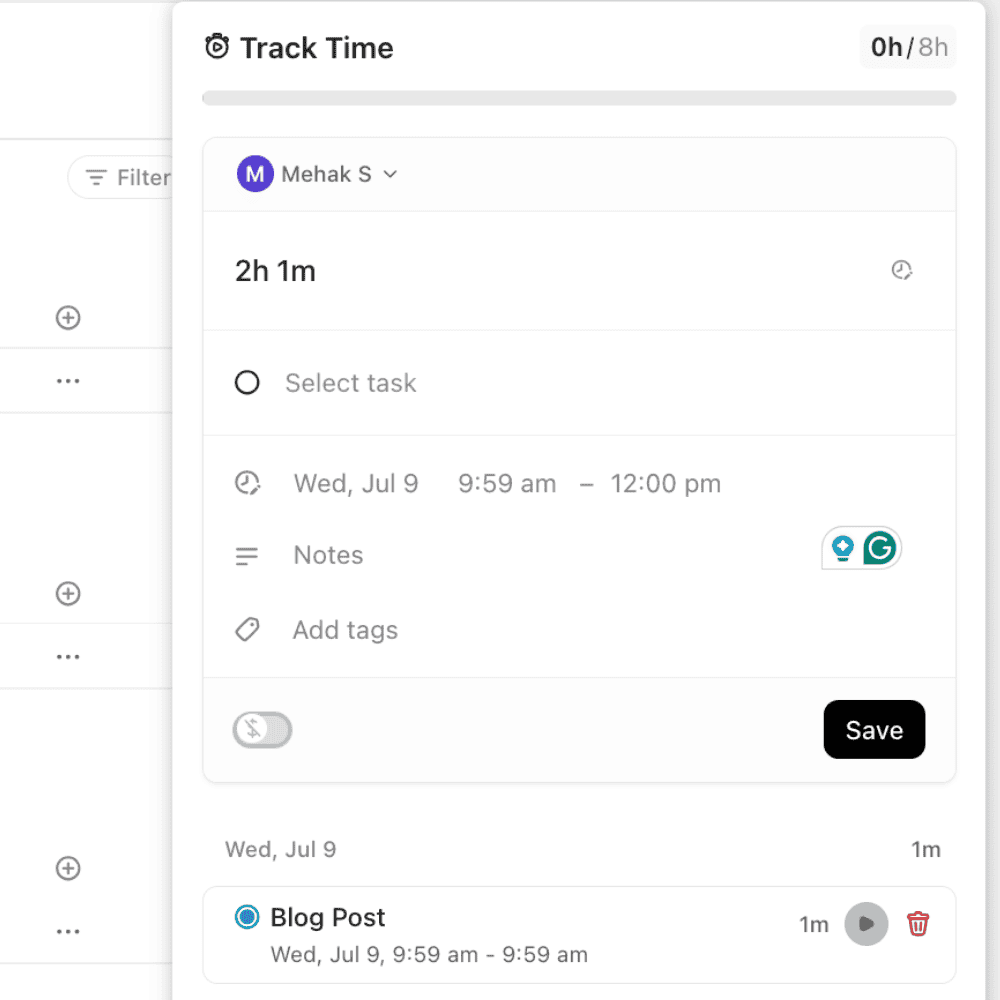
In Asana, if you opt for the affordable Starter plan, you’ll need to use third-party integrations to track time. This can involve extra setup and potential third-party costs. Therefore, if you’re looking for a time-tracking feature, ClickUp is a better choice. It provides a seamless experience for teams that need precise control over how time is spent.
Pricing & Value for Money
ClickUp is a more cost-effective solution than Asana, especially for teams seeking extensive features at a lower price point. Its Unlimited plan starts at $7 per user per month (billed annually), with unlimited time tracking and 1,000 automation actions each month. The Business plan is $12 per user per month, adding features like unlimited dashboards.
- Basic functionality with some limitations
- All prices per user
- All prices per user
In comparison, Asana’s pricing begins at $10.99 per user per month for the Starter plan, which includes basic features and unlimited automations. To access advanced features like enhanced reporting and unlimited portfolios, teams must opt for the Advanced plan at $24.99 per user per month. Both platforms offer an Enterprise plan with custom pricing.
- Up to 10 users
- Price is per user. unlimited users, expanded features
- Price is per user. unlimited users, even more features
- Custom pricing, advanced security features
Free Plans
Both Asana and ClickUp rank high in our best free project management software guide, and each have attractive free plans with access to the list, board and calendar views.
However, ClickUp’s free plan has an edge because it supports unlimited users and allows limited access to advanced features. For instance, it permits 100 monthly automation actions and 60 dashboard uses. This makes it a suitable choice for small teams.
While it provides unlimited tasks, projects and storage, Asana’s free plan is limited to 10 collaborators, and it lacks advanced features like automation and reporting tools. This limitation may hinder scalability for growing teams.
Can I Easily Import Data From One Service to the Other?
You can import data between Asana and ClickUp, and both platforms make the process fairly straightforward.
ClickUp offers a built-in import tool that lets you bring in projects, tasks, assignees and due dates directly from Asana. Here’s how to access it:
- Go to ClickUp’s Settings > Imports / Exports.
- On the next page, you must choose a source of import. Select Asana.
- In the pop-up window, sign in to your Asana account and follow the on-screen instructions.
The import process is automated, and most core data transfers smoothly. However, if you’re moving from ClickUp to Asana, you’ll need to:
- Export your projects from ClickUp as a CSV file.
- Create a new project in Asana and select the “import” option.
- Upload the ClickUp CSV file to Asana.
While you may need to tidy up some formatting afterward, both tools ultimately make it possible to migrate your work without starting from scratch.
What Users Are Saying: Real-World Feedback on ClickUp vs Asana
Both Asana and ClickUp have garnered great user reviews online, but they also point out the differences between the two apps. For instance, one Reddit user described ClickUp as “Asana on steroids.” Others back this up by highlighting ClickUp’s configurability and robust feature set.
Ultimately, user reviews reiterate that both apps are good, and choosing one over the other depends on individual needs.
The Verdict: Why We Think ClickUp Wins Overall
Overall, ClickUp takes the lead thanks to its unmatched flexibility, depth of features and incredible value for money. It combines task management, time tracking, document creation, chat, goals and whiteboards all in one place. Its customization options let users tailor workflows to fit any industry or team size, from freelancers to large enterprises.
That said, ClickUp’s extensive feature set can feel overwhelming at first, especially for those who prefer simplicity. Once you get past the learning curve, though, it becomes a highly capable productivity powerhouse that grows with your needs. The generous free version and affordable paid plans provide an easy, low-risk way to experience everything it has to offer.
If You Want to Consider Other Services, Check Out…



FAQ: Asana vs ClickUp Project Management Software Comparison
Both are good for personal use. ClickUp offers more customization and features, while Asana is simpler to set up. Both have generous free versions that make them great options.
All are among the best project management apps, but the best choice depends on your specific needs. monday.com and ClickUp are the most customizable, whereas Asana and Trello are somewhat simpler to use.
ClickUp is popular because it offers an all-in-one project management platform with powerful features, strong customization and generous free plans. It’s ideal for teams and individuals alike.
ClickUp tends to be the better choice thanks to its flexibility, built-in time tracking, document tools and generous features that are available even on the free or lower tiers.

