Best Cloud Storage for Collaboration in 2026: Online Tools for Business & School
In the era of remote working, we all need the best tools to collaborate on tasks and projects, while having a space to store the files we create. In this article we're going to focus our attention on the best cloud storage for collaboration, for personal and professional use.


Written by Dan Ginn (Writer)
Reviewed by Aleksander Hougen (Chief Editor)
Facts checked by Eugenie Tiu (Editorial Assistant)
Last Updated:
All our content is written fully by humans; we do not publish AI writing. Learn more here.
Key Takeaways: Best Cloud Storage for Collaboration
- Sync.com — The best option for all user types who want secure cloud-based collaboration with Microsoft Office integration.
- Google Drive — Top-notch collaboration tools for those who use Google Docs and need real-time editing.
- Proton Drive — A privacy-first cloud storage with built-in document collaboration and zero-knowledge encryption.
- OneDrive — If you use Office 365, OneDrive integrates all its tools seamlessly for families and businesses.
- Internxt Drive — Zero-knowledge encrypted storage with basic sharing features for privacy-focused users.
- pCloud — A secure service with dedicated business plans, fast speeds and collaboration tools.
Beyond offering a space to store files, many leading cloud storage services also offer tools that help teams collaborate on tasks and projects. Of course, each service is different, and some outdo others, making it hard to know which service to choose. Not to worry, this roundup of the best cloud storage for collaboration will help you find the right software.
With the exponential rise in remote work, more people are collaborating on projects through their computers and from different locations. Some believe this hinders productivity; however, when used correctly, the leading cloud storage services can help boost output through their fully functioning cloud-based collaboration tools.
We’ve pretty much reviewed all the best cloud storage services, so we have a strong idea of which platforms have the right tools for collaboration. We’ve narrowed the options down to five service providers, and below we’ll break each of them down and explain why they’re worth your consideration.
-
08/21/2022 Facts checked
Rewrote the article; updated our selection of the best cloud storage for collaboration.
-
05/21/2024 Facts checked
Updated to reflect Google Drive’s latest pricing changes.
-
03/29/2025 Facts checked
Added pCloud to our top five list.
Optimize Your Team’s Collaborative Workflow With the Right Cloud Platform:
 200GB$2.65 / month(All Plans)
 (All Plans)
 2TB$4.17 / month(All Plans)
 1TB – 5TB$4.92 / month(All Plans)
 200GB – 3TB$1 / month(All Plans)
 100GB – 30TB$1.67 / month(All Plans)
 2TB – 5TB$9.99 / month(All Plans)
 1TB – 5TB$1 / month(All Plans)
 100GB – 6TB$1.67 / month(All Plans)
 30GB – 5TB$7 / month(All Plans)
 Unlimited GB$17.50 / month(All Plans)
 10GB – 20TB$0.50 / month(All Plans)
 50GB – 12TB$0.99 / month(All Plans)
 100GB – 10TB$0.83 / month(All Plans)
 100GB – 30TB$1.67 / month(All Plans)
 3TB – 100TB$9.78 / month(All Plans)
 Unlimited GB$4.17 / month(All Plans)
 2TB – 3TB$12 / month(All Plans)
 1TB – 2TB$8.33 / month(All Plans)
 500GB – 2TB$7.08 / month(All Plans)
 10GB – 1TB$1.67 / month(All Plans)
 500GB – 2TB$2.99 / month(All Plans)
 100GB – 5TB$6.90 / month(All Plans)
 1TB$8.25 / month(All Plans)
 10GB – 500GB$5.83 / month(All Plans)
 200GB – 3TB$1.38 / month(All Plans)
 2TB$3 / month(All Plans)
 1TB – 4TB$8.33 / month(All Plans)
 100GB – 5TB$1.67 / month(All Plans)
 150GB – 10TB$1.25 / month(All Plans)
 100GB – 1TB$7.49 / month(All Plans)
 50GB – 1TB$3 / month(All Plans)
 50GB – 1TB$5.83 / month(All Plans)
 500GB – 2TB$5 / month(All Plans)
 100GB – 10TB$0.93 / month(All Plans)
 250GB – 4TB$30.44 / month(All Plans)
Successful team collaboration requires more than shared file access — it demands seamless real-time editing, intuitive permission management and smooth integration with existing productivity tools. Some platforms excel at native collaboration features while others prioritize security or third-party flexibility, creating distinct advantages for different workflow styles. Read on for how each service handles the practical challenges of modern collaborative work.
10,000+ Trust Our Free Cloud Storage Tips. Join Today!

- Demystify cloud storage terminology and key concepts in plain language
- Discover easy-to-implement techniques to securely backup and sync your data across devices
- Learn money-saving strategies to optimize your cloud storage costs and usage
The Top Cloud Storage for Collaboration Services
- 1
- :
- :
- :
- :
- 2
- :
- :
- :
- :
- 3
- :
- :
- :
- :
- 4
- :
- :
- :
- :
- 5
- :
- :
- :
- :
- 6
- :
- :
- :
- :
What Makes the Best Cloud Storage for Collaboration?
Several factors contribute to a company becoming one of the best cloud storage services for collaboration. Whenever we test a product, we’re looking for how much storage space it offers and how well it performs with file syncing. We also expect to see strong security for our files and fluid, real-time functionality when simultaneously collaborating on a task with others.
The best options also need to work well with the two leaders in online collaboration tools, Google Docs and Microsoft Office 365. Naturally, Google Drive and Microsoft OneDrive offer these tools; but, that doesn’t mean they’re the best options with all things considered, including privacy. However, security can sometimes restrict collaboration.
Our selections are a result of testing each of the products. Sync.com takes the number one spot, as it provides excellent security, and you can get plenty of storage at a reasonable price. Google Drive and Proton Drive excel when it comes to providing native collaboration options, Microsoft OneDrive is excellent for Office users, Internxt offers zero-knowledge encryption for privacy-focused teams and pCloud offers zero-knowledge encryption to all business customers.
While we’ll predominantly focus on the collaboration capabilities of each of the providers, we’ll also point out why they’re great for all of your cloud storage needs. Let’s take a look.
What Are the 6 Best Cloud Storage Services for Collaboration?
Below we’ll break down each of the products, sharing with you the good and the bad, to help you decide which one to choose.
1. Sync.com — Most Secure Cloud Storage for Collaboration
Sync.com is our leading cloud storage provider for all types of use. It excels when it comes to protecting all your data. It’s the only option in this roundup to offer zero-knowledge encryption. That means you have full control over your files, and nobody but you and your designated users can access your sensitive information.
From a collaboration perspective, Sync.com doesn’t offer native productivity apps; however, users can integrate Microsoft Office. With that you can create and share Office documents, and you can do so directly inside Sync.com’s web, desktop and mobile apps.
For the artistic types, Sync.com also integrates with Adobe products such as Photoshop and Illustrator. As such creative works tend to generate large files, you’ll be pleased to know that Sync.com has no file size limits for uploads and also offers plans that come with unlimited storage space.
Divide Team Collaboration
For businesses with multiple teams working on different projects, Sync.com Teams is a great collaboration tool as it allows you to separate your work across different folders. Administrators can set user permissions and ensure that only the people collaborating on a particular task can access that file. Not only is this a great way to keep your work secure, it also helps bring some structure to your workflow.

the paid plans are pretty affordable.
While Sync.com is an exceptionally good cloud storage service, it also has some areas of improvement. It’s not the quickest option in terms of performance. Also, only selected plans have monthly payment options, which is a little frustrating.
Those who want the best cloud service money can buy and are already using Microsoft Office, Sync.com will take your team collaboration to the next level. To learn more about the service, take a look at our Sync.com review.
- 5GB
- 2TB
More plans
- 6TB
- per user, per month, billed annually
- 1TB
- Priced per user (3 users minimum)
- Unlimited GB
- Minimum 100 users, custom requirements, account manager, training options
2. Google Drive — Best Cloud Collaboration Tool for Teams

With around one billion active users, Google Drive is by far the most popular cloud storage provider for personal, family and business use. So many people flock to the service because it’s affordable, easy to use and has arguably the best collaboration functionality built directly into the app.
It comes with several online storage plans, appealing equally to personal users and larger sized businesses. There’s no unlimited storage option; however, those added to a Google Workspace account can access up to 5TB of storage per user.
The simplicity of Google Drive makes it one of the top cloud services when it comes to file sharing and giving other users access to folders and documents. Setting user permissions is easy too, and you can have full control over who can view, comment and edit certain files.
Exceptional Collaboration Tools
When we think about what makes the best online storage service for collaboration, it’s about how well it functions. Google Drive offers incredible real-time performance that allows you to work on joint tasks. Users can comment on documents, photographs and videos, and it’s possible to see previous versions of an edited file, although this isn’t unique to the service.
As the result of recent updates to the software, Google Meet is now available directly inside other Google Apps. If you’re collaborating on a document, you can now open a Google Meet call inside the document and discuss any changes or improvements you need to make.

For all intents and purposes, Google Drive should be number one on this list. The reason it isn’t is because it has a terrible track record when it comes to user privacy. Google likes snooping around your business and targeting ads toward your interests. For those cool with that — and who prefer Workspace apps over Office 365 — there’s really no reason to look elsewhere.
The free account will be great for families who want to share images or work on personal projects together, and with Google Workspace, businesses will be able to operate fully across different departments. To learn more about the service, read our Google Drive review.
- Free plan
- 15GB
- 100GB
- *The plan is "hidden." To find the 200GB plan, you need to be subscribed to one of the other plans, upgrade or downgrade to the 200GB through your account's settings.
- 200GB
More plans
- 2TB
- 2TB
- 5TB
- 10TB
- 20TB
- 30TB
3. Proton Drive — Best Private Cloud Storage for Collaboration
![Video thumbnail for the video: I Tested Proton Drive to See If It's as Private as It Claims [2024 REVIEW]](https://img.youtube.com/vi/XWmsFdm-VLg/maxresdefault.jpg)
Proton Drive is part of the Proton ecosystem, which includes Proton Mail, Proton VPN and Proton Calendar. For teams that prioritize privacy above all else, Proton Drive offers something unique: zero-knowledge encryption across your entire storage, not just a single folder like some competitors.
From a collaboration standpoint, Proton Drive now includes Proton Docs and Proton Sheets, allowing users to create and edit documents directly within the platform. While these editors are more basic than Google Docs or Microsoft Office, they support real-time collaboration with comments and suggested edits, all protected by end-to-end encryption.
In our 2026 speed tests, Proton Drive proved to be very stable and fast, with low CPU usage. The service averaged upload speeds of around 25MB/s under no-throttle conditions, making it reliable for teams sharing documents and project files.
Secure Collaboration by Default
Unlike services that require additional purchases for zero-knowledge encryption, Proton Drive encrypts everything by default. Additionally, when you share a file or folder, you can set collaborators as editors or viewers. The sharing works seamlessly, and changes to shared documents happen simultaneously with no noticeable delays.

with up to 10 years of version history.
The main limitation for collaboration-heavy teams is simplicity. If you need advanced formatting, complex spreadsheets or presentation tools, you may find Proton’s options limiting. However, for teams that value privacy and need basic document collaboration, it strikes an excellent balance between security and functionality.
For privacy-conscious teams who want secure collaboration without sacrificing usability, Proton Drive is an excellent choice. The combination of Swiss jurisdiction, GDPR compliance for all users globally and zero-knowledge encryption makes it ideal for handling sensitive business documents. To learn more, read our Proton Drive review.
- 5GB
- 200GB
- 500GB
More plans
- 2TB
- 3TB
- per user
- 1TB
- per user, minimum of 2 users
- 1TB
- 1TB
4. Microsoft OneDrive — Best Cloud Storage for Microsoft Users

Microsoft OneDrive is a natural choice for those already using Office tools. Windows users automatically receive an account just for using Microsoft’s operating system, and for most people, there’s little reason to look elsewhere.
Performance-wise, Microsoft offers very fast file syncing. It also has block-level sync, meaning edited files will update quickly in the cloud and without putting too much pressure on your computer’s performance.
For family members already in the Microsoft ecosystem, you can sign up for a Family plan, which, on top of OneDrive, allows access to Office tools and 1TB of storage each (up to 6TB in total). File sharing will be easy, and you can work in Excel, Word and PowerPoint individually or simultaneously.
The Business plans offer more Microsoft apps, and the most expensive option allows users to have HD conference calls, implement cross-departmental collaboration and create a SharePoint intranet to keep employees up to date with what’s going on in your business.
Personal Vault
For those super confidential files, Microsoft OneDrive offers what it calls the “personal vault.” It works through two-factor authentication, as users can only access files stored in the vault by entering a unique password or through fingerprint recognition. If an unauthorized person gains access to your account, it will not be possible for them to access the essential files in your vault.

While Microsoft does everything to keep your data safe and secure, one thing to remember is that its data centers are located in the United States. If the authorities want to look into your information, Microsoft is obligated to cooperate and hand over your data.
If you feel like this of no concern, or you’re a family looking to work on projects and share the files you care about, then Microsoft OneDrive is great. We’ll also mention it has fast upload speeds, and its collaboration options through Office 365 speak for themselves. To learn more about what OneDrive is offering, check out our OneDrive review.
- For one person
- 5GB
- 100GB
- Comes with Office 365 Personal
- 1TB
More plans
- Comes with Office 365 Home
- 6TB
- Price per user
- 1TB
- 1TB
- Price per user
- 1TB
5. Internxt — Zero-Knowledge Cloud Storage for Privacy-First Teams

Internxt is a Spain-based cloud storage provider that focuses on privacy and security. Like Proton Drive, it offers zero-knowledge encryption across all your storage, meaning Internxt cannot access your files even if compelled by authorities.
For collaboration, Internxt provides basic sharing capabilities, but not much else. You can share files and folders via link or email invitation. Collaborators can be granted editor or viewer permissions. However, the collaboration features are minimal compared to services like Google Drive, Microsoft OneDrive, or even Proton Drive.
In our 2026 speed tests, Internxt showed improvement over previous years but still struggles with large files and zip archives. The service is better suited for smaller files and document sharing rather than large media projects.
Privacy Without Complexity
Internxt’s strength lies in its straightforward approach to privacy. There’s no need to configure encrypted folders or purchase add-ons. Everything is encrypted by default using AES-256 encryption with post-quantum key encapsulation, before it leaves your device. The service also offers a backup key system in case you forget your password.

The main drawbacks of collaboration are the lack of native productivity tools and the inconsistent performance with larger files. Internxt is fine for teams that primarily need to share documents and files securely without the need for real-time editing. However, if your workflow requires collaborating on complex projects, you’ll need to pair Internxt with external tools.
For privacy-focused individuals or small teams who need secure file sharing without advanced collaboration requirements, Internxt offers good value. To learn more, read our Internxt review.
- 1GB
- Post-quantum encryption Zero-knowledge encryption Two-factor authentication Backup your computer Password-protected file sharing Encrypted VPN Antivirus
- 1TB
- Everything in Essential plus; Cleaner Invite, share & collaborate File versioning (coming soon) Cleaner
- 3TB
More plans
- Everything in Premium plus CLI & WebDav support NAS & Rclone support Meet Mail (coming soon)
- 5TB
- Annual Price is per user
- 1TB
- Annual Price is per user
- 2TB
6. pCloud — Secure Cloud Storage for Enterprise
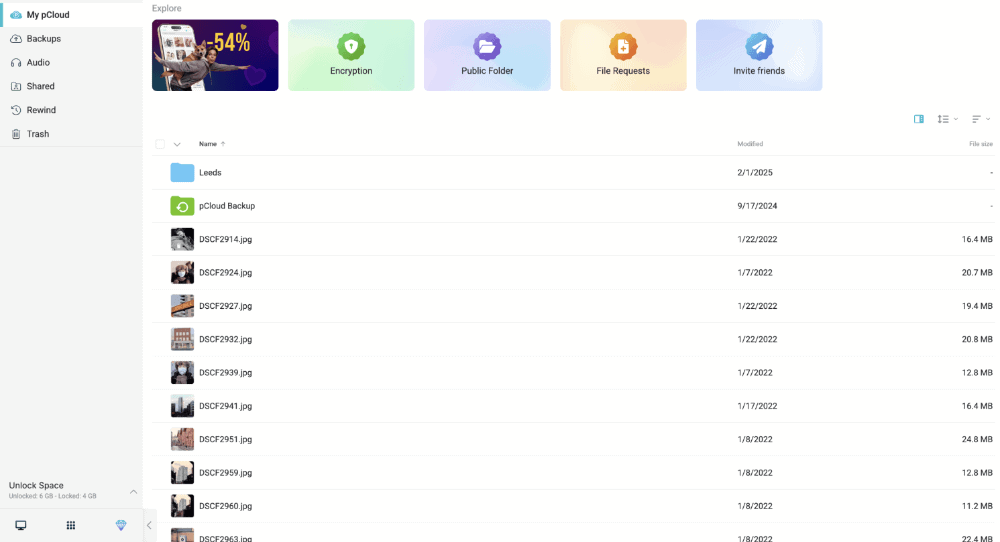
pCloud is a great cloud storage provider for individuals, but the business plans also offer an enticing deal for teams. You can easily share large files between pCloud accounts and even set up a shared folder that multiple users can access and edit.
You get both pCloud Crypto and extended versioning included with the business plans. This means each account gets a folder with zero-knowledge encryption enabled and you can recover files for up to 180 days.
Overall, pCloud is one of the best cloud storage services for teams. It’s lack of editing tools and third-party integrations hold it back, but it’s a great service for quickly sharing files between team members.
Encryption and Speed
Most services with zero-knowledge encryption fall behind in the speed category. However, pCloud doesn’t fall into this trap. You can protect your most sensitive files with pCloud Crypto while also taking advantage of its fast transfer speeds when sharing files or using a shared folder.

pCloud has limited options for business plans, although at a reasonable price. The 1TB plan costs $9.99 per user per month or $7.99 per user per month when paying annually. You can try it out with the 10GB free plan or you can read our pCloud review for more information.
- 10GB
- 500GB
- 2TB
More plans
- 10TB
- + FREE Encryption
- 2TB
- + FREE Encryption
- 10TB
- Price per user (minimum 3)
- 1TB
- Price per user (minimum 3)
- 2TB
- Encryption for pCloud Drive
Final Thoughts: Best Cloud Storage for Collaboration
By now, it should be apparent that not much separates the best services when it comes to collaboration tools. They all excel in different areas, and it may be difficult to decide which is the best.
We stand by our position that Sync.com is the top collaborative cloud service your money can buy because of its ease of use, great security and ability to integrate with quality collaboration tools.
Google Drive and Microsoft OneDrive remain excellent choices for those already invested in their respective ecosystems, offering the most comprehensive native collaboration tools available.
Proton Drive stands out for teams that need both collaboration capabilities and ironclad privacy, with its zero-knowledge encryption and native document editors. Meanwhile, Internxt offers a more basic but highly secure option for privacy-conscious users who don’t need advanced editing features.
On the other hand, pCloud is a secure service with fast speeds, but lacks some of the more advanced collaboration tools and integrations of other services. Whatever you choose, all of them will help you improve collaboration both in your personal and professional life.
Which is your favorite tool for collaboration? Is there another option you think we should include? What collaboration issues are you currently facing? Let us know in the comments. Thanks for reading.
FAQ: Cloud Collaboration Tools
No. Cloud storage is an online space where users store a range of file types in what’s known as “the cloud.” However, most online storage providers offer integrated tools where multiple users can work together and collaborate on documents and other file types.
Sync.com is the top cloud storage service for all types of cloud storage users because of its excellent security. Google Drive is also an excellent option for friends and family, as well as businesses. For privacy-focused teams, Proton Drive offers zero-knowledge encryption with built-in document collaboration tools.