12 Best Free Project Management Software Providers in 2026
In this guide, I’ve tested the most popular options and brought you the top 12 best free project management software picks for you to start growing your projects.


Written by Sofia Oliber (Writer)
Reviewed by Kate Hawkins (Editor, Writer)
Facts checked by Igor Kurtz (Fact-checking editor)
Last Updated:
All our content is written fully by humans; we do not publish AI writing. Learn more here.
Key Takeaways: Best Free Project Management Software
- ClickUp: The best choice for an all-in-one platform, with unlimited projects, tasks and boards. Get started with ClickUp today for free.
- Zoho Projects: Ideal for small projects and teams wanting to scale their project scope. Try Zoho Projects for free today.
- Asana: Great tool for structured workflows to collaborate, build and work with manageable tasks. Get started with Asana for free to test out its functionalities.
- Trello: One of the best project management tools for visual teams that love using kanban boards. Try Trello’s free option now.
- Notion: Flexible tool to create custom workflows and organize multiple projects. Try Notion for free today.
- Airtable: Ideal for spreadsheet fans and teams in need of a customizable and intuitive platform. Sign up for Airtable now.
- Jira: The best free plan for development and Agile teams, as it includes scrum boards and integrations like Confluence. Test out Jira for your team for free.
- monday.com: Great visual and intuitive platform for organizing tasks and tracking the progress of small interactive projects. Start using monday.com today for free.
Honorable Mentions:
Basecamp, Teamwork.com, Wrike and Todoist all make our honorable mentions list for having solid free plans, though they aren’t quite as robust as our top eight picks.
Facts & Expert Analysis About Free Project Management Tools
- Project management is becoming a priority: Over 45% of organizations said that they prioritize having a work culture that values project management practices.1
- You can save time with these tools: The average project manager can save up to 153 hours per year by using project management software.2
- The global project management market is growing: This niche is expected to reach $20.47 billion by 2030, representing a growth of approximately 210% between 2022 and 2030.3
Organizing teams on a budget is hard enough; just imagine trying to do it with the wrong tools. The best free project management software can help you stay organized and proactive without making big investments. These highly professional tools can provide useful features such as Gantt charts, automations and integrations at no cost.
In this article, I compared the best project management software options based on accessibility, ease of use and scalability. If you’re looking for further insights, you can check out our full project management software roundup for premium alternatives.
-
11/17/2021 Facts checked
Added Redmine to the list of honorable mentions
-
08/25/2022 Facts checked
Updated article to reflect changes in free plans in the project management space.
-
05/23/2023 Facts checked
Updated the ranking of the providers, moving ClickUp higher in the list.
-
05/28/2024 Facts checked
Added new video ranking for the best free project management software.
-
06/07/2024 Facts checked
Updated the article to reflect monday.com’s latest pricing information.
-
12/18/2025 Facts checked
We’ve fully rewritten this article to reflect the latest test results and software updates, and we’ve updated the provider rankings.
Cloudwards’ Choice: ClickUp
 Cloudwards' Choice: ClickUp
ClickUp stands out for its generous free plan with strong customization, subtask organization, and handy tools like video recording and collaborative docs. I like that it’s easy to scale with ClickUp; you can have unlimited team members on the free plan, and it also offers the widest options of features at no cost. Try ClickUp’s free forever plan to see how it fits your workflow.
The 8 Best Free Project Management Tools Compared
The tools below represent the best free project management options. I tested each one to ensure all core features work correctly for their respective free plans.
| Tool: | Free Users | Best Free Plan For | Unique Selling Point | Free Plan Limitations |
|---|---|---|---|---|
 | Unlimited members & guests | Medium to large projects | User-friendly interface & generous free tier | Limited integrations & spaces |
 | Up to 5 users | Client-centered business, contractors & freelancers | Budget & client-centered features | Only 3 projects allowed |
 | Up to 2 users | Individual professionals or duos | Ultimate simplicity & automation tools | Board & calendar views only, no time tracking |
 | Up to 10 users per workspace | Freelancers & small visual teams | Visual workflow & intuitive kanban board | No custom fields or AI options |
 | 1 user & up to 10 guests | Individuals & freelancers | Unlimited customization & flexible document management | Only 5MB per file & limited pages |
 | Up to 5 users | Spreadsheet-driven small teams | Great structure & task hierarchy | No integrations allowed |
 | Up to 10 users | Small software development teams | Advanced Agile/Scrum features & extensive integrations | Complex setup, overwhelming for non-developers |
 | Up to 2 users | Individual professionals or duos | Intuitive & customizable interface | No automations or integrations allowed |
Hands-On Testing
It’s important to know how each tool performs in real-world use, including how smooth the interface feels and how well the views, fields and collaboration features work.
Avoid Costly Project Management Mistakes – Get Free Tips Today!

- Discover 10 fundamentals of project management
- Understand step-by-step plans for PM execution
- Learn tips to avoid 5 common mistakes by beginners
Free Plan Feature In-Depth Comparison Overview
| Tool: | View Types | Time Tracking | Custom Fields | Dashboards | Real-time Collaboration |
|---|---|---|---|---|---|
| 11: Board, calendar, dashboard, doc, form (1 use), list, Gantt (60 uses), table, timeline (60 uses), whiteboard (3 uses), workload (60 uses) | Not included | 60 uses of custom fields | Yes, 60 uses | Comments, tags & in-app video recording |
| 3: list, kanban, Gantt | Not included | Not included | Advanced reporting included for each project | Yes |
| 3: board, list, calendar | Not included | Not included | Basic reporting | Yes |
| Kanban only | Not included | Not included | Not included | Comments & tags |
| 6: table, board, list, calendar, gallery, timeline; limited chart view | No tool available, only time-tracking template | Yes, from premade options | Yes, via templates | Yes |
| 8: list, grid, kanban, calendar, dashboard, inbox, forms, gallery | Not included | Yes, from premade options | Yes, customizable dashboards | Yes |
| 6: backlog, list, board, timeline, calendar, summary | Only via integrations | Yes, but only product admins | Advanced reporting | Yes |
| 3: list, table, kanban | Not included | Not included | Yes, but limited to 1 board per dashboard | Yes |
Each tool offers unique standout features; for instance, ClickUp includes in-app video recording. Notion and Jira are strong competitors when it comes to available views, though they fall short on extra tools.
Trello, meanwhile, lacks built-in time tracking or additional views but compensates with unlimited power-ups, even on its free plan. While these features are versatile, those managing financial firms should prioritize specialized security and document handling found in the best project management software for accountants, as general free plans often omit these essential professional tools.
Platform & Administration on Free Plans
| Tool: | Apps | Storage | File Management | Permissions |
|---|---|---|---|---|
| Web | 60GB | Search, task dependencies & integrated documents | Team/project/task level |
| Web | 5GB | Central hub for document sharing & file attachment | Basic project access control (public or private) |
| Web | Unlimited, up to 100MB per file | File attachments & sharing | Project level |
| Web | Unlimited, up to 10MB per file | Approvals & file management power-ups | Board/group/item level |
| Web | Unlimited file uploads, up to 5GB per file | Embedded files & databases | View, comment & full access |
| Web | 1GB per base | Versioned uploads | Sheet & workspace |
| Web | 2GB | Advanced with Confluence | Not customizable |
| Web | 500MB | Files column & files tab | Board, column, workspace & account permissions |
ClickUp offers the most storage by far, whereas Zoho Projects provides only 5GB of storage. The rest of the platforms provide powerful features with their free tiers with the exception of Jira, which remains restrictive due to its developer-centered interface.
Free Integrations & Automations
| Tool: | Integration Count | Top Integrations | Native vs 3rd-Party | Automation Features |
|---|---|---|---|---|
| More than 1,000 | Zapier, Google Calendar, time tracking | Mostly third-party | 5 active rules & 100 automation executions |
| 40: 17 Zoho apps, 23 3rd-party apps | None on free tier | 42% native, 58% third-party | Not available |
| More than 100 | Slack, Google Drive, Dropbox | Mostly third-party | Not available |
| More than 200 | Slack, Dropbox, Zapier, GitHub | Mostly third-party | 250 automation runs per month |
| 177 | Slack, Google, Figma, GitHub | Mostly third-party | Basic automation & public API |
| None | None on free tier | Mostly third-party | 100 per month |
| More than 3,000 | Confluence, GitHub, Slack, Zendesk | Almost all Atlassian native | 100 rule runs per month |
| None | None on free tier | 100% native | Not available |
Each platform handles free integrations differently. Jira, Trello and Zoho Projects belong to larger ecosystems, which is ideal if you’re already invested in those environments. Jira leans toward developer-focused integrations, while tools like Notion and Asana keep their integration options lighter but still productivity-focused.
Usability & Performance Assessment on Free Plan
| Tool: | Learning Curve | Interface Design | Mobile Experience | Customer Support |
|---|---|---|---|---|
| Intermediate | Customizable & modern | Excellent (90% feature parity) | 24/7 support |
| Intermediate | Customizable, though not very visually-friendly | Fair (65% parity) | |
| Easy to intermediate | Polished & structured | Excellent (90% parity) | Forum, Asana Academy, webinars & help center |
| Easy | Minimalist | Excellent (90% parity) | Community support |
| Easy to Intermediate | Extra flexible | Good (80% parity) | Email & community forum |
| Intermediate | Spreadsheet-like | Good (85% parity) | Help center & community |
| Difficult | Dense & enterprise-focused | Fair (70% parity) | Community support |
| Easy | Intuitive & flexible | Good (80% parity) | Chatbot & community forum |
ClickUp, Trello and Asana offer the best mobile experience, but the others aren’t far behind. Most of these services provide a similar user experience on desktop and mobile, creating a natural workflow for users.
The Best Free Project Management Software
These platforms offer the most generous free tier options for teams and individuals on a budget or looking to cut expenses.
1. ClickUp — Best Overall Free Project Management Software
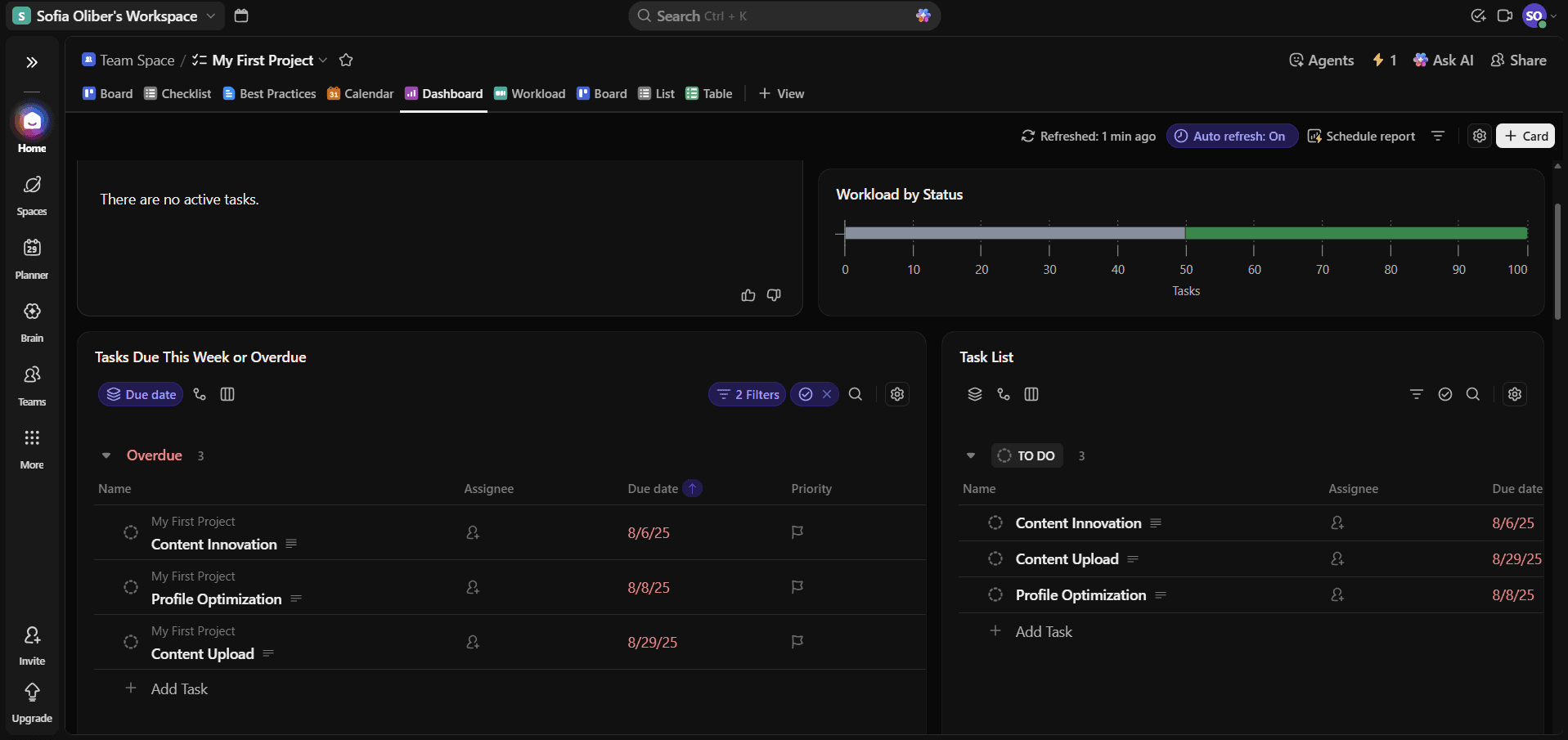
ClickUp’s free version offers advanced tools like sprint management and automations. Additionally, the platform provides an excellent balance between depth and customization, making it accessible for both beginners and complex teams. This is why I find ClickUp to be an ideal fit for almost any kind of team.
What Makes ClickUp Special
ClickUp stands out for its packed free tier and unlimited free users. You can easily create a full project, add collaborators, assign tasks and track your team’s performance.
When to Choose ClickUp
Choose ClickUp if you’re ready to centralize your team’s work with a more professional project management system. You can track goals, visualize progress and get started for free, or try a paid plan with the 30-day money-back guarantee. Read our full ClickUp review to learn more.
- Basic functionality with some limitations
- All prices per user
- All prices per user
2. Zoho Projects — Best for Dependency Tracking
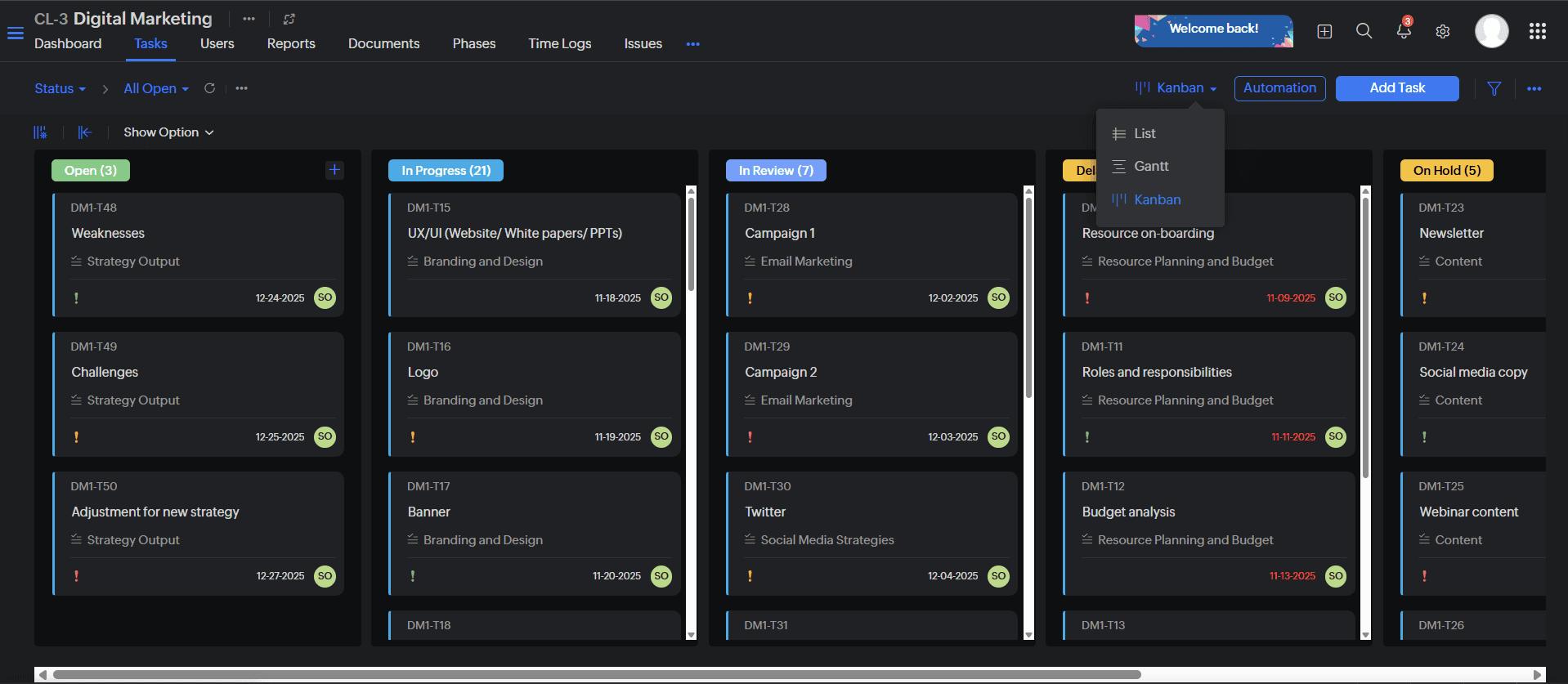
Zoho Projects’ free plan stands out for including views and dashboard options that are often locked behind other tools’ paywalls. It offers a solid set of essential features, such as document sharing and subtasks, especially for teams managing only up to three projects.
What Makes Zoho Projects Special
Most software restricts advanced functionalities like milestones or reminders to paid tiers, but Zoho Projects provides them all for free. Its interface might not be as visual as other services, but it is still quite intuitive and accessible.
When to Choose Zoho Projects
Opt for this tool if you need an ally to manage your projects and client data. Even though the free plan doesn’t include time tracking, templates or custom fields, it’s still a budget-friendly way to make sure it’s a good fit before you subscribe. Sign up for Zoho Projects’ free version, or check out our in-depth Zoho Projects review for the full scoop.
3. Asana — Best Tool for Task Organization
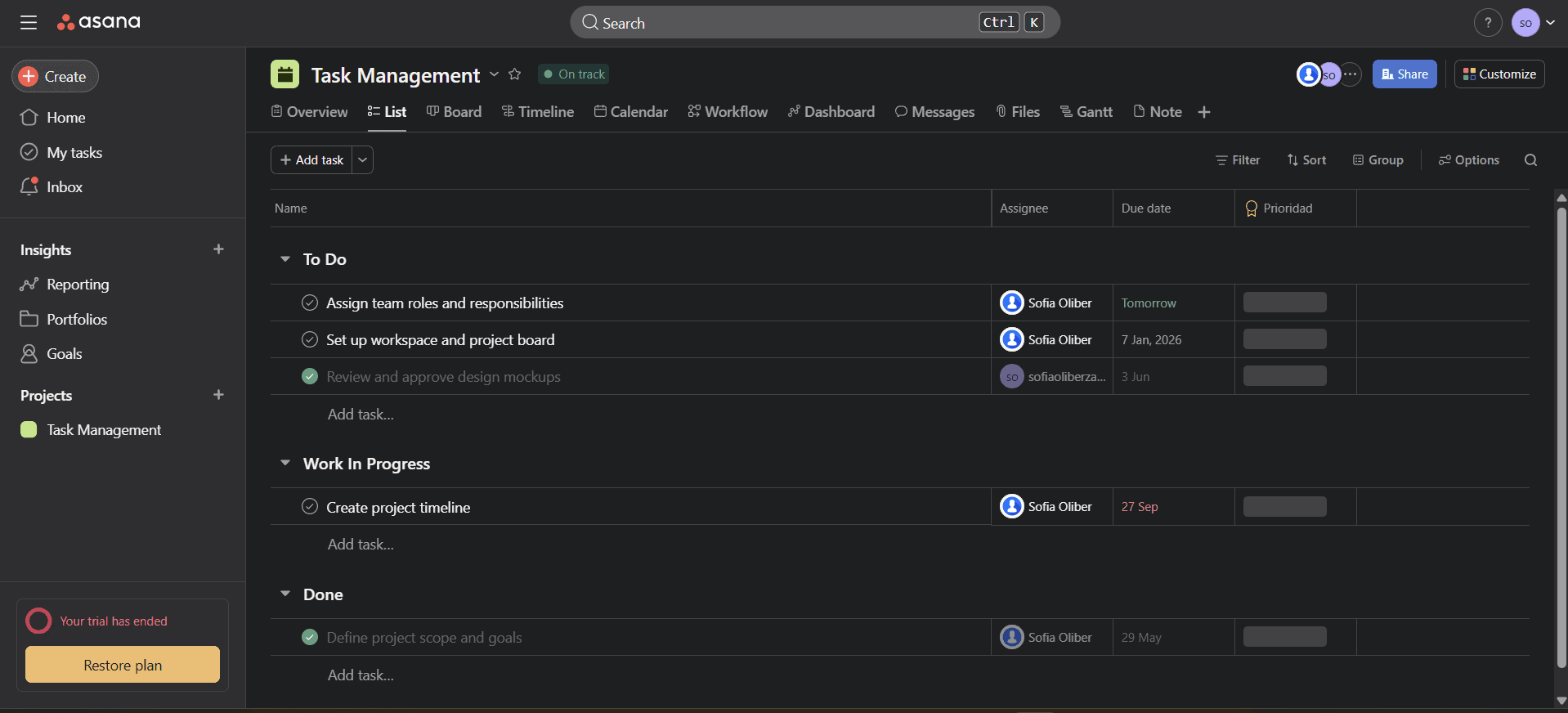
deadlines and overall task assignments.
Asana’s free plan is simple and easy to use; its interface succeeds at enhancing productivity while keeping team communication centralized in a non-overwhelming user experience. It feels natural to manage multiple tasks in Asana with key features such as search filters and status updates.
What Makes Asana Special
Asana’s purpose-driven design makes it simple to create a complete campaign in just a matter of minutes. The software also allows for unlimited tasks, projects and messages.
When to Choose Asana
Opt for Asana if your small team needs a structured and straightforward tool without task limitations. The free version is generous and supports basic functionalities, but it lacks more advanced tools like timeline and Gantt views or project dashboards. Try Asana for free now and upgrade later as your team grows. You can read more about the platform in our full Asana review.
- Up to 10 users
- Price is per user. unlimited users, expanded features
- Price is per user. unlimited users, even more features
- Custom pricing, advanced security features
4. Trello — Best for Straightforward Visual Teams
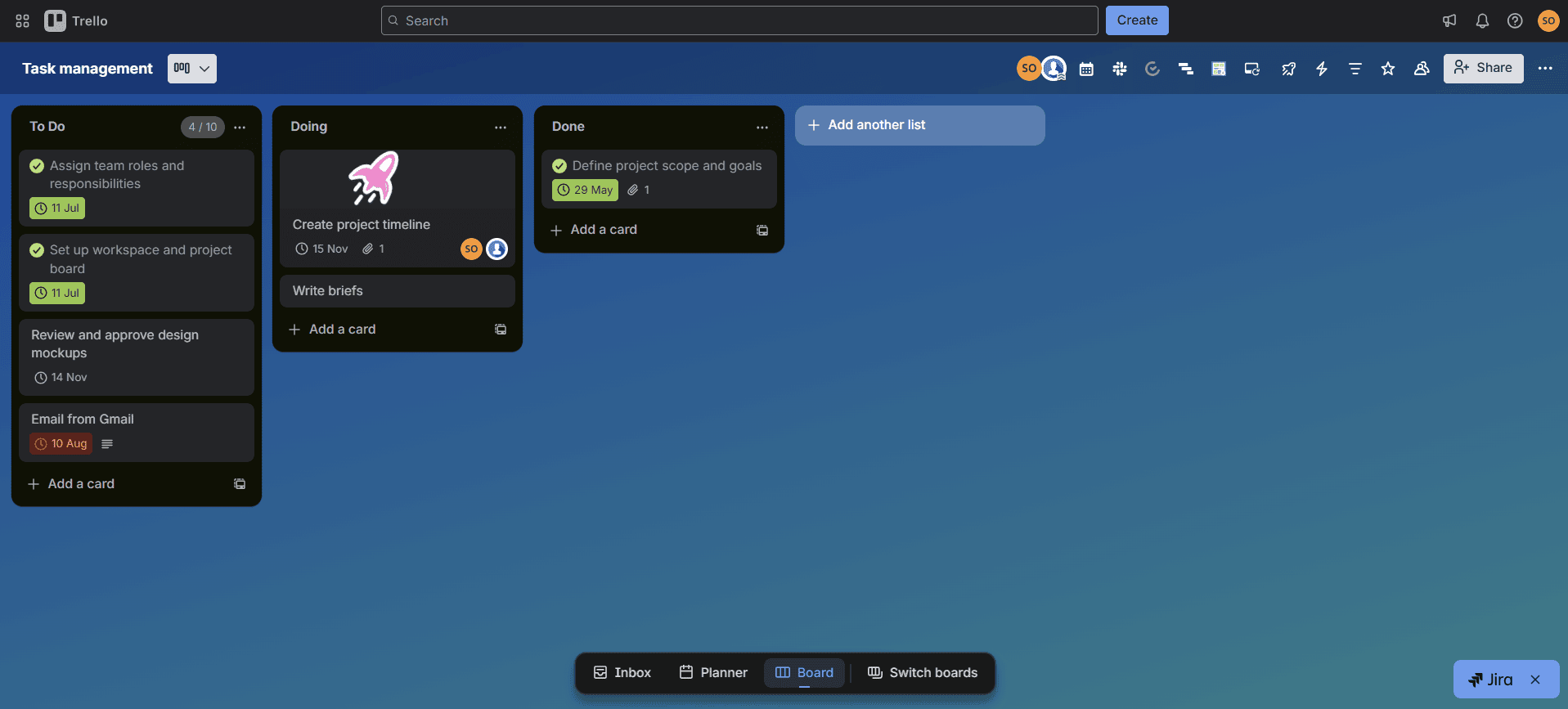
Trello is one of the most straightforward platforms out there, and its free plan is effortless to get set up. Its kanban structure is perfect for uncomplicated workflows and for visual teams that need to keep track of multiple projects at a time.
What Makes Trello Special
Trello manages to keep workflows easy without losing efficiency. You can track project progress in a clear and well-organized interface, and add integrations when you need more depth.
When to Choose Trello
Trello is the ideal platform for users searching for lightweight and accessible project management software. The free plan doesn’t include custom fields, collapsible lists or AI assistance, but it’s a good choice for beginners who don’t want to spend tons of time learning a new platform. Check out Trello’s free version today and upgrade later if needed. Learn about everything Trello has to offer in our full Trello review.
- Unlimited users, 10 boards, Unlimited power-ups, Unlimited storage
- Price is per user, Unlimited boards, Custom fields, Invite guests
- Price is per user, Several new views
- Price is per user, Advanced admin & security settings. Discounts for larger teams.
5. Notion — Best for Flexible Projects
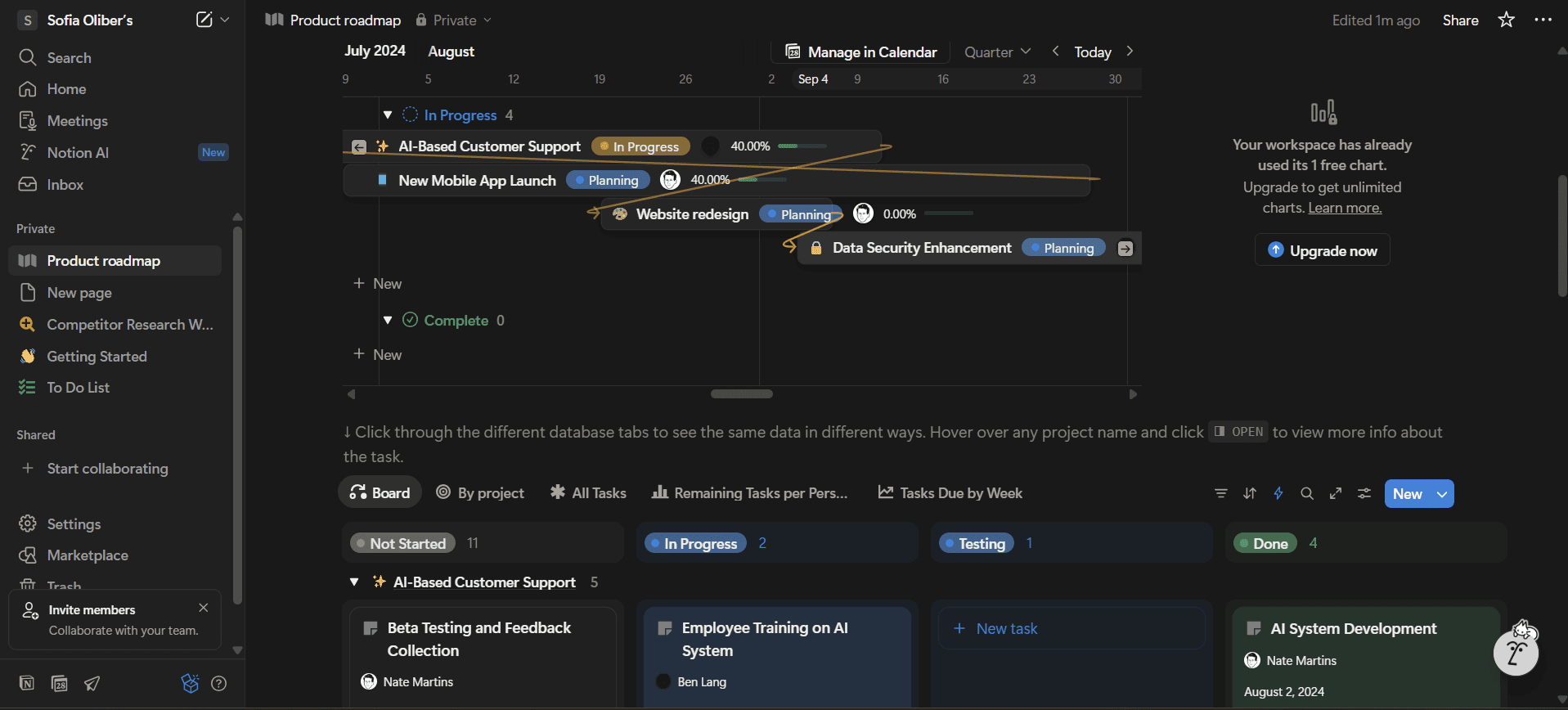
Small teams looking for a simple, flexible and visual tool will see Notion as a great option, especially as the free plan includes the document manager, which includes forms and charts. Teams can combine to-do lists, kanban boards and calendar notes seamlessly.
What Makes Notion Special
Notion’s interface is special due to its block-based layout. Every element is movable, including text, media and more, and you can arrange these elements however you want. I also appreciate having the option to create unlimited and personalized pages to fit any workflow.
When to Choose Notion
Notion is the obvious choice for teams or individuals who appreciate flexibility over deep functionalities. You won’t get priority support or more than a trial for the AI assistant on the free version, but it’s still a solid option for small teams or individuals. Try Notion’s free tier today, or check out our full Notion review to learn more about the software.
- 1 user only, Up to five guests, 5MB file upload limit
- 1 user only, Unlimited guests, Unlimited file uploads, Version history
- Unlimited users, Unlocks workspace, User permission settings
- Advanced security features
6. Airtable — Best for Spreadsheet-Like Management
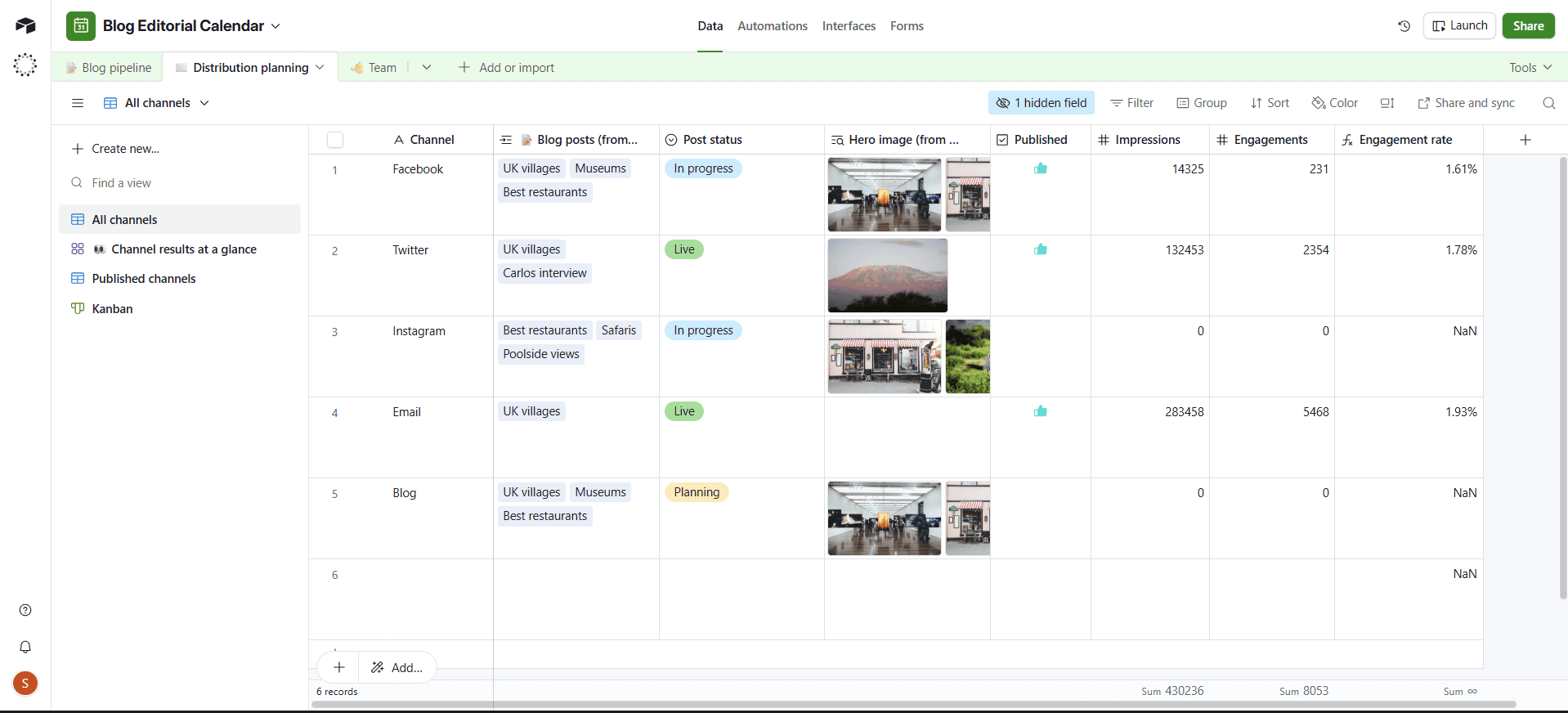
Airtable’s free tier is a natural fit for teams that need a strong platform to manage large amounts of data. The platform is unique in that it seamlessly blends spreadsheet and project management functionality.
What Makes Airtable Special
Airtable blends the data power of spreadsheets with the interface flexibility of tools like monday.com or ClickUp. Even though the platform relies heavily on its grid template, it still feels intuitive and lightweight. Airtable provides a great structure for managing, automating, visualizing and organizing tasks and projects.
When to Choose Airtable
If your workflow adapts well to spreadsheet structures but your team needs a more customizable experience, Airtable is a good choice. The free plan is the perfect entry point to test out the software, even if it doesn’t include tools like Gantt charts and integrations. Try Airtable today, or learn more about it in our in-depth Airtable review.
- Up to five users. Unlimited bases. 1,000 records, 1GB of storage per base. Revision and snapshot history for two weeks. Views: grid, calendar, form, Kanban board, gallery and list. 100 automations per month.
- Everything in free, plus unlimited users, 50,000 records and 20GB of storage space per base. Adds Gantt charts and timeline views. 25,000 automations per month.
- Everything in Team, plus 125,000 records, 100GB of storage per base, 100,000 automation per month. Admin controls, single sign-on (SSO) and premium integrations with third-party services.
- Everything in Business, plus 500,000 records, 1TB of storage per base, and 500,000 automation monthly.
7. Jira — Best for Tech and Developer Teams
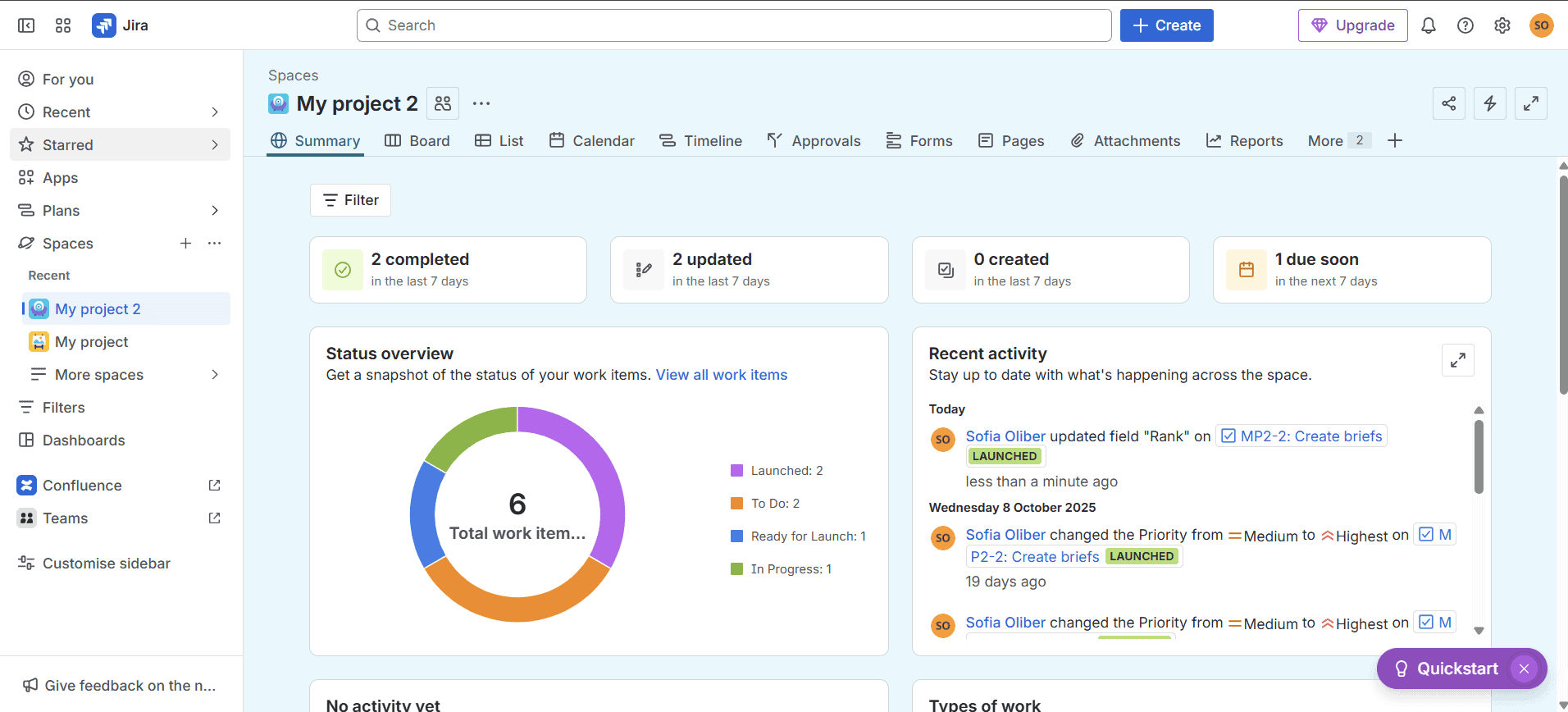
Thanks to the Jira free plan’s unlimited projects, forms and customizable workflow options, the tool can easily adapt to Agile methodologies. You can easily run structured sprints with Jira’s free plan. Tools like task boards, automations and issue tracking are included at no cost.
What Makes Jira Special
Jira is built for development teams, offering advanced Agile tools like sprint planning, backlog tracking and automation for free. It also supports unlimited integrations, making it a capable option for software projects.
When to Choose Jira
Choose Jira if you’re managing projects related to development or advanced tech. The free option lacks advanced tools like admin insights and issue-level security, but no other tool will give you the same niche-specific set of features in a free tier. Try Jira today and explore how it can help your team. Dive deeper into the platform’s functionalities in our Jira review.
- Max. 10 users. unlimited boards, reports and insights; backlog; basic roadmaps; 2GB of storage; community support
- Monthly pricing starts from 11 users, pricing changes based on the number of users. Monthly pricing changes with teams over 110. Annual pricing shown is for 1-10 users
- Monthly pricing starts from 11 users, pricing changes based on the number of users. Monthly pricing changes with teams over 114. Annual pricing shown is for 1-10 users
- Enterprise plan pricing is available when you enter 801 or more users above; User tier: 801 – 1,000
8. monday.com — Best for Smooth Onboarding
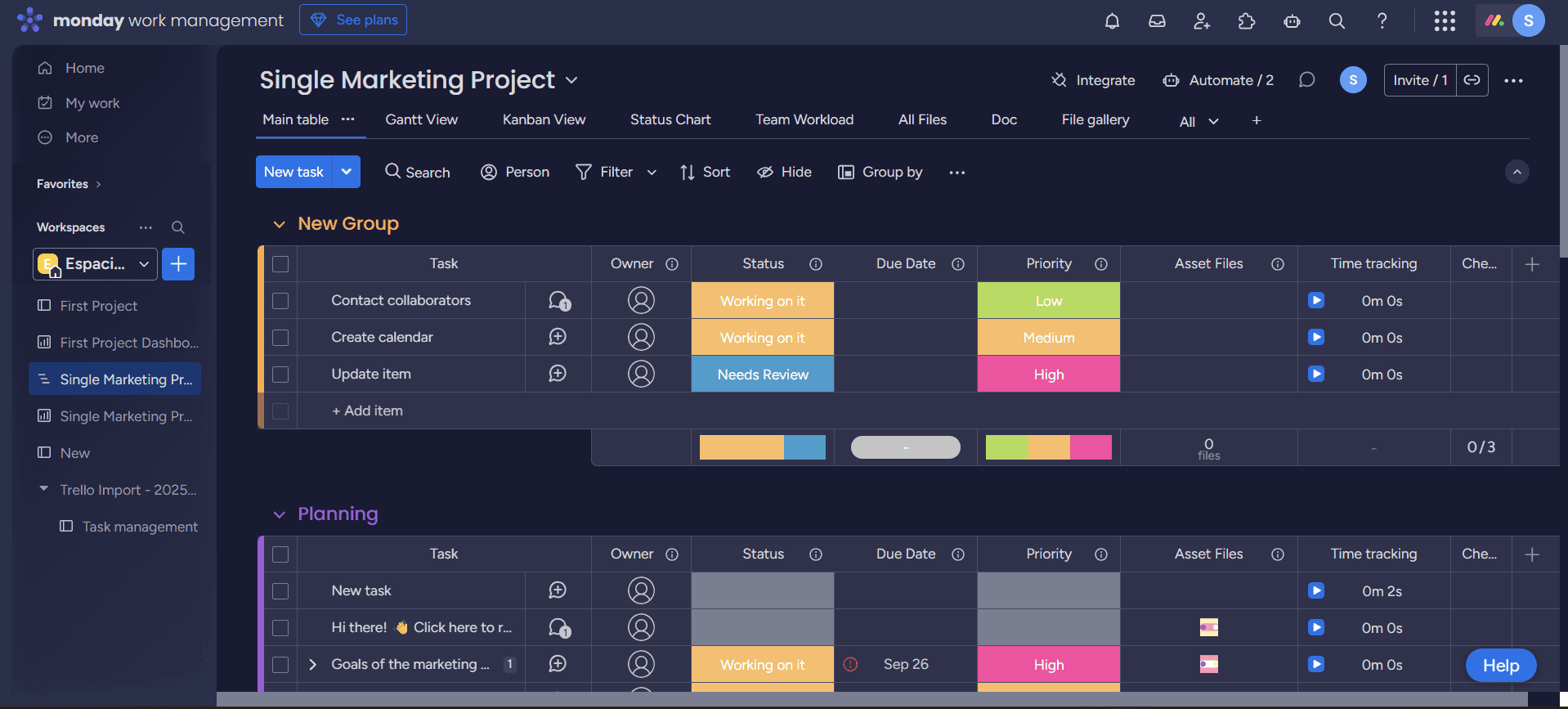
monday.com stands out for its clean interface and intuitive design, but the free plan can be very limited. It also includes a wide variety of templates for various industries, such as sales, client work and HR.
What Makes monday.com Special
monday.com delivers a powerful and intuitive experience with an easy learning curve. The platform also stands out for its flexibility and customization, though the free plan is a bit more limited in terms of features, such as views.
When to Choose monday.com
If your team needs a tool you can set up in a few hours, monday.com is a solid pick despite the free plan missing advanced views, automations and integrations. Start testing monday.com today if you value visual experiences over data-heavy project management apps. Discover all the details about the platform in our full monday.com review.
Honorable Mentions
Here are four honorable mentions that may not match up to the eight tools above but still offer powerful free solutions.
- Basecamp: If you need to manage just one project while still keeping close communication with your team and clients, Basecamp is the perfect fit. Its free plan supports one project and up to 20 users (including clients), and it offers 1GB of storage. Read more in our Basecamp review.
- Wrike: Wrike’s free plan allows for an unlimited number of users and 2GB of storage, making it a great choice for large but simple teams. However, the calendar and dashboard views are not available on the free plan, which is important to take into account if those tools are key to your workflows. Learn more about Wrike in our review.
- Todoist: The beginner plan supports up to five projects and provides basic key features like subtasks and deadlines. Todoist is a simplified project management software that can also be used as a simple task management tool, especially on its free tier. Check out our Todoist review to read more.
- Teamwork.com: This platform’s free version allows up to five users and includes projects and AI functionalities. Teamwork.com stands out as a great choice for service providers thanks to its client-centered tools, such as client views and billable time-tracking options.
What Are the Benefits of Free Project Management Apps?
Free project management apps help teams keep track of their goals, collaborate and enhance overall productivity at no cost. They’re a great choice for students, nonprofits, startups and beginner teams in need of good organization to kickstart managing projects.
The main benefit is that your organization can gain access to basic productivity tools at no cost while learning how to structure effective workflows. Free options give teams flexibility as they grow, allowing them to decide when and how to upgrade to more advanced options.
Should I Get a Free Plan or a Paid Plan?
A free plan is the go-to option for individuals, small teams, students and nonprofits. If your project or team is a bit bigger, you may need to upgrade. Features like advanced reporting, automations and AI assistants are usually available only on paid tiers.
The table below provides a quick comparison of free and paid tiers:
| Comparison: | Free Plans | Paid Plans |
|---|---|---|
| Best for | Individuals, small groups, beginners or students | Growing teams, enterprises & mid-sized to large businesses; project portfolio management |
| Features | Basic features like task hierarchies or kanban boards | Advanced features like complex automations, time-tracking tools & reports |
| Projects, boards & tasks | Usually limited | Unlimited |
| User limits | 1 to 10 | Unlimited |
| Storage limits | 500MB to 2GB | Usually above 5G |
| Customer support | Chatbots & email | 24/7 support |
| Views | Basic options like kanbans & lists | Advanced options such as Gantt charts & workload |
| Reporting | Basic insights | Customizable dashboards |
| Scalability | Low | Enterprise level |
Methodology: Our Testing Framework & How You Choose
I tested each platform’s free plan with a typical team setup in mind, focusing on key features like task management and project views. Your needs may differ, so I recommend testing a few tools yourself. Below, I break down the framework I used to compare the platforms:
Final Thoughts
Regardless of whether you’re managing multiple projects for a small team or your own personal projects, these powerful free project management software solutions can help you reach your goals.
Free project management tools can make both personal projects and professional tasks easier. I recommend ClickUp’s free plan as the best all-around option: It’s powerful, scalable and great for getting started, though some people might be intimidated by the learning curve. You can try it for free or explore paid plans with the 30-day money-back guarantee.
What’s your favorite tool from this ranking for juggling multiple projects? Will you try any of these free tools? Share your thoughts in the comments, and thanks for reading.
FAQ: Top Free Project Management Software
ClickUp is the best free project management software, as it includes unlimited tasks and members, 60MB of storage and 24/7 support.
Google doesn’t offer a dedicated project management app, but you can use Google Sheets, Tasks and Drive as free alternatives for basic task and project management.
Trello is the easiest project management software to use, thanks to its clear and visual kanban boards and drag-and-drop functionalities.