Amazon Firestick Comparison 2026: Models, Specs, Pricing & Performance
In the world of streaming devices, it can be hard to cut through the buzzwords and figure out what you really need. For this Firestick comparison, we’ll go through each of the available devices to help you find the right one.



Written by Sapphire Fox (Editorial Assistant)
Reviewed by Sandra Pattison (Editor, Writer)
Facts checked by Simona Ivanovski (Fact-Checker, Formatter)
Last Updated:
All our content is written fully by humans; we do not publish AI writing. Learn more here.
There are plenty of Fire TV options, from the standard Fire TV Stick to the Fire TV Cube and smart TVs with Fire OS built in. All of them give you access to major streaming services and other Fire TV apps, including VPNs for streaming. However, as you’ll see in this Firestick comparison, the audiovisual experience, connectivity options and added extras vary.
You also have to consider how the Amazon Fire TV Sticks compare to other options. Our Roku vs Firestick vs Chromecast roundup goes into more detail, but we recommend sticking with Amazon if you like the operating system and are looking for a high-quality stream.
In this article, we’ll focus on the current lineup of Amazon Fire TV devices. We’ll also compare Fire TV Stick versions that have been discontinued, since you can get them secondhand or refurbished.
-
04/19/2025 Facts checked
This article was rewritten to include up-to-date information about the latest Firestick devices.
Cloudwards’ Choice of Best Firestick Model: Fire TV Stick 4K Max
 Cloudwards’ Choice: Fire TV Stick 4K Max
The Fire TV Stick 4K Max may be a mouthful of a name, but it’s my go-to recommendation. You get 4K streaming, 16GB of storage, the Fire TV Stick remote (called Alexa Voice Remote Enhanced) and the Fire TV Ambient Experience.
It offers a good balance of performance, features and affordability, making it a worthwhile choice if you want more than a basic streaming stick without paying for the Fire TV Cube. The 4K Max is also easy to set up and use, even if it’s your first smart TV experience.
Firestick Model Comparison
We’ll start this comparison with the more affordable devices and work our way through the lineup, highlighting the differences in Fire TV Stick devices as we go. It’s important to remember that these devices are all able to stream content from major streaming services, such as Amazon Prime Video and Netflix.
How Much Do Amazon Fire TV Devices Cost?
Amazon Fire TV devices range from affordable HD streaming sticks to premium streaming boxes and smart TVs. The table below compares the U.S. launch prices of the current Fire TV models. Actual retail prices may vary depending on discounts and availability.
| Fire TV device | U.S. launch price |
|---|---|
| Fire TV Stick HD (2026) | $34.99 |
| Fire TV Stick 4K (2026) | $59.99 |
| Fire TV Stick 4K Max (2nd Gen, 2023) | $59.99 |
| Fire TV Cube (3rd Gen, 2022) | $139.99 |
| Amazon Ember Artline (2026) | From $899 |
Prices reflect Amazon’s announced U.S. launch prices, not live retailer prices. Older Fire TV Stick models, including the 4K Select and 4K Plus, may still be available while supplies last. Smart TV prices also vary by model and screen size.
Firestick Comparison Chart: Features
| Model | Video Quality | HDR Standard | Dolby Atmos | Connectivity | Stick Remote | Storage |
|---|---|---|---|---|---|---|
| Fire TV Stick HD (2026) | 1080p at 60fps | HLG, HDR10, HDR10+ | Passthrough | WiFi 6, Bluetooth 5.3, BLE | Fire TV Remote | 8GB |
| Fire TV Stick 4K (2026) | 4K at 60fps | HLG, HDR10, HDR10+ | Passthrough | WiFi 6, Bluetooth 5.3, BLE | Fire TV Remote | 8GB |
| Fire TV Stick 4K Max (2nd Gen, 2023) | 4K at 60fps | HLG, HDR10, HDR10+, Dolby Vision | Native support | WiFi 6E, Bluetooth 5.2, BLE | Alexa Voice Remote Enhanced | 16GB |
| Fire TV Cube (3rd Gen, 2022) | 4K at 60fps | HLG, HDR10, HDR10+, Dolby Vision | Native support | HDMI, Ethernet, WiFi 6E, Bluetooth 5.0, BLE | Alexa Voice Remote Enhanced | 16GB |
| Amazon Ember Mini-LED Series | 4K at 120Hz (144Hz gaming mode) | HLG, HDR10, HDR10+ Adaptive, Dolby Vision IQ | Built-in 2.1-channel audio | HDMI, Ethernet, WiFi 6E | Fire TV Alexa Voice Remote | Model-dependent |
1. Fire TV Stick HD (2026)
Fire TV Stick HD
Pros:
- Most affordable Fire TV device
- Voice commands through remote
Cons:
- Doesn’t support 4K
- No native Dolby Atmos or Dolby Vision
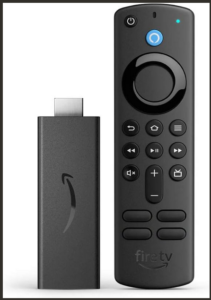
Key Features:
- HDR-enabled 1080p streaming
- WiFi 6 and Bluetooth 5.3
- USB-C power connection with Direct Power support
The 2026 Fire TV Stick HD is Amazon’s most affordable streaming stick. It has 8GB of storage and 1GB of RAM, supporting streaming up to 1080p with HDR10+. Dolby Atmos is supported through HDMI passthrough, so you’ll need compatible audio equipment to take advantage of it.
The refreshed model introduces WiFi 6 and Bluetooth 5.3, replacing the older model’s WiFi 5 and Bluetooth 5.0 connectivity. It also has a slimmer design and a USB-C connection with Direct Power support, allowing it to draw power directly from a compatible TV’s USB port without a separate wall adapter.
The Fire TV Stick HD runs Vega OS rather than the Android-based Fire OS found on older models. This is worth considering if you use less common streaming apps, as app availability and compatibility can differ between the two operating systems.
Who Is the Fire TV Stick HD Best For?
The Fire TV Stick HD is best for budget-conscious users who want to upgrade an older 1080p TV without spending much. Its WiFi 6 connectivity and compact design make it a practical choice for everyday streaming, although anyone with a 4K TV should consider the Fire TV Stick 4K instead.
2. Fire TV Stick 4K (2026)
Fire TV Stick 4K
Pros:
- Supports 4K
- HDR
- Dolby Vision
- Dolby Atmos
Cons:
- No Ethernet connection
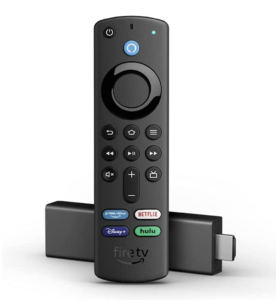
Key Features:
- 4K streaming with HDR10+
- WiFi 6 and Bluetooth 5.3
- USB-C power connection with Direct Power support
The 2026 Fire TV Stick 4K offers a resolution upgrade over the Fire TV Stick HD, supporting 4K streaming at up to 60fps with HDR10+. It also includes WiFi 6 and Bluetooth 5.3, although it lacks Dolby Vision and supports Dolby Atmos through HDMI passthrough rather than native decoding.
The device has 8GB of storage and 1GB of RAM, alongside a quad-core processor running at up to 1.7GHz. It runs Amazon’s Vega OS 2.0 rather than the Android-based Fire OS used by older models, so users who rely on particular apps should check compatibility before upgrading.
Like the refreshed Fire TV Stick HD, this model features a USB-C connection with Direct Power support, allowing it to draw power from a compatible TV’s USB port without a separate wall adapter.
Who Is the Fire TV Stick 4K Best For?
The Fire TV Stick 4K is best for viewers who want to enjoy 4K streaming without paying for the more advanced Fire TV Stick 4K Max. However, if Dolby Vision, additional storage or broader compatibility with older Fire OS apps matters to you, the 4K Max may be the better choice.
What About the Fire TV Stick 4K Select and 4K Plus?
Amazon introduced the Fire TV Stick 4K Select in 2025 as a budget-friendly 4K option. It runs Vega OS, supports HDR10+ and lacks Dolby Vision.
The Fire TV Stick 4K Plus is the renamed second-generation Fire TV Stick 4K from 2023. It retains the older model’s hardware, including 2GB of RAM, WiFi 6, Dolby Vision and native Dolby Atmos support.
Both models may still be available through retailers, although Amazon’s newer 2026 Fire TV Stick 4K has taken their place in the main lineup. The 4K Plus is particularly worth considering if you prefer the Android-based Fire OS over Vega OS.
3. Fire TV Stick 4K Max
Fire TV Stick 4K Max
Pros:
- Supports WiFi 6
- More powerful processor
- 4K, HDR, Dolby Vision & Dolby Atmos
Cons:
- No Ethernet connection
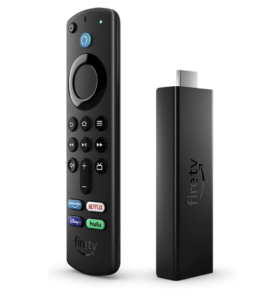
Key Features:
- Boosted hardware specs
- Fire TV Ambient Experience
- Enhanced Alexa Voice Remote
The Fire TV Stick 4K Max is Amazon’s most powerful streaming stick, offering several advantages over the standard 2026 Fire TV Stick 4K. Its quad-core processor runs at up to 2.0GHz, and it comes with 2GB of RAM and 16GB of storage. It also supports WiFi 6E, Dolby Vision and native Dolby Atmos, making it a more capable option for demanding users.
The Alexa Voice Remote Enhanced has live TV channel buttons, plus extra TV control buttons for switching to recent apps and going to the settings. You can also use the Fire TV Ambient Experience on the 4K Max. This lets you use your TV to show a slideshow of photos, play music, display the weather, control smart home devices and more.
Who Is the Fire TV Stick 4K Max Best For?
The Fire TV Stick 4K Max is best for users who want premium streaming features without moving to the larger Fire TV Cube. Its faster processor, additional storage, WiFi 6E connectivity and Dolby Vision support make it a worthwhile upgrade over the standard Fire TV Stick 4K. It also runs Fire OS 8, which may appeal to users who prefer the Android-based Fire TV experience over the newer Vega OS.
4. Fire TV Cube
Fire TV Cube
Pros:
- Expandable storage
- Far-field Alexa control
- Most powerful Fire TV device
Cons:
- Expensive
- Only one HDMI input
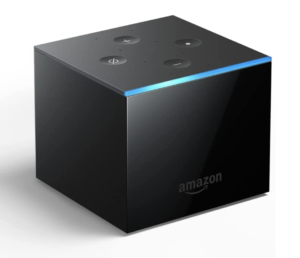
Key Features:
- HDMI passthrough
- Enhanced hardware
- Integrated Alexa control
The Fire TV Cube is a significant upgrade over Amazon’s streaming sticks, offering an octa-core processor, 2GB of RAM and 16GB of internal storage. It also has an HDMI input for connecting a gaming console or cable box, allowing you to switch between external devices and streaming content. Unlike the Fire TV Sticks, the Cube includes a built-in Ethernet port for wired connectivity and a USB-A port that can be used with compatible storage devices.
The Fire TV Cube also acts as an Amazon Echo. Though any Fire TV device can be linked to an Echo, the Cube skips past that hassle. This lets you change channels, control the TV’s volume or even open a different app with just your voice.
Who Is the Fire TV Cube Best For?
The Fire TV Cube is best for users who want a powerful streaming device with hands-free Alexa control and more connectivity options than a Fire TV Stick. Its faster processor and wired Ethernet connection make it a strong choice for demanding streaming setups, while the HDMI input is useful for switching between a cable box, gaming console and streaming apps. However, its higher price makes it harder to justify if you only need basic 4K streaming.
5. Amazon Ember Smart TVs (Formerly Fire TV Omni)
Ember Smart TVs
Pros:
- No dongle required
- Hands-free Alexa control
Cons:
- Expensive
- Weak hardware
- Limited to Amazon’s TV specs
Key Features:
- Fire OS built in
- 4K QLED and Mini-LED display options
- Fire TV Ambient Experience on supported models
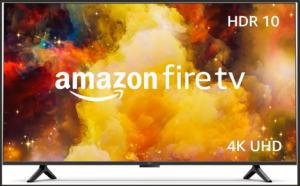
Amazon’s Ember smart TVs have Fire OS built in, eliminating the need for a separate Fire TV Stick or Cube. Previously sold under the Fire TV branding, the lineup includes affordable 2-Series and 4-Series TVs alongside premium QLED, Mini-LED and Artline models. Features vary considerably, so it’s worth comparing individual models rather than treating every Ember TV as equivalent.
The Amazon Ember Mini-LED Series is particularly appealing for viewers who prioritize picture quality and gaming. It combines a 4K QLED Mini-LED display with a 120Hz refresh rate, a 144Hz gaming mode and up to 1,344 local dimming zones. It also supports Dolby Vision IQ, HDR10+ Adaptive and Dolby Atmos, making it considerably more capable than Amazon’s entry-level TVs.
The main advantage of an Ember TV is convenience: You get streaming apps, Alexa integration and smart-TV features without connecting an external device. However, unlike a Fire TV Stick, you can’t easily replace the built-in streaming hardware when it becomes outdated. I would consider the Mini-LED model for its display capabilities rather than simply as an alternative to a streaming stick.
Who Is the Amazon Ember Smart TV Series Best For?
Amazon Ember TVs are best for anyone buying a new television who wants Fire TV built in. The more affordable 2-Series and 4-Series models are suitable for everyday streaming, while the QLED and Mini-LED options offer improved picture quality. The Mini-LED Series is worth considering for gaming and HDR content, although upgrading an existing TV with a Fire TV Stick or Cube is considerably cheaper.
Discontinued Fire TV Stick Models
Amazon has discontinued several Fire TV devices over the years, although some remain available secondhand, refurbished or through retailers clearing older stock. These can be cheaper alternatives, but it’s worth checking the hardware generation and software compatibility before buying.
The original Fire TV streaming boxes were among Amazon’s earliest streaming devices. Although their hardware is outdated by modern standards, the third-generation Fire TV (2017) supports 4K streaming, HDR10 and Dolby Atmos.
Amazon also retired the third-generation Fire TV Stick and Fire TV Stick Lite, both released in 2020, when it introduced the Fire TV Stick HD in October 2024. Both older models support 1080p streaming, but the standard third-generation stick offers native Dolby Atmos support, while the Lite relies on passthrough. The Lite also comes with a simpler remote that lacks TV power and volume controls.
More recently, Amazon replaced the Fire TV Stick 4K Select and Fire TV Stick 4K Plus with the third-generation Fire TV Stick 4K in September 2026. The 4K Select was introduced in 2025 with Vega OS, while the 4K Plus was a renamed version of the second-generation Fire TV Stick 4K from 2023. The latter supports Dolby Vision and runs the Android-based Fire OS, making it potentially attractive to buyers who prefer the older software platform.
I would generally recommend choosing a current-generation model unless you find a substantial discount on an older device. Newer Fire TV Sticks offer updated connectivity and hardware, while discontinued models may have more limited long-term support.
Which Fire TV Stick Should I Buy?
Though raw specifications and capabilities are useful for comparing devices, your personal setup and use case will determine which one is best for you. Below are some factors we think you should consider when choosing a streaming stick.
- TV capabilities: It’s common for a Fire TV Stick to be limited by the TV. If you don’t have a 4K TV, you don’t need a 4K Fire Stick.
- Existing Echo devices: If you already have an Echo device, you can connect it to a Fire TV Stick. This makes some features of the more advanced devices obsolete.
- Cloud gaming: Cloud gaming compatibility varies between Fire TV models, particularly between devices running Fire OS and Vega OS. Check whether your preferred gaming service supports your device before buying.
- Switching screens: Many users like to switch between screens or use their device while traveling. In that case, you’ll want one of the smaller, lightweight streaming stick devices.
- Cost: Ultimately, cost may be a limiting factor. More expensive devices offer benefits such as faster performance, additional storage and better audiovisual features. However, app compatibility also varies between Fire OS and Vega OS, so cheaper models won’t necessarily support all the same apps.
Fire OS vs Vega OS: Which Is Better?
Fire OS is Amazon’s Android-based operating system, while Vega OS is its newer Linux-based alternative. The biggest difference is app compatibility: Fire OS supports a wider selection of apps and Android sideloading, while Vega OS offers a more restricted experience.
App availability: Fire OS has a significantly larger app library, with tens of thousands of apps available compared to a few thousand on Vega OS. Popular streaming services such as Netflix, Prime Video and Disney+ are available on both platforms, but some smaller apps and utilities may be missing from Vega OS.
Sideloading: Fire OS allows users to install compatible Android APK files from outside the Amazon Appstore, although Amazon has introduced restrictions on certain apps. Vega OS doesn’t support traditional Android APK sideloading. Developers can install specially built Vega apps for testing, but this isn’t equivalent to the freedom offered by Fire OS.
Device compatibility: The 2026 Fire TV Stick HD and Fire TV Stick 4K run Vega OS, while the Fire TV Stick 4K Max and third-generation Fire TV Cube run Fire OS. The older Fire TV Stick 4K Plus also uses Fire OS, which could make it worth considering despite its age.
I would recommend Fire OS if you want greater flexibility, particularly for installing third-party apps or using less common streaming services. Vega OS should be sufficient for most people who primarily use mainstream streaming apps, but I’d check that all your preferred apps are supported before buying a newer Fire TV Stick.
The 2026 Fire TV Interface and Alexa+
Amazon introduced its biggest Fire TV interface redesign in years in 2026, bringing a cleaner layout, rounded corners and improved navigation. The update also increased the number of apps you can pin to the home screen from six to 20, making it easier to access your favorite streaming services without scrolling through menus.
The redesigned interface organizes content into dedicated sections for movies, TV shows, sports, live TV and news. It also brings recommendations from different streaming subscriptions into one place, reducing the need to switch between apps. Amazon claims the updated interface can be 20% to 30% faster on some devices, although actual performance will vary depending on the hardware.
Alexa+ adds generative AI features to Fire TV, allowing users to search for content using more natural, conversational requests. For example, you can ask for movie recommendations based on your preferences or search for a particular scene. However, Alexa+ availability and supported features vary by device and region, so it’s worth checking compatibility before buying.
The redesigned interface is available on current-generation Fire TV devices, meaning you don’t necessarily need to buy new hardware to benefit from it. I would prioritize hardware specifications, app compatibility and price when choosing between Fire TV models rather than the interface alone.
Fire TV Stick Alternatives
The Fire TV Stick isn’t the only streaming device on the market. If none of the devices in this roundup are right for you, here are some alternative options.
- Roku: There are plenty of Roku devices to choose from, especially if you’re looking for something affordable. The Roku Express 4K is great for 4K streaming on a budget.
- Google TV Streamer: The Google TV Streamer is a new contender with impressive specs, including 32GB of storage. It is controlled through the intuitive Google Home mobile app and can receive casts from a laptop or PC.
- Chromecast: Though technically discontinued, the original Chromecast is a budget way to stream. It lets you cast your mobile device or laptop to your TV and even works without WiFi.
- Apple TV 4K: The Apple TV 4K is a high-end competitor to the Fire TV Cube. It comes with more internal storage and seamless integration with other Apple devices and software.
Final Thoughts
There are plenty of Amazon Fire TV devices to choose from, and you can’t really go wrong with any of them. If you want to learn more about your device, read our article on how to set up a Firestick. We also have a guide for how to fix an Amazon device that isn’t working.
Do you have a Firestick? Did you choose a Roku, a Chromecast or another device instead? Is there a feature you wish Amazon offered? Tell us in the comments below, and be sure to check out our guide to the best Firestick channels. Thanks for reading.
FAQ: Compare Firesticks
The different Firestick types can all stream the same content and run the same apps, with the exception of Xbox cloud gaming. However, the more expensive devices offer faster hardware and a better audiovisual experience.
There’s no single best Firestick, but the Fire TV Stick 4K Max is a good all-arounder. It offers the best experience with the dongle format and doesn’t cost much more than the other sticks. You’ll also enjoy significant savings over buying the Fire TV Cube.
The Fire TV Stick 4K Max has a stronger CPU and GPU than the regular 4K model. It also comes with more internal storage and the enhanced remote control. However, the video resolution, HDR formats and audio quality are the same.
The regular Firestick has been replaced by the Fire TV Stick HD. You can still buy previous models secondhand, though.