Chromecast vs Firestick 2026: Differences & Similarities
Google and Amazon are two of the biggest smart home tech companies, so it’s no surprise that their smart TV devices are popular. In this Chromecast vs Firestick guide, I’ll highlight their differences to help you choose the right streaming device for your needs.



Written by Sapphire Fox (Editorial Assistant)
Reviewed by Sandra Pattison (Editor, Writer)
Facts checked by Igor Kurtz (Fact-checking editor)
Last Updated:
All our content is written fully by humans; we do not publish AI writing. Learn more here.
Key Takeaways: Chromecast vs Firestick
- The main difference between and is the smart home speaker they can connect to. Plus, only Firestick offers native Dolby Atmos and Bluetooth Low Energy (BLE) support.
- Both Chromecast and Firestick let you use popular streaming platforms.
- Chromecast devices are generally more affordable.
Facts & Expert Analysis About Fire TV Stick & Chromecast:
- Connectivity options: The Fire TV Stick offers Bluetooth 5 and BLE support. BLE is particularly important because the reduced energy requirements help battery-powered connected devices last longer.
- Video quality: The Fire TV Stick and Chromecast have HD and 4K models. Both companies offer the same resolution, frame rate and HDR standards, so the version you choose is more important than deciding between Amazon vs Google.
- User interface: Although both interfaces are easy to use, they are different. Choosing between Google TV and Fire TV is often a matter of personal preference for how you control your device.
Winner

Despite being discontinued in favor of the Google TV Streamer, the Google Chromecast is still a great-value streaming device. However, the Amazon Fire TV Stick is a tough competitor, with options at every price point. In this Chromecast vs Firestick comparison, I go over all the details to help you decide between them.
The Chromecast with Google TV has HD and 4K versions, which are fairly similar to the Fire TV Stick HD and 4K versions. Both devices also offer the same video content, so you don’t have to worry about being locked out of certain streaming apps due to your choice of device.
However, these devices have different price points, user interfaces and remotes. You’ll also have access to different cloud gaming apps. I’ll explain all of this and more as we go through this comparison.
-
12/29/2025 Facts checked
We rewrote this article with updated information about the streaming devices.
Cloudwards’ Choice:
 Cloudwards’ Choice: Firestick Is the Winner
If you’re not already in the Google or Amazon ecosystem, I recommend the Fire TV Stick range over Chromecast. It’s still available brand-new and offers native support for newer Bluetooth standards and Dolby Atmos. I also prefer Amazon’s more traditional remote style. The Google TV remote is sleek, but it is rather unintuitive.
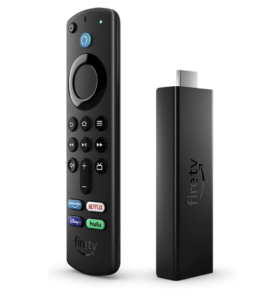
Fire TV 4K Max
Pros:
- Supports WiFi 6
- More powerful processor
- 4K, HDR, Dolby Vision & Dolby Atmos
Cons:
- No Ethernet connection
Which Is Better: Chromecast vs Firestick?
There’s no one-size-fits-all device for streaming, but there is one clear way to decide. If you’re already using either Amazon’s or Google’s smart home devices, pick the streaming device that matches that system. The Fire TV Stick offers slightly better connectivity and sound options, but it doesn’t outweigh the ability to connect to your other devices.
Who Is Chromecast For?
- Google Nest users: You can control the Chromecast with your existing Nest device.
- Bargain hunters: The HD version of the Chromecast is the most affordable device across both lineups, and finding secondhand deals is easy.
- Users who cast: Although both devices are capable of casting, Google’s Cast software is more widely implemented than Amazon’s Miracast.
- Maker: Google
- Year of Release: 2020
- Storage: 8 GB
- Resolution: 4K Ultra HD at 60fps
Who Is Firestick For?
- Amazon Alexa users: You can control the Firestick with your existing Alexa device.
- Headphone users: Firesticks support Bluetooth Low Energy (BLE), which can extend the battery life of compatible devices.
- Cloud gamers: The Firestick has native support for both Xbox Game Pass and Amazon Luna, with other services available through APKs.
- Maker: Amazon
- Year of Release: 2023
- Storage: 16 GB internal storage
- Resolution: 4K Ultra HD
Our Detailed Comparison Methodology
I analyzed these devices thoroughly while comparing them, taking a deep dive into the device specifications and running tests to see how they perform in real-world scenarios. I also considered how each feature benefits different users.
In addition, I examined how the devices stack up for different use cases to find points of comparison between Google’s and Amazon’s offerings. Major differences include the pricing, remote controls, streaming quality and cloud gaming capabilities.
Amazon Fire TV Stick vs Chromecast: Comparison at a Glance
Chromecast With Google TV 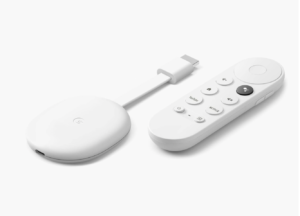 | Fire TV Stick 4K Max | Fire TV Cube 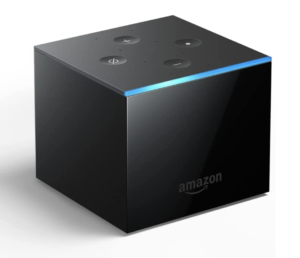 | |
|---|---|---|---|
| Pros |
|
|
|
| Cons |
|
|
|
Buy on More shops | Buy on Amazon More shops | Buy on Amazon More shops |
Chromecast Key Features:
- Chromecast remote: All Chromecast with Google TV devices come with a Chromecast remote.
- Cloud gaming support: Chromecast devices have native support for GeForce Now and Shadow.
- Casting: Chromecast devices support casting with Google Cast.
- Affordable HD streaming: Google’s HD device is one of the cheapest streaming sticks available.
Firestick Key Features:
- Alexa voice remote: All Fire Stick devices come with an Alexa voice remote.
- Cloud gaming support: Fire Stick devices have native support for Xbox Game Pass and Amazon Luna.
- Casting: Fire Sticks support casting with Miracast.
- Improved connectivity: Higher-end Fire Stick models offer WiFi 6E and BLE connections.
- Native Dolby Atmos support: The 4K Fire Sticks have native support for Dolby Atmos Audio.
Chromecast vs Firestick: Similarities
To start this comparison, let’s look at the similarities between the Chromecast with Google TV and Amazon Fire TV Stick devices.
Ease of Use
One of the most important aspects of a streaming stick is usability. If it isn’t easy to use, you might as well just stream from a computer. Luckily, both the Chromecast and the Firestick make it easy to set up and begin streaming. There are some differences in the UI (user interface), but neither device has a steep learning curve or requires much technical ability.
Chromecast With Google TV Usability
To set up a Chromecast with Google TV, simply plug it into your TV’s HDMI port and follow the instructions in the Google Home app. You don’t need a mobile device to set up a Chromecast, but it makes the process much faster. We have a complete Chromecast setup guide if you want to learn more.
Once you’re on the Google TV homepage, it’s easy to start streaming. Google will give you recommendations from every streaming service you subscribe to, and the search function allows you to find shows without checking every app. Of course, you can still open specific streaming platforms if you know which service you want to use.
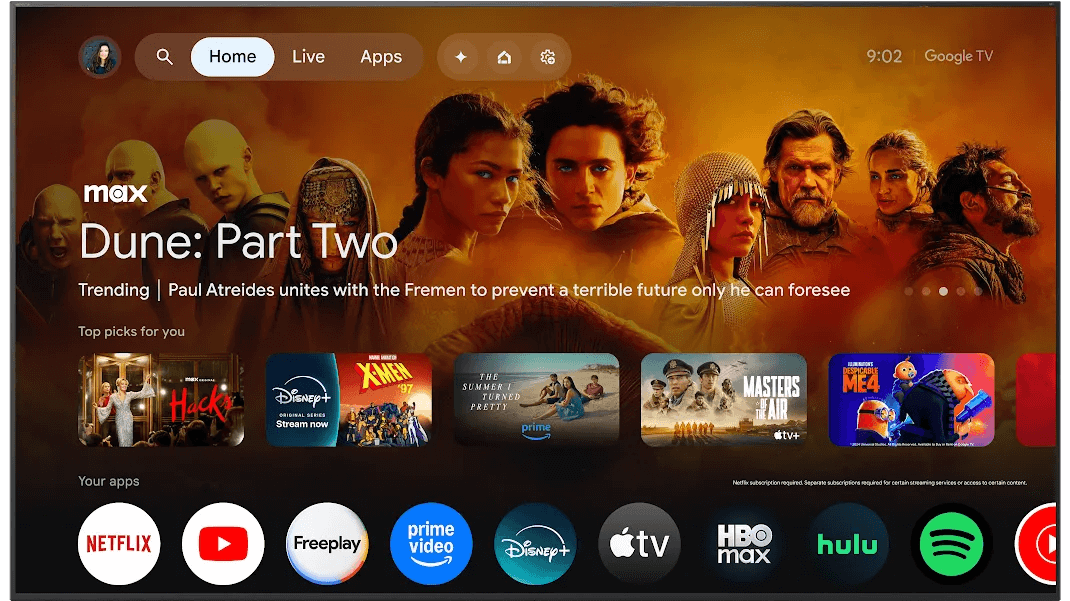
The settings menu is also easy to navigate. Like any Android TV device, there is a range of menus for accessibility settings, display and audio options, account details, app permissions and more. The options can feel a little overwhelming at first, but it’s pretty simple to find different settings when you scroll through the menu.
Amazon Fire TV Stick Usability
The Amazon Fire TV Stick is also a very user-friendly device. You set it up with the remote, though you can use a phone to input text such as a WiFi password. You can control your Firestick with the Fire TV app on your phone once you’ve finished the initial setup. Read our Firestick setup guide for more details.
Similar to Google TV, Fire TV opens to a homepage with recommended shows and apps. The search function lets you find TV shows and movies from major streaming services. Amazon prioritizes shows on services you subscribe to, but you can’t filter out shows on platforms you don’t subscribe to.
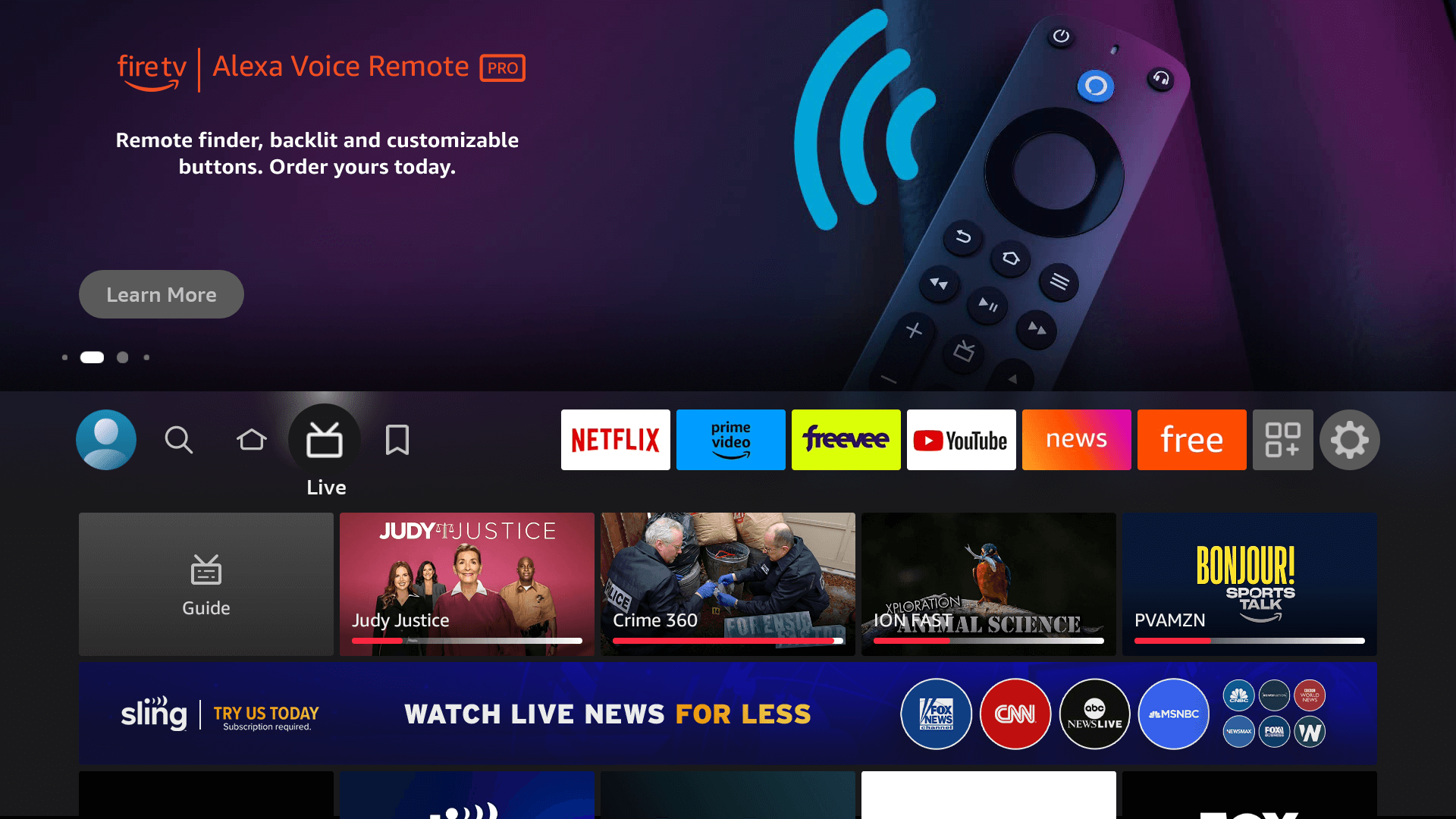
The Fire TV settings page features cards in a layout similar to the rest of the UI, which makes all 14 menus visible at once. This is cleaner and less intimidating than Google’s long list, but I personally find it easy to overlook things.
Overall, it comes down to personal preference. Chromecast offers a bit more flexibility with its filters; however, they can be fiddly, and you need to update them whenever you change your subscriptions. Both systems feature a similar design, though, and they’re easy for anyone to pick up and use.
Available Streaming Services & Channels
Both Amazon Fire TV and Chromecast with Google TV advertise popular streaming services such as Amazon Prime Video, Netflix, Disney Plus and BBC iPlayer. However, some smaller or regional platforms don’t have native smart TV apps.
Both devices have Android-based operating systems. They also allow for sideloading, so you can download any Android app to either device. You can even get apps that aren’t in the Google Play store and use browsers to watch content on websites that don’t have apps. Read the section on sideloading in our article on jailbreaking Fire TV Sticks to learn more.
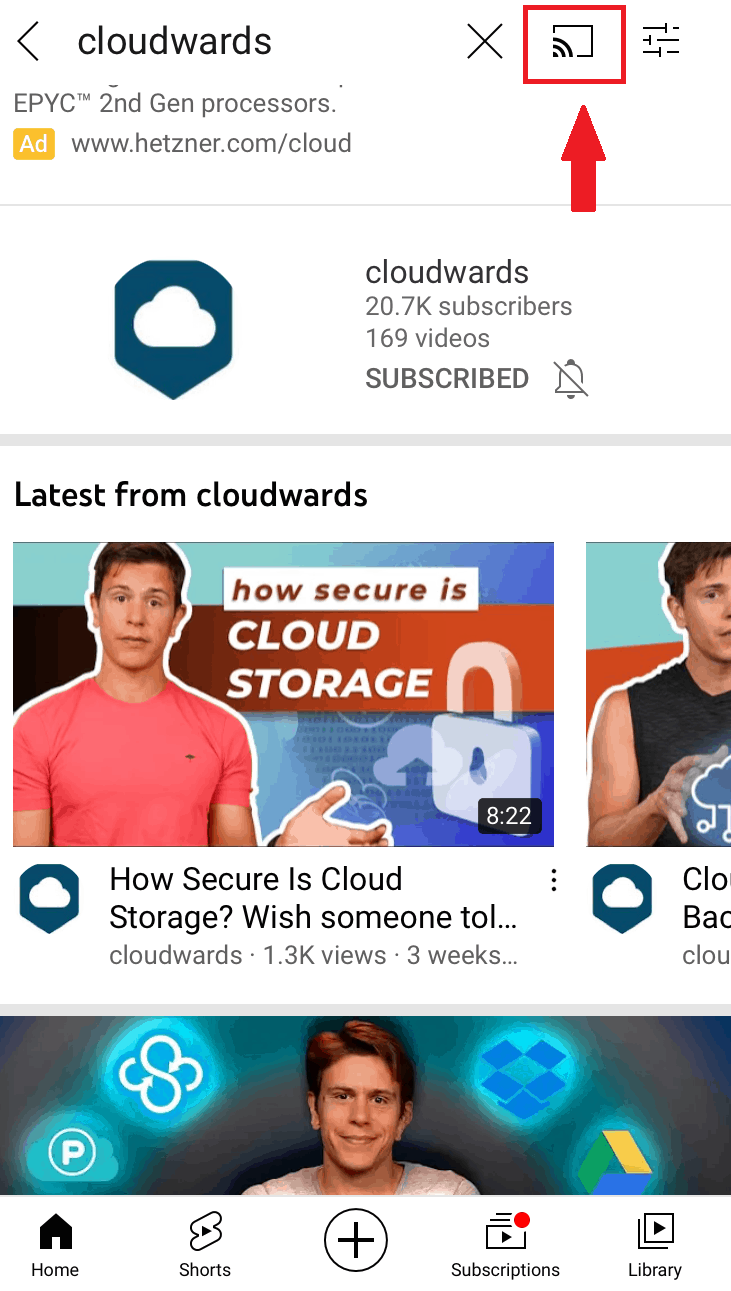
You can also cast to your streaming stick, which lets you mirror your mobile device or computer display on your TV. This is a simple way to stream that skips sideloading if it’s too technical for you.
Note that Chromecast uses Google Cast, while Firesticks use Miracast. Google Cast tends to be supported on the app level. For example, Google Chrome can cast to Chromecast from almost all devices. Miracast, on the other hand, is supported on the device level. This makes it more flexible, but fewer devices support it in practice.
Amazon Fire Stick vs Chromecast: Differences
Although both the Chromecast and the Fire Stick are streaming sticks, there are many differences between them. You have to consider the price and availability of each device, as well as the specifications, which can affect features like picture quality.
Remote Control & Voice Commands
Voice controls are built into the remote for both the Amazon and the Google devices. You can also connect the Chromecast or the Firestick to a Google Nest or an Amazon Echo device, respectively. This allows you to turn the TV on with your voice and control it without the remote.
Alexa has a few extra commands, including the option to change video and audio settings. However, if you already have a smart speaker, you’re better off staying within that ecosystem for long-range voice control.
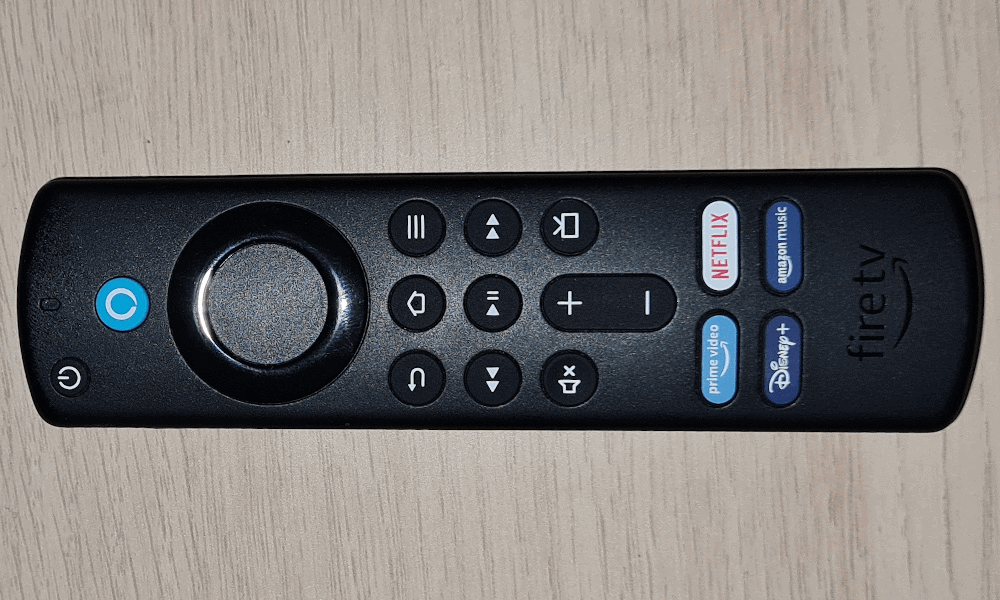
If you prefer to use your remote control without voice commands, you’ll find both the Chromecast and the Firestick remotes are quite similar. They each have a large ring for navigation, as well as power, mute, back and home buttons. Both also have volume control buttons.
The Alexa voice remote has a menu button that lets you access a context-specific menu. For example, if you hover over an app and press it, you’ll see an option to uninstall it. There’s also a live TV button that takes you to a TV guide page, as well as TV controls with play, pause, fast-forward and rewind buttons.
The Google TV remote has a button for changing the source on your TV, but that’s the only unique option it offers. The Google Assistant button is grouped with the home, back and mute buttons, with volume controls on the side of the remote.
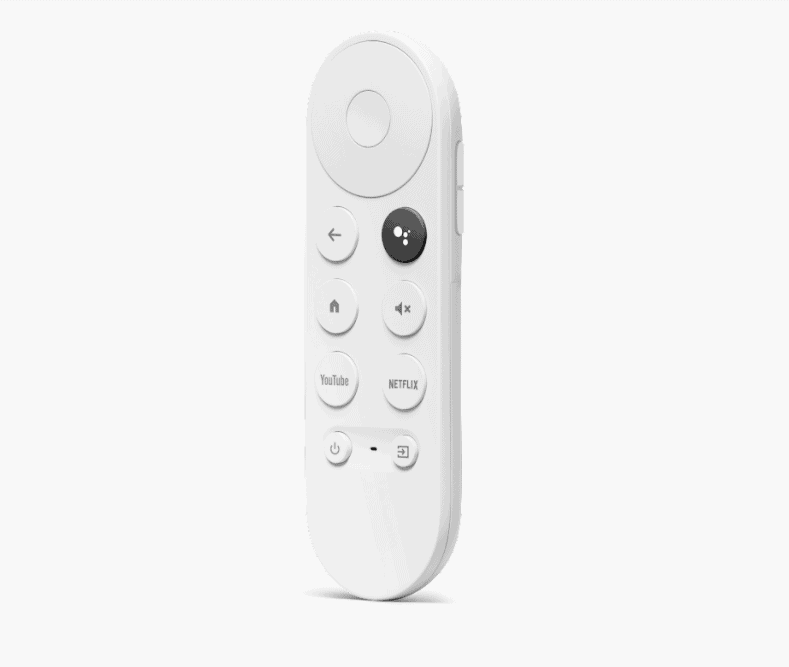
Google also includes two buttons for dedicated streaming apps: YouTube and Netflix. The Alexa voice remote has four dedicated streaming app buttons. Although they change regularly, the four options are usually for Netflix, Prime Video, Disney Plus and Amazon Music.
Pairing Your Smart TV Remote
Although pairing is part of the process when you first set up your device, it can sometimes unlink. Both Google TV and Amazon Fire TV have a dedicated settings menu for remote controls, where you can unlink old remotes or search for new ones. You can control your device with any mobile device on the same network to get into the settings menu.
On the Alexa remote, you’ll need to press the home button for 10 seconds for it to start pairing. With the Google remote, on the other hand, you’ll hold down the home and back buttons until the light begins to pulse.
Cloud Gaming Capabilities
Online gaming is incredibly popular, and cloud gaming services are a great way to jump in without the up-front cost of a high-end PC or console. However, both devices support only two of the top five cloud gaming services natively.
get started with a popular pastime.
Google Chromecast supports only GeForce Now and Shadow, though some users have found that you can sideload both Xbox Game Pass and Amazon Luna. The Amazon Fire TV Stick, on the other hand, supports both Xbox Game Pass and Amazon Luna natively, but you’ll have to sideload GeForce Now and Shadow.
Although none of the devices are particularly powerful, the Fire TV Stick 4K Max does boast the strongest CPU and best connectivity of the six devices we’ve looked at. This means it gives you the best chance of a seamless gaming experience if you don’t have the money for a dedicated device like an NVidia Shield. If you want to learn more about why these factors matter, check out our article on how cloud gaming works.
The Verdict: Why We Think the Firestick Wins Overall
There are a lot of similarities between the Chromecast and the Fire TV Stick. Ultimately, if you already have Google or Amazon devices, I recommend sticking with the same company. However, I think the Firestick is a better choice overall because it’s available brand-new and has more options.
Winner
Check out our Firestick comparison guide before deciding on a Fire TV Stick device. If you want a quick recommendation, I think the Fire TV Stick 4K Max offers the best value for money: It has upgraded hardware compared to the more affordable devices and is a fraction of the cost of the full Fire TV Cube.
Have you used a streaming stick before? Did you choose the Chromecast or the Firestick? Did you opt for a different device altogether? Let us know in the comments below. Thanks for reading!
FAQ: Amazon Fire Stick vs Google Chromecast
No, Chromecast is not the same as Firestick. They are both streaming devices with similar features, but they aren’t identical.
There is a YouTube TV app for Fire TV, which lets you access live shows with your streaming stick.
You can’t get a brand-new Chromecast anymore, so you’ll have to settle for secondhand devices. The remote is also much simpler than Amazon’s equivalent.
Google discontinued production of the Chromecast in August 2024, replacing the device with the Google TV Streamer.