Roku vs Firestick in 2026: Which is the Better Streaming Device?
Roku and Firestick are two of the best streaming device players on the market, but which one comes out on top? Our Roku vs Firestick showdown puts the two head-to-head. Read on to find out which one wins.


Written by Sandra Pattison (Editor, Writer)
Reviewed by Aleksander Hougen (Chief Editor)
Last Updated:
All our content is written fully by humans; we do not publish AI writing. Learn more here.
If you’re comparing Roku vs Firestick, the main difference is how they approach streaming: Roku offers a simpler, app-focused interface, while Amazon Fire TV prioritizes content discovery, Alexa voice controls and integration with Amazon’s ecosystem. I think Roku is the better choice for most users who want straightforward navigation, whereas a Fire TV Stick makes more sense if you regularly use Alexa or other Amazon services.
Both streaming platforms offer access to major streaming services, multiple device options and features beyond basic video playback. In this Roku vs Firestick comparison, I’ll look at their pricing, ease of use, search, voice controls, apps and other features to explain where each platform has an advantage.
To help you decide which streaming device is the best for you, we put the two players head-to-head (though you can also check out our guide to what a Firestick is, as well as our Roku beginner’s guide).
Roku vs Firestick: The Best Streaming Device Standoff
The biggest difference between Roku and Firestick is the experience around the apps: Roku keeps navigation relatively simple and app-focused, while Fire TV puts more emphasis on recommendations, Alexa and finding content from the home screen. This Roku vs Firestick comparison chart covers the differences that matter most when choosing between the two platforms.
| Feature | Roku | Amazon Fire TV |
|---|---|---|
| Starting price | $39.99 | $34.99 |
| Current device options | Streaming Stick, Streaming Stick Plus, Streaming Stick 4K, Roku Ultra and Streambar SE | Fire TV Stick HD, Fire TV Stick 4K Select, Fire TV Stick 4K Plus, Fire TV Stick 4K Max, Fire TV Cube and Fire TV smart TVs |
| Maximum video quality | Up to 4K, Dolby Vision and HDR10+ on supported models | Up to 4K, Dolby Vision and HDR10+ on supported models |
| Interface & ease of use | Simple, app-focused home screen that makes installed streaming services easy to reach | More content-focused interface with prominent recommendations and Amazon service integration |
| Voice assistant & search | Roku Voice, plus support for Alexa and Google Home | Deep Alexa integration with strong voice-powered search, playback and smart-home controls |
| Smart-home compatibility | Alexa and Google Home; Apple AirPlay and HomeKit on compatible Roku devices | Best integrated with Alexa and Amazon’s smart-home ecosystem |
| Free content | The Roku Channel plus free apps and live TV channels | Free ad-supported content and apps, including Fire TV Channels where available |
| Best for | Users who prioritize simplicity, easy app access and a more platform-neutral streaming experience | Alexa and Amazon users, or anyone who prioritizes voice-powered content discovery |
How Do Roku and Firestick Compare in Terms of Cost?
Roku and Fire TV are both inexpensive streaming platforms, with entry-level devices followed by progressively more capable 4K models. Fire TV can have the lower entry price, while the better value depends on the video formats and features you need. Roku’s current players start at $39.99, while Amazon’s 2026 Fire TV Stick HD launched at $34.99.
I recommend comparing the standard prices rather than Amazon’s frequent discounts, which can make Fire TV devices look considerably cheaper for short periods. The right choice also depends on whether you need HD or 4K playback and premium features such as Dolby Vision.
Roku Pricing
Roku’s current lineup is much simpler than it used to be. The Roku Streaming Stick costs $39.99 and is designed for HD TVs, while the $59.99 Streaming Stick Plus adds 4K and HDR playback.
The Roku Streaming Stick 4K costs $79.99 and adds Dolby Vision, HDR10+ and long-range WiFi. At the top of the lineup is the $149.99 Roku Ultra, a set-top box with 4K, HDR and Dolby Vision support, plus extras such as a rechargeable backlit Voice Remote Pro and a lost-remote finder.
| Roku device | Standard price | Maximum video quality | Best suited for |
|---|---|---|---|
| Roku Streaming Stick | $39.99 | 1080p HD | HD TVs and budget streaming |
| Roku Streaming Stick Plus | $59.99 | 4K HDR | Affordable 4K streaming |
| Roku Streaming Stick 4K | $79.99 | 4K, Dolby Vision and HDR10+ | 4K TVs where better HDR support and WiFi range matter |
| Roku Ultra | $149.99 | 4K, Dolby Vision and HDR10+ | Users who want Roku’s premium player and remote features |
Amazon Fire TV Pricing
Amazon starts slightly lower with the 2026 Fire TV Stick HD, which launched at $34.99. It supports up to 1080p and is the logical choice for an older HD television or anyone who doesn’t need 4K.
For 4K TVs, the Fire TV Stick 4K Select is the entry-level 4K option, while the Fire TV Stick 4K Plus and Fire TV Stick 4K Max occupy the higher tiers. The 4K Max is the most capable stick, with features such as WiFi 6E and 16GB of storage, while the Fire TV Cube sits above the sticks as Amazon’s premium streaming player.
| Fire TV device | Standard/list price | Maximum video quality | Best suited for |
|---|---|---|---|
| Fire TV Stick HD (2026) | $34.99 launch price | 1080p HD | HD TVs and the lowest upfront cost |
| Fire TV Stick 4K Select | $39.99 launch price | 4K HDR | Entry-level 4K streaming |
| Fire TV Stick 4K Plus | $49.99 | 4K, Dolby Vision and HDR10+ | More fully featured 4K streaming |
| Fire TV Stick 4K Max | $59.99 | 4K, Dolby Vision and HDR10+ | Users who want Amazon’s most capable streaming stick |
| Fire TV Cube | $139.99 | 4K, Dolby Vision and HDR10+ | Premium performance and hands-free Alexa controls |
Amazon frequently discounts its Fire TV hardware, but those temporary prices can change quickly. Using the regular prices gives a more useful Roku vs Firestick cost comparison: Fire TV has the cheaper entry point, while both platforms charge more as you move into higher-end 4K hardware.
Although Fire TV has a lower starting price, Roku has the edge because its current lineup offers a clearer progression from basic HD streaming to premium 4K features, making it easier to choose the right device without paying for extras you don’t need.
Winner: Roku
Which Is Easier to Use: Roku or Firestick?
Roku is easier to use overall because its interface keeps apps and navigation relatively simple. Fire TV is more content-focused, with greater emphasis on recommendations, Alexa+ and Amazon services.
Is Roku or Firestick Better for Elderly Users?
For elderly or less tech-confident users, I generally recommend Roku because its simpler, more app-focused interface makes it easier to find and open familiar streaming services. In a Roku vs Firestick comparison for elderly users, Fire TV has stronger voice-powered search, but its recommendation-heavy interface can feel busier to navigate.
Which Is Better for Travel: Roku or Firestick?
For travel, Roku and Fire TV both offer compact sticks that are easy to move between TVs, but I give newer Roku Streaming Sticks a slight edge. They’re small, can draw power directly from a compatible TV and work well as a travel streaming stick when moving between hotel rooms or other TVs.
The 2026 Fire TV Stick HD can also be powered by a compatible TV, making it similarly convenient for travel. In a Firestick vs Roku for travel comparison, I’d choose Roku for its simpler interface, though Fire TV makes more sense if you rely heavily on Alexa and Amazon services.
Installation and Setup
When it comes to installation, Roku and Firestick are very similar. Connect the device to your TV and the internet, log in to your account and follow the on-screen setup. Power requirements vary by model: newer Roku Streaming Sticks and the 2026 Fire TV Stick HD can draw power from a compatible TV, while other models may require a separate power connection. Overall, setting up Roku and Fire TV is equally straightforward.
Navigation and Use
Roku is generally simpler and more app-focused, while Fire TV puts greater emphasis on content recommendations, Alexa and Amazon services. Both interfaces were redesigned in 2026, though, so the difference between Roku and Firestick is less pronounced than it used to be.
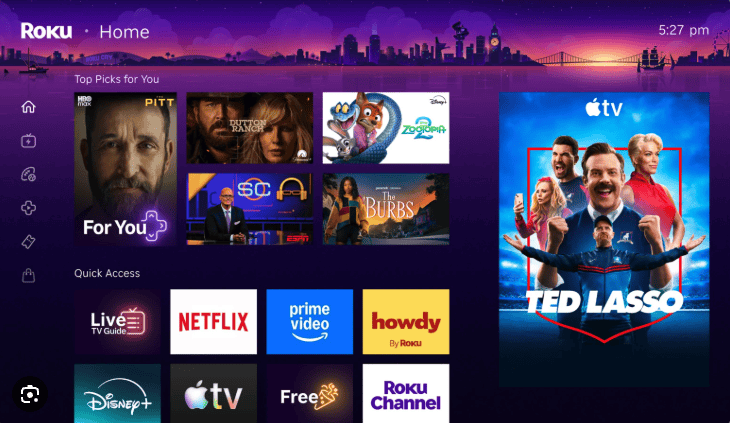
Roku’s Home Screen redesign added personalized content recommendations, a Quick Access row for frequently used apps and shortcuts, and content hubs for browsing by genre or theme. Your full app grid is still available, and you can rearrange apps, move favorites to the top and hide recommendation rows if you prefer a more traditional app-focused layout.
Roku’s search can help you find content across services, while shortcuts provide quick access to features such as Continue Watching and your Save List. You can also customize the Home Screen to make frequently used apps easier to reach. Be sure to check our guide on how to add local channels on Roku.
Amazon also redesigned the Fire TV interface in 2026, with a more streamlined Home screen and deeper Alexa+ integration for finding content and getting personalized recommendations. Fire TV remains more content-focused than Roku and gives Amazon services a prominent role, but you can rearrange app tiles to keep your favorite streaming services within easy reach.
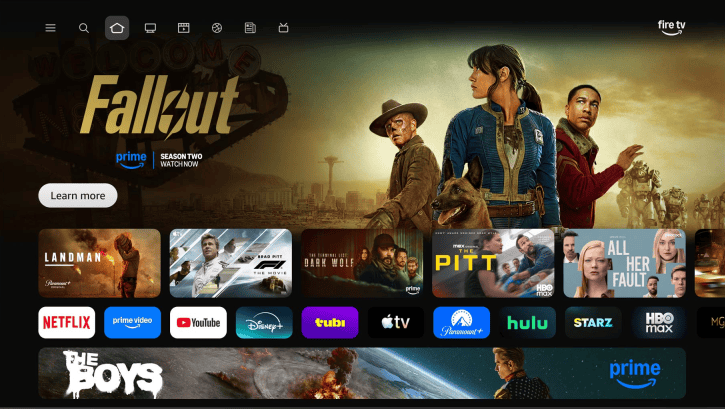
Overall, I still find Roku easier to navigate because you have more control over keeping the experience focused on your apps. Fire TV is a better fit if you prefer recommendations and Alexa-powered discovery to help decide what to watch.
Roku vs Firestick Mobile Apps
The Roku and Firestick mobile apps are similar in that you can basically turn your mobile device into a remote control. You can search for movies and shows using the on-screen keyboard or voice control, navigate and access apps easily and have playback controls, too.
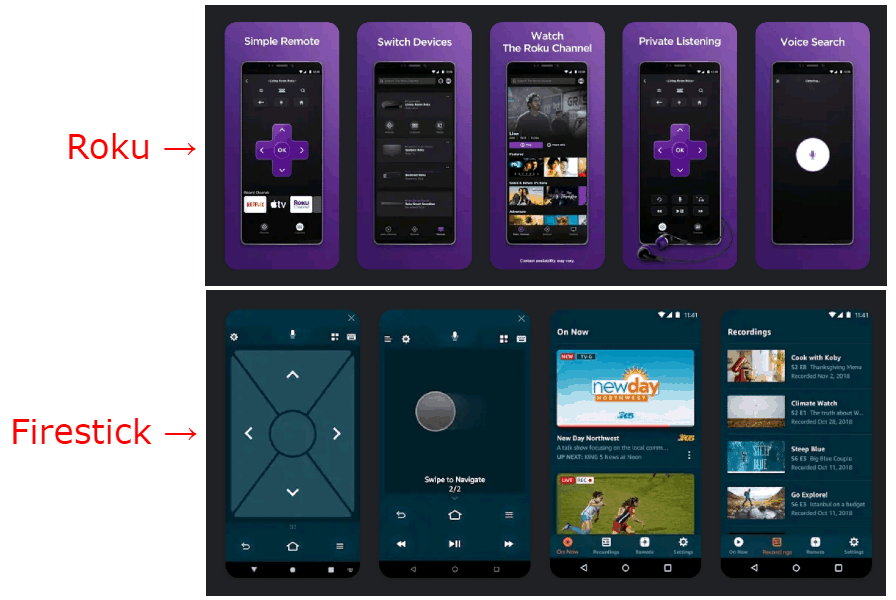
Both apps are available on iOS and Android, with the Firestick also being compatible with Fire OS. Both platforms offer private listening, too, so you can watch without disturbing others. With Roku’s mobile app, audio can play through headphones connected to your phone or tablet, including Bluetooth headphones; some current Roku devices also support connecting Bluetooth headphones directly.
Roku still has an advantage in this round because I find its mobile app more intuitive, and its private-listening options are flexible. Roku’s mobile app also has a “Play on Roku” feature, which lets you display local media, such as videos, photos and music, on your TV. That’s why Roku takes the point in this round.
Winner: Roku
Which Has Better Voice and Remote Control: Roku or Firestick?
Fire TV has the advantage for voice control, particularly with Alexa+ and its conversational content discovery. Roku offers useful remote features and broader smart-home compatibility, including Alexa, Google Home and Apple HomeKit on compatible devices.
Roku’s higher-end remote options add features such as backlit buttons, hands-free voice controls and a lost-remote finder. Fire TV remotes focus more heavily on Alexa, with voice search and playback controls, while some models and bundles add TV power, volume controls and additional shortcuts.
I prefer Roku’s remote options for their useful hardware features, but Fire TV has the advantage once voice control becomes the priority.
Voice Assistant
Fire TV has the stronger voice assistant, with Alexa handling playback, content searches and compatible smart-home devices. Alexa+ takes this further with more conversational content discovery, so you can describe what you want to watch or ask follow-up questions instead of searching only by a specific title, actor or genre.
Roku Voice is more focused on finding entertainment and controlling playback. Roku also works with Alexa and Google Home, while compatible Roku devices support Apple AirPlay and HomeKit, giving it broader compatibility across the major smart-home ecosystems.
Winner: Firestick
Which Has More Streaming Services: Roku or Firestick?
Roku and Fire TV both support a large selection of streaming apps, including major services such as Netflix, Disney+, Prime Video, Hulu, Max and YouTube TV. The exact catalogs change regularly, so I wouldn’t use a specific app or channel count to decide between them.
Roku calls its apps “channels,” but in practice both platforms cover the major streaming services most users are likely to need. There are some platform-specific and regional differences, so it’s worth checking availability if you rely on a niche service.
Neither platform has a meaningful advantage based simply on the number of streaming services available. For most users, the bigger difference is how Roku and Fire TV organize, recommend and help you find that content.
Which Has More Free Channels: Roku or Firestick?
Roku is my pick for watching free content. The Roku Channel offers more than 500 free live TV channels in the U.S., alongside tens of thousands of ad-supported movies and TV shows, and Roku makes this content easy to find through its Live TV guide and free-content sections.
Fire TV also has plenty of free, ad-supported entertainment, including Fire TV Channels, which Amazon says includes more than 900 short-form playlists and feeds covering news, sports, entertainment and other categories. However, that figure isn’t directly comparable to Roku’s live-channel count, and I find Roku’s combination of free live TV and on-demand entertainment more useful if free streaming is your priority.
Winner: Roku
Which Has Better Video and Audio Quality: Roku or Firestick?
Roku and Fire TV both offer devices capable of 4K, HDR10+, Dolby Vision and Dolby Atmos, but support varies by model. Neither platform has a clear overall quality advantage, so I recommend comparing the specific devices and formats you need.
| Device | Max Resolution | HDR10+ | Dolby Vision | Dolby Atmos |
|---|---|---|---|---|
| Roku Streaming Stick | 1080p | No | No | Dolby-encoded audio passthrough* |
| Roku Streaming Stick Plus | 4K | Yes | No | Dolby-encoded audio passthrough* |
| Roku Streaming Stick 4K | 4K | Yes | Yes | Dolby-encoded audio passthrough* |
| Roku Ultra | 4K | Yes | Yes | Yes |
| Fire TV Stick HD (2026) | 1080p | Yes | No | Dolby-encoded audio passthrough* |
| Fire TV Stick 4K Select | 4K | Yes | No | Yes* |
| Fire TV Stick 4K Plus | 4K | Yes | Yes | Yes* |
| Fire TV Stick 4K Max (2nd Gen) | 4K | Yes | Yes | Yes* |
| Fire TV Cube (3rd Gen) | 4K | Yes | Yes | Yes* |
*Audio capabilities can involve passthrough and also depend on the streaming service, content, TV and audio equipment.
Roku’s lineup scales from basic 1080p on the Streaming Stick to 4K HDR10+ on the Streaming Stick Plus. The Streaming Stick 4K adds Dolby Vision, while the Roku Ultra supports 4K, HDR10+, Dolby Vision and Dolby Atmos.
Amazon follows a similar pattern. The 2026 Fire TV Stick HD is limited to 1080p but supports HDR10 and HDR10+, while the current 4K models add different combinations of HDR formats; the Fire TV Stick 4K Plus supports 4K, HDR10+, Dolby Vision and Dolby Atmos.
In practice, picture and sound quality depend as much on your TV, sound system and streaming content as the player itself. If you want Dolby Vision or Dolby Atmos specifically, I recommend choosing by model rather than assuming either platform supports those formats universally.
Winner: Tie
The Verdict: Firestick vs Roku
Roku is my overall pick for most streaming-focused users because its simpler, more app-focused interface makes it easy to get to the services you already use. Fire TV is the better fit if you want Alexa+ to play a central role in finding content or you already have other Amazon and Alexa devices.
Roku’s current lineup ranges from the basic Streaming Stick to the Streaming Stick Plus, Streaming Stick 4K and Roku Ultra. I’d choose the Streaming Stick Plus for straightforward 4K streaming, while the Streaming Stick 4K makes more sense if you want features such as Dolby Vision; the Roku Ultra is the premium option if you want Roku’s more advanced hardware and remote features.
On the Fire TV side, the Fire TV Stick HD is suited to 1080p TVs, while Amazon’s current 4K sticks offer progressively more capable streaming hardware. Fire TV’s biggest advantage isn’t simply its hardware, though: Alexa+ provides more conversational content discovery, and the platform integrates more deeply with Amazon services and compatible smart-home devices.
Overall Winner: Roku
Roku is the better choice for most people who prioritize simplicity, easy access to their apps and a less ecosystem-focused interface. However, I’d choose Fire TV instead if Alexa+, Amazon ecosystem integration or voice-driven content discovery matters more to you than having the simplest interface.
What’s your experience with Roku or Firestick? In your opinion, what is the best streaming device? Do you have a favorite? Let us know in the comments below. As always, thank you for reading.
FAQ
The main difference is the interface and ecosystem. Roku is simpler and more app-focused, while Fire TV puts greater emphasis on content discovery, Alexa+ and Amazon services. Both support the major streaming apps, so I’d choose primarily based on how you prefer to find and navigate content.
I think Roku is better for most users because its straightforward interface makes it easier to access the streaming apps you already use. Fire TV is the better choice if you prioritize Alexa+, voice-powered content discovery or integration with Amazon’s ecosystem.
Both platforms offer substantial free, ad-supported content, but I prefer Roku for users primarily interested in free streaming. The Roku Channel combines free live TV with a large on-demand library, while Fire TV also provides free content through Fire TV Channels and third-party streaming apps.
No, Roku does not charge a mandatory monthly fee to use its streaming devices or platform. You still have to pay for any subscription services or paid content you choose, but you can also use Roku with free, ad-supported streaming services without an ongoing Roku subscription.