Best Free Cloud Storage for Photos
Photos are irreplaceable if they’re lost or accidentally deleted. Uploading them to free cloud storage for photos is the best way to keep them safe. In this article, I go over my top six picks.


Written by Rebecca White (Writer)
Reviewed by Kate Hawkins (Editor, Writer)
Facts checked by Goran Nikolić (Fact-checking editor)
Last Updated:
All our content is written fully by humans; we do not publish AI writing. Learn more here.
Key Takeaways: These Are the Best Cloud Storage Services for Photos
- pCloud — The best overall storage for photos and other media types. Get up to 10GB of free storage.
- MEGA — Has the biggest free storage capacity on this list. Store 20GB of photos for free.
- Google Drive — Comes with advanced sharing and collaboration features. Start saving your photos with 15GB of free storage.
- Icedrive — Integrates seamlessly with your device’s operating system. Try storing your photos with the 10GB free option.
- Proton Drive — A privacy-focused option with excellent photo organization and mobile backup. Get 5GB of free encrypted storage.
- Sync.com — Offers client-side encryption for all storage. Enjoy 5GB of free photo cloud storage.
Facts & Expert Analysis About Free Cloud Storage for Photos
- Free forever vs free trials: Free plans from providers such as pCloud let you keep your data stored indefinitely. However, some providers offer free trials, which grant you storage for a limited time only. Make sure you check which type of free service you’re using so you don’t lose your photos.
- Security features: Most cloud storage platforms have server-side encryption and provide robust security through two-factor authentication (2FA). Some providers — like MEGA and Sync.com — also offer free client-side encryption, which means only you can access your files.
- Privacy concerns: Free plans from most cloud storage providers usually include lighter privacy features than their premium counterparts. For example, Icedrive offers only server-side encryption for free. However, some providers, like Sync.com, have client-side encryption and are GDPR compliant on both free and paid plans.
Storing your photos in the cloud can protect them against data loss and make it easier to share them with other people. Free cloud storage for photos provides an easy and low-commitment entry into backing up your photos.
I looked at our best cloud storage options to find the ones most well suited for free online photo storage. In this article, I’ll break down each service’s available features, including how much free storage they provide, and highlight any limitations.
-
05/25/2023 Facts checked
Edited the article to remove IDrive as an option.
-
04/03/2024 Facts checked
Updated to reflect changes in Icedrive’s pricing plans and storage offers.
-
08/31/2024 Facts checked
Added video reviews for cloud storage providers in the list.
-
02/20/2025 Facts checked
This article was updated with details on new functionalities in pCloud and features to look for in providers.
-
05/20/2025 Facts checked
We updated this article with more details about MEGA’s cloud storage offering.
-
08/18/2025 Facts checked
Added a fresh video review of MEGA Cloud Storage
-
08/20/2025 Facts checked
We added more information about Google Photos and how it connects to Google Drive.
-
11/22/2025 Facts checked
We updated our free cloud storage options and re-analyzed what makes them good for photos. We also added comparison tables and a quick guide on how to use cloud storage space.
-
11/24/2025 Facts checked
We added a new section on what to look for in cloud storage for photos and expanded the sections on each provider.
Cloudwards’ Choice: pCloud

My top choice for free cloud storage for photos is pCloud. You can get up to 10GB of free storage, and the free plan includes a media viewer and a photo editor. If you like the service, you also have the option of upgrading to a lifetime plan for long-term photo storage.
Which Free Cloud Storage Services Are Best for Photos?
The best free cloud storage services for photos include pCloud, MEGA, Google Drive, Icedrive, and Sync.com, each offering different storage amounts and features. The table below highlights how the top free cloud storage providers compare in terms of storage space, best price, top use cases and limitations.
| Service: | Free Storage | Best Price | Best For | Standout Feature | Limitation |
|---|---|---|---|---|---|
 | 10GB | $8.33 per month (one-year plan) for 2TB | Overall free photo storage | Media viewer | Paid add-ons |
 | 20GB | $9.78 per month (one-year plan) for 3TB | Free storage capacity | Dedicated media storage | Strict data transfer limits |
 | 15GB | $8.33 per month (one-year plan) for 2TB | Teams & Android devices | Real-time collaboration | Lack of security |
 | 10GB | $9.92 per month (one-year plan) for 3TB | Cheap lifetime storage | OS integration | Minimal integrations |
 | 5GB | $3.99 per month (one-year plan) for 200GB | Privacy & mobile backup | Detailed photo organization | Limited free storage |
 | 5GB | $4.80 per month (one-year plan) for 2TB | Free security | Client-side encryption | Slow speeds |
Lab Data & Hands-On Testing
To find the best free services for storing photos, I compared each service across multiple categories, including upload and download speeds, security and collaboration features.
10,000+ Trust Our Free Cloud Storage Tips. Join Today!

- Demystify cloud storage terminology and key concepts in plain language
- Discover easy-to-implement techniques to securely backup and sync your data across devices
- Learn money-saving strategies to optimize your cloud storage costs and usage
Speed Test Comparison (5GB Folder)
In terms of the fastest cloud storage, in our most recent tests Google Drive is the best option for fast upload speeds, followed closely by pCloud. Proton Drive also performed impressively, completing a 5GB folder upload in 07:15 min and download in 07:11 min. As for download speeds, pCloud is the fastest overall.
Security & Privacy Analysis
| Provider: | Encryption Type | Client-Side Encryption | 2FA Options | Server Locations | Compliance |
|---|---|---|---|---|---|
| AES-256 | * | App-based | U.S., EU | DPA, GDPR |
| AES-256 | App-based | EU, Canada, New Zealand | GDPR, PIPEDA, NZ Privacy Act | |
| AES-256 | App-based or SMS | Worldwide | GDPR (EU only) | |
| Twofish 256-bit | * | App-based or SMS (paid) | EU | GDPR |
| AES-256 | App-based | Switzerland | GDPR, HIPAA, ISO 27001 | |
| AES-256 | App-based or email | Canada | GDPR |
Sync.com and MEGA are the best options for security, as they both offer client-side encryption even on the free plans. Proton Drive operates under Swiss jurisdiction and adheres to GDPR, HIPAA and ISO 27001 compliance. pCloud and Icedrive also offer client-side encryption, but not for free.
Collaboration & Features Overview
| Provider | Real-Time Editing | Microsoft Office Integration | Google Workspace Integration | Version History | Sharing Controls | Mobile Apps |
|---|---|---|---|---|---|---|
| 15 days free | Basic controls, link deletion | / | |||
| 100 versions | Basic controls | / | |||
| Native | 30 days free | Advanced permissions, link controls | / | ||
| 15 days free | Paid only | / | |||
| 7 Days free | Basic controls, link controls | / | |||
| Advanced permissions, link controls | / |
Of all the services on this list, Google Drive is the best for collaboration, followed by MEGA. Both allow for real-time editing, so you can work on files alongside others simultaneously.
However, Google Drive also benefits from Office and Google Workspace integration. Proton Drive offers basic sharing controls with password protection and expiry dates, though its version history on the free plan is limited to 7 days.
What Should You Look for in the Best Free Cloud Storage for Photos?
When looking for the best free cloud storage for photos, you should prioritize services that maintain file relationships in RAW+JPEG workflows and preserve metadata. This ensures edits and organization applied to one version can be automatically synchronized to its companion file.
Professional photographers in particular should prioritize services that preserve IPTC metadata fields containing copyright information, usage rights and licensing terms, as some free providers strip this critical information during upload or processing.
Advanced free cloud storage platforms now leverage AI-powered duplicate detection that can identify near-identical photos with slight variations, helping photographers clean up their collections without manually reviewing thousands of similar shots.
In addition, custom metadata tagging capabilities allow photographers to create personalized organizational systems beyond the standard date and location tags, enabling specialized sorting by equipment used, shooting conditions or project-specific attributes.
Keep an eye out for cloud storage platforms with multi-threaded upload architecture, which splits large photo collections into multiple concurrent transfer processes, dramatically reducing total upload time for high-resolution image batches compared to single-threaded services.
As for security, certificate pinning, which certain providers implement, prevents man-in-the-middle attacks by ensuring your photo uploads connect only to legitimate servers, even if a malicious actor has compromised traditional certificate authorities.
Some free cloud storage providers also offer integration with cold storage tiers for rarely accessed historical photos, automatically moving older images to more cost-efficient storage while maintaining accessibility with a slight retrieval delay.
These days, it’s important to be able to access your photos from your phone as well. Advanced mobile apps implement background upload prioritization that intelligently manages which photos to sync first based on recency, manual selections or AI-determined importance, ensuring your most valuable images reach the cloud even with limited connectivity windows.
The best mobile apps support offline photo-editing synchronization that queues your edits locally when disconnected, then intelligently applies them in the correct sequence once connectivity is restored, maintaining edit integrity across devices.
The Best Free Photo Storage in Detail
pCloud is the overall best free cloud storage option for photos, but I’ll go into more detail about each of my top five recommendations’ strengths, weaknesses and free features.
1. pCloud — Best Overall Free Cloud Storage for Photos

pCloud is my top choice for free and secure cloud photo storage, with up to 10GB of free space available. The free version includes a media viewer and a photo editor, so you can make small tweaks to your uploaded images.
pCloud also now incorporates AI-powered content recognition that can automatically tag photos based on objects, scenes and activities shown in the images, making it easier to search your photo collection without manual labeling. This is useful for photographers with extensive archives spanning multiple years and subjects.
What Makes pCloud Special
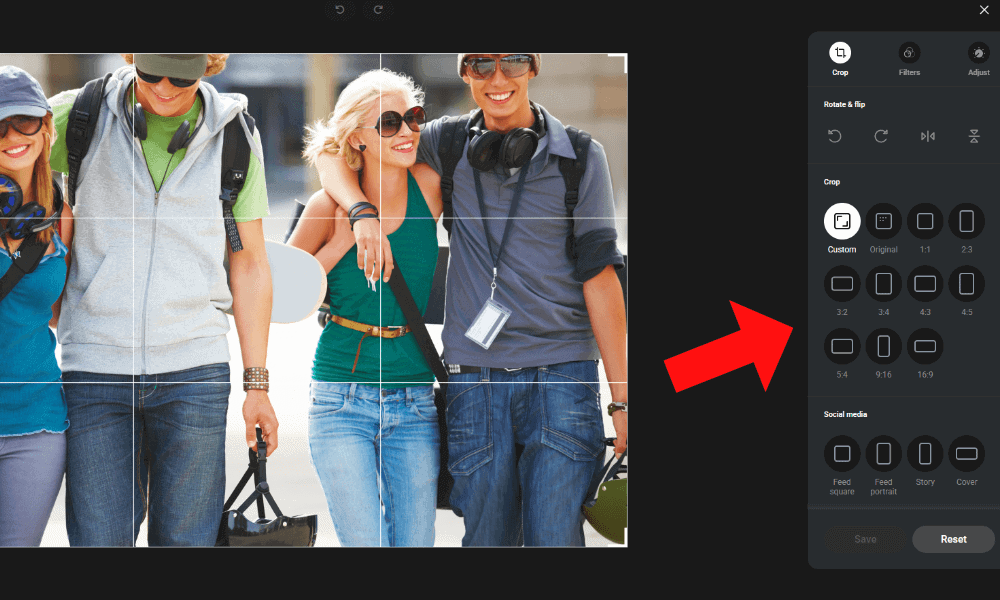
pCloud stands out for its built-in photo editor, which allows you to crop photos to different aspect ratios. You can choose a custom ratio or pick a social media standard such as square, portrait or story. You can also apply filters, add a vignette or grain effect, and adjust light and color settings.
pCloud’s media-streaming optimization technology transcodes photos on the fly to match your viewing device’s specifications, reducing bandwidth usage by up to 40% while maintaining visual quality when browsing your collection.
When to Choose pCloud
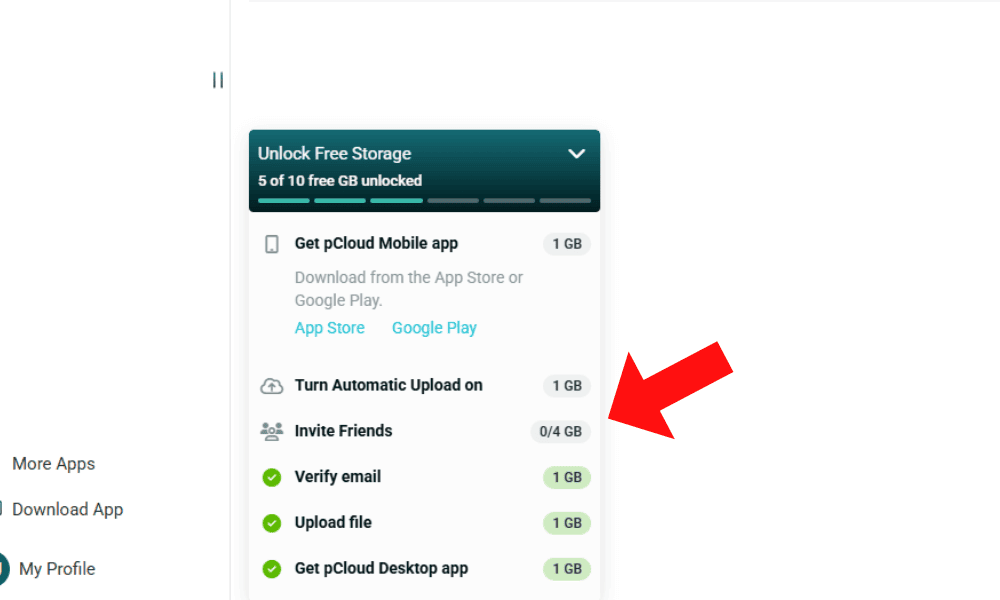
pCloud is the best photo storage service overall, and the fact that it offers 10GB for free puts it at the top of this list. Note, though, that you need to verify your email address to unlock the extra 8GB beyond the initial free 2GB.
One other perk is that pCloud has lifetime cloud storage plans, which means it’s a good option for long-term storage of old but treasured photos — lifetime plans typically pay themselves off in three to four years, which means it’s “free” after that period. Read our full pCloud review to learn more.
- 10GB
- 500GB
- 2TB
More plans
- 10TB
- + FREE Encryption
- 2TB
- + FREE Encryption
- 10TB
- Price per user (minimum 3)
- 1TB
- Price per user (minimum 3)
- 2TB
- Encryption for pCloud Drive
2. MEGA — Best Free Photo Storage for Storage Space

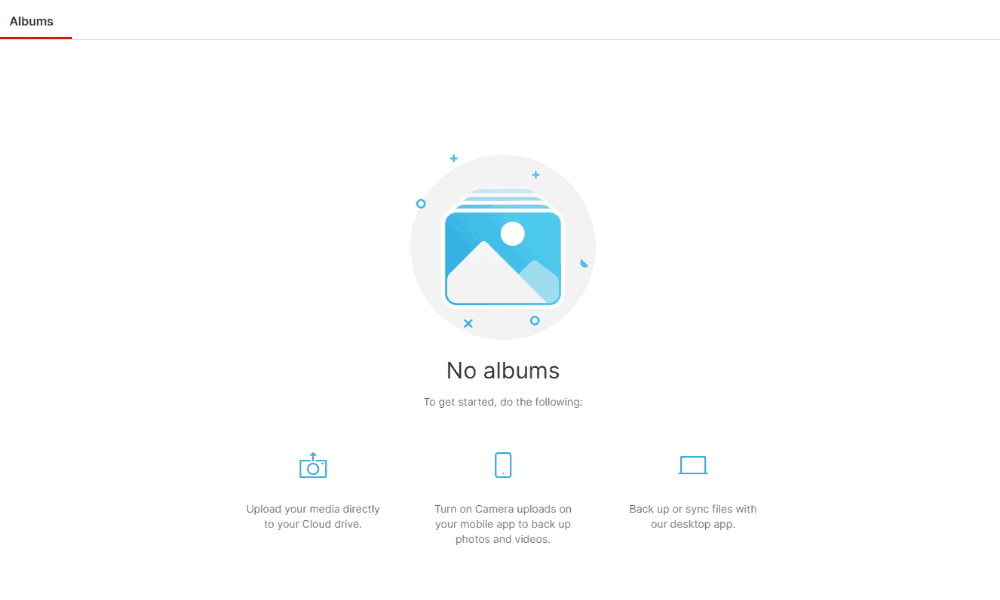
MEGA includes client-side encryption for all storage, even for free users, which means no one else, not even your cloud storage, can ever access your personal photos. You can also set up your own photo albums in MEGA if you install the desktop or mobile app.
Plus, MEGA’s browser extensions for Chrome, Firefox and Edge enable direct screenshot capture and uploading to your encrypted photo collection without saving locally first, streamlining the workflow for web-based image acquisition.
This privacy-first approach now extends to their newer security tools as well, which you can learn more about in our MEGA VPN review.
What Makes MEGA Special
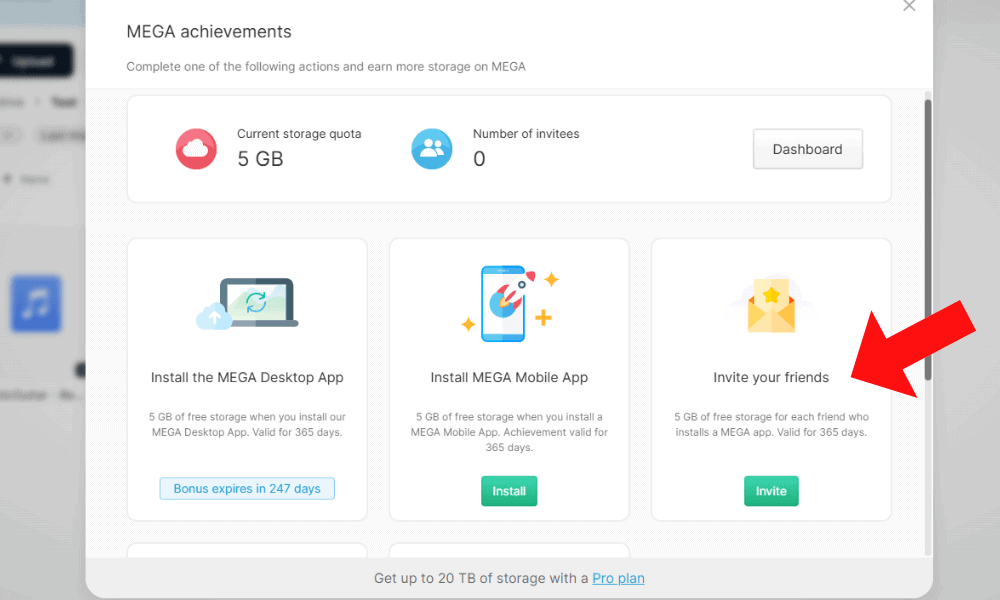
MEGA’s best feature is its generous storage capacity. It provides an impressive 20GB of storage, all of which is protected with client-side encryption. If you happen to need additional storage, you can unlock more in 5GB increments by installing the apps, starting a free trial or inviting friends (5GB per invite).
When to Choose MEGA
MEGA is best for users who need a large amount of free storage or want the option to increase their storage. Unlike pCloud, which requires email verification to unlock its full free storage capacity, MEGA gives you 20GB right away. This makes MEGA more practical if you don’t want to complete extra tasks. Read our MEGA review for more details.
- 20GB
- File transfer: 3TB (Monthly plan) 36TB (yearly plan)
- 3TB
- File transfer: 10TB (monthly plan), 120TB (yearly plan)
- 10TB
More plans
- File transfer: 20TB (monthly plan) 240TB (yearly plan)
- 20TB
- Price per user (minimum 3) 3TB Transfer quota
- 100TB
3. Google Drive — Best Free Cloud Storage for Photo Sharing & Android Devices

Google Drive, which offers 15GB of free storage, is a good option if you need to share or collaborate on photos. The main downside of Google Drive is its approach to privacy — an invasive file analyzer scans your photos’ metadata for better characterization.
However, Google Photos implements differential privacy techniques that add carefully calibrated noise to metadata when using it for service improvements, mathematically limiting how much it can learn about individual users from aggregated data.
What Makes Google Drive Special
Google Drive’s most useful features are its easy file-sharing and productivity tools. You can set up folders to share with people even with the free service, and set different read, comment and edit permissions.
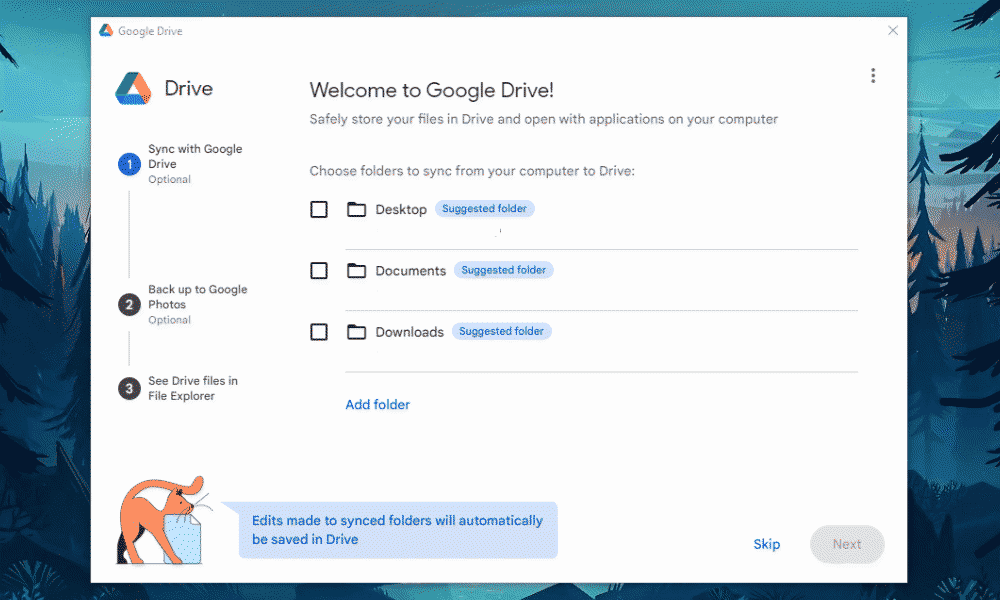
Downloading the desktop and mobile apps allows you to upload files from multiple devices. Google Drive is integrated into Android devices, and you can enable automatic sync from your phone camera to Google Photos and then back up your photos to Google Drive. You can also receive notifications about any changes made to files in your Drive account.
When to Choose Google Drive
If you have many photos to share, Google Drive is an enticing option. However, it protects user storage with server-side encryption only, so anyone with access to Google’s servers can potentially see your files. This may make Google Drive less appealing if you value privacy, especially considering its photo analysis activity.
Developers may like that they can access Google Photos’ image recognition API to build custom applications that interface with the platform. This enables the use of specialized third-party photo organization tools that leverage Google’s AI capabilities while maintaining user control over the original files.
To learn more about its full range of features, check out our Google Drive review.
- Free plan
- 15GB
- 100GB
- *The plan is “hidden.” To find the 200GB plan, you need to be subscribed to one of the other plans, upgrade or downgrade to the 200GB through your account’s settings.
- 200GB
More plans
- 2TB
- 2TB
- 5TB
- 10TB
- 20TB
- 30TB
4. Icedrive — Best Free Photo Storage for Cheap Lifetime Plans
![Video thumbnail for the video: Ultimate Icedrive Review [2024 Pros and Cons Revealed]](https://img.youtube.com/vi/iVGsDxYVV-Y/maxresdefault.jpg)
Icedrive is one of the cheapest cloud services for lifetime plans, which makes it a great option if you have a lot of photos to upload. It gives you up to 10GB of free storage and has a built-in photo viewer.
For photographers working with large RAW files or video content, Icedrive implements advanced streaming decryption piping methods for Google Chrome users, enabling smooth download and playback of large encrypted files without requiring complete decryption first. This is a significant advantage when reviewing or sharing high-resolution encrypted photo and video content.
Another standout feature for professional photographers is Icedrive’s metadata preservation guarantee, which ensures that important EXIF data like camera settings, GPS coordinates and timestamps remain intact even when sharing or processing images through the Icedrive platform. This is critical for maintaining the professional integrity of your photography collection.
For photographers with established editing workflows, Icedrive’s WebDAV integration allows you to mount your cloud storage as a network drive, enabling seamless access from professional photo-editing software like Lightroom or Photoshop without downloading files first.
Photographers concerned about disaster recovery will appreciate that Icedrive employs a distributed storage architecture across multiple data centers in the U.K., Germany, and the U.S. with N+2 redundancy, ensuring your precious photo collection remains accessible even if an entire facility experiences an outage.
Icedrive has also enhanced its sync functionality with a background monitor system (IceMon, available on Windows and macOS) that tracks changes in photo folders even when the app isn’t running. When you reopen the app, these changes are automatically synced, ensuring your photo collection remains up to date across all devices without requiring you to manually initiate sync processes.
When to Choose Icedrive
With its cheap lifetime plans and upgradeable storage, Icedrive is a good option for users who want a one-time payment for storage, with the ability to increase storage limits later. While it’s missing features like a photo editor, the virtual drive makes it more user-friendly for those new to cloud storage. Read our Icedrive review to learn more.
- 10GB
- 1TB
- 3TB
More plans
- 5TB
- 2TB
- Additional 1TB storage for users who purchased the Lifetime Plan
- 1TB
- Additional 5TB storage for users who purchased the Lifetime Plan
- 5TB
5. Proton Drive — Best Free Photo Storage for Privacy & Mobile Backup
![Video thumbnail for the video: I Tested Proton Drive to See If It's as Private as It Claims [2024 REVIEW]](https://img.youtube.com/vi/XWmsFdm-VLg/maxresdefault.jpg)
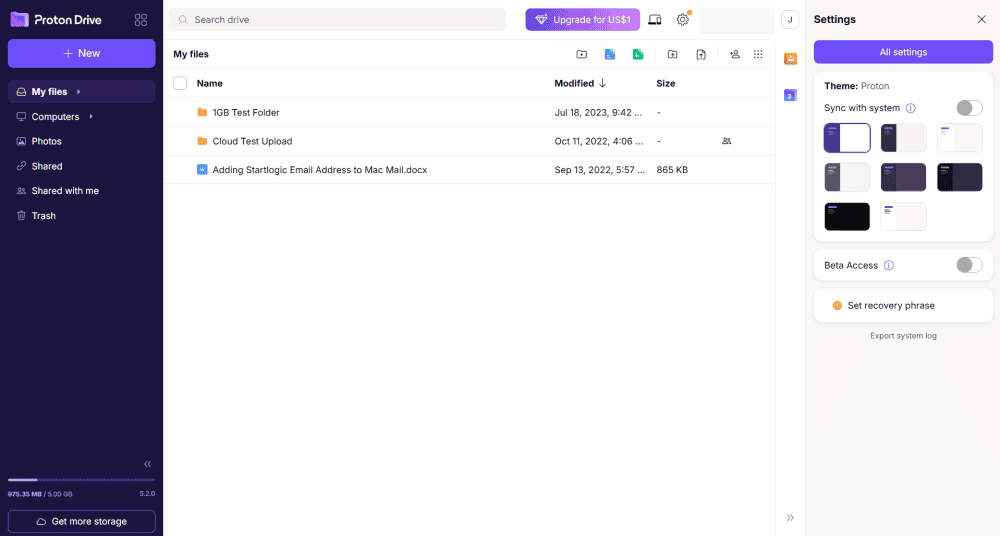
Proton Drive is an excellent choice if privacy is your top priority for photo storage. Based in Switzerland, it offers client-side encryption on all plans, including the free tier, so not even Proton can access your personal photos.
In our stress tests, Proton Drive handled everything just fine, uploading files in alphabetical order with smooth scrolling and no hangs. Our Sync War testing showed no conflicts; the file uploaded correctly with no duplicate version issues. The desktop app is very stable with low CPU usage, and speeds were impressive at 07:15 min upload and 07:11 min download for a 5GB folder.
What Makes Proton Drive Special
Proton Drive’s mobile app stands out with excellent photo organization options. It’s more detailed than I’ve seen in any other app. You get separate tabs for All, Screenshots, Videos, Selfies, Favorites, Portraits, Panoramas, Bursts, Live Photos and RAW files, all further organized by month.
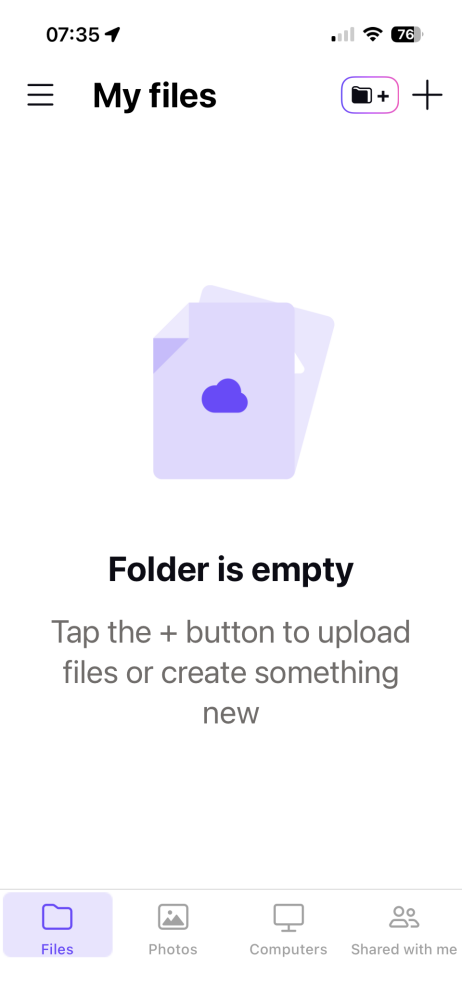
The automatic photo backup works great, instantly uploading new photos with the option to choose which folders to back up. You can even disable battery-saving settings from within the app for consistent uploads.
When to Choose Proton Drive
Proton Drive is best for privacy-conscious photographers who want true client-side encryption for free. The mobile app’s detailed photo organization makes it ideal for backing up your phone’s camera roll.
However, the free plan has only 5GB of storage and version history limited to seven days, so it’s not the best fit for content creators with large libraries. Read our full Proton Drive review to learn more.
- 5GB
- 200GB
- 500GB
More plans
- 2TB
- 3TB
- per user
- 1TB
- per user, minimum of 2 users
- 1TB
- 1TB
6. Sync.com — Best Free Photo Storage for Security and Privacy

Sync.com is one of the best options if you need free and secure storage for your photos. The free version is protected with client-side encryption, so not even Sync.com can access your files.
When to Choose Sync.com
Sync.com is best for users who are happy with 5GB of free storage, are concerned about the privacy of their photos and want to retain total control over them. Since it’s a slower service than others, it’s best for users who don’t have many large files to upload or who don’t need instant uploads. Our full review of Sync.com has all the details.
- 5GB
- 2TB
More plans
- 6TB
- per user, per month, billed annually
- 1TB
- Priced per user (3 users minimum)
- Unlimited GB
- Minimum 100 users, custom requirements, account manager, training options
Methodology: How Do We Test and Evaluate Free Cloud Storage for Photos?
To find the top free cloud providers, I tested each provider against a certain set of criteria. I looked at storage space, security, speed and any photo-specific features.
How Do You Use Free Cloud Storage for Photos?
You can use free cloud storage for photos by following a simple upload and sync process that’s similar across most platforms. The storage options I list in this article are all simple to use, so you shouldn’t have too much trouble implementing them to back up photos to the cloud. Most platforms follow a similar process. In the guide below, I’ll show you how to upload and sync photos using pCloud.
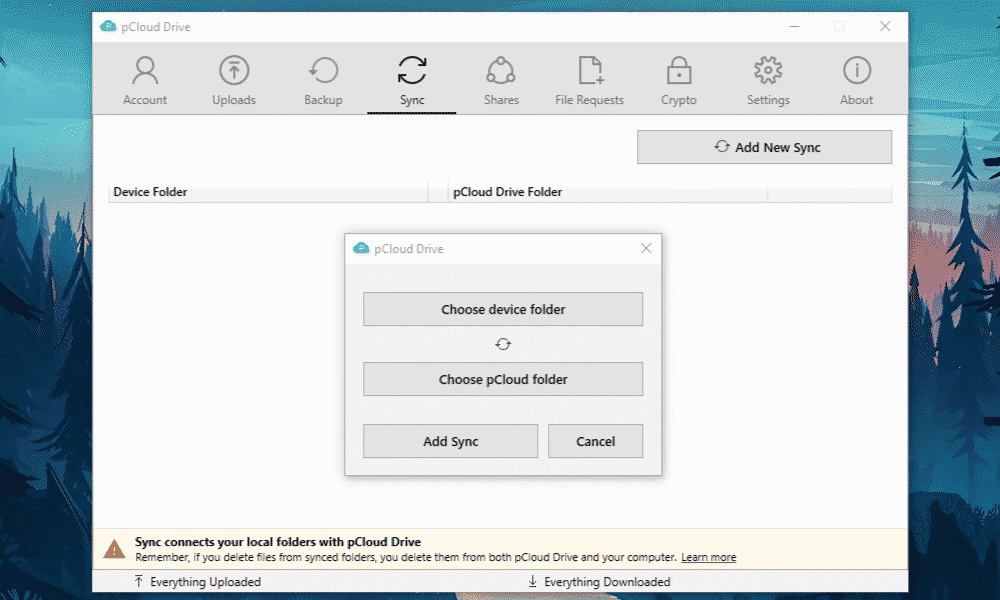
- Sign up and install — Create an account with your chosen cloud service. My top recommendation is pCloud, especially if you need to make any edits to your photos. Access it through the web app or from its apps for desktop or mobile devices.
- Set up sync folders — Choose the photo folder that you want to upload and sync. After you’ve set up the folder, any new additions will automatically upload to your pCloud account.
- Configure your workflow — If you take a lot of photos that you want to back up, it may be a good idea to set up a system of regularly placing new photos into your synced folder.
- Enable security features — Consider investing in one of pCloud’s premium plans with client-side encryption so you can keep your photos safer. Alternatively, if you would rather stick to the free service, set up two-factor authentication for additional account security.
Final Thoughts
Finding the top free cloud storage for photos depends on your specific needs. If you need photo editing features, pCloud is the best option. You can get started for free with 10GB of storage.
Which free photo storage option do you like the most? How often do you back up your photos? Do you have a backup workflow? Let us know in the comments, and thank you for reading.
FAQ: Free Online Storage for Photos
You won’t be able to find free unlimited storage for photos; your best option is to sign up for a service with generous free storage. MEGA is one of the best options for photos, with an impressive 20GB of free storage.
Yes, free cloud storage is safe for your photos, but it depends on the provider. I recommend using a provider with free client-side encryption, such as MEGA or Sync.com, if you’re concerned about the safety of your files.
Yes, you still own the photos you upload to the cloud. Some providers have the ability to view your content, though, so make sure to review privacy policies before you upload anything.