Top 6 Cloud Services to Back Up Music
If you keep a lot of important audio files, you need to have a good backup strategy that includes a dedicated external backup location. In this article, I go over the six best cloud options for backup music files.


Written by Rebecca White (Writer)
Reviewed by Kate Hawkins (Editor, Writer)
Facts checked by Eugenie Tiu (Editorial Assistant)
Last Updated:
All our content is written fully by humans; we do not publish AI writing. Learn more here.
Key Takeaways: These Are the Best Cloud Storage Services for Music Backup
- pCloud — The best cloud backup for your music library, with lifetime plans and affordable pricing.
- IDrive — Music backup for an unlimited number of devices, with client-side encryption.
- Internxt — An affordable zero-knowledge option, though it struggles with large files and has a weak mobile app.
- Proton Drive — A privacy-focused service with solid performance, but expensive storage for big libraries.
- Acronis — Business-focused cloud backup for professional musicians or content creators.
- Google Drive — Comes with advanced collaboration tools so you can share your backup audio files.
Facts & Expert Analysis About Music Backup Services:
- Affordable pricing: If you have a lot of playlists or raw music files, storage can become an issue. I’ve picked providers that offer the best value per terabyte.
- Music-friendly storage: The providers I’ve listed retain metadata information for better categorizing, and some also come with basic media viewers.
- Tight security: I’ve chosen providers that offer data redundancy, file versioning and AES encryption for better security.
Collecting music files is incredibly easy, but keeping them safe from device loss or data corruption is more complicated. It’s essential to back up music files that you want to keep safe, and a key step is saving your files to an external location. A cloud backup service can help, but many are either too expensive or don’t have good security.
Of our selection of the best cloud backup services, the top provider for music files is pCloud, as it offers affordable pricing per terabyte and good security features. Other great options include IDrive, Acronis and Google Drive. Read on to discover which of these services is right for your backup music files.
-
01/10/2022 Facts checked
Cloudwards.net updated this article to consider mobile devices and include a step-by-step guide to backing up music on your phone.
-
05/23/2023 Facts checked
Updated to remove IDrive’s discontinued free plan.
-
08/08/2024 Facts checked
Updated IDrive’s pricing information.
-
03/03/2026 Facts checked
We retested and updated the provider sections and included more details on what you need to look for in a backup service for music.
Cloudwards’ Choice: pCloud
 Cloudwards’ Choice: pCloud
Of the six services I’ve chosen for backup music files, pCloud is my favorite. Its consistently fast speeds make it less time-consuming to upload my music files, and it’s affordable. You can get an annual 2TB plan for $8.33 per month.
How Do You Choose the Best Music Backup Software?
A cloud backup solution for music files needs to meet certain criteria. Security is a top priority. Look for a service that implements AES 256-bit encryption at a minimum to guarantee the safety of your files. Client-side encryption guarantees even tighter security.
Consider backup processes as well. For music files, incremental sync will ensure the files are backed up as quickly and efficiently as possible. Finally, consider how much storage space you need. Some services, like IDrive, offer cheap storage if you need less than a terabyte of space.
10,000+ Trust Our Free Cloud Storage Tips. Join Today!

- Demystify cloud storage terminology and key concepts in plain language
- Discover easy-to-implement techniques to securely backup and sync your data across devices
- Learn money-saving strategies to optimize your cloud storage costs and usage
What Are the 6 Best Music Backup Services Compared?
| Service: | Free Storage | Best Price | Server Locations | E2E Security | Collaboration | Advanced Sharing | Encryption |
|---|---|---|---|---|---|---|---|
 | 10GB | $8.33 per month (one-year plan) for 2TB | Dallas, Texas, Luxembourg | Yes (paid) | Proprietary (comments only) | | AES-256, TLS/SSL |
 | 10GB | $5.81 per month (one-year plan) for 5TB | U.S., Asia, Europe, Canada | Yes | Microsoft 365 | | AES-256 |
 | 1GB | $8.33 for 1TB | Spain (EU) | Yes | None | | AES-256* |
 | 5GB | $3.99 for 200GB | Switzerland, Germany | Yes | Proton Docs | | AES-256 |
 | N/A | $4.17 for unlimited storage | U.S., Asia, Europe, Canada, | Almost | None | | AES-256, TLS/SSL |
 | 15GB | $9.99 for 2TB | U.S., Asia, Europe, South America | No | Google Workspace | | AES-256 |
1. pCloud — The Best Backup for Music

pCloud is my top choice for a music backup service, as it offers fast speeds, selective backup options and a generous [pprice id=”9101-0-0-gb”] of free storage. While it doesn’t offer system-wide imaging or backup restoration, it does allow you to set selective backup for specific folders, such as a music folder.
The downside of pCloud is that its client-side encryption applies only to a dedicated cloud storage folder, which doesn’t protect your backups. On top of that, client-side encryption is an expensive paid add-on, costing $49.99 annually.
pCloud Hands-On Testing
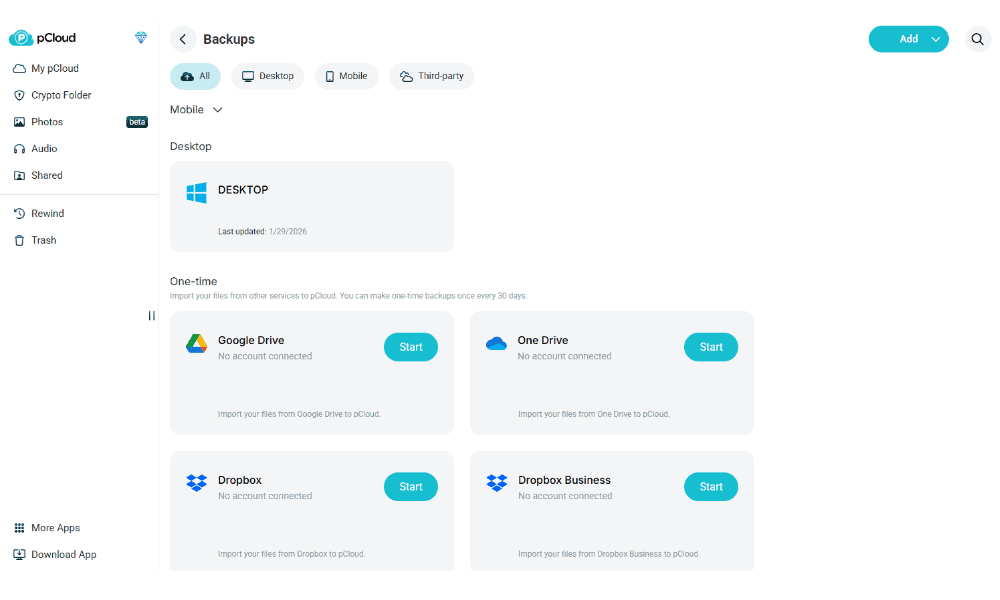
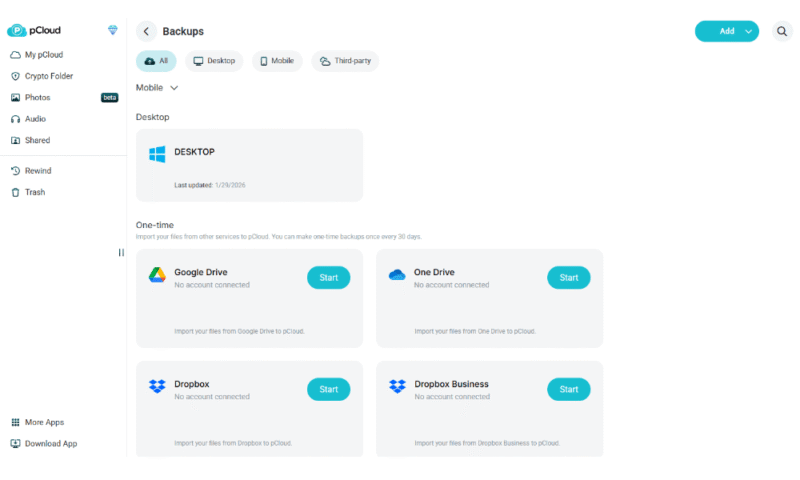
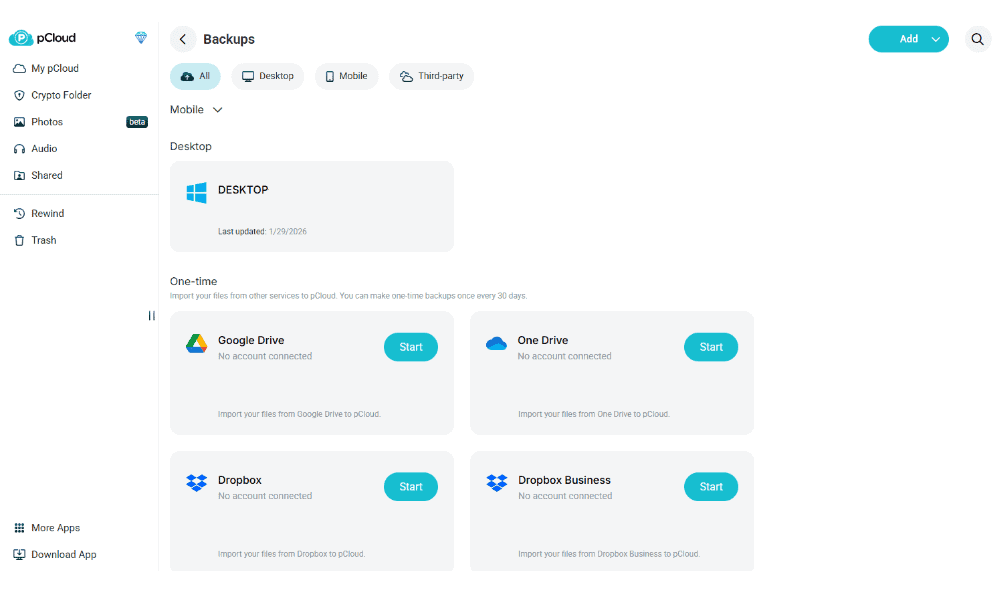
You can set up a backup with pCloud using its desktop or mobile apps on Windows, macOS, Linux, iOS and Android. I found the process to be very straightforward, though a few options are missing, such as backup scheduling. On the browser client, you can run a one-time backup from external cloud services like Google Drive or Dropbox every 30 days.
As a bonus, pCloud’s cloud storage comes with an integrated music player that lets you preview audio files in your music collection. However, backup files aren’t accessible from pCloud’s cloud storage interface, as they’re synced to a separate location. To make use of pCloud’s media and playlist tools, you’ll have to sync the files to its cloud storage as well.
Notes From the Lab: pCloud Speed Test Results
| 1st Test | 2nd Test | Average | Unthrottled |
|---|---|---|---|---|
| Upload Speeds | 07:02 | 07:10 | 07:06 | 02:06 |
| Download Speeds | 06:50 | 06:53 | 06:52 | 02:33 |
Our speed tests consist of uploading and downloading a 5 GB folder on a 100 Mbps throttled connection. pCloud has impressive upload and download speeds, but it unfortunately doesn’t offer high stability. You can expect drops in performance if you’re syncing large files.
In the unthrottled test on a 1 GB/s connection, pCloud had fast speeds but similar stability. It noticeably slows down for large files.
Notes From the Lab: pCloud Security Analysis
| Encryption Type: | Protocols Used |
|---|---|
| Encryption at rest | AES-256 |
| Encryption in transit | TLS/SSL |
Even without client-side encryption, pCloud has great security to keep your files safe. It uses AES 256-bit encryption for stored files, which is the industry standard for unbreakable security.
What Is pCloud’s Pricing and Value?
pCloud’s annual and lifetime plans offer the best value. For $8.33 per month, you can get 2TB of storage for your music backups. Alternatively, you can get a 2TB lifetime plan for $399, which is equivalent to roughly four years of the annual plan.
Read our pCloud review and test it out for yourself with up to 10GB of free storage.
- 10GB
- 500GB
- 2TB
More plans
- 10TB
- + FREE Encryption
- 2TB
- + FREE Encryption
- 10TB
- Price per user (minimum 3)
- 1TB
- Price per user (minimum 3)
- 2TB
- Encryption for pCloud Drive
2. IDrive — Best Music Backup for Unlimited Devices

IDrive is the best choice for backing up multiple devices, as it places no limit on the number of devices you can link. You can create separate backups for your desktop and mobile devices, which is ideal if you have multiple music collections across devices.
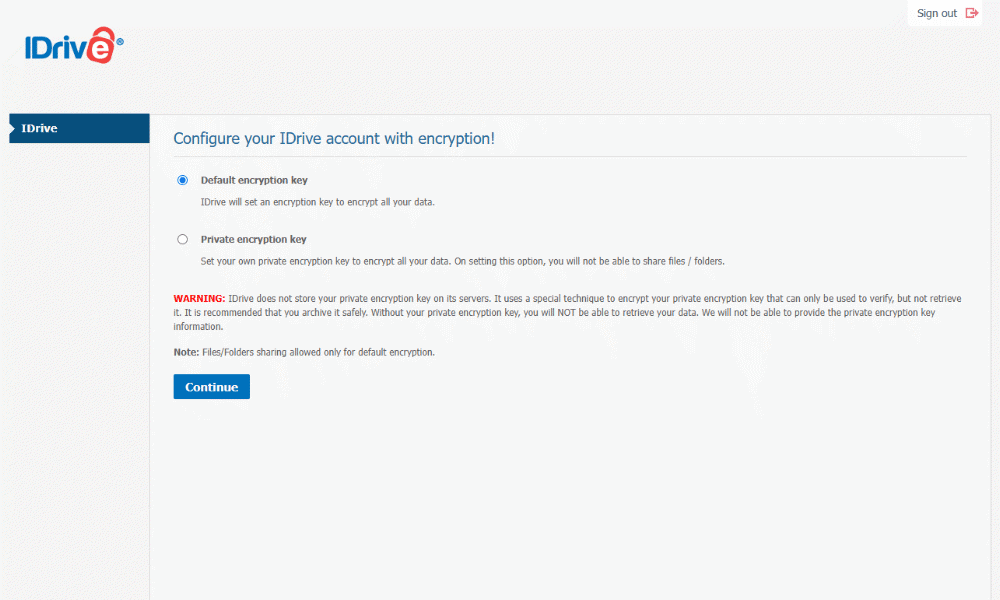
IDrive is a dedicated backup service, offering backup scheduling, full-image backup and more extensive disaster recovery. It also offers client-side encryption for backed-up files. However, this is an option only at account creation. IDrive defaults to server-side encryption, so make sure you choose “private encryption key” when setting up your storage.
IDrive Hands-On Testing
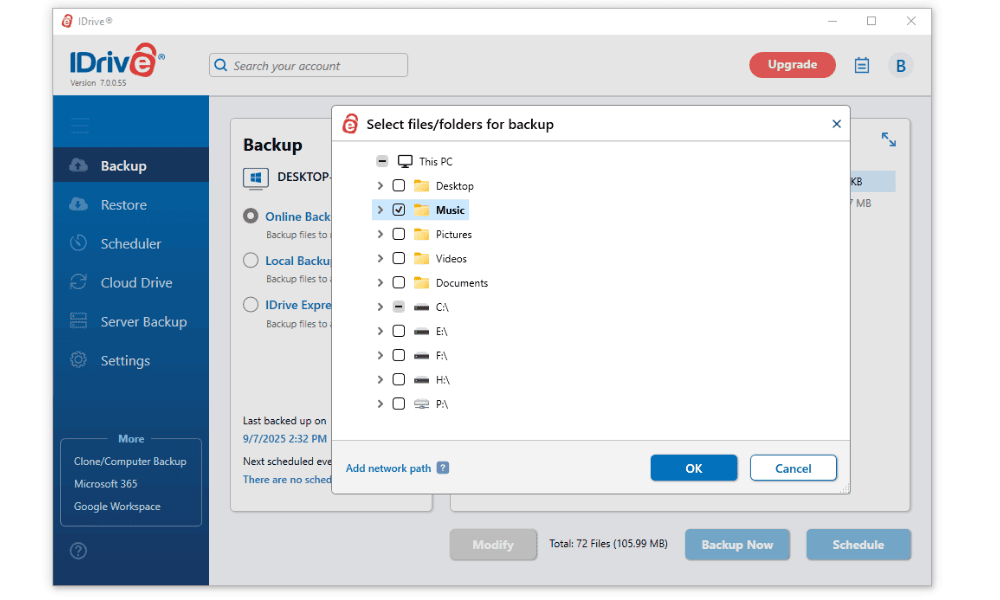
During installation, IDrive allows you to choose whether you want to back up specific folders or drives, or your entire PC. I found this helpful, as I keep my music files on a dedicated drive. With IDrive, I was able to back up just the music files.
The backup schedule tool also has a user-friendly interface. You can choose the exact time to start the backup and which days you want it to run, which is ideal if you make regular changes to your music library.
Notes From the Lab: IDrive Speed Test Results
| 1st Test | 2nd Test | Average | Unthrottled |
|---|---|---|---|---|
| Upload Speeds | 06:45 | 06:44 | 06:45 | 05:00 |
| Download Speeds | 06:50 | 07:06 | 06:58 | 04:57 |
I was impressed with IDrive’s speeds and stability during testing. It maintained consistent speeds throughout, with minimal CPU usage. If you do experience performance issues, you can throttle your bandwidth and CPU usage in the IDrive app.
For the unthrottled 1 GB/s test, IDrive had speeds between 18 MB/s and 22 MB/s throughout the upload and download. However, while it was stable, it was slower than pCloud overall.
Notes From the Lab: IDrive Security Analysis
| Encryption Type: | Protocols Used |
|---|---|
| Encryption at rest | AES-256 |
| Encryption in transit | AES-256 |
Aside from IDrive’s restrictions on client-side encryption, it’s a very secure service for backup storage. It uses AES 256-bit encryption for files at rest, making it a solid option for backup music files.
What Is IDrive’s Pricing and Value?
IDrive is one of the most affordable options for music collections, especially smaller ones. You can get a 100GB or 500GB plan for $2.95 or $9.95 per year, respectively. Larger storage options are also affordable: The 5TB plan costs $69.65 per year ($5.81 per month) for the first year and $99.50 per year ($8.29 per month) on renewal, which is comparable to pCloud’s pricing.
See our IDrive review to learn more about it, or try the 10GB free plan for yourself.
- No credit card required.
- 10GB
- One user.
- 100GB
- One user, multiple computers. Plans starting from 5TB up to 100TB. Big discount for first-time signup.
- 5TB
More plans
- 5 computers, 5 users. Starting at 5TB up to 500TB. Big discount for first-time signup.
- 5TB
- Monthly Plan storage starts at 1.25TB up to 50TB Unlimited users, multiple computers and servers. NAS devices. 250GB storage. Starting at 250GB up to 50TB. Large discount for first-time signup.
- 250GB
- 5TB
3. Internxt — Affordable Private Music Storage

Internxt is an affordable option if privacy is your top concern, thanks to its client-side encryption and zero-knowledge architecture. It also features a basic in-app audio player, so you can listen to your backed-up tracks. However, stress tests revealed some serious problems: syncing was “super slow,” and the service struggled when handling large folder counts.
Internxt Hands-On Testing
The mobile app is a major weakness for music backup. It lacks automatic uploads and multiple file selection, making it functionally useless for backing up your phone’s music library without manual effort. During testing, files sometimes just wouldn’t sync from the desktop folder, and uploads struggled with large files and zips, with speeds dropping below 5MB/s.
Notes From the Lab: Internxt Speed Test Results
| 1st Test | 2nd Test | Average | Unthrottled |
|---|---|---|---|---|
| Upload Speeds | 0:07:57 | 0:08:05 | 0:08:01 | 0:07:48 |
| Download Speeds | 0:09:26 | 0:09:30 | 0:09:28 | 0:09:27 |
Internxt has fairly average upload speeds, despite the speed dropping substantially at times while I was testing it. However, its download speeds are pretty poor compared to the fastest services. Even in the unthrottled 1 GB/s test I didn’t see a huge increase in average speed as its poor stability holds Internxt back.
Notes From the Lab: Internxt Security Analysis
| Encryption Type: | Protocols Used |
|---|---|
| Encryption at rest | AES-256 |
| Encryption in transit | AES-256 |
Internxt offers zero-knowledge, AES-256 encryption for your whole drive. This includes post-quantum Kyber-512 encryption for protection against future quantum computing attacks. Plus, Internxt’s servers are based in the EU and it’s passed independent security audits. All this makes Internxt one of the most secure cloud storage services on the market.
What Is Internxt’s Pricing and Value?
If you only have a small collection of MP3s, Internxt’s low prices are appealing. 1TB costs just $20 per year, for the first year. However, if you have a massive FLAC library or thousands of tracks, the sync failures and slow speeds make it hard to recommend. Check out our full Internxt review to learn more.
- 1GB
- Post-quantum encryption Zero-knowledge encryption Two-factor authentication Backup your computer Password-protected file sharing Encrypted VPN Antivirus
- 1TB
- Everything in Essential plus; Cleaner Invite, share & collaborate File versioning (coming soon) Cleaner
- 3TB
More plans
- Everything in Premium plus CLI & WebDav support NAS & Rclone support Meet Mail (coming soon)
- 5TB
- Annual Price is per user
- 1TB
- Annual Price is per user
- 2TB
4. Proton Drive — Privacy-Focused Music Backup
![Video thumbnail for the video: I Tested Proton Drive to See If It's as Private as It Claims [2024 REVIEW]](https://img.youtube.com/vi/XWmsFdm-VLg/maxresdefault.jpg)
Proton Drive is a strong choice if you want your music library protected by serious encryption. It offers zero-knowledge, client-side encryption, meaning not even Proton can access your files. The service also includes a basic in-app audio player for previewing your tracks. During stress tests, Proton Drive handled large file counts without issues, uploading everything in alphabetical order with smooth navigation.
Proton Drive Hands-On Testing
I was impressed by the mobile app with its organization and a useful option to disable battery saving, guaranteeing constant uploads. It was able to handle conflicts when files had the same name, and the desktop app is visually clear with a modern design. However, Proton Drive is expensive compared to competitors; if you have a huge music library, the cost per GB will add up fast.
Notes From the Lab: Proton Drive Speed Test Results
| 1st Test | 2nd Test | Average | Unthrottled |
|---|---|---|---|---|
| Upload Speeds | 0:07:17 | 0:07:13 | 0:07:15 | 0:03:20 |
| Download Speeds | 0:07:06 | 0:07:16 | 0:07:11 | 0:03:48 |
Proton Drive’s transfer speeds are fast and stable. It didn’t use too much CPU power, so your computer won’t slow down if you’re uploading files in the background. There was also a significant speed boost when I unthrottled the connection, showing that Proton Drive can make use of fast internet speeds.
Notes From the Lab: Proton Drive Security Analysis
| Encryption Type: | Protocols Used |
|---|---|
| Encryption at rest | AES-256 |
| Encryption in transit | AES-256 |
Proton Drive is another provider that applies zero-knowledge AES-256 encryption to your entire account, regardless of which plan you choose. It uses servers in Germany and Switzerland, so you’re protected by strong privacy legislation.
What Is Proton Drive’s Pricing and Value?
At $3.99 per month for 200GB, Proton Drive is best suited for users with smaller music libraries who prioritize privacy. The 5GB free plan is also quite limited for music backup. If you want to learn more, read our full Proton Drive review.
- 5GB
- 200GB
- 500GB
More plans
- 2TB
- 3TB
- per user
- 1TB
- per user, minimum of 2 users
- 1TB
- 1TB
5. Acronis — Best Business Music Backup
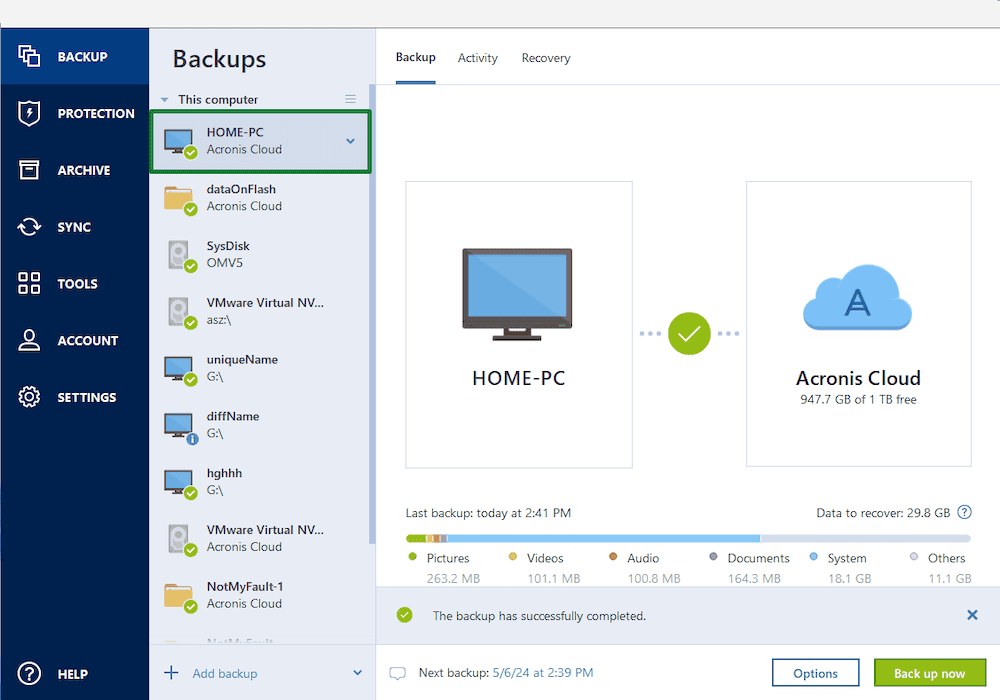
great fit for small businesses or professionals.
Acronis is a good option for businesses or professionals who need music backups. Along with its cloud backup, Acronis offers endpoint management, malware protection and fast data recovery. It also has a cybersecurity package for home use, but the app installation is more complicated than others on this list.
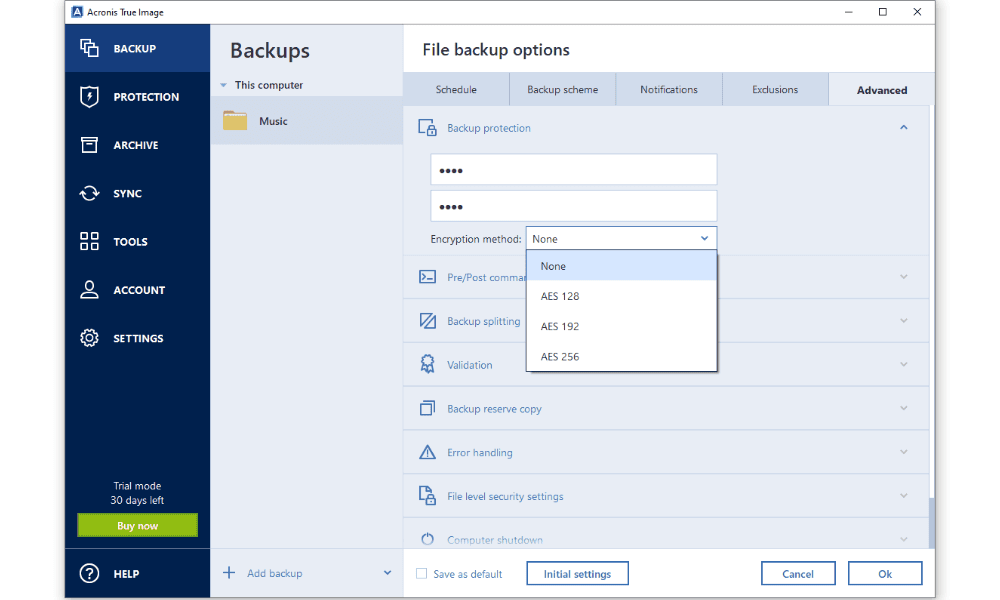
For better security, Acronis offers the option to lock backups with an encrypted password. Theoretically, this provides the same level of security as client-side encryption, since only you can unlock the backup. However, I hesitate to call Acronis a true client-side encrypted service since this option is buried in the settings and not applied automatically.
Acronis Hands-On Testing
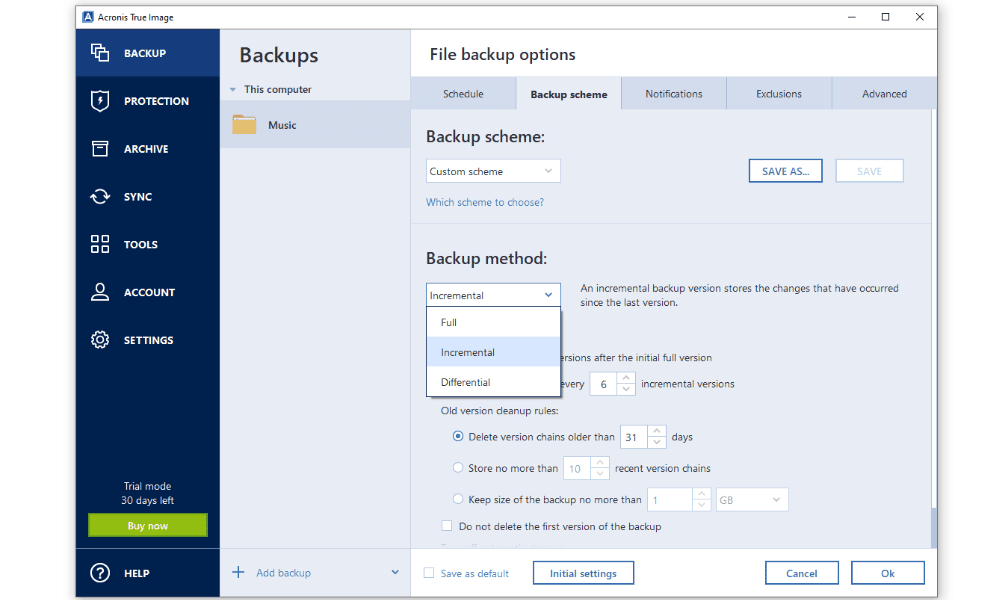
Acronis is available on Windows, macOS, iOS and Android, but the app is difficult to install and use. You can’t download it unless you sign in on a browser, and the sign-in and setup processes are time-consuming and spread over multiple pages.
To its credit, Acronis acknowledges that its app is tricky to use, and the provider has integrated a tutorial into the app launch. That said, the complexity makes it better suited for power users or professional studios than small businesses or casual users who have a small music library to back up.
Notes From the Lab: Acronis Speed Test Results
| 1st Test | 2nd Test | Average | Unthrottled |
|---|---|---|---|---|
| Upload Speeds | 07:05 | 07:02 | 07:04 | 06:45 |
| Download Speeds | 06:58 | 07:02 | 07:00 | 03:25 |
Acronis has fast upload and download speeds, but it suffers from a lack of stability. While this was not an issue for the 5GB file we tested, it may be a problem on different connections or with bigger files.
Our unthrottled 1 GB/s test showed a similar speed instability, and it was slower than expected. It jumped between 8 and 18 MB/s on the uploads, and the downloads started slow but stayed between 20 – 27 MB/s.
Notes From the Lab: Acronis Security Analysis
| Encryption Type: | Protocols Used |
|---|---|
| Encryption at rest | AES-256 |
| Encryption in transit | TLS/SSL |
Acronis is a very secure app, with AES 256-bit encryption applied to your storage and the option to set a password for your backups. It also has a built-in anti-malware tool that implements AI heuristic learning.
What Is Acronis’ Pricing and Value?
Acronis’ cheapest business plan, Cyber Protect Standard, costs $76.50 per year and includes most of the security tools you’d need for a small-scale music backup. If you need integration with Google Workspace to share audio files with your team, opt for the Cyber Protect Backup Advanced plan, which costs $109 per year.
Unlike the other services on this list, Acronis doesn’t offer a free plan. However, it does have a generous 30-day trial, no credit card required, as well as a 30-day money-back guarantee on annual plans. Our Acronis review goes into more detail about what you can expect from the service.
- Flexible backups: full image to file-level Active disk cloning Universal restore and fast recovery Ransomware protection
- Flexible backups: full image to file-level Active disk cloning Universal restore and fast recovery Ransomware protection + Block viruses and malware Cloud backup and features Automatic replication of data in the cloud Microsoft 365 backups
- 50GB
- Flexible backups: full image to file-level Active disk cloning Universal restore and fast recovery Ransomware protection + Block viruses and malware Cloud backup and features Automatic replication of data in the cloud Microsoft 365 backups
- 250GB
More plans
- Flexible backups: full image to file-level Active disk cloning Universal restore and fast recovery Ransomware protection + Block viruses and malware Cloud backup and features Automatic replication of data in the cloud Microsoft 365 backups
- 500GB
- Flexible backups: full image to file-level Active disk cloning Universal restore and fast recovery Ransomware protection + Block viruses and malware Cloud backup and features Automatic replication of data in the cloud Microsoft 365 backups + Blockchain certification of files Electronic signatures on files Ability to add up to 5TB of cloud storage
- 1TB
- Flexible backups: full image to file-level Active disk cloning Universal restore and fast recovery Ransomware protection + Block viruses and malware Cloud backup and features Automatic replication of data in the cloud Microsoft 365 backups + Blockchain certification of files Electronic signatures on files Ability to add up to 5TB of cloud storage
- 5TB
6. Google Drive — Best Music Backup Service for Collaboration

Google Drive is the best option for music backups for teams. Like pCloud, it’s not a true backup service, instead offering cloud storage with sync. However, this means it has better file sharing than dedicated cloud backups, which allows for seamless real-time collaboration on music files.
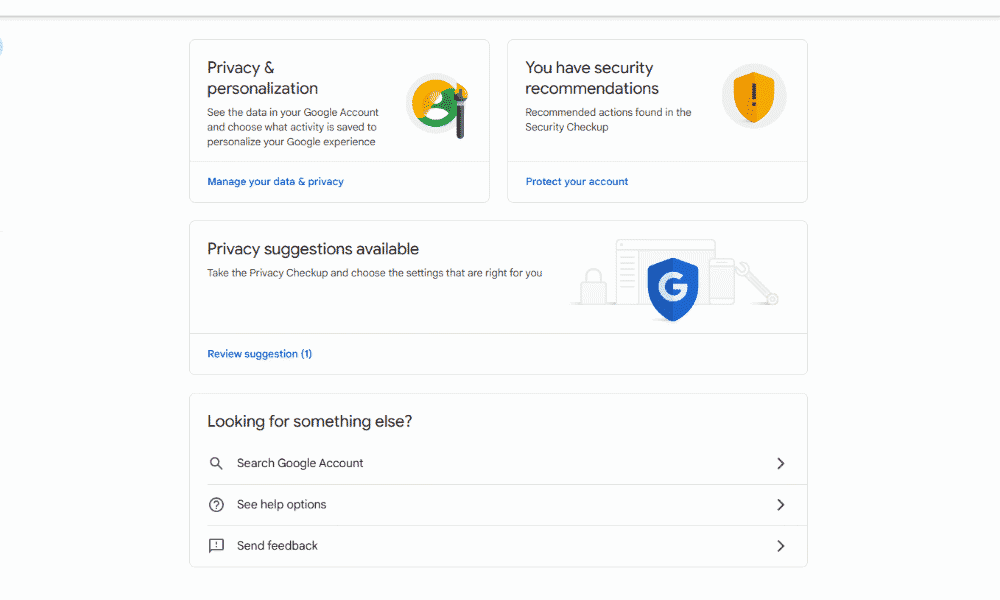
The main issue with Google Drive is its security and privacy. Check out our analysis of Drive’s potential privacy problems and what it means for your stored files.
Google Drive Hands-On Testing
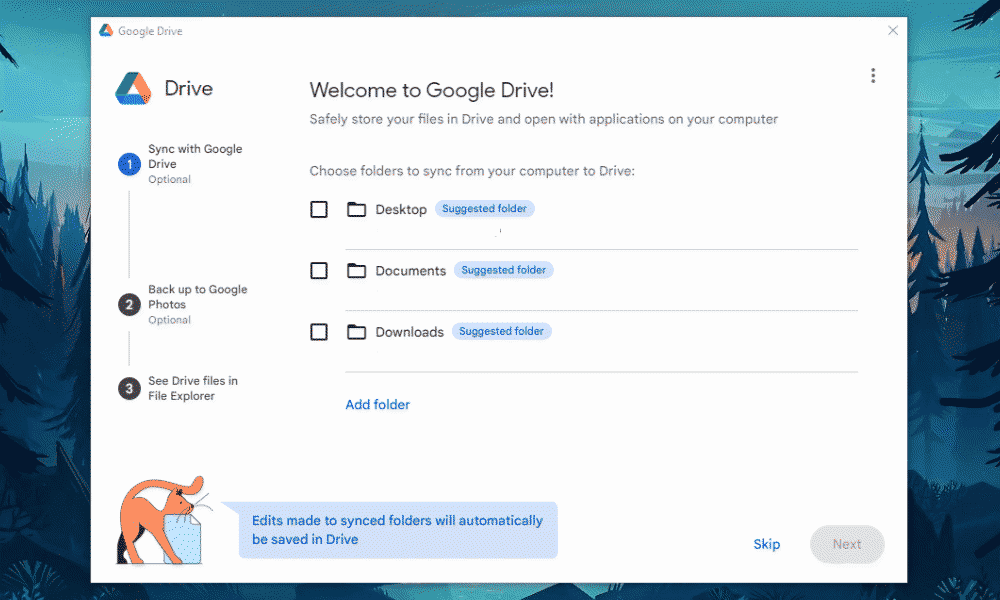
Google Drive comes pre-installed on Android devices, but it’s also compatible with Windows, macOS and iOS. None of Google Drive’s apps offer full-image backups, but it does have selective sync, so you can choose the specific folders containing your music library or project folders.
Selective sync is useful for collaboration, as the smaller scale of the backup makes it easier to ensure all project files are synced correctly. However, the lack of full-image backup and the inability to back up entire drives at once make it more tedious to back up larger libraries spread across multiple locations.
Notes From the Lab: Google Drive Speed Test Results
| 1st Test | 2nd Test | Average | Unthrottled |
|---|---|---|---|---|
| Upload Speeds | 07:02 | 06:55 | 06:59 | 05:01 |
| Download Speeds | 07:10 | 07:13 | 07:12 | 05:47 |
Google Drive had very stable speeds during testing, with minimal CPU usage. This means it likely won’t struggle with larger files.
Surprisingly, Google Drive had slightly less stability in the 1 GB/s unthrottled test. Its speeds varied between 5 and 32 MB/s for both the upload and downloads.
Notes From the Lab: Google Drive Security Analysis
| Encryption Type | Encryption Protocols Used |
|---|---|
| Encryption at rest | AES-256 |
| Encryption in transit | AES-256 |
Google Drive’s security is a bit weaker than that of other providers on this list, but it does use secure AES 256-bit encryption to protect your files.
What Is Google Drive’s Pricing and Value?
The best way to decide whether Google Drive’s backup and collaboration workflow suits your needs is with its 15GB free plan. If you need more storage, you can get 2TB with Google One for $8.33 per user per month.
Read our Google Drive review to learn more, or test it out for yourself.
- Free plan
- 15GB
- 100GB
- *The plan is “hidden.” To find the 200GB plan, you need to be subscribed to one of the other plans, upgrade or downgrade to the 200GB through your account’s settings.
- 200GB
More plans
- 2TB
- 2TB
- 5TB
- 10TB
- 20TB
- 30TB
Our Methodology: How Did We Test the Best Music Backup Software?
I followed the criteria outlined below while testing the best backup solutions for music:
- Speed: The Cloudwards testing team measured how quickly each service could upload and download a 5GB file, and I picked the fastest services of the ones that offer backups for audio files.
- Backup methods: I tested each provider’s backup process to see whether they offer automatic scheduling, block-level sync and file retention.
- Security: I made sure each service offers a minimum of AES 256-bit encryption, and checked for client-side encryption as a bonus.
- Price: I analyzed each provider’s value based on cost per TB and features such as multiple device compatibility, high storage limits and strong security.
How Do You Use Music Backup Software?
In the quick guide below, I explain how to use music backup software, using pCloud as an example.
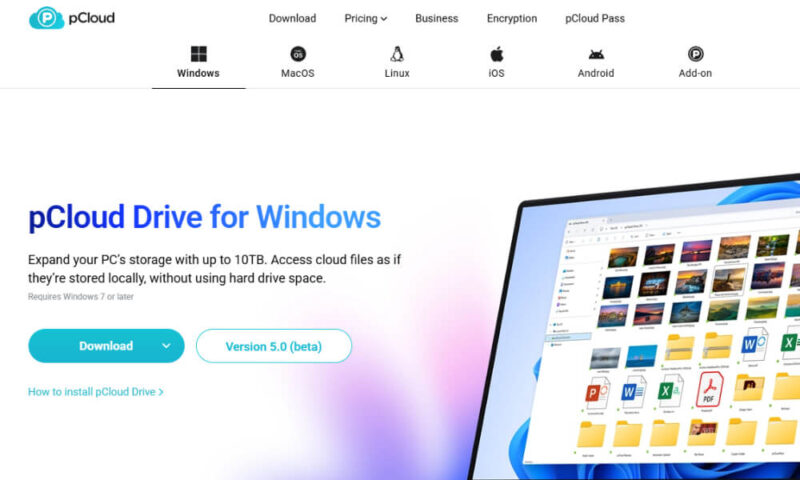
- Download pCloud
Download a cloud backup service from the website or app page. Make sure you download from official sources for the best security.
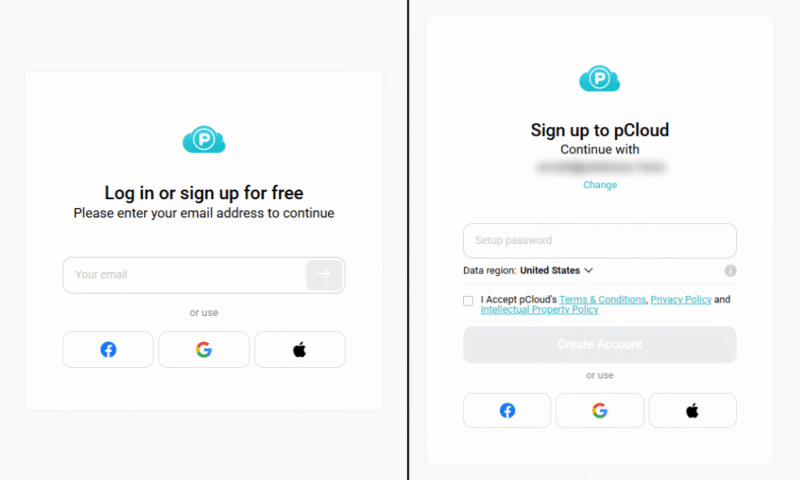
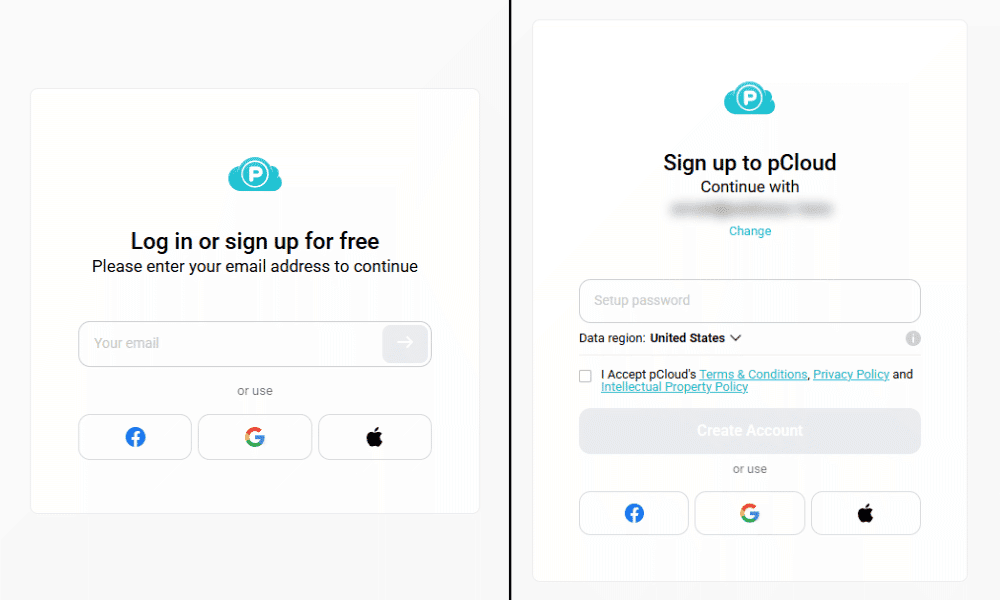
- Create an Account
Create an account with your chosen backup service. If the provider has a free plan, I recommend signing up for that first to get a feel for the service.
- Start File Backup
Open the cloud backup app and begin syncing your files. Most backup services let you choose the folders you want to back up.

Final Thoughts
Creating a backup for your audio files doesn’t have to be complicated. All of the providers on this list are great options. pCloud is my overall favorite for its cheap pricing and bundled cloud storage, but if you want client-side encryption, IDrive and Acronis are also solid choices. Google Drive is great if you want integrated collaboration tools.
What’s your current method of backing up music? Have you tried any of the providers on this list? Which one seems most useful to you? Let me know in the comments, and thank you for reading.
FAQ: Best Music Cloud Backup
You can back up your music by following the 3-2-1 backup method: Store three copies of your music on two different types of storage, including at least one external solution.
A backup service is the best way to back up your music library, as it stores your music files in a safe external location. pCloud is my top choice for backing up audio files.
Yes, you can backup music to Google Drive. In fact, Google Drive is a good choice for backup audio files, especially if you want to use its advanced collaboration features.