Proton Drive vs pCloud: Cloud Service Comparison
Discover the best secure, Swiss-based cloud storage service in this Proton Drive vs pCloud comparison. I dive into their features, performance, pricing and more to help you find the best fit for your needs.


Written by Aleksandar Kochovski (Writer)
Reviewed by Valentina Bravo (Managing Editor)
Facts checked by Eugenie Tiu (Editorial Assistant)
Last Updated:
All our content is written fully by humans; we do not publish AI writing. Learn more here.
Key Takeaways: Proton Drive vs pCloud
- The main difference between Proton Drive and pCloud is that Proton Drive focuses more on privacy, while pCloud offers more features.
- If you need full client-side encryption for all your files, Proton Drive is the better choice.
- pCloud is better than Proton Drive for those who want to stream music and need ample storage space.
Facts & Expert Analysis About Proton Drive vs pCloud
- Privacy vs utility: pCloud makes some privacy concessions to provide a broader set of features, though it does offer client-side encryption as a paid add-on, while Proton Drive focuses more on ironclad privacy.
- Jurisdiction matters: Both services are headquartered in Switzerland and abide by strong Swiss and EU privacy laws.
- Ecosystem integration: Proton Drive is part of the Proton privacy suite, which includes a VPN, a password manager and encrypted email.
Proton Drive and pCloud are two of the top cloud storage platforms, and they have a lot in common. Both are based in Switzerland, offer excellent security, and let you manage and edit documents in your storage. Keep reading to learn which one wins in this Proton Drive vs pCloud matchup, and discover which service best suits your needs.
Cloudwards’ Choice: pCloud Is the Winner
 Cloudwards’ Choice: pCloud Is the Winner
pCloud’s long years of experience are on full display with its offering. Between the integrated document editor, full-featured media player and strong privacy options, it’s a complete package that is simply too hard to beat compared to Proton Drive.
Which Is Better: Proton Drive vs pCloud?
Despite their similarities, pCloud and Proton Drive have some differences, and they take varying approaches to feature implementation. Read our pCloud review and Proton Drive review if you want a more detailed look at each.
Who Is Proton Drive For?
- Privacy-minded users: Proton Drive has strong client-side privacy across all plans and can come bundled with a full online privacy suite.
- Writers: Proton Drive’s productivity apps provide everything you need to edit documents.
- Students: Students can edit documents in the cloud, easily share them for group work or grading, and rest assured that their work is encrypted.
Who Is pCloud For?
- Music fans: pCloud has music fans covered with its advanced media player.
- Content creators: The large amounts of storage space, high transfer speeds and media playback all come together to create the perfect platform for working on content.
- Freelancers and remote workers: pCloud’s document-editing capabilities, decent privacy and advanced sharing options make it a great cloud storage solution for remote work.
Our Detailed Comparison Methodology
Before putting pen to paper, we spend a week testing each cloud service with regular day-to-day use. We also run a string of rigorous technical tests and performance benchmarks, including speed and stress tests designed to push the app to its limits, and security evaluations using network inspection tools and DNS and IP analysis.
pCloud vs Proton Drive: Comparison at a Glance
| Features |  |  |
|---|---|---|
| 2TB$4.17 / month(All Plans) | 200GB – 3TB$1 / month(All Plans) | |
| Review | Review | |
| Sync Folder | ||
| Block-Level Sync | ||
| Selective Sync | ||
| Bandwidth management | ||
| Sync Any Folder | ||
| File Link Sharing | ||
| Link Passwords | ||
| Link Expiry Dates | ||
| Folder Sharing | ||
| Folder Permissions | ||
| Link Download Limits | ||
| Upload Links | ||
| File Previews | ||
| Edit Files | ||
| In-App Collaboration | ||
| Office Online | ||
| Google Docs | ||
| Notes App | ||
| Media Playback | ||
| Mobile Apps | ||
| Deleted File Retention | ||
| Versioning | ||
| WebDAV | ||
| At-Rest Encryption | ||
| In-Transit Encryption | ||
| Encryption Protocol | AES 256-bit | ECC Curve25519 |
| Client-Side Encryption | ||
| Two-Factor Authentication | ||
| Server Location | EU | EU |
| 24/7 Support | ||
| Live Chat Support | ||
| Telephone Support | ||
| Email Support | ||
| User Forum | ||
| Knowledgebase | ||
| Free Plan |
What Do Proton Drive and pCloud Have in Common?
The similarities between Proton Drive and pCloud revolve mostly around privacy and performance.
10,000+ Trust Our Free Cloud Storage Tips. Join Today!

- Demystify cloud storage terminology and key concepts in plain language
- Discover easy-to-implement techniques to securely backup and sync your data across devices
- Learn money-saving strategies to optimize your cloud storage costs and usage
End-to-End Encryption & Compliance: Which Has Better Security & Privacy?
pCloud and Proton Drive both have solid privacy policies and are incorporated in Switzerland, which means your files are protected under some of the world’s strictest privacy laws.
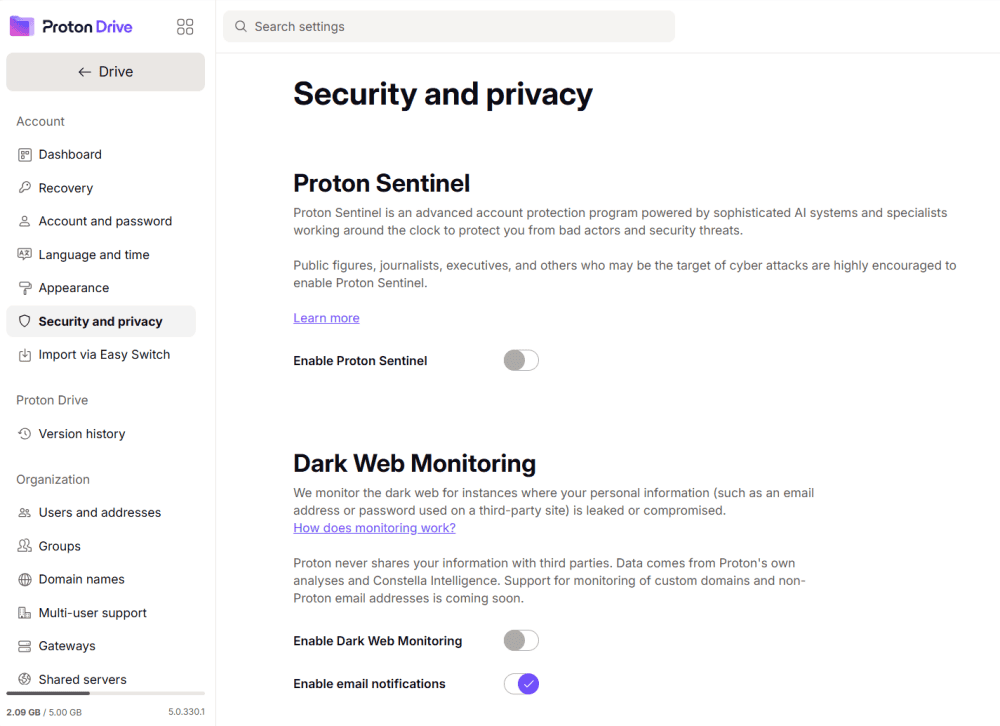
Like most services on our list of the most secure cloud storage, Proton Drive and pCloud both offer client-side encryption. This means files are encrypted on your device before being uploaded, so the provider can’t access them. Proton Drive protects all your files this way, while pCloud offers only one client-side encrypted folder as a paid add-on.
Performance & Speed for File Transfers: Which Is Faster?
Our speed test involves uploading and downloading a 5GB test folder twice over a throttled 100 Mbps connection and twice over an unthrottled 1 Gbps connection. pCloud is one of the fastest cloud services we’ve tested, but Proton Drive is only marginally slower. In real-world usage, you really shouldn’t see any difference between the two.
| Provider: | Download* | Upload* | Download** | Upload** |
|---|---|---|---|---|
| 0:06:52 | 0:07:06 | 0:02:33 | 0:02:06 |
| 0:07:11 | 0:07:15 | 0:03:48 | 0:03:20 |
**Speed average of 1 Gbps
What Are Differences Between pCloud and Proton Drive?
The key differences between Proton Drive and pCloud are their feature sets, file-sharing options and pricing.
Free, Paid & Lifetime Plans: Which Offers Better Pricing & Value?
Proton Drive is more expensive per gigabyte and offers only up to 2TB of storage, but it also can come bundled with a VPN, a password manager and other Proton services in the Unlimited plan, which offers excellent value.
- 5GB
- 200GB
- 500GB
More plans
- 2TB
- 3TB
- per user
- 1TB
- per user, minimum of 2 users
- 1TB
- 1TB
pCloud, on the other hand, is cheaper per gigabyte, even if you count the paid encryption add-on. Plus, its lifetime plans can help you save in the long run. It also comes with up to 10TB of storage, making it a better fit for media professionals.
- 10GB
- 500GB
- 2TB
More plans
- 10TB
- + FREE Encryption
- 2TB
- + FREE Encryption
- 10TB
- Price per user (minimum 3)
- 1TB
- Price per user (minimum 3)
- 2TB
- Encryption for pCloud Drive
pCloud and Proton Drive offer 10GB and 5GB of free storage, respectively. However, access to pCloud’s free storage is contingent on performing a few tasks, while Proton Drive’s free plan unlocks the full 5GB from the get-go.
File Sharing & Collaboration: Which Is Best for Teams?
pCloud wins handily for file-sharing. Proton Drive covers just the bare minimum, with sharing links, email invites and basic permissions (editor or viewer).
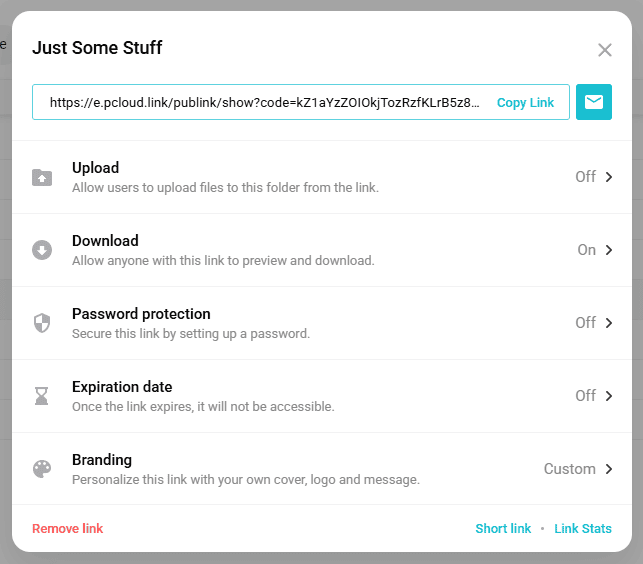
pCloud’s collaboration tools, on the other hand, include secure link sharing with password protection, expiration dates and download prevention, upload links for folders and even custom branding. It’s a no-brainer — if you need to share files, pCloud is your best bet.
Which Is Easier to Use: Interface & User Experience
Proton Drive definitely has pCloud beat in terms of user interface design. I found it much better-looking than pCloud, and the relative lack of customization is better for usability.

Although pCloud’s app looks worse and is more complicated, it gives you more freedom, making it a better fit for power users. The mobile app experience is fairly similar for both services.
The Verdict: Why We Think pCloud Wins Overall
Although Proton Drive puts up a strong fight, I often find it hard to recommend because of its low storage cap. Proton Drive might be better for privacy, but pCloud still offers client-side encryption and more than makes up for it as a paid add-on with its strong performance, affordable plans and broad feature set.
Do you agree with my choice of winner? Do you prefer Proton Drive or pCloud? Have you had any experience with either of these services? Drop your answers in the comments below, and as always, thank you for reading.
What Other Services Should You Consider?
If neither pCloud nor Proton Drive scratches the itch, try one of these alternatives.



- 1
- :
- :
- :
- :
- 2
- :
- :
- :
- :
- 3
- :
- :
- :
- :
- 4
- :
- :
- :
- :
- 5
- :
- :
- :
- :




FAQ: pCloud vs Proton Drive
No, Proton Drive is not better than pCloud for most users, as its sharing is more basic and its document editors are not fully fleshed out yet.
Yes, pCloud is actually secure, thanks to employing client-side encryption and adhering to Swiss privacy laws.
Yes, you can transfer files from pCloud to Proton Drive by downloading them from pCloud and then uploading them to Proton Drive.