Best Mac Password Manager in 2026: Manage Passwords with Ease
iCloud Keychain gives Mac users basic features mainly for personal use. However, you may need a dedicated password manager for business use and for advanced capabilities. We researched multiple providers to identify the best Mac password manager.



Written by Grace Micere (Writer)
Reviewed by Brett Day (Writer, Editor)
Facts checked by Simona Ivanovski (Fact-Checker, Formatter)
Last Updated:
All our content is written fully by humans; we do not publish AI writing. Learn more here.
Key Takeaways: These Are the Best Password Managers for Mac
- Proton Pass — Best privacy-focused password manager for Mac
- 1Password — Best Mac password manager overall
- Dashlane — An ideal enterprise password manager for Mac users
- Bitwarden — The most secure password manager for macOS users
- RoboForm — Offers robust form-filling and password management tools for Mac
- NordPass — An simple password manager for Mac
Facts & Expert Analysis About Mac Password Manager
- 2FA popularity is growing: More than 80% of people around the world are familiar with two-factor authentication, which is a key security feature of password managers.1
- Apple’s Passwords app: Apple launched its dedicated password manager, called Passwords, in June 2024 to compete with other third-party password managers.2
- Password reuse is rampant: As many as 85% of people reuse passwords across multiple websites, while 58% rely on memory to recall credentials.3
Password managers are tools for creating strong passwords, safely storing login credentials and securely sharing them with loved ones and colleagues. The best password managers offer more robust security and password management features than iCloud Keychain. In this guide, we’ll discover which third-party platform is the best Mac password manager.
We tested multiple password managers and narrowed it down to this list of the six best password managers for Mac users. They’re simple to set up and use on Mac, and they integrate seamlessly with Apple devices. We know you’re eager to learn more, so let’s jump in.
-
07/24/2024 Facts checked
We have rewritten our guide to the best Mac password manager to include current information about features and pricing.
Why Use a Mac Password Manager vs iCloud Keychain?
Using a dedicated password manager is better than using iCloud Keychain because you get a dedicated dashboard for managing all your credentials. You can save your personal data separately from your business data with a password manager. If you’re undecided on which third-party tool to choose, our password manager comparisons highlight the pros and cons of the best Mac-compatible options.
Cloudwards’ Choice: Proton Pass
After careful comparison, our team thinks that Proton Pass is the best Mac password manager that secures your passwords, usernames, web addresses and metadata. It’s open source, end-to-end encrypted, and protected by Swiss privacy laws. We also love the built-in “hide-my-email” aliases feature, which lets you generate burner email addresses when signing up for services.
At a Glance: Comparing the Best Mac Password Managers
| Features: |  |  |  |  |  |  |
|---|---|---|---|---|---|---|
| Free Version | ||||||
| AES-256 | ||||||
| Zero-Knowledge | ||||||
| MFA | ||||||
| Encrypted Storage | ||||||
| Password Sharing | ||||||
| Emergency Access |
What Are the 6 Best Password Managers for Mac?
The six best password managers for Mac are user-friendly, secure and loaded with advanced security features that safeguard your data. They are compatible with macOS and other Apple devices, making them ideal for Apple product users. Let’s take a closer look at each of our recommendations.
- 1
- :
- :
- :
- :
- :
- 2
- :
- :
- :
- :
- :
- 3
- :
- :
- :
- : iOS & Android
- :
- 4
- :
- :
- :
- : Android, iOS
- :
$1.65 / month(All Plans) - 5
- :
- :
- :
- :
- :
- 6
- :
- :
- :
- :
- :
1. Proton Pass — Best Privacy-Focused Password Manager for Mac

open-source transparency and full metadata encryption.
Proton Pass tops our list as the best privacy-focused password manager for Mac users. It secures your passwords, usernames, web addresses and metadata with AES-256-GCM encryption. The codebase is fully open source under GPLv3, and it has undergone a comprehensive independent security audit by Cure53.
The built-in “hide-my-email” aliases feature lets you generate burner email addresses on the fly, protecting your real inbox from spam and data breaches. Proton Pass also supports passkeys natively across devices, includes a built-in TOTP authenticator on paid plans and recently rolled out emergency access for up to five trusted contacts.
Proton Pass Hands-On Testing
We tested Proton Pass on macOS and didn’t encounter any issues. Overall, it is very user-friendly and intuitive, offering a smooth experience on both mobile and desktop. Safari and Mac compatibility has grown remarkably robust, with seamless Touch ID integration and simple setup.
However, a notable frustration for Apple users is the lack of a dedicated Apple Watch app. Another common complaint is that the offline mode and the integrated 2FA authenticator are locked behind the paid tier, though the free plan remains one of the most comprehensive out there.
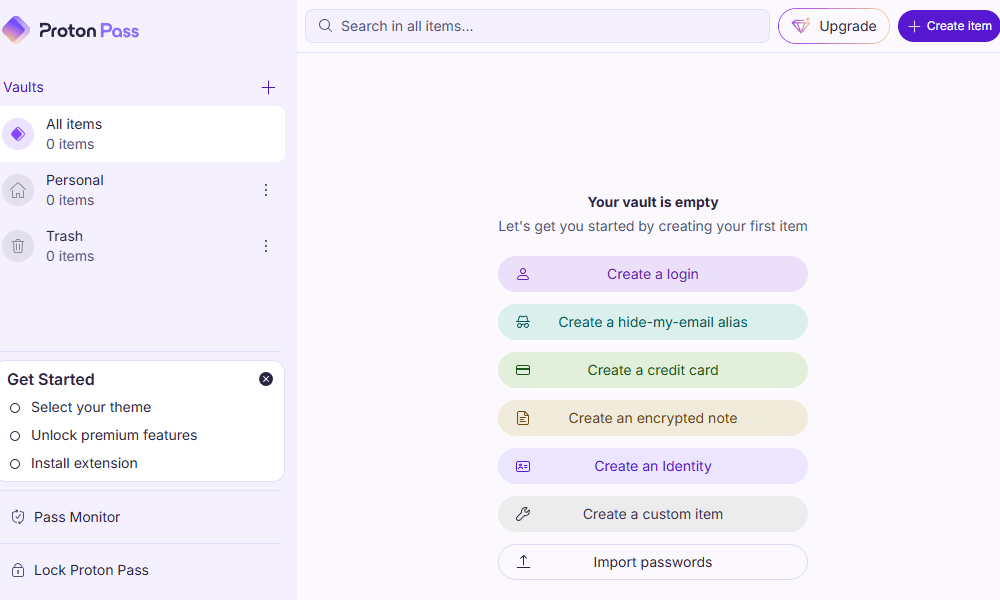
sharing directly from the Proton Pass desktop app.
Proton Pass Pricing & Value
Proton Pass has a generous free plan, with no restrictions on the number of passwords, logins or credit cards you can save, and you can also create up to 10 email aliases. Paid plans start at $2.99 per month for 12 months. All paid plans include a 30-day money-back guarantee. Our Proton Pass review has more details.
More plans
- Includes Pass, Mail, Calendar, VPN & Drive
- Price is per user, 3 users minimum
- Price is per user, 3 users minimum
- Price is per user, 3 users minimum
2. 1Password — Best Mac Password Manager Overall

it’s affordable, user-friendly, secure and loaded with features.
1Password remains one of the best password managers for Mac because it’s user-friendly, secure and loaded with features, though it barely misses out on the top spot due to Proton Pass’s superior privacy architecture and more generous free offering.
When activated, the travel mode feature protects your passwords in hidden vaults as you cross borders. Email masking protects your email address as you browse online and sign up for services. 1Password is easy to use, affordable, secure and well tiered to cater to individuals, families and businesses of all sizes.
1Password Hands-On Testing
1Password’s interface is intuitive and simple to navigate. It’s easy to set up and run on a Mac. You can easily set up a Safari browser extension and autofill your login information on most websites. However, 1Password lacks live and phone chat support, which makes it more challenging to get immediate help.
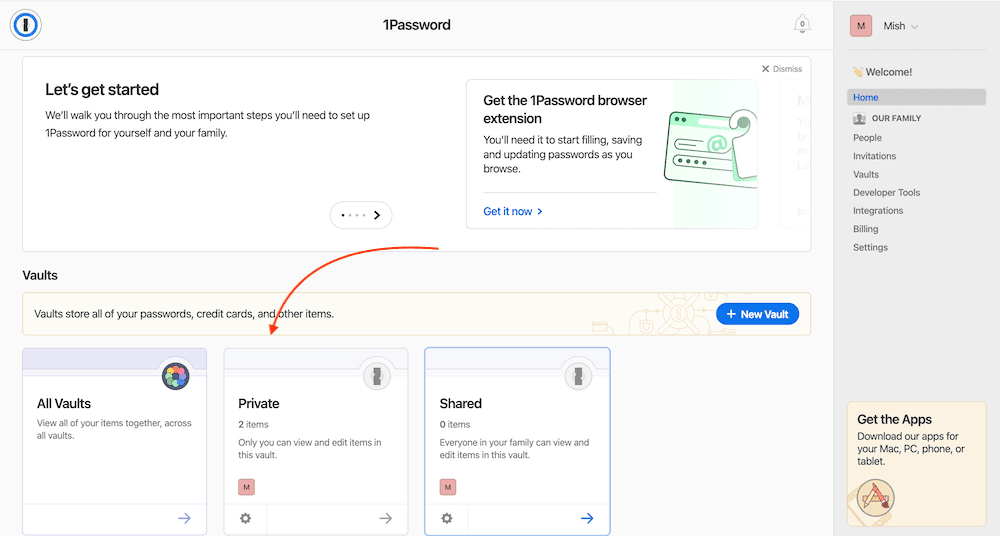
at a glance on your vault homepage.
1Password Pricing & Value
Although 1Password has no free plan or money-back guarantee, you can try 1Password with its 14-day free trial on any plan: Individual, Families, Teams Starter Pack and Business. The Teams Starter Pack, which costs $1.66 per month and protects up to 10 team members, is the most popular plan. Our 1Password review has more details.
- Unlimited storage, 1GB document storage
- Up to five users, Up to 5 additional guests
- up to 10 users per month; Actionable security alerts; Domain Breach Report
- per user per month; Includes Teams Starter Pack, plus: Integrates with Okta, Entra ID, OneLogin, Duo, and more; Advanced reporting, granular admin controls, end-to-end encryption; Friendly, expert phone support
3. Dashlane — Best Enterprise Password Manager for Mac

but it is user-friendly, secure and packed with features.
Dashlane lets you save unlimited passwords and add unlimited devices. You can share unlimited passwords, two-factor authentication tokens and secure notes with loved ones who have Dashlane accounts. Dashlane helps you create secure passwords and identify weak or duplicate passwords that need replacing.
A free VPN is available to all Dashlane users except those on the Premium plan. Phishing alerts and dark web monitoring help you quickly identify compromised credentials. However, the emergency access procedure is awkward and inconvenient, as it requires you to have the account holder’s password and a file with their credentials. Still, it’s a good feature to have.
Dashlane Hands-On Testing
Dashlane is easy to use and allows you to quickly sign up using your Apple ID. The apps and web versions have a similar flow, making the tool easy to navigate across devices. You can download the Dashlane app from the Apple app store or use the Safari browser extension. You can also export existing passwords from iCloud Keychain, provided you have Keychain access.
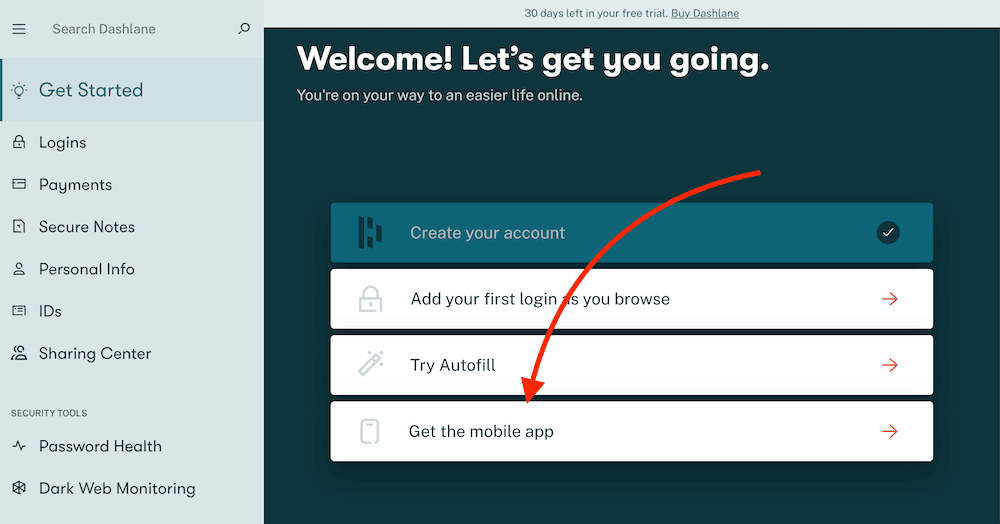
Dashlane Pricing & Value
Dashlane has a free tier that’s limited to one device and 25 saved passwords. A 30-day money-back guarantee covers all paid plans. A 30-day free trial and a 14-day free trial are available for Premium and Business plans, respectively. We recommend you try the Dashlane Premium plan, which costs $32.52 per month, billed annually. Our Dashlane review has more details.
- One device at a time, 25 passwords and login details, Autofill fields, Password Generator, Set up account without a master password
- Billed annually, Unlimited devices, Unlimited passwords & passkeys , Secure sharing, Dark Web Monitoring, VPN for WiFi protection, Real-time phishing alerts, Passwordless login (currently new mobile users only)
- Billed annually, 10 accounts, 1 subscription, Everything in Premium
More plans
- Per user/month; Price is billed annually; Safeguard employee access with unlimited passwords, passkeys, and group sharing; Streamline security controls with an intuitive Admin Console and customizable policies; Integrate with your tech stack, including SSO, SCIM provisioning, and SIEM tools
- Per user/month; Price is billed annually; Enjoy everything in Password Management plus Credential Protection: Get proactive intelligence to uncover risk and prioritize mitigation; Respond to risk in real time with smart, in-context employee alerts; New! Add additional phishing protection with AI phishing alerts
4. Bitwarden — Most Secure Password Manager for Mac

We consider Bitwarden to be one of the most secure password managers because it uses open-source technology. That means it receives multiple updates from independent developers, which can help prevent data breaches. You get a password generator and can add email aliases to your Bitwarden account, share encrypted files and store notes, identities or credit cards.
Bitwarden offers biometric support to access vaults. It also offers customer support options such as a help center, a knowledgebase, forums and email support. Bitwarden’s interface is not as intuitive as other password managers, making it better for more experienced users, but you’ll learn how to navigate efficiently after a while.
Bitwarden Hands-On Testing
We found Bitwarden to be simple to set up on the Mac operating system. It’s easy to find what you’re looking for on the interface once you get used to it. The password generation feature lets you create unique passwords to protect your accounts. Additionally, you can import your passwords from iCloud Keychain and install browser extensions with a few clicks.
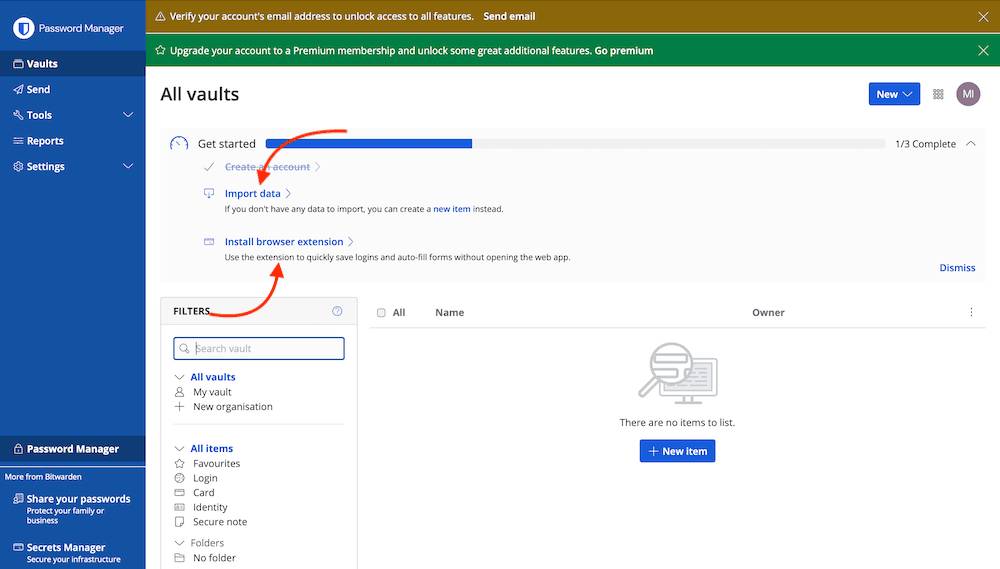
Bitwarden Pricing & Value
Bitwarden’s free plan lets you add multiple Apple devices to two user accounts. A seven-day free trial is available for Families, Teams and Enterprise plans. A 30-day refund policy applies to all paid tiers as well. We suggest trying Bitwarden’s Premium version — which costs less than $1.65 per month (one-year plan) per month, billed annually — offers the best value for the money. Our Bitwarden review has more details.
- Unlimited storage, Multi-device sync, 2FA
- 1GB of encrypted file storage, Additional 2FA options, Password health reports, Priority customer service
- Billed annually, Six accounts
More plans
- Billed annually,Per user, includes all premium features
- Per user, includes all premium features and families plan for all users,
5. RoboForm — Best Form-Filling Password Manager for Mac

RoboForm is best known for its extensive form-filling capabilities, which automatically fill out online forms so you don’t have to. It offers secure password sharing, robust password generation and passkey support. It also identifies weak passwords and alerts you if it finds your credentials in a data breach.
Additionally, RoboForm backs up your account data in the cloud so you can restore it from any device. It has a zero-knowledge policy, so your master password is not stored anywhere on its servers. You can access RoboForm from all your devices, but only with paid plans. You can learn more in our RoboForm review.
RoboForm Hands-On Testing
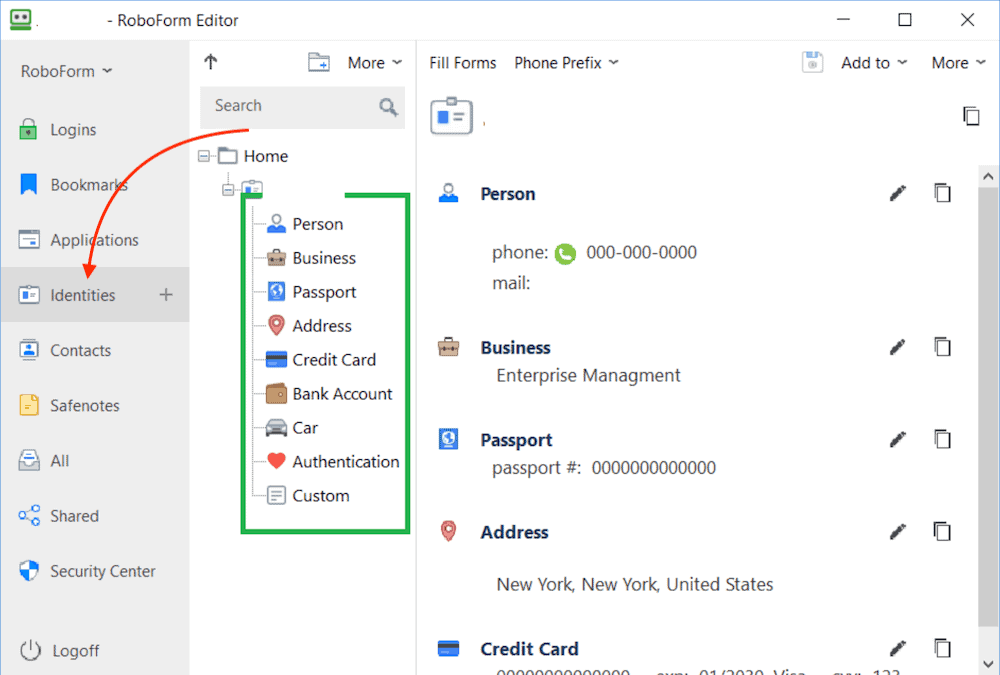
Unfortunately, RoboForm’s interface isn’t as easy to navigate or as light and airy as its competitors. Therefore, it is more complex to use and harder to find what you need. That said, the form-filling feature works effectively on multiple types of online forms. We also liked how easy it was to see all our saved credentials by clicking the “identities” tab.
RoboForm Pricing & Value
RoboForm’s free version gives you one user account and lets you save unlimited passwords. The paid tiers include Premium, Family and Team & Business. We recommend trying RoboForm Premium, which costs $1.66 per month, billed annually. All paid plans except Team & Business have a 30-day money-back guarantee. A 14-day full-feature trial is available for the Business tier.
- Free forever
- Five users
- *Price per user
6. NordPass — Best Free Password Manager for Mac

NordPass is one of the easiest password managers to use. It offers robust security features, allowing you to secure your password vault using biometric authentication and your master password.
The free tier offers unlimited password and passkey storage, a password generator, autofill, biometric vault access, secure notes and automatic sync across devices. NordPass’ multi-factor authentication (MFA) options include security keys and backup codes, and it works with authenticator apps like Google Authenticator, Authy, Microsoft Authenticator and others.
NordPass Hands-On Testing
Luckily, NordPass has a friendly user interface; everything is easy to find. With a few simple steps, you can set up and customize your password vault. The free version offers basic features; you’ll have to upgrade to Premium to unlock features like dark web monitoring, email masking and password health scores.
NordPass Pricing & Value
The NordPass free tier lets you sync passwords across your Apple devices. Paid versions include Premium, Family, Teams, Business and Enterprise. If the free plan is too simple, we recommend you try Premium, which costs $1.39 per month, billed annually. The Premium and Family plans have a 30-day money-back guarantee. Our NordPass review goes into more detail.
- *Renewal price for the 1-year plan is $35.88; and $80.73 for the 2-year plan.
- *Renewal price for the 1-year plan is $71.88; and $143.76 for the 2-year plan.
More plans
- *Teams is for 10 user pack only. Price is for 10 users.
- *Business & Enterprise starts from 5 users. The price is for 5 users already.
- *Business & Enterprise starts from 5 users. The price is for 5 users already.
Can You Use a Free Password Manager for Mac?
You can use a free password manager for Mac if you only need basic password management features. However, if you need more advanced features and robust security for personal or business use, you’ll have to upgrade to a paid plan, as a free Mac password manager won’t offer enough power user tools.
What Are the Best Free Password Managers for macOS?
The best free password managers for macOS are secure and offer a slew of features to help you take charge of your credential storage, sharing and usage.
- Proton Pass: Proton Pass Free gives you one user account with unlimited password storage, unrestricted cross-device syncing and up to 10 email aliases and a password generator.
- Bitwarden: Bitwarden Free gives you two user accounts, two collections, password storage and multiple device capabilities.
- NordPass: NordPass has a free version that offers one user account with unlimited password storage, biometric vault access, MFA and automatic sync across devices.
- RoboForm: RoboForm’s free version grants access to one user account, with which you can save unlimited passwords on a single device.
- Dashlane: Dashlane Free offers one user account accessible on one device at a time. You can save up to 25 passwords.
- Keeper: Keeper’s free version lets you save up to 10 passwords on one user account. You can learn more in our full Keeper review.
- 1Password: 1Password doesn’t have a free plan but does offer a 14-day free trial for all its plans.
How Do I Use a Password Manager for Mac?
Using a password manager for Mac helps secure your online credentials and autofill online forms when necessary. Below are the steps you’ll follow to set up and use a password manager for Mac.
- Choose a password manager for Mac and download it from the Apple app store.
- Install the app on your Mac and click to open it.
- Sign up for the service by entering your email address and password. Some platforms also let you use your Apple ID to sign up.
- Confirm your email address and sign in to the service.
- Customize your password vault by importing passwords and saving new ones over time.
How Do I Choose the Best Mac Password Manager App?
When choosing the best Mac password manager, consider the security features the app offers. Look into how compatible the tool is with macOS as well to determine whether it will work well with the apps you use daily. Below are some additional criteria to consider when choosing the best password manager service.
- Security: Look for encryption, zero-knowledge architecture, frequent security audits, passkeys, prompt data breach notifications and biometric login options.
- Compatibility: Choose a password manager that’s compatible with most of the apps you use on your Mac and integrates with other Apple devices.
- User-friendliness: Choose a tool with an easy-to-use interface that has little to no learning curve for both its desktop and mobile apps.
- Multi-factor authentication options: To further protect your password vaults from unauthorized access, choose a service with robust two-factor authentication.
- Password generator: Pick a password manager that automatically creates complex and strong passwords each time you sign up for an online service.
- Password sharing: Look for a platform with secure password and credential-sharing features, which will allow you to share that data with friends and family.
- Encrypted file storage: Choose a tool that provides encrypted storage spaces and lets you save notes and other sensitive data.
- Password autofill: Pick a service that automatically fills in your details each time you need to complete an online form.
- Customer support: Look for a tool that offers 24/7 support with prompt responses via live chat, email, phone, text and/or ticketing systems.
- Emergency access: Choose a service that allows trusted individuals to access your vaults in case you cannot do so yourself.
- Price: Choose a tool that’s affordable and fits your password management budget.
Final Thoughts
Password managers work by saving your passwords and sensitive data in encrypted vaults for safekeeping. The best Mac password manager is secure, easy to use and accessible on all your Apple devices while offering a slew of features.
Proton Pass has earned the top spot thanks to its fully open-source codebase, independently audited security, end-to-end metadata encryption and one of the most generous free plans available. You can get started with the unlimited free plan or try Pass Plus with the 30-day money-back guarantee.
Do you use a Mac password manager, or is iCloud Keychain enough for you? Have you considered using a dedicated service? If so, which one are you eyeing? Let us know in the comments, and thank you for reading.
FAQ: Mac OS Password Manager Options
Yes, your Mac comes with iCloud Keychain preinstalled for basic personal password management.
You can see your passwords on your Mac by navigating to “system settings” and clicking on “passwords.” You’ll then use touch ID or face ID to gain access to the vault.
Apple Keychain is a good password manager for basic or personal password management. If you need advanced features, you’ll have to get a dedicated password manager.
You can access Apple’s password manager by navigating to “settings” and clicking on “passwords.” You’ll then use touch ID or face ID to gain access to the saved passwords.