Best VPN for Firestick: 7 Free & Paid Services
Streaming apps offer a wealth of content for a reasonable price, but some content is locked behind geoblocks due to licensing agreements or local censorship. You can easily access all of this content by using the best VPN for Firestick. Read on to learn more.



Written by Sapphire Fox (Editorial Assistant)
Reviewed by Sandra Pattison (Editor, Writer)
Facts checked by Simona Ivanovski (Fact-Checker, Formatter)
Last Updated:
All our content is written fully by humans; we do not publish AI writing. Learn more here.
Key Takeaways: These Are the 5 Best VPNs for Fire TV Stick
- NordVPN — The best overall VPN, with powerful unblocking capabilities and fast download speeds, starting at just $2.99 per month.
- Surfshark — An affordable provider that can access the top streaming sites with ease, with plans starting at just $1.99 per month.
- Proton VPN — The best free VPN for Fire Stick, with 10 server locations and unlimited data. Upgrade to the full paid plan for $2.99 per month.
- ExpressVPN — A premium VPN provider that’s great for beginners and offers servers in many U.S. cities, with plans starting at $3.49 per month.
- Private Internet Access — A great VPN service if you need an affordable dedicated IP, with the three-year plan going for $2.19 per month.
Facts & Expert Analysis About Using a VPN With Firestick
- Server count and speed: The best VPNs offer servers in more than 100 countries around the world, with coverage on every continent. They should also have consistently fast connection speeds to reduce buffering.
- Unblocking capability: Since the Fire Stick is primarily a streaming device, a good Fire Stick VPN will be able to access all major streaming services without issue.
- Security and privacy: It’s important to keep your data safe even while streaming. Top VPNs will hide your data from surveillance and even help protect your device from malware.
The Amazon Fire TV Stick is a great way to turn an old screen into a smart TV and access major streaming sites. However, some shows simply won’t be available in your region. In that case, you need the best VPN for Firestick. A VPN lets you change your device’s location and access TV shows and movies as if you were in a different country.
VPNs can do more than just assist with streaming. They’re ideal for privacy and security, and they can help bypass censorship. If you’re looking beyond great TV, check out our article on the best VPNs overall.
-
03/23/2022 Facts checked
Updated to change the providers to ones we deem more suitable for Firestick in 2022 and to explain in more detail why someone might want to use a VPN with Firestick.
-
09/05/2022 Facts checked
Updated Windscribe pricing: the paid plan increased to $5.75 per month from $4.08. The Build-a-Plan minimum purchase also increased to $3 from $2. Also updated Windscribe’s free data cap to 15GB due to it offering 5GB extra permanently when you tweet about the service.
-
11/02/2023 Facts checked
Updated the article to reflect ExpressVPN’s expansion of server presence from 94 to 105 countries.
-
10/01/2024 Facts checked
We updated the list to reflect the latest advancements in VPN technology and usability.
-
01/26/2025 Facts checked
Updated our VPN vendors to add PrivadoVPN as the top free service.
-
02/20/2026 Facts checked
We rewrote the article to include more information on why these are our top providers and a guide to installing a VPN on Fire Stick.
Cloudwards’ Choice: NordVPN
 Cloudwards' Choice: NordVPN
My top choice for a VPN for Fire TV devices is NordVPN. It uses a custom app that makes it easier to use with the Alexa remote, and you get access to all of NordVPN’s features, including Meshnet. In addition, it has servers in more countries than the other top VPNs, giving you more options for streaming.
What Are the Top 5 Best Firestick VPNs? Quick Comparison
Below are some of the key features of the top five VPNs so you can compare them at a glance.
- 1
- : PayPal, Credit card, Google Pay, JCB, UnionPay, Bitcoin, Ethereum, X-Coin
- : 10
- :
- :
- :
- :
Average speedDownload Speed288 MbpsUpload Speed48 MbpsLatency6 ms - 2
- : PayPal, Credit card, Google Pay, Amazon Pay
- : Unlimited
- :
- :
- :
- :
Average speedDownload Speed288 MbpsUpload Speed48 MbpsLatency7 ms - 3
- : PayPal, Credit card
- : 10
- :
- :
- :
- :
- 4
- : PayPal, Credit card, Bitcoin, UnionPay, iDeal, Sofort, Giropay, Pixpay, Sepa Direct Debit
- : 14
- :
- :
- :
- :
Average speedDownload Speed288 MbpsUpload Speed48 MbpsLatency6 ms - 5
- : PayPal, Credit card, Amazon, Paygarden, Apple Pay, Google Pay
- : Unlimited
- :
- :
- :
- :
Average speedDownload Speed234 MbpsUpload Speed46 MbpsLatency8 ms
Lab Data & Hands-On Testing
To find the best Firestick VPN, I looked at the speed, network size, streaming capability and security protocols of the best VPNs. Other than ease of use, these are the most important considerations for a VPN for Fire Stick streaming devices.
Protect Your Privacy. Get Our Free VPN Guide Now!
- Comprehend the essential role a VPN plays in safeguarding your digital life
- Gain a deep understanding of how VPNs function under the hood
- Develop the ability to distinguish fact from fiction in VPN promotions
Server Networks & Coverage
| Service: | Server Countries | Coverage Areas | Geographic Focus |
|---|---|---|---|
 | 118 | Strong coverage across Europe & the Americas | Best overall coverage |
 | 100 | Strong coverage across Europe & Asia | Strongest Asian coverage |
 | 129 | Strong coverage across Europe & Africa but poor coverage in the Americas | Best African coverage |
 | 105 | Strong coverage across Europe & the Americas but poor coverage in the Middle East & Africa | Best U.S. coverage, with 56 cities |
 | 91 | Widespread coverage but few countries covered overall | Strong European coverage |
All of these VPNs have solid coverage in Europe and the Americas but are less consistent in the rest of the world. NordVPN and Proton VPN are the best options if you need servers in the Middle East or Africa, while ExpressVPN and PIA cover many U.S. cities. Surfshark is likely the best choice overall for Asian coverage. Consult each VPN’s server list for specific countries.
Streaming Unblocking Results
| Service: | | | | | | |
|---|---|---|---|---|---|---|
| | | | | | |
| | | | | | |
| | | | | | |
| | | | | | |
| | | | | | |
A Fire Stick VPN that can’t access streaming services would be pretty useless, so I’ve focused on VPNs that can access the most popular apps. Private Internet Access struggled with Disney+ and Hulu during testing, but as a whole, these are the top VPNs for streaming.
Security & Privacy Analysis
| Provider: | VPN Protocol | Encryption | DNS Leaks | Kill Switch | Logs Policy |
|---|---|---|---|---|---|
| NordLynx OpenVPN (TCP) OpenVPN (UDP) | ChaCha20 on NordLynx, AES-256 on OpenVPN | | | Zero-logs |
| WireGuard IKEv2 OpenVPN (TCP) OpenVPN (UDP) | ChaCha20 on WireGuard, AES-256 on IKEv2 and OpenVPN | | | Zero-logs |
| WireGuard Stealth OpenVPN (TCP) OpenVPN (UDP) | ChaCha20 on WireGuard, AES-256 on Stealth and OpenVPN | | | Zero-logs |
| Lightway (TCP) Lightway (UDP) OpenVPN (TCP) OpenVPN (UDP) | AES-256 or ChaCha20 on Lightway, AES-256 on OpenVPN | | | Zero-logs |
| WireGuard OpenVPN | ChaCha20 on WireGuard, AES-256 on OpenVPN | | | Zero-logs |
I wouldn’t recommend a VPN that wasn’t secure, even for streaming. Therefore, you’ll find that all five VPNs on this list have a proven no-logs policy, strong VPN protocols and encryption like ChaCha20 or AES-256 included with the Firestick VPN apps. However, Proton VPN and PIA fall slightly behind, as neither offers a kill switch on the Fire Stick app.
What Is the Best VPN Service for Fire TV Stick?
The five best VPNs to use with a Fire TV Stick include NordVPN, Surfshark, Proton VPN, ExpressVPN, and Private Internet Access. Keep reading to learn more details about their performance.
1. NordVPN — Best Overall VPN for Fire Stick
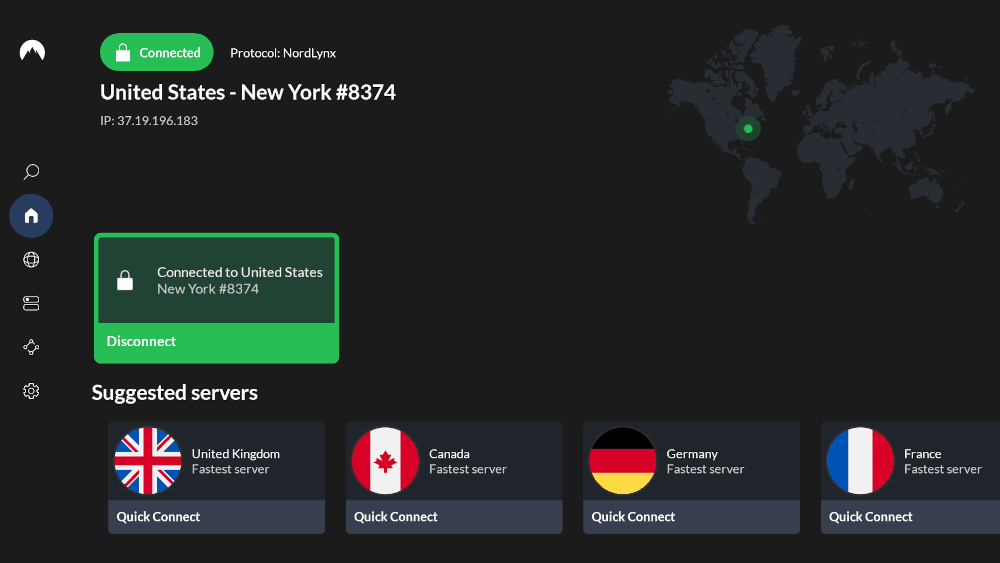
making it easier to use with a remote.



Very Fast
NordVPN is consistently one of the fastest and most reliable VPNs when it comes to streaming content, which is why it’s the best VPN for Fire TV. It also offers specialized servers that can provide extra security if you’re using the VPN for more than just streaming on your Fire Stick. Read our NordVPN review to learn more about its advanced feature set.
What Makes NordVPN Special?
NordVPN doesn’t offer its normal map layout on Fire Sticks. Instead, you’ll see an alphabetical table that’s much easier to navigate with the Alexa remote. This bespoke app is ideal for use on TVs while still offering NordVPN’s full range of features, including Meshnet, split tunneling, kill switches and more.
When to Choose NordVPN
NordVPN offers a two-year plan for $2.99 per month with three months free. Considering the speed and range of features that NordVPN offers, this is the best VPN deal overall. A 30-day money-back guarantee is available, so you can try it out without risking your money.
- **VAT may apply
- Unlimited GB
- 10
- Yes
- *The prices are charged in the first billing cycle only. Renewal prices vary.
- Unlimited GB
- 10
- Yes
- *The prices are shown only apply for the first 12 months.
- Unlimited GB
- 10
- Yes
- **The prices are applicable only for the first 24 months. Secure, high-speed VPN Threat Protection Pro™: Anti-malware and advanced browsing protection Threat Protection Pro™: Ad and tracker blocker Password manager with Data Breach Scanner 1 TB of encrypted cloud storage Identity and SSN monitoring and alerts Credit monitoring services Up to $1M in identity theft insurance Up to $100K in cyber extortion insurance
- 10
2. Surfshark — Cheapest VPN for Fire Stick
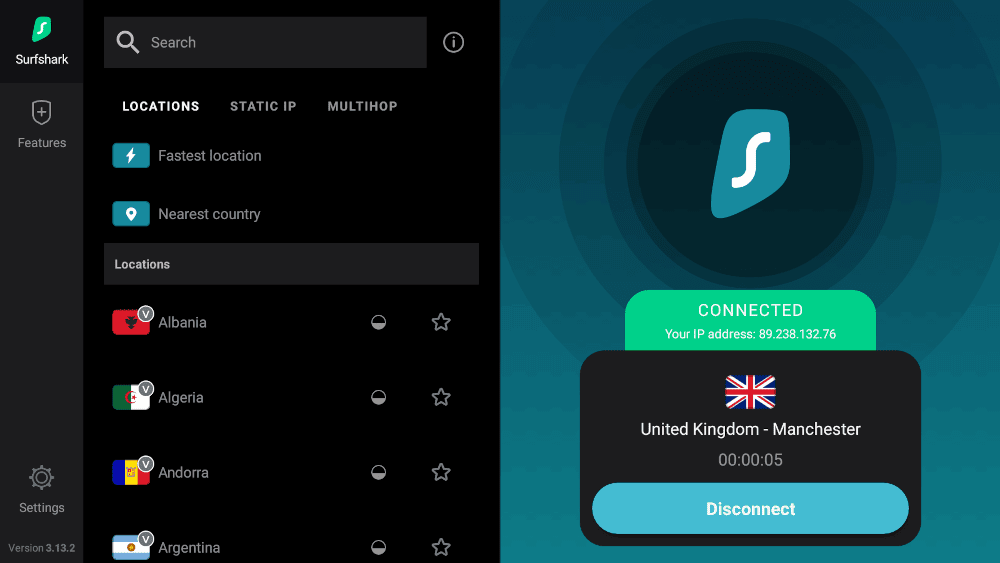
Very Fast
If you’re looking to save a buck, Surfshark is the best affordable VPN for streaming. Despite its low price tag, Surfshark can access all of the major streaming apps and is fast enough for a good experience. Check out our full Surfshark review to find out more about the service.
What Makes Surfshark Special?
Surfshark offers unlimited simultaneous connections, which is ideal for large families with lots of devices. Plus, the Fire Stick app includes CleanWeb, Surfshark’s ad blocker. CleanWeb lets you stream on more affordable, ad-supported streaming plans without disruptions.
When to Choose Surfshark
Few trustworthy VPNs are more affordable than Surfshark. Its two-year plan, which costs just $1.99 per month, is ideal if you’re on a budget but still want a good streaming experience. The 30-day money-back guarantee means you can test it out and get a refund if it doesn’t suit you.
- Unlimited GB bandwidth, Unlimited devices, Secure VPN, Ad blocker, Cookie pop-up blocker. Pricing for the annual and biennial plans only apply for the first payment. Renewal fees vary.
- Unlimited GB
- Unlimited
- Yes
- Everything in Starter, plus Antivirus protection, Identity protection, Email Breach and Credit Card Alerts, Online Alias Pricing for the annual and biennial plans only apply for the first payment. Renewal fees vary.
- Unlimited GB
- Unlimited
- Everything in One, plus Data removal Pricing for the annual and biennial plans only apply for the first payment. Renewal fees vary.
- Unlimited GB
- Unlimited
3. Proton VPN — Best Free Fire Stick VPN With No Subscription
Very Fast
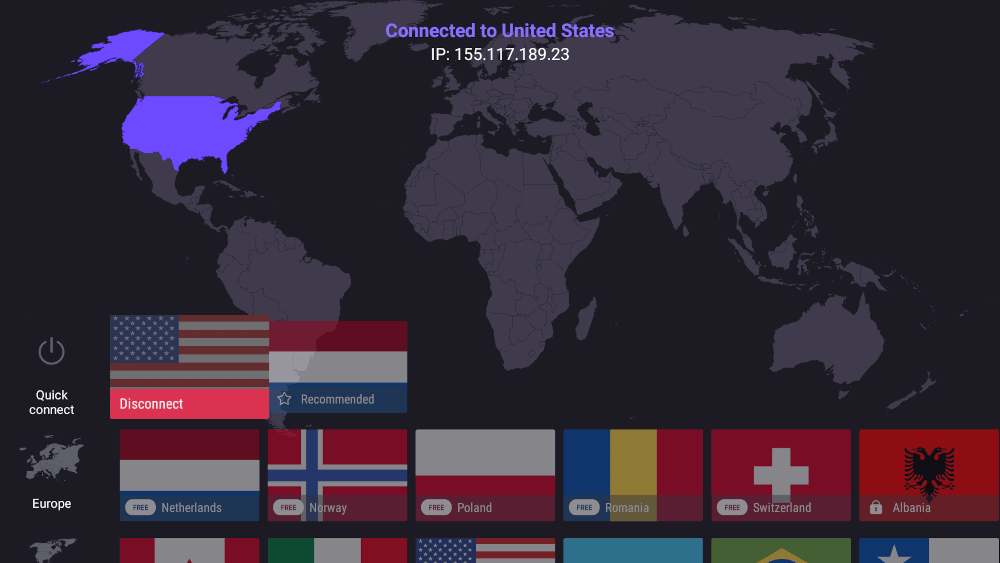
Proton VPN has earned its place as a top Firestick VPN thanks to its rock-solid performance with Amazon Prime Video and impressively consistent speeds. During our testing, Amazon Prime Video delivered “great quality with no lag,” making it ideal for the Firestick’s native streaming service.
What Makes Proton VPN Special?
Firestick remote users can easily navigate the native Proton VPN’s modern, clean interface, which feels professional but not cluttered. The paid plan unblocks Netflix, Hulu, Peacock and BBC iPlayer, but struggles with Disney Plus. Security-conscious users will appreciate the open-source apps, audited no-logs policy and Swiss jurisdiction.

When to Choose Proton VPN
Choose Proton VPN if you’re looking for a secure, affordable VPN for streaming. Paid subscriptions are cheap, starting at $2.99 for the two-year plan, and they come with a 30-day refund period. It also has an impressive free plan, but free users can’t pick specific server connections. Read our Proton VPN review to learn more.
- Unlimited GB
- 1
- Yes
- 500 GB storage 1 user 15 extra email addresses for you Support for 3 custom email domains Unlimited folders and labels Unlimited hide-my-email aliases Dedicated customer support Ultra fast and private VPN Encrypted password manager Encrypted cloud storage for photos and documents Advanced account protection
- Unlimited GB
- 10
- Yes
- **Renewal prices differ for the 1-year and the 2-year plans. Price includes all premium Proton services (Proton Mail, Calendar, Drive, VPN, Pass, & Wallet)
- Unlimited GB
- 10
4. ExpressVPN — Best U.S. VPN for Fire Stick
Very Fast
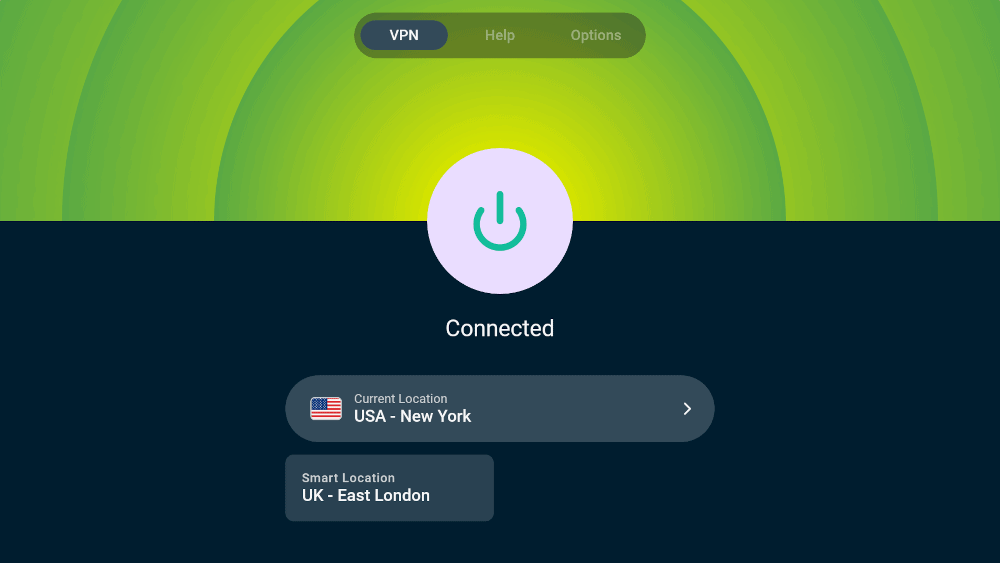
ExpressVPN’s Fire Stick app is surprisingly feature-rich. It includes a kill switch, split tunnelling, ExpressVPN Keys and the full advanced protection suite. You’ll need the Advanced or Pro plan to use some of these security tools, but I love that the native Fire Stick app includes the full feature set. Check out our ExpressVPN review to learn more.
What Makes ExpressVPN Special?
ExpressVPN has servers in 56 U.S. cities in all U.S. states, which makes it perfect if you need to connect to a specific location. This is important for bypassing sports blackouts or getting around state restrictions. ExpressVPN is also excellent for streaming content. It’s rare that you’ll face a block and have to switch servers.
When to Choose ExpressVPN
ExpressVPN isn’t the most affordable service. The cheapest subscription — the two-year Basic plan — goes for $3.49 per month. However, if you want a good streaming experience with minimal effort, pick ExpressVPN. A 30-day money-back guarantee is available if you decide it’s not for you.
- Pricing for the annual and biennial plans applies only on the first year.
- Unlimited GB
- 10
- Yes
- Advanced Protection, ExpressVPN Keys, 3 days unlimited eSIM data, Identity Monitoring, IDP Insurance, Credit Monitoring, 25-50% off on Aircove Router Pricing for the annual and biennial plans applies only on the first year.
- Unlimited GB
- 12
- Everything on the Advanced Plan, Credit Monthly Report, Data Removal, 50-75% off on Aircove Router Pricing for the annual and biennial plans applies only on the first year.
- Unlimited GB
- 14
5. Private Internet Access — Best VPN for Affordable Dedicated IPs
Very Fast
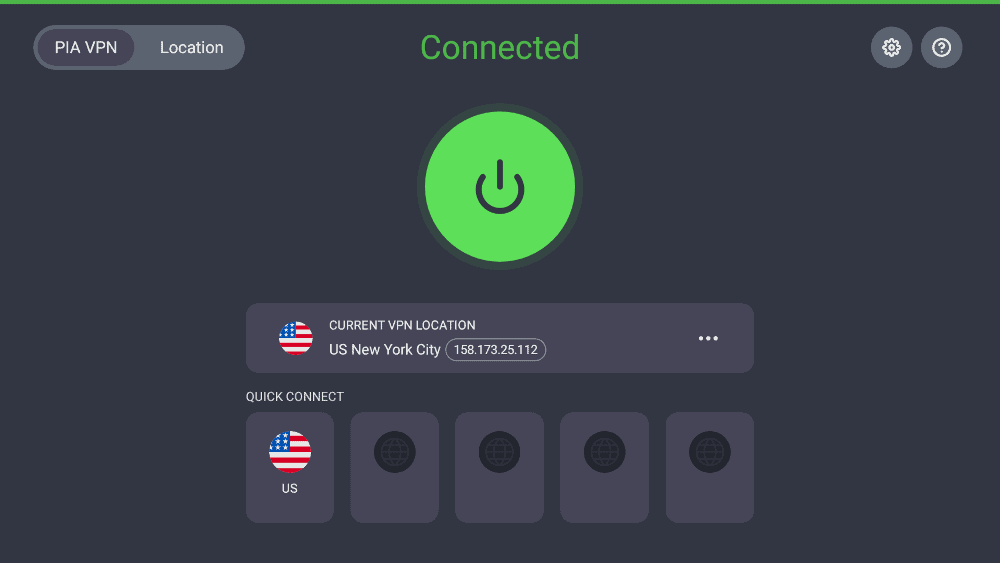
Private Internet Access is one of the most affordable VPN services. Sadly, it’s rather lacking in features, especially on the Fire Stick app. However, if you’re just looking for a simple VPN and Surfshark isn’t a great fit for you, PIA is worth looking into. Our Private Internet Access review goes into more detail about the service.
What Makes Private Internet Access Special?
PIA’s dedicated IP addresses cost only $2.50 per month on the three-year plan, which is cheaper than the other providers on this list. A dedicated IP is useful for streaming because it’s less likely to be flagged as a VPN IP and blocked.
When to Choose Private Internet Access
With the three-year plan going for just $2.19 per month, PIA is another solid budget VPN option. It also has the most affordable dedicated IP addresses, which are worth considering if you mainly stream from one location. A 30-day money-back guarantee is available if you want to try it out.
Honorable Mentions
The top five VPNs should cover most users, but they aren’t the only good VPNs available. I list two more providers worth considering below.


Are There Any VPNs I Should Avoid for Firestick?
There are plenty of VPNs that you shouldn’t use. Some are simply slow or unreliable at getting into streaming platforms, while others have major security issues or are malware disguised as a VPN. Free VPNs are often the worst offenders, but you should avoid certain paid services too. Our complete VPN warning list goes into more detail.
Can You Use a Free VPN for Amazon Fire Stick?
Although you should avoid most free VPNs, a handful are worth considering. Even the best free VPNs have limitations, though. VPNs with data limits will restrict how much you can stream, and bandwidth throttling will prevent 4K streaming. Free VPNs also usually have a limited server network, with only a handful of locations to choose from.
The best free VPNs, including Proton VPN, PrivadoVPN, and hide.me, have a dedicated app for Fire TV devices. I recommend Proton VPN because it offers unlimited data and can access most major streaming platforms. Unfortunately, it can’t access BBC iPlayer because there are no free Proton VPN servers in the U.K.
How to Use a VPN on Firestick & Bypass Geoblocks
Using a VPN on Fire TV streaming devices to bypass geoblocks is easy. I used NordVPN for the steps below, but the process is similar for most VPNs.
- Sign Up for a NordVPN Account
Go to NordVPN’s website on your mobile device or desktop and sign up for an account. Most VPNs won’t let you sign up from your Fire Stick.
- Install NordVPN on Your Fire Stick
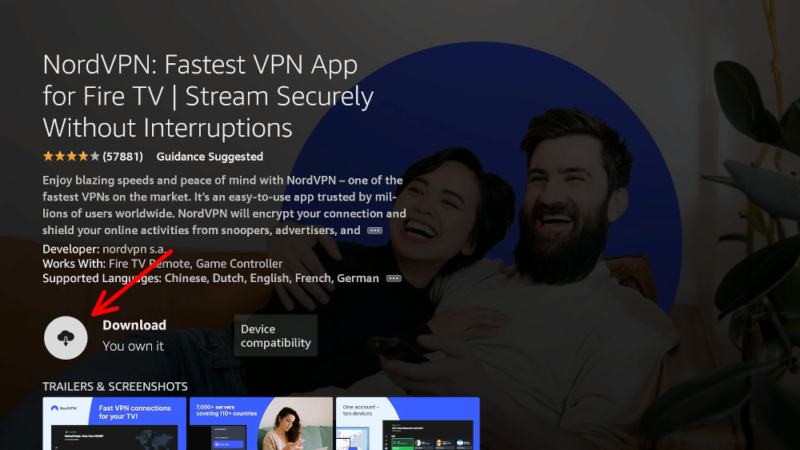
Search for NordVPN in the Amazon app store and download the app.
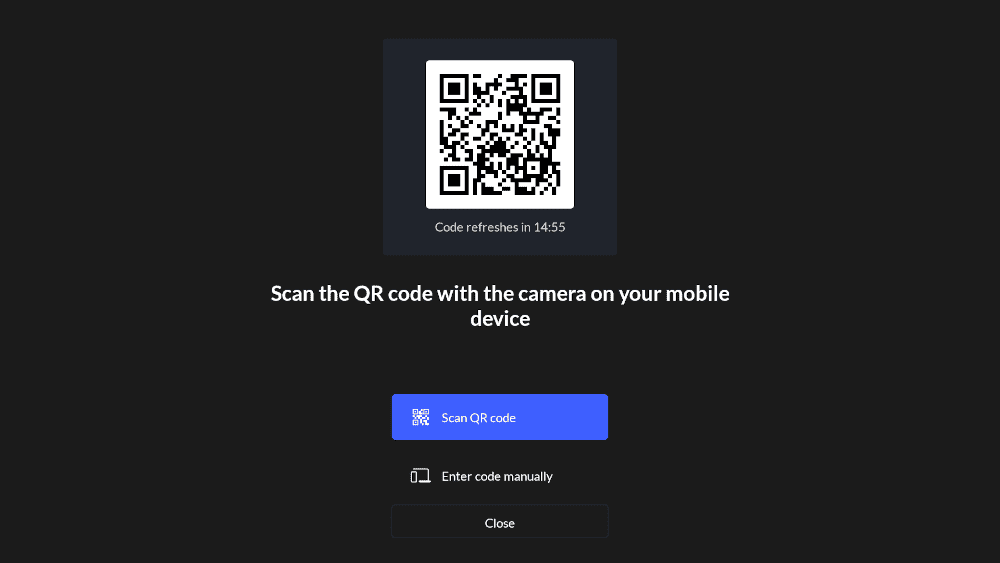
- Log In to NordVPN
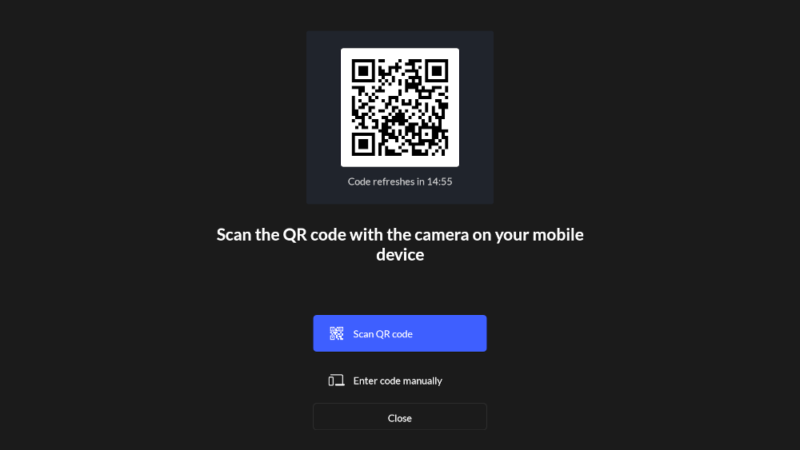
Open the app and log in to your account. You can do this by scanning a QR code and entering your details or by going to nordaccount.com/remote and entering your code.
- Choose Your VPN Server
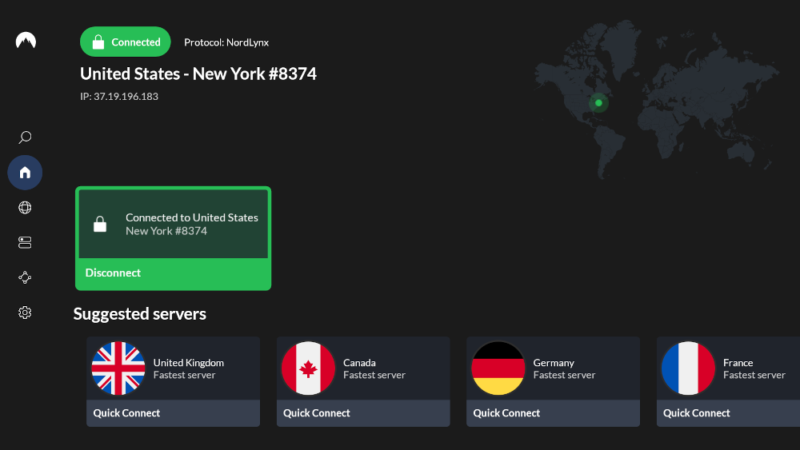
Select the country with the content you want to watch and connect to the server.

Do All VPNs Have Dedicated Firestick Apps?
Most VPNs have Fire Stick apps, and all of the providers I researched have an app in the Amazon app store. Some services, such as NordVPN, offer a unique user interface (UI) on the app for Fire TV devices to make it easier to use with a remote. However, most simply offer the Android app scaled for a bigger screen.
What If My VPN Doesn’t Have a Firestick App?
You might still be able to use your VPN even if it doesn’t have a dedicated Fire Stick app. Alternatives include installing the VPN on your router or using tools like ExpressVPN’s MediaStreamer. However, if you want the VPN app on your Fire Stick, you’ll have to sideload it.
How to Install a Firestick VPN Via an APK File
- Go to the “about” section of your “my Fire TV” settings and click on your device’s name repeatedly until developer mode is activated.
- Go to “developer options” in “my Fire TV” and turn on “ADB debugging” and “apps from unknown sources.”
- Make sure you can download files on your Fire Stick, such as by installing the Downloader app.
- Open the Downloader app and search for your VPN.
- In the browser window that opens, navigate to the VPN’s downloads page and find the APK download. It may be helpful to find this on a different device first so you know where to look.
- Follow the on-screen instructions to install your VPN from the APK file.
- Find the app in your application settings under “manage installed applications” and open it.
Should I Install a VPN on My Router?
Installing a VPN on your router instead of on your device has some benefits. You can protect all devices in the household regardless of connection limits, and the coverage can include devices that a VPN doesn’t typically support. Plus, you won’t have to reconnect every time you turn on your device.
However, setting up a VPN on your router is a lot of work, and not all VPNs can be used on all routers. Plus, you’ll have to go back into the settings every time you need to change server locations. Take a look at our guide to setting up a VPN on various routers for more information.
What’s the Best VPN Protocol for Streaming on a Firestick?
Most VPNs offer both WireGuard and OpenVPN. Of the two, I’d recommend WireGuard for Fire Stick because it’s typically faster and thus less likely to cause buffering. However, NordVPN and ExpressVPN offer their own protocols: NordLynx and Lightway, respectively. These protocols aren’t as widely tested, but they’re both reliable in my experience.
Why Do I Need a VPN for Firestick?
The main reason to use a VPN on Fire Stick is to access content from other countries. For example, BBC iPlayer is available only in the U.K., but with a British VPN server, you can watch it from anywhere. You can also use a VPN to avoid network throttling or censorship from your internet service provider (ISP).
Methodology: Testing Framework for VPNs & How to Choose
There are five key factors to consider when deciding which Fire Stick VPN to use: speed, security, server network, unblocking capability and user interface. Assessing a VPN’s UI can be pretty subjective, but the other four factors can be compared objectively.
Final Thoughts
Using a VPN to access foreign content on your Fire Stick is easy. However, it’s important to pick the right one. Considering factors like server network, speed and unblocking capability, I recommend NordVPN; you can try any plan with a 30-day money-back guarantee. NordVPN isn’t the only good VPN, though — Surfshark, Proton VPN, ExpressVPN and PIA are also worth trying out.
Have you used a VPN to access other content libraries on your Fire TV Stick? Did you use any of the VPN providers I covered in this article? Let me know in the comments below. Thanks for reading!
FAQ: VPNs for Amazon Fire TV Stick
The best free VPN for Fire Stick is Proton VPN. You can connect to only a handful of countries on the free plan, but you get unlimited data and will have no bandwidth restrictions.
Yes, you can use a VPN on a jailbroken Firestick. However, you’ll need to sideload the app if you can’t access the Amazon app store.
Yes, a VPN is worth using on Fire Stick devices. It lets you access more content from your streaming services by bypassing geoblocks.
In most countries, it’s completely legal to use a VPN on Fire Stick. However, using a VPN to access other content libraries is against most streaming providers’ terms of service. It’s very rare for accounts to be suspended for this, though.