Acronis True Image Review
Acronis True Image is one of the most capable backup and cybersecurity suites out there, but does it hold up under scrutiny? Find out whether it’s worth the high price tag in this Acronis True Image review.

— Last Updated: 2026-02-27T16:50:15+00:00 Facts checked by Eugenie Tiu
Key Takeaways: What Is Acronis True Image & Is It Good to Use?
- Acronis True Image combines traditional online backup with cloud sync and advanced cybersecurity tools.
- True Image stands out in hands-on testing for its incredibly fast speeds that outpace most competitors.
- The software is best suited for power users who can utilize all of its features and don’t mind the hefty price tag.
Top Use Cases for Acronis True Image:
- Full-system backup: True Image can back up your entire computer and create recovery media that you can use to boot up from bare metal.
- Cybersecurity and malware protection: Acronis True Image offers dedicated ransomware protection, malware detection and antivirus scanning.
- Remote workers: The file sync functionality lets you access files remotely, whether they’re in the cloud or on another computer.
Acronis True Image — formerly Acronis Cyber Protect Home Office (what a mouthful) — is very powerful PC backup software, though its steep price keeps it off our list of the best cloud backup providers. In this Acronis True Image review, I’ll share my thoughts on the service after having thoroughly tested its limits and capabilities.
-
11/18/2021 Facts checked
Cloudwards.net wrote a fresh Acronis Cyber Protect review to reflect the name changes of the backup service, plus added new images, speed tests and information on the business plans.
-
03/06/2025 Facts checked
We updated this review to refer to the product by Acronis True Image, replacing the Acronis Cyber Protect Home Office naming.
-
02/15/2026 Facts checked
We fully rewrote this review after retesting the software.
What Is Acronis True Image & Who Is It For?
Acronis True Image is a pricey bit of backup and disk-imaging software that offers one of the most capable backup tool kits on the market, including baked-in ransomware and malware protection for comprehensive cybersecurity.
- Release date: 2003
- Developer: Acronis International GmbH
- Platforms: Desktop and mobile devices
- Operating systems: Windows, macOS, iOS, Android
- Notable features: Full disk imaging and cloning, malware and ransomware protection
- Pricing: $10.42 per month (one-year plan) with 1TB of storage
The Cloudwards Expert Opinion
 The Cloudwards Expert Opinion
I wish Acronis True Image were cheaper so I could recommend it more often — that’s how good it is. It truly does everything you could want, and it’s highly polished. However, when IDrive offers almost the same service at a lower cost, it’s hard to justify the price tag just for some extra polish.
Acronis True Image Video Review

Acronis True Image Alternatives
- 1
- :
- :
- :
- :
- :
- :
- :
- 2
- :
- :
- :
- :
- :
- :
- :
- 3
- :
- :
- :
- :
- :
- :
- :
- 4
- :
- :
- :
- :
- :
- :
- :
- 5
- :
- :
- :
- :
- :
- :
- :





Features: What Can Acronis True Image Do?
Acronis True Image comes with plenty of backup features, but I’ll discuss those later on. For now, let’s look at a few unique inclusions.
10,000+ Trust Our Free Cloud Storage Tips. Join Today!

- Demystify cloud storage terminology and key concepts in plain language
- Discover easy-to-implement techniques to securely backup and sync your data across devices
- Learn money-saving strategies to optimize your cloud storage costs and usage
Cloud Syncing
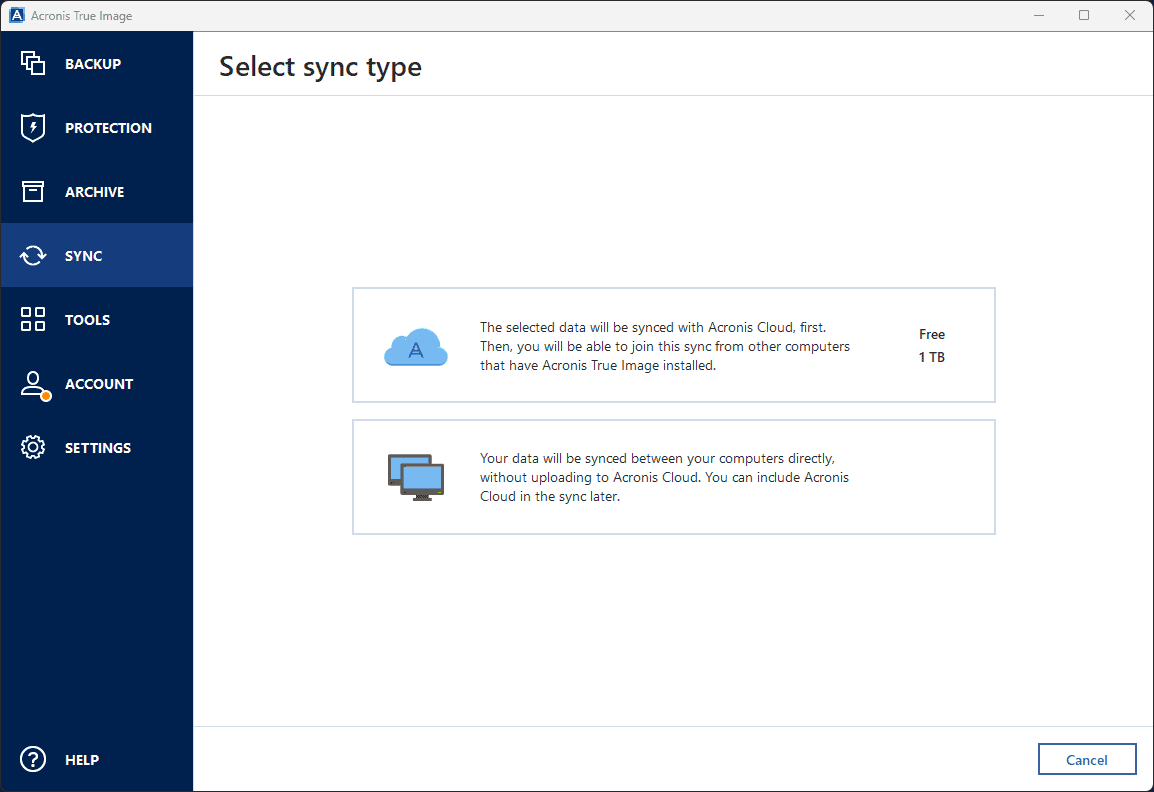
True Image allows you to sync files from your device to the cloud, like cloud storage services do, letting you access files quickly from anywhere. You can also set up syncing directly between two computers for remote access to files on other devices.
Ransomware Protection
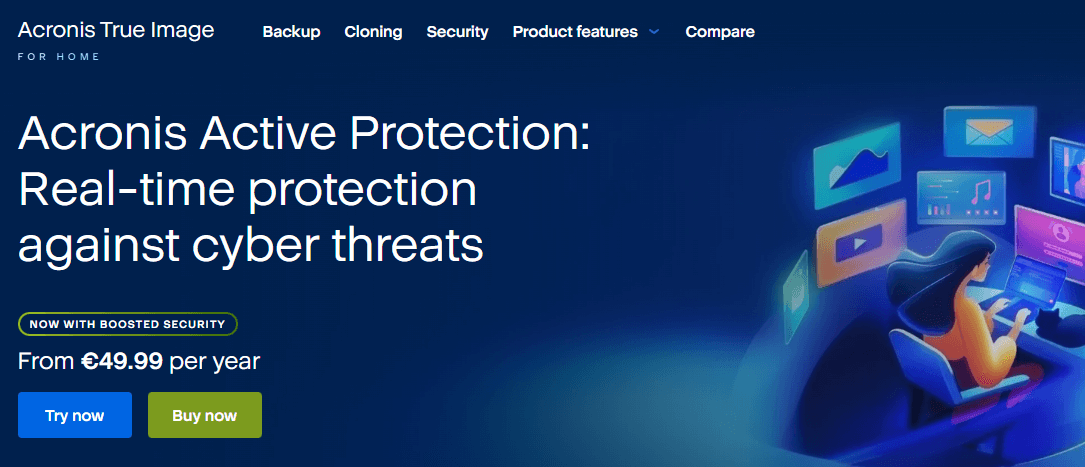
All Acronis backup products offer ransomware protection, which prevents infected files from being uploaded. This means that if you ever fall victim to an attack, you won’t have to roll your files back to an older version — you can just use the latest backup, which will always be clean.
Antivirus Scans
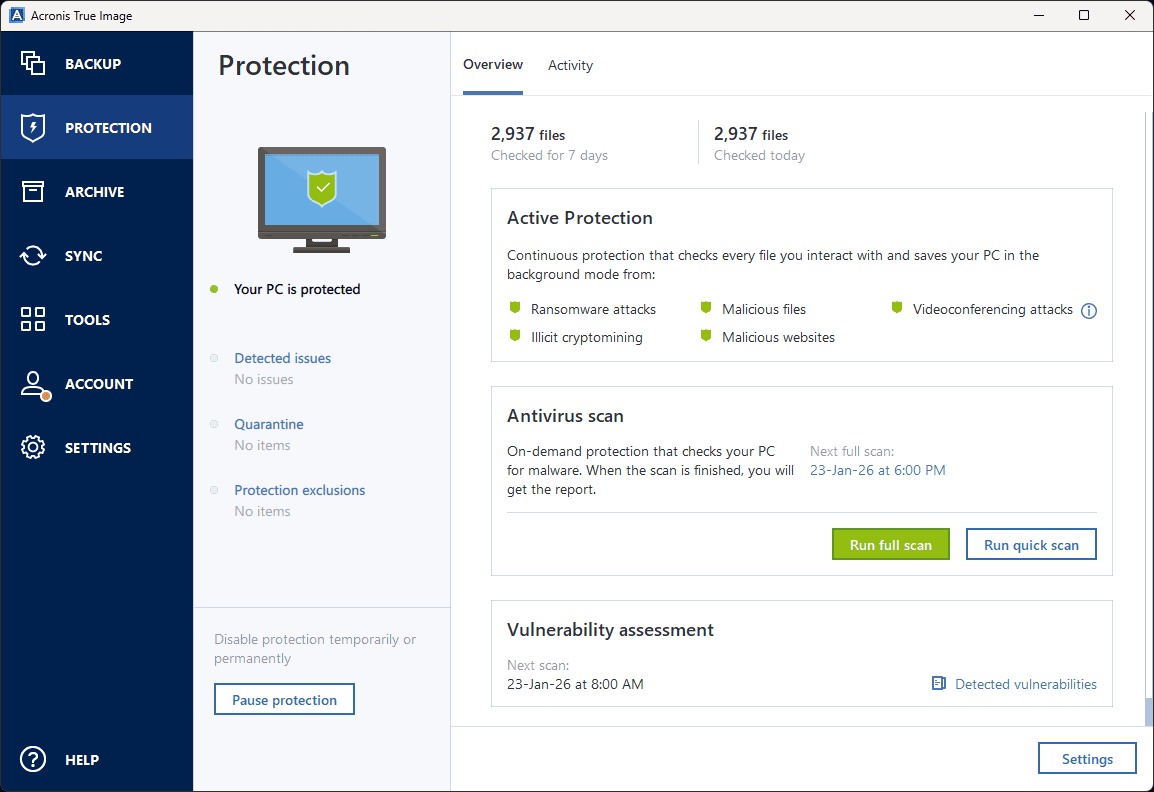
In addition to detecting malware when backing up files, True Image can scan your device for malware at any time, just like an antivirus app. You can run a full-system scan or a quick scan, and you can schedule scans as well.
Acronis Cyber Protect Features Overview
| Features |  |
|---|---|
| Backup Scheduler | |
| Continuous Backup | |
| Incremental Backup | |
| Image-Based Backup | |
| External Drive Backup | |
| NAS Backup | |
| Server Backup | |
| Hybrid Backup | |
| Mobile Device Backup | |
| Unlimited Backup | |
| Unlimited Devices | |
| Speed Throttling | |
| Block-Level File Copying | |
| Multithreaded Backup | |
| Courier Recovery Service | |
| Browser Access | |
| Mobile App Access | |
| Versioning | |
| Deleted File Retention | |
| Private Encryption | |
| At-Rest Encryption | |
| In-Transit Encryption | |
| Encryption Protocol | 256-bit AES |
| Two-Factor Authentication | |
| Hardened Data Centers | |
| Proxy Server Settings | |
| HIPPA Compliant | |
| 24/7 Support | |
| Live Chat Support | |
| Telephone Support | |
| Email Support | |
| User Forum | |
| Knowledgebase | |
| File Sharing | |
| Device Sync | |
| Free Trial |
File Backup & Restoration
True Image is one of the most customizable backup services I’ve tested, combining a wide range of features with ease of use.
Acronis True Image Backup Types
Acronis True Image gives you quite a decent selection of data backup options:
- Mobile device backup
- Whole-computer backup
- File & folder-level backup
- Blockchain-verified backup
- Cloud service backup (for Outlook or OneDrive)
- Partition and whole-disk cloning (i.e., disk imaging)
Backing Up Files & Folders With Acronis True Image
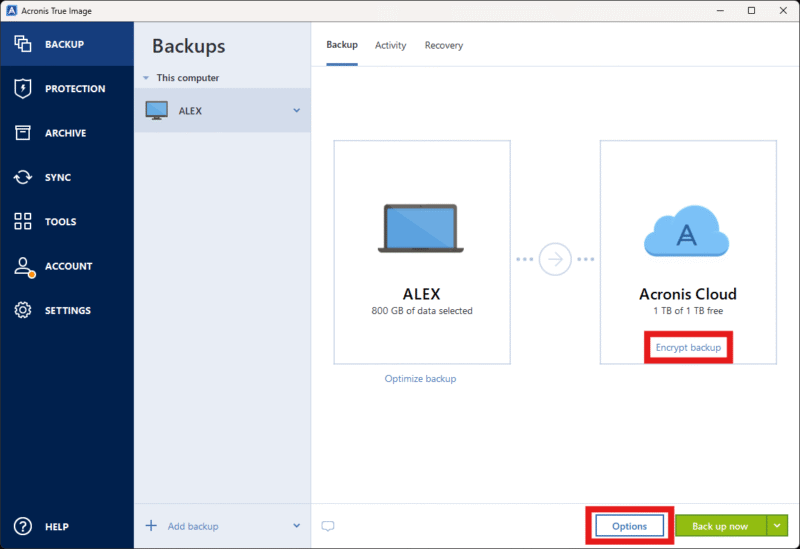
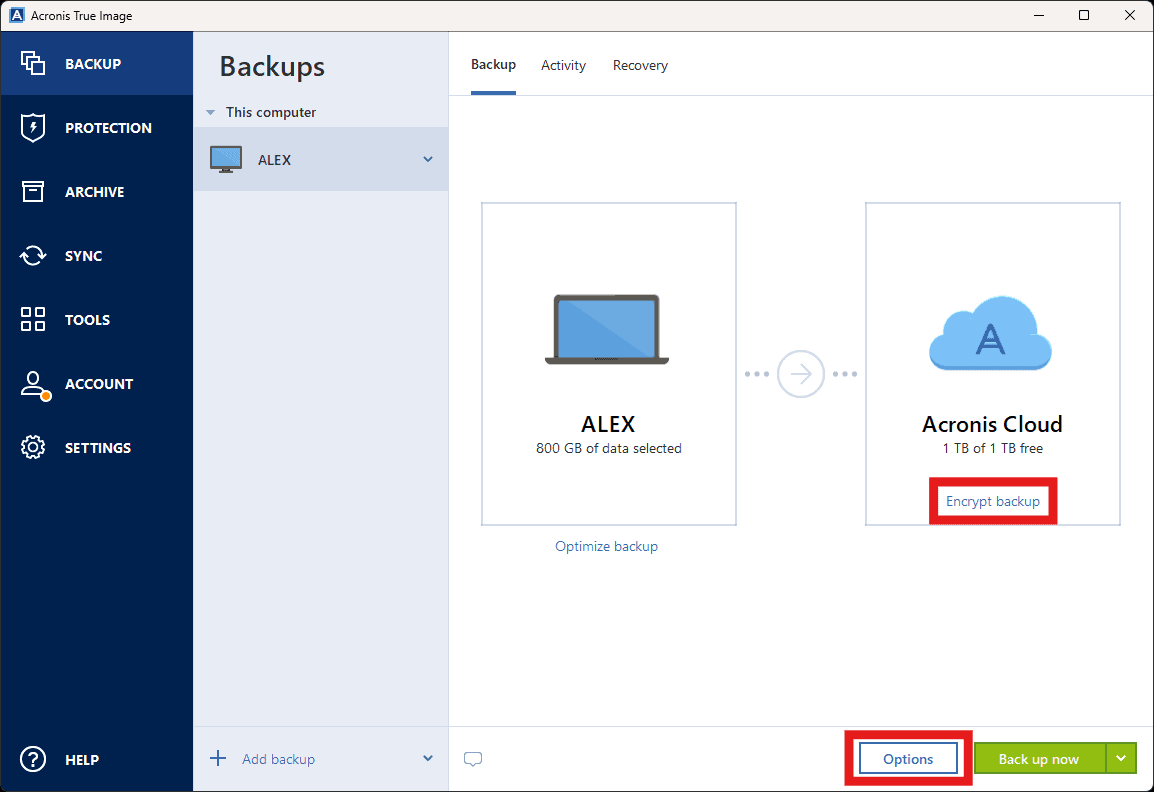
The backup process is fairly straightforward: You choose a backup type and source path, then select a destination (cloud storage is the default) and start the backup. You can edit some of the options, such as backup frequency, notifications and speed throttling, and set an encryption password.
Restoring is similarly uncomplicated, and you can even restore to dissimilar hardware. Bare-metal restores are supported as well.
User-Friendliness & Hands-On Testing
Given the number of features it offers, Acronis True Image is surprisingly intuitive and easy to use.
How to Install Acronis True Image
Installing True Image on desktop is simple. Follow the steps below to set it up in no time.
- Sign Up and Download the App
Visit the Acronis True Image website, sign up for an account and download the desktop app.

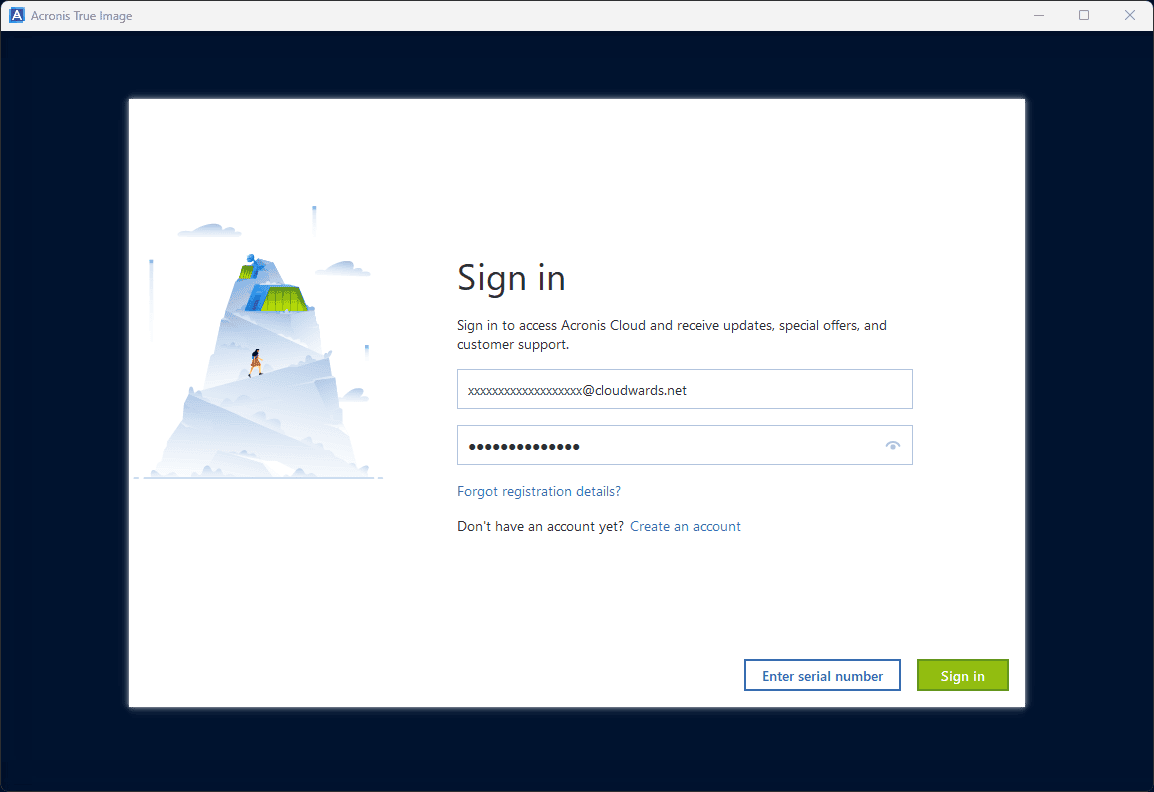
- Run the Install Wizard and Sign In
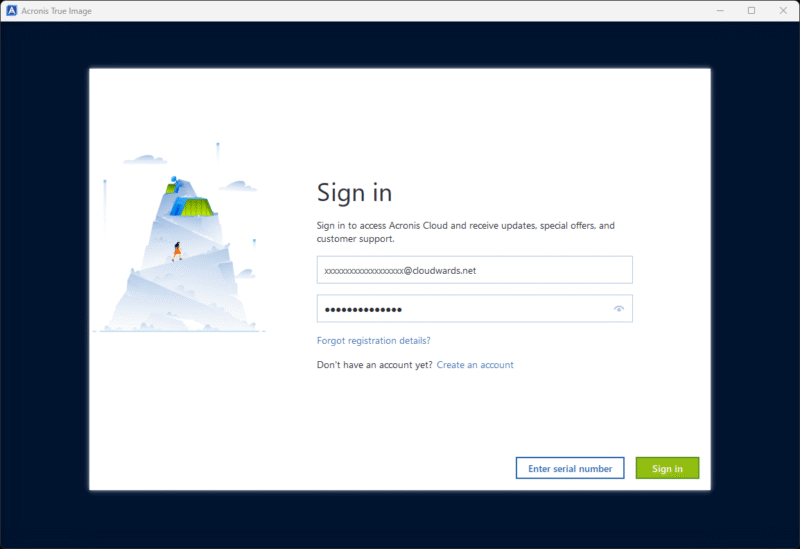
Follow the steps in the installation wizard. Once the installation process is complete, enter your login details.

How to Set Up & Use Acronis True Image
The following steps describe how to create a backup with True Image.
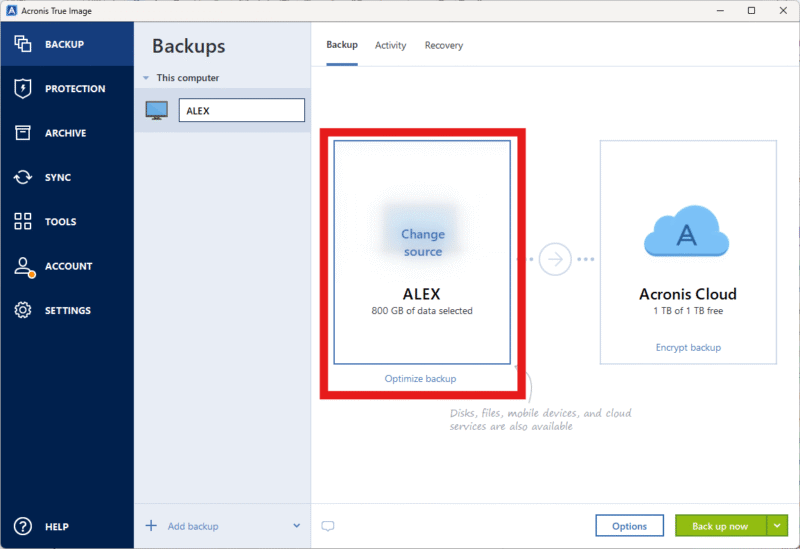
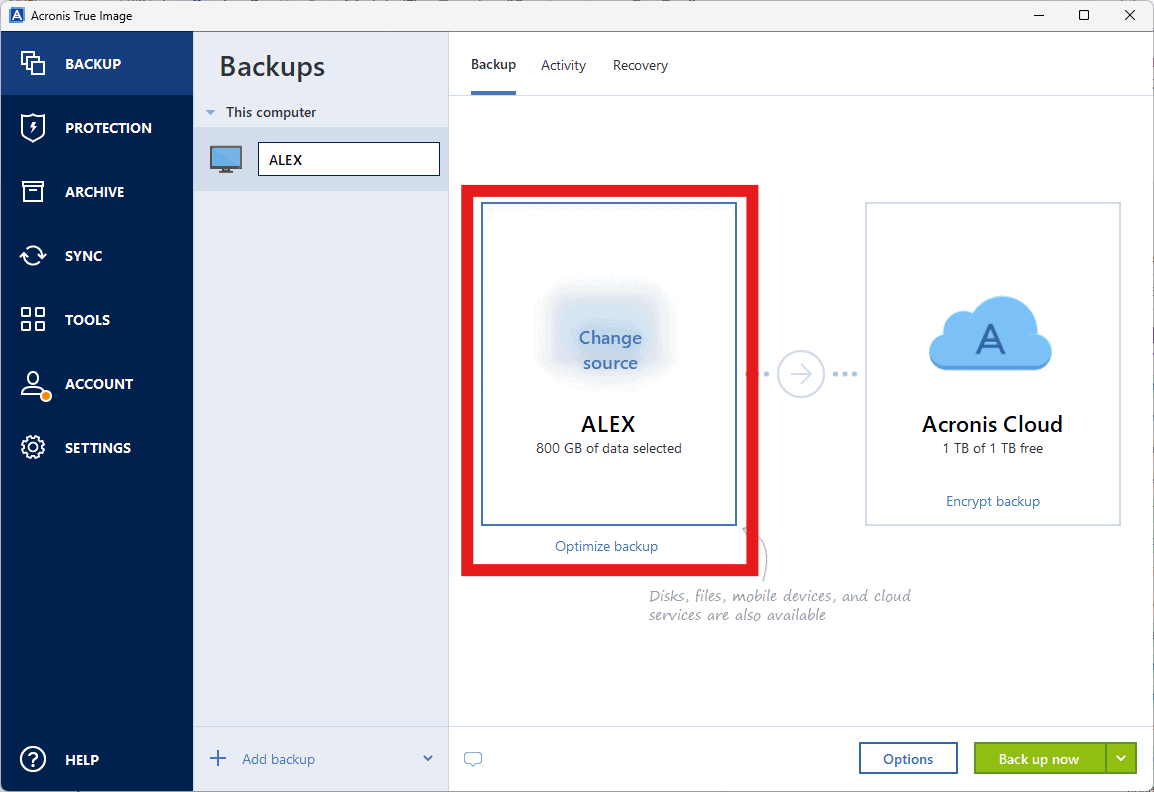
- Choose a Source
Click on “change source” to choose the source for your backup.
- Select a Backup Type
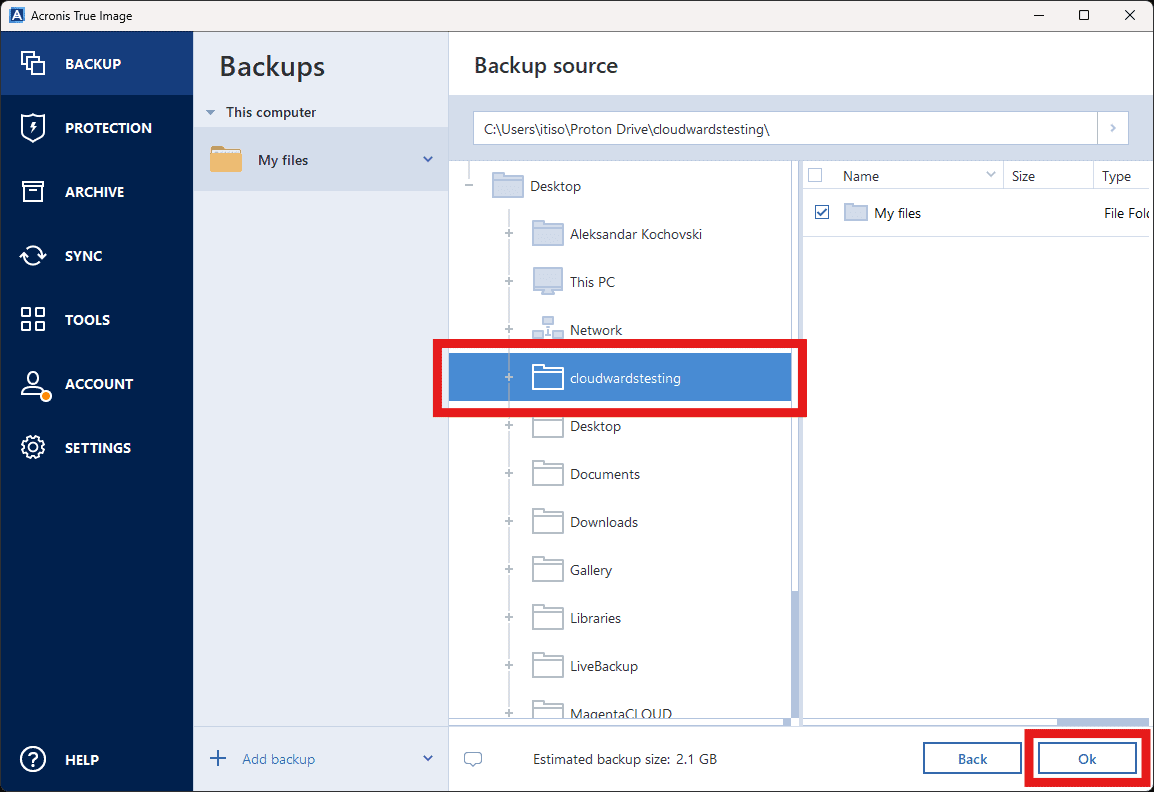
You can choose whether to back up your whole computer, a partition, a folder or a file. Select the backup type you need.

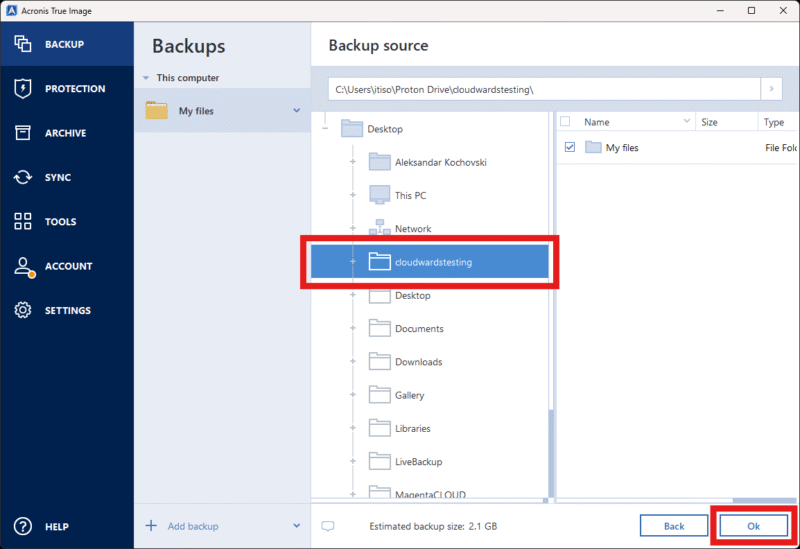
- Choose Files and Folders
Select the files, folders, partitions, disks or devices you want to back up.
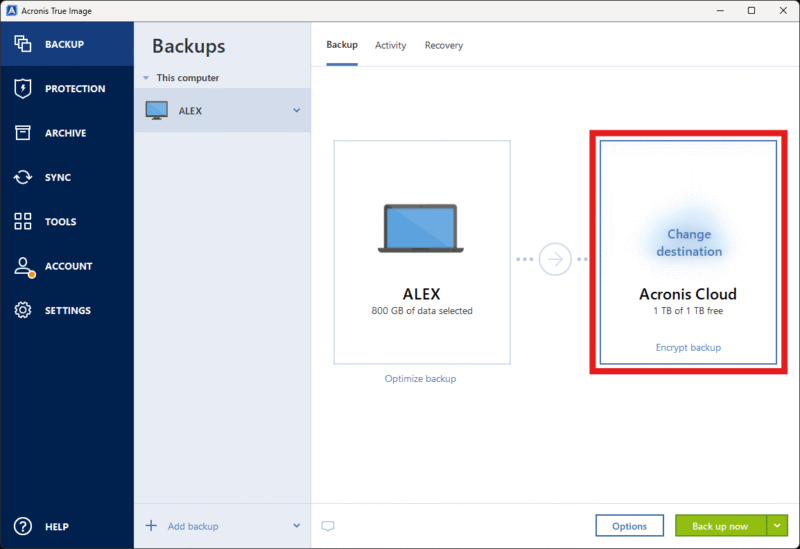
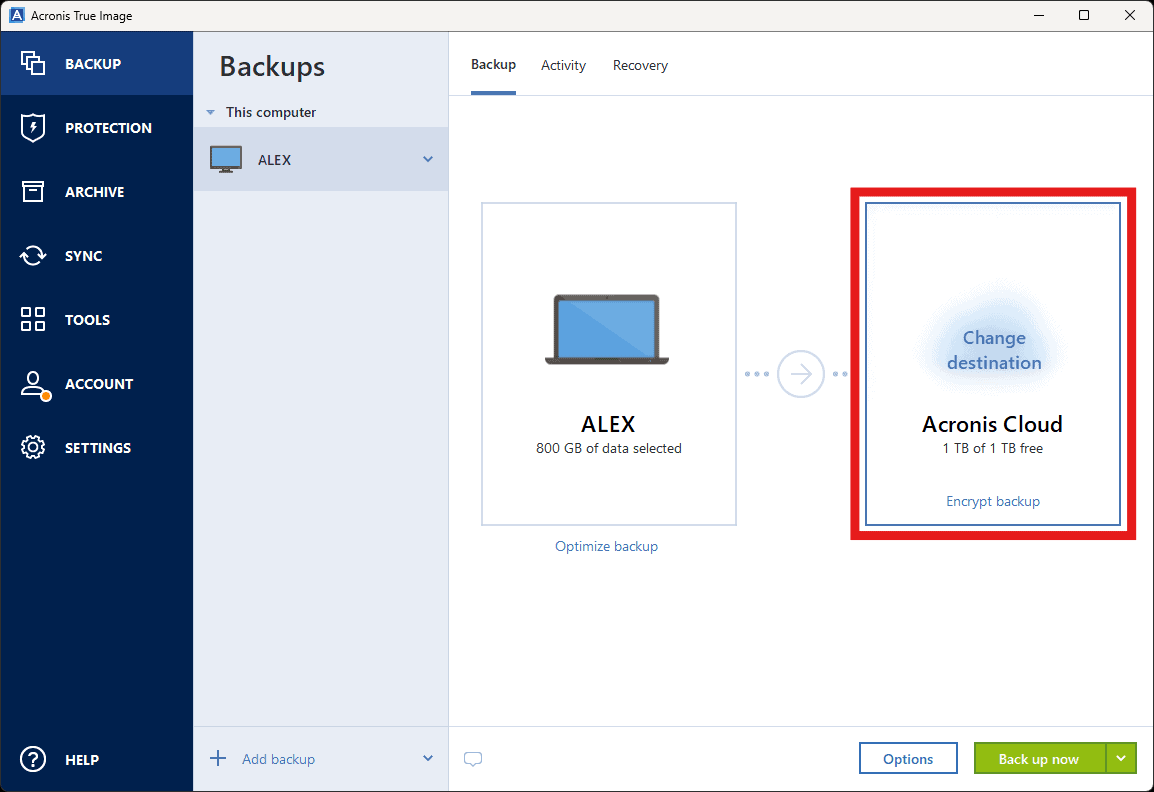
- Select a Backup Destination
You can choose where to back up your files, such as Acronis’ cloud storage, a hard drive or another network location.
- Manage Your Backup Settings
The “encrypt backup” button on the main screen allows you to set an encryption password. You can also go into the options menu to manage settings such as backup frequency, versioning and speed throttling.

File Backup & Acronis True Image Pricing: How Much Does Acronis True Image Cost?
Acronis True Image’s pricing is flexible, letting you choose the number of computers to cover and amount of cloud storage you need. However, it’s quite pricey.
- Flexible backups: full image to file-level Active disk cloning Universal restore and fast recovery Ransomware protection
- Flexible backups: full image to file-level Active disk cloning Universal restore and fast recovery Ransomware protection + Block viruses and malware Cloud backup and features Automatic replication of data in the cloud Microsoft 365 backups
- 50GB
- Flexible backups: full image to file-level Active disk cloning Universal restore and fast recovery Ransomware protection + Block viruses and malware Cloud backup and features Automatic replication of data in the cloud Microsoft 365 backups
- 250GB
More plans
- Flexible backups: full image to file-level Active disk cloning Universal restore and fast recovery Ransomware protection + Block viruses and malware Cloud backup and features Automatic replication of data in the cloud Microsoft 365 backups
- 500GB
- Flexible backups: full image to file-level Active disk cloning Universal restore and fast recovery Ransomware protection + Block viruses and malware Cloud backup and features Automatic replication of data in the cloud Microsoft 365 backups + Blockchain certification of files Electronic signatures on files Ability to add up to 5TB of cloud storage
- 1TB
- Flexible backups: full image to file-level Active disk cloning Universal restore and fast recovery Ransomware protection + Block viruses and malware Cloud backup and features Automatic replication of data in the cloud Microsoft 365 backups + Blockchain certification of files Electronic signatures on files Ability to add up to 5TB of cloud storage
- 5TB
Acronis True Image Speed (90/100)
True Image’s speeds are among the best I’ve tested for both uploads and downloads.
Acronis True Image Speed Test Results
Security: Is Acronis True Image Safe?
Acronis True Image is highly secure, boasting industry-standard encryption protocols and compliance with strict data center security standards.
Acronis True Image Security Features
Apart from encryption and server security, True Image offers the following security measures:
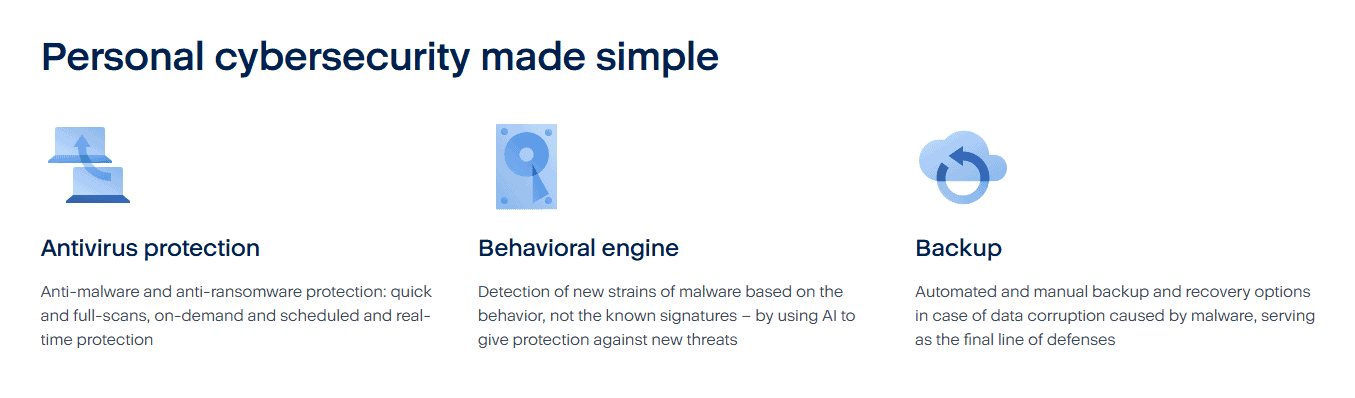
- Anti-ransomware
- Cryptomining detection
- Two-factor authentication
- Video-conferencing attack protection
- Anti-malware (real-time scan, antivirus protection)
Detailed Security Analysis: Encryption & Cloud Security
| File Status | Encryption Protocol |
|---|---|
| At rest | AES-256 |
| In transit | TLS/SSL |
True Image uses AES 256-bit encryption for files at rest and TLS/SSL for files in transit. Acronis’ data centers are under 24/7 surveillance and follow strict access protocols. Its security certifications include SOC 2 Type 2 and the ISO/IEC 27000 series.
Privacy: Is Acronis True Image Private?
True Image’s privacy measures are nearly perfect, offering compliance with data protection regulations like the GDPR and HIPAA. I deducted some points for the way it implements client-side encryption, though.
Client-Side Encryption
While the service does let you use your own encryption key for backups, you have to set a new one manually for each backup. What’s worse, you can’t recover these keys. If you forget or lose them, you may experience data loss. Note that the cloud-syncing space is not encrypted client-side.
Acronis True Image Privacy Policy
The Acronis privacy policy is a dense and sprawling document that encompasses all of its various products. While it’s difficult to read, it doesn’t have any particularly concerning clauses. The service collects no more data than any other cloud backup provider.
Acronis True Image Customer Support
Acronis’ customer support is remarkably varied, with a sizable knowledgebase, a ticketing system and even live chat available in English, German, French, Italian, Spanish and Chinese.
Live Chat Support Speed & Quality
My experience with Acronis’ live support was a mixed bag. I received a reply fairly quickly, but the agent did not know how to resolve my issue beyond linking me to knowledgebase pages. In the end, they redirected me to technical support (email-based, unfortunately).
Acronis True Image vs Other Cloud Backup Services: How Does It Compare?
I personally believe that Acronis True Image is about as close to “the best” as you can get. However, I can also see that not everyone would want to pay for it, or even need all of its tools.
Acronis True Image vs EaseUS Todo Backup
EaseUS Todo Backup is a cheap and simple backup solution focused solely on backup and recovery. If you don’t need a full cybersecurity suite, it’s a decent alternative to Acronis True Image.
Community Feedback: Acronis True Image Reviews on Reddit & Social Media
While scrolling through Acronis’ social media, including its subreddit, I was surprised to find only minor complaints about bugs. Public forums for software are usually full of these types of complaints (warranted or not), so the lack of major common issues is a great sign for prospective users.
The Verdict: Is Acronis True Image Worth It?
Acronis True Image is a powerful, feature-rich and secure service that’s more akin to a cybersecurity suite than mere cloud backup. Still, it costs a pretty penny, which makes it inaccessible to many. However, I’d argue that it’s worth the cost for power users and businesses that rely on compliance with privacy regulations like HIPAA.
What are your thoughts on Acronis True Image? Have you taken its free trial for a spin yet? What was your experience like? Let me know in the comments below, and as always, thank you for reading.
FAQ: Acronis Software Review
No, Acronis True Image does not have a free plan, though it does have a 30-day free trial.
Pretty much everyone needs a cloud backup service, but True Image makes sense only if you need all of its features and can justify the relatively high cost.
A 1TB Acronis True image Premium plan costs $10.42 per month with a yearly commitment.
Acronis True Image and Cyber Backup are two different products, with the former being a home backup solution and the latter an enterprise backup and cybersecurity platform.