Proton Drive Review
Proton Drive is a cloud storage option that offers client-side encryption across its entire storage. In this Proton Drive review, I go over the service to see if this security-heavy option is worth its high price.

Key Takeaways: What Is Proton Drive & Is It Good to Use?
- Proton Drive is a secure and private cloud storage provider with end-to-end encryption for data Proton Drive is the central cloud storage for Proton’s productivity ecosystem focused on the security of your files and the privacy of your data.transit and zero-knowledge encryption for data at rest.
- Its apps are easy to use, with seamless integration between your file storage and other Proton apps.
- Contacting support may be a challenge, as there’s only email support available.
Top Use Cases for Proton Drive:
- Strong security standards: Open-source client-side encryption ensures that the security can be independently verified.
- Digital app ecosystem: With Drive, you also get access to Proton Mail, Docs, Sheets, VPN, Pass, Meet and more.
- Privacy-focused storage: Proton Drive’s Swiss-based headquarters mean it’s subject to the consumer-friendly Swiss privacy laws.
Proton is a well-known name in the cybersecurity field, with multiple apps focused on security and privacy. In this Proton Drive review, I’ll be analyzing whether its cloud storage app is better or worse than our best cloud storage providers.
The main draw of Proton Drive is its integration with Proton’s apps. It’s the central storage hub for Proton Docs and Sheets and allows seamless sharing through Proton Mail. While Drive is a little expensive alone, the value for the entire app ecosystem makes it worth it.
-
08/07/2023 Facts checked by Jasna Mishevska
This article has been updated to show new features and pricing.
-
03/10/2026 Facts checked by Eugenie Tiu
We rewrote the review of Proton Drive based on our recent experience with the app’s speed, security, features and community support.
What Is Proton Drive & Who Is It For?
Proton Drive is a cloud storage service offered by the Proton team, which also has other cybersecurity apps such as Proton VPN and Proton Mail. The Proton team is dedicated to the security and privacy of its customers, and Proton Drive is no different, with open-source client-side encryption and an HQ based in Switzerland.
- Release date: September 2022
- Developer: Proton AG
- Platforms: Browsers, computers and mobile
- Operating systems: Windows, macOS, iOS, Android
- Notable features: Client-side encryption and Proton ecosystem
- Pricing: 2TB annual for $14.99
The Cloudwards Expert Opinion
 The Cloudwards Expert Opinion
Proton Drive has a lot of features to offer; it’s incredibly easy to use and I like how it comes bundled with other Proton apps. As much as I enjoy Proton Drive, it does come at a higher price point per terabyte compared to other alternatives, especially if you only need the cloud storage. You can get a 2TB annual plan for $14.99 per month.
Proton Drive Pros & Cons
Proton Drive Video Review
![Video thumbnail for the video: I Tested Proton Drive to See If It's as Private as It Claims [2024 REVIEW]](https://img.youtube.com/vi/XWmsFdm-VLg/maxresdefault.jpg)
Proton Drive Alternatives
- 1
- :
- : 5 GB
- :
- :
- :
- :
- 2
- :
- : 100 GB
- :
- :
- :
- :
- 3
- :
- : 50 GB
- :
- :
- :
- :
- 4
- :
- : Unlimited GB
- :
- :
- :
- :
- 5
- :
- : 100 GB
- :
- :
- :
- :
- 6
- :
- : 50 GB
- :
- :
- :
- :
- 7
- :
- : 20 GB
- :
- :
- :
- :
$20 / month(All Plans) - 8
- :
- : 150 GB
- :
- :
- :
- :
- 9
- :
- : 100 GB
- :
- :
- :
- :
- 10
- :
- : Unlimited GB
- :
- :
- :
- :
$24 / month(All Plans) - 11
- :
- : Unlimited GB
- :
- :
- :
- :
- 12
- :
- : Unlimited GB
- :
- :
- :
- :
- 13
- :
- : Unlimited GB
- :
- :
- :
- :










Features: What Can Proton Drive Do?
Proton Drive offers a very good range of cloud storage features and also comes with attractive extras through the Proton ecosystem.
10,000+ Trust Our Free Cloud Storage Tips. Join Today!

- Demystify cloud storage terminology and key concepts in plain language
- Discover easy-to-implement techniques to securely backup and sync your data across devices
- Learn money-saving strategies to optimize your cloud storage costs and usage
At a Glance – Decent Features With Integrated Extras
Proton Drive’s main appeal is the Proton ecosystem. While it does work well as a standalone cloud storage, if you get it through Proton Unlimited, you get 500 GB of storage along with integrated Mail, Docs, Sheets, Photos, Calendar, VPN, Pass, Wallet and Lumo AI.
File Previews

You can preview .docx, .txt, PDF, JPG, PNG, MP3 and MP4 files with Proton Drive. I noticed that text documents are converted into a Proton Docs file when you make changes, which creates a new copy of the file alongside the original and generates a lot of clutter.
However, the photo and video viewer works well, and I had no noticeable lag while watching my uploaded clips. While there used to be a 100 MB size limit on the MP4 files you could watch, I was able to preview my 1 GB video with no issue.
Docs & Sheets

Proton Drive includes document and spreadsheet software within its cloud storage. These services are almost on par with Google Drive’s Docs and Sheets or OneDrive’s Office 365. You can create documents and share and edit them in real time among a team of people.
While Proton Docs isn’t quite as sophisticated as Google, as it’s missing a few advanced document comparison tools or add-on compatibility, I found it to be a usable and clean text editor.
File Versioning & Trash

Proton Drive keeps 10 file versions for at least 7 days on all plans. Premium users of Drive can save up to 200 versions for up to 10 years, or you can turn off versioning completely.
Your deleted files are saved in the trash until you remove them manually. Unfortunately, there’s no way of setting an automatic deletion, so you’ll have to remember to empty the trash if you’re running out of storage space.
Photos & Albums

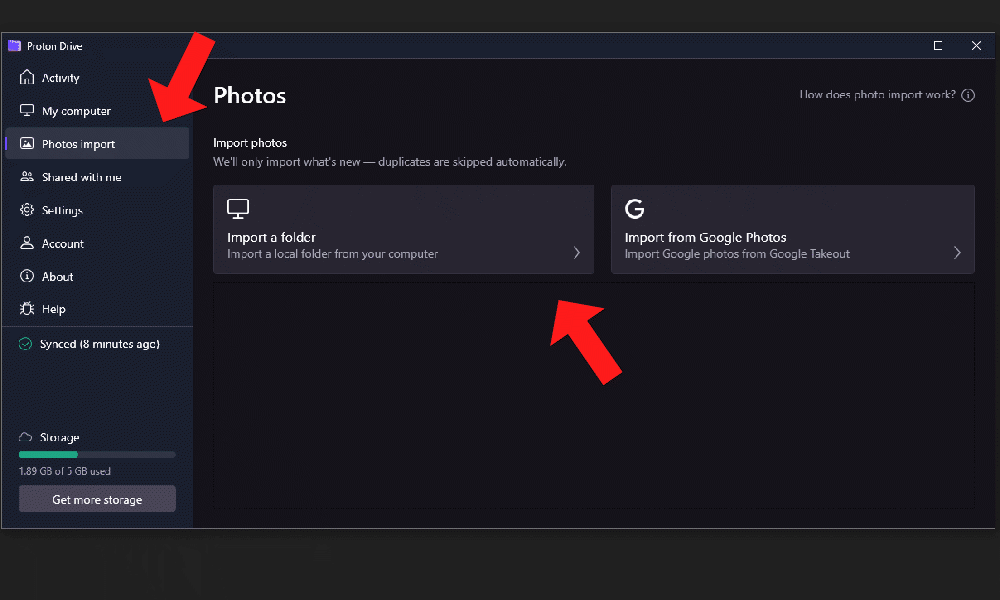
There’s a separate storage section for photos, which makes organizing your photos a lot easier. It automatically scans the metadata to sort your photos by year. You can also manually sort your photos into albums, which can be shared with other Proton users.
While this is a good feature to have, it would be nice if photos and videos were automatically sorted into this storage, or at least movable between storage types. During my testing, I couldn’t transfer photos from my main storage to my new album.
Proton Drive Features Overview
| Features |  |
|---|---|
| Sync Folder | |
| Block-Level Sync | |
| Selective Sync | |
| Bandwidth management | |
| Sync Any Folder | |
| File Link Sharing | |
| Link Passwords | |
| Link Expiry Dates | |
| Folder Sharing | |
| Folder Permissions | |
| Link Download Limits | |
| Upload Links | |
| File Previews | |
| Edit Files | |
| In-App Collaboration | |
| Office Online | |
| Google Docs | |
| Notes App | |
| Media Playback | |
| Mobile Apps | |
| Deleted File Retention | |
| Versioning | |
| WebDAV | |
| At-Rest Encryption | |
| In-Transit Encryption | |
| Encryption Protocol | ECC Curve25519 |
| Client-Side Encryption | |
| Two-Factor Authentication | |
| Server Location | EU |
| 24/7 Support | |
| Live Chat Support | |
| Telephone Support | |
| Email Support | |
| User Forum | |
| Knowledgebase | |
| Free Plan |
How User-Friendly Is Proton Drive? Our Hands-on Testing
Proton Drive is very easy to use overall; the only main downside is that you’ll have to install all the Proton apps separately.
At a Glance – Beginner-Friendly and Customizable
Proton Drive has a very simple interface, so it’s easy to set up and organize.
How to Install Proton Drive
Installing Proton Drive is straightforward, as the installer will do everything for you.
- Download the App
Go to the “Download” tab on the Proton Drive website, and click “Download.”

- Run the Install Wizard
Once the file is downloaded, run the launcher and follow the steps given.

- Log In to Proton
After installation, log in to your Proton account.


How to Set Up & Use Proton Drive
Proton Drive doesn’t require much setup, but there are a few options you can change.
- Customize Themes
Open settings and pick between eight themes to choose how you want your storage to look.

- Sync Your Files
On the desktop or mobile apps, you can choose which folders you want to sync automatically to your storage.

- Upload Photos
Proton Drive has a dedicated storage section for photos, which automatically organizes them for you. Upload your photos on the browser, desktop or mobile apps.


Proton Drive Web Version

with easy organization features.
The browser client of Proton Drive has a very clean interface and is easy to use. It looks similar to other cloud storage services, so it’s easy to switch to Proton from another provider.
Proton Drive on Desktop: macOS & Windows Apps

Unlike some other cloud storage services, Proton Drive’s desktop apps give you a dedicated interface to view your storage, instead of just a synced folder on your drive. I found the performance of the desktop app to be consistently fast, even during syncing.
Proton Drive on Mobile: Android & iOS Apps
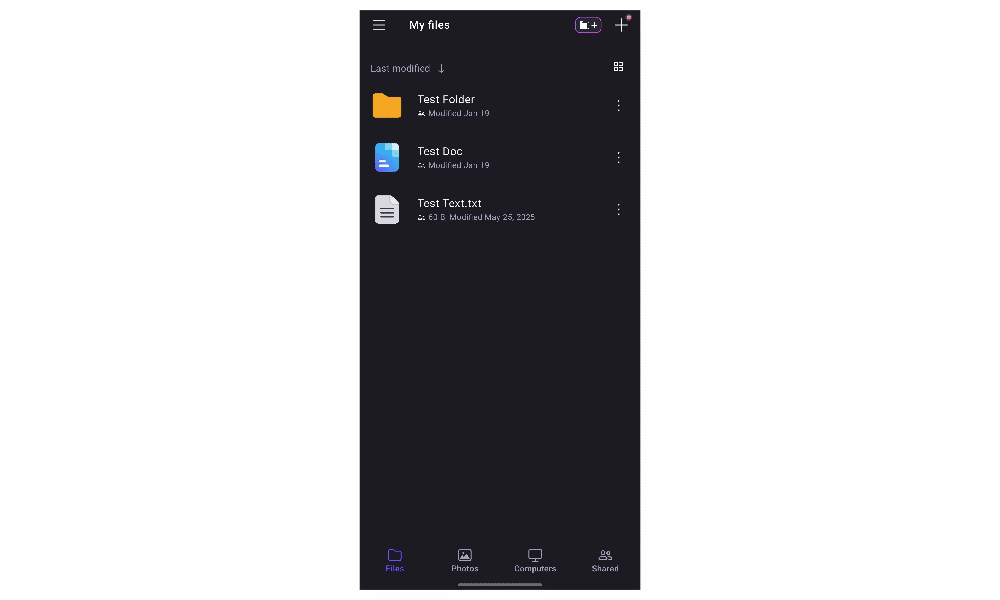
Proton Drive’s mobile apps are very similar to the desktop ones. However, the mobile apps go a step further and allow you to set up an automatic sync from your gallery to your storage.
Proton Drive Pricing: How Much Does Proton Drive Cost?
Proton Drive is relatively expensive if you only use the cloud storage. However, Proton Unlimited offers excellent value if you make use of the broader productivity and security ecosystem.
At a Glance – A Pricey Cloud Storage, But Great Value Security Bundle
Proton Drive on its own is more expensive than comparable cloud storage options. However, Proton Unlimited combines encrypted storage with Mail, Docs, Sheets, VPN and Pass, making it comparatively priced when viewed as a complete privacy-focused suite.
- 5GB
- 200GB
- 500GB
More plans
- 2TB
- 3TB
- per user
- 1TB
- per user, minimum of 2 users
- 1TB
- 1TB
How Fast Is Proton Drive?
Proton Drive offers very fast speeds with stable uploads and downloads.
At a Glance – Strong and Stable Speeds
During tests, Proton Drive was fast with stable speeds and CPU usage.
How Does Proton Drive Handle File Sharing & Syncing?
Proton offers great file sharing through its combination of Drive and Mail. While it does an excellent job of secure internal sharing, it does fall short by not allowing email sharing to non-Proton users. However, this isn’t too much of a downside since you can create an account for free.
At a Glance – Basic Sharing and Collaboration
With its integration with Docs and Sheets, you can collaborate in real-time on documents with Proton Drive.

File Sharing Options
Proton Drive has two file-sharing options: via public link or by adding people directly. While this latter option uses email, the recipient will have to create a Proton account before they can access the file, so it doesn’t technically have true email sharing.
On public links, you can set an expiry date, a link password and also choose between edit or view permissions. At any point you can disable the link and stop sharing. If you need to reshare the file at a later date, a new link will be created.
Its collaboration features have improved, and you can now share Doc and Sheet files with other Proton users and collaborate on them in real-time.

File Syncing Options
The Proton Drive desktop and mobile apps use selective sync, which means you can choose which folders to automatically sync. You can choose between offline sync to keep files on your device or online-only sync to free up your local storage and store files on the cloud.

Security: Is Proton Drive Safe?
Proton Drive offers highly secure storage. Used alongside the Proton ecosystem, your files, communications, productivity and internet browsing will be more secure.
Privacy: Is Proton Drive Private?
How Good Is Proton Drive Customer Support?
Proton Drive customer support includes a help ticket system, a knowledge base and direct email support, but no live chat.
At a Glance – Email and Knowledge Base Support
Proton Drive has reliable email support with useful support integration in the interface. However, it does lack live chat or phone support options for non-business accounts.
Proton Drive vs Other Cloud Storage Services
Proton Drive has many good points, but its price and do-it-yourself method of customer support are major issues. Here are some Proton Drive alternatives:
Proton Drive vs Google Drive

Google Drive is similar to Proton Drive with its integrated productivity apps like Docs and Sheets, but it has better collaboration with more advanced role permissions. With its 15GB free storage or 2TB annual plan for $9.99 monthly, Google Drive is better value, but it does suffer from a lack of privacy features.
Read our Google Drive review for more information.
Proton Drive vs Dropbox
Dropbox comes with its own Docs, Slides and Sheets, along with compatibility with both Office 365 and Google Workspace. However, Dropbox does not come with client-side encryption.
See our Dropbox review to learn more.
Community Feedback: Proton Drive Reviews on Reddit & Social Media
The reputation of Proton Drive is positive, helped by its very strong privacy and lack of data breaches. While some users on Reddit have issues with its speed, this wasn’t consistent with our own recent testing. Previous speed tests of Proton did show it struggled with performance in the past, but these issues have been fixed.
The Verdict: Is Proton Drive Worth It?
Proton Drive is worth it for privacy-focused users who want a fully secure productivity suite through Proton Unlimited. While it is an expensive option to buy Proton Drive alone, the amount of features you get with Unlimited makes it a great value.
Have you ever used Proton Drive? What do you think of its integrated apps, especially compared to similar services like Google Drive? Are there any flaws of the service that you’ve struggled with? Let us know in the comments, and thanks for reading.
FAQ: Proton Drive Cloud Storage Review
Yes, Proton Drive is trustworthy, with proven security and a commitment to the privacy of your data. Its lack of data breaches shows how seriously it protects your information.
Yes, Proton Drive is better than Google Drive, especially in terms of security and privacy. However, Google Drive has slightly better sharing and collaboration features, which is possible due to its looser security standards.
Proton Mail doesn’t have many downsides. It’s a very secure email service that can keep your email communications more private. The only potential downside is the email search can be slow or not accurately find emails.
The point of Proton Drive is to store your files securely and privately in the cloud.