Bitdefender vs Windows Defender: Who Defends Best in 2026?


Written by Ben Stockton (Writer)
Reviewed by Jackie Leavitt (Editor at Large)
Last Updated:
All our content is written fully by humans; we do not publish AI writing. Learn more here.
Windows has never had a great reputation for cybersecurity. This comes with being the most popular PC operating system. That’s also why antivirus software like Bitdefender exist in the first place. Thankfully, Microsoft hasn’t ignored the threat themselves, adding Windows Defender to every Windows installation.
Whether you can trust Windows Defender to keep your PC secure or not is another matter. This is why we’re going to compare it with Bitdefender, our choice as the best antivirus software on the market. Windows Defender made it onto our best free antivirus software shortlist, and it’s seen some pretty good protection scores, but you’ll need to read on for a full breakdown.
You might also want to take a look at our more detailed Bitdefender review before you find out who wins the war against malware in this Bitdefender vs. Windows Defender comparison.
Which Is Better: Bitdefender vs. Windows Defender?
When comparing Bitdefender vs. Windows Defender, the choice depends on your security needs and budget. Bitdefender is a paid option, with a premium feature list to match, and it’s the top of our recommendations list. Windows Defender is free, and that means it has limitations, which we’ll run through.
Protect Your Privacy. Get Our Free VPN Guide Now!

- Comprehend the essential role a VPN plays in safeguarding your digital life
- Gain a deep understanding of how VPNs function under the hood
- Develop the ability to distinguish fact from fiction in VPN promotions
To give you the clearest sense of how well one antivirus software shapes up against the other, we’ll test Bitdefender and Windows Defender in five areas. We’ll start with features, before delving into pricing, user-friendliness, the quality of protection you’re given, and the customer support they offer.
The winner of each round gets a point, and the first to earn three points wins overall. We’ll round up each section with a recap and explain our choices, then we’ll welcome your thoughts in the comments.
What Features Do Bitdefender and Windows Defender Offer?
Bitdefender and Windows Defender offer different feature sets to protect your devices from malware and cyber threats. With that in mind, we’re taking a look at what Bitdefender and Windows Defender offer their users.
What Features Does Bitdefender Offer?
Bitdefender offers comprehensive features including “real-time data protection” and “advanced threat defense” in all packages. That means it’ll protect you against all kinds of malware, even the trickier-to-spot kinds.
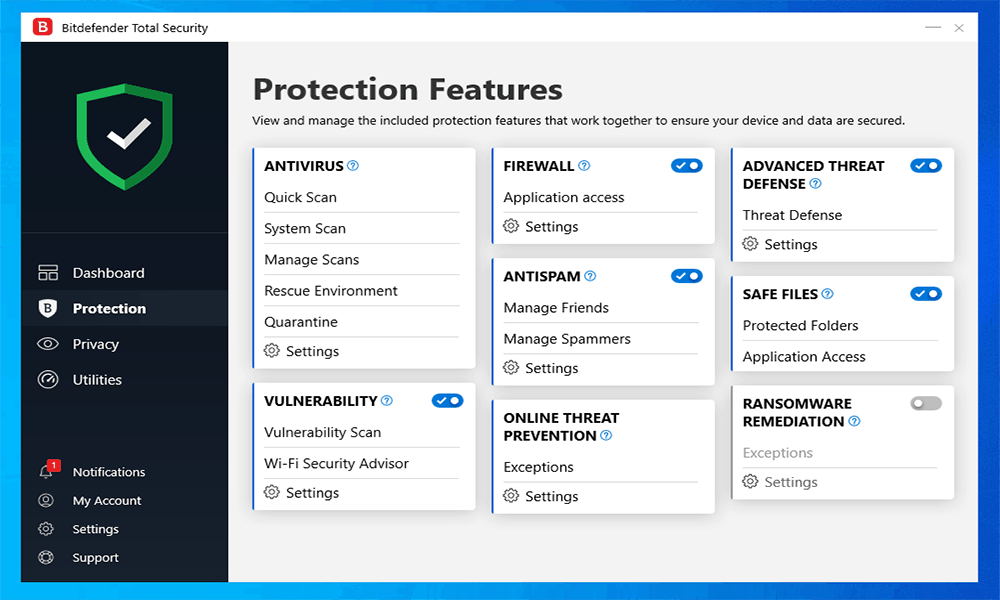
Most Bitdefender packages include protection against cyber attackers that take advantage of your mic or webcam, with restrictions on both. Bitdefender is one of our top recommendations concerning how to secure your webcam against these kinds of threats.
Bitdefender’s threat detection goes further, too, with software and WiFi vulnerability scanners. You’ve also got a firewall included to defend yourself against outside threats.
If you’re worried about buying online, you can take advantage of Bitdefender Safepay, which lets you browse online in a secure environment. You can use it for any website, but Bitdefender will alert you to switch to Safepay if it spots you trying to make a payment without it.
Safepay works well with Bitdefender’s limited VPN, too, especially if you’re unaware of the dangers of public WiFi and you risk your data on an open WiFi network. You get a daily allowance for data, but this is capped at 200MB. If VPN protection is important, you’ll want to combine Bitdefender with a VPN provider like ExpressVPN (see our ExpressVPN review).
Bitdefender comes with a password manager to protect your most sensitive data, which is a nice addition. It’s basic and light on features, but as you’ll see in our IronVest review, that doesn’t necessarily make for a bad password manager, especially if you just want to set it and forget it. However, we’d probably recommend Dashlane (see our Dashlane review) first and foremost.
Given the risk from ransomware, it’s good to see that Bitdefender prevents file changes to your most sensitive files and offers comprehensive file encryption to lock down any critical documents. There’s also a neat file shredder that erases any of your files.
It’s important to note that, while most of these features are standard for Windows users with the most basic Bitdefender Internet Security package, you’ll need to choose one of Bitdefender’s multi-OS plans, like Total Security, to secure your Mac or Android device.
All in all, Bitdefender has one of the most comprehensive sets of features we’ve seen in any of our antivirus reviews.
What Features Does Windows Defender Offer?
Windows Defender is the free, built-in protection that comes automatically with Windows installations. Depending on your specific version of Windows 10, Windows Defender may also have the name Windows Security or Windows Defender Security.
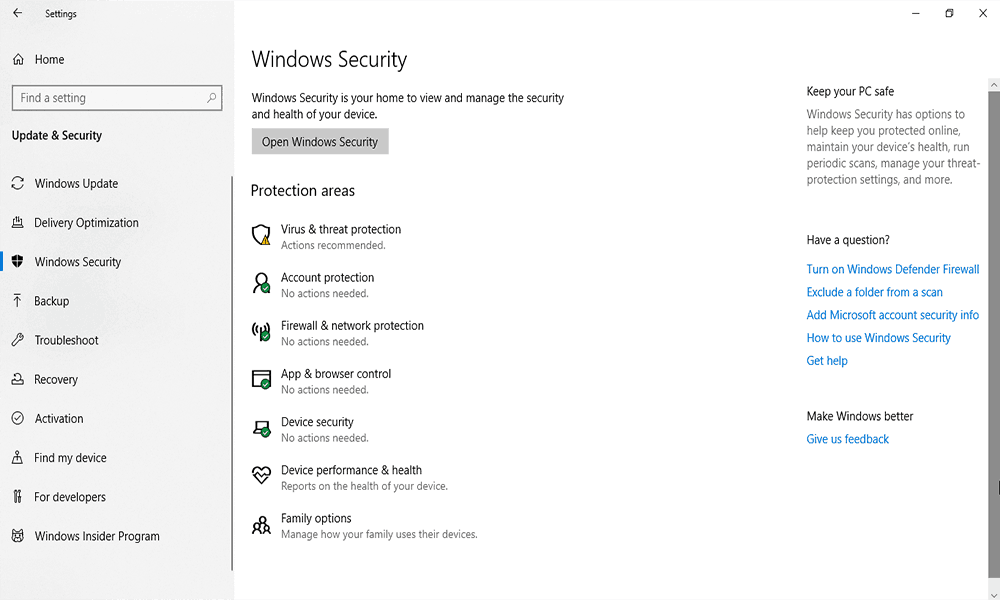
This protection will switch itself off and let a competitor, like Bitdefender, take over once it’s installed. As soon as it’s removed, though, Windows Defender reactivates its own protection.
At its core, Windows Defender is a typical antivirus scanner. You can run a quick scan to look for any immediate threats, but it also allows for targeted scanning of particular folders or drives, in addition to a more thorough scan of your system.
Windows Defender includes web protection, thanks to SmartScreen, Windows’ anti-phishing and anti-malware protection. This comes pre-built into Microsoft Edge, and will soon be available to Google Chrome users with the Windows Defender Browser Protection extension. This will make Chrome — our choice as the most secure web browser — even safer to use.
SmartScreen takes advantage of Microsoft’s extensive experience with cloud computing, using an extensive cloud-based database of threats to offer the widest possible protection. Windows Defender also offers round-the-clock protection to prevent malware installations, as well as tamper protection to lock down any critical settings.
Defender also includes specific protection against ransomware. By default, It’ll protect certain folders, like your documents folder, but you can customize it to protect any folders you want. It’ll automatically back up these files to your OneDrive account (see our OneDrive review).
There’s a network and system firewall included as part of Windows Defender’s protection, with customizable settings based on what type of network you use.
Windows Defender doesn’t offer all the trimmings, like Bitdefender, but it offers a solid alternative to a third-party antivirus suite. One obvious thing to point out, however, is in the name. Windows Defender is a component of Windows 10 and can’t be installed on other devices.
Which Has Better Features: Bitdefender or Windows Defender?
Bitdefender has better features overall, offering more comprehensive security tools than Windows Defender’s basic protection suite.
Windows Defender tries to be an all-round security suite, and does it well with ransomware protection and a firewall. The simple truth is that Bitdefender offers more, even if you have to pay for it.
Round One Winner: Bitdefender
How Much Do Bitdefender and Windows Defender Cost?
Bitdefender and Windows Defender cost structures differ significantly, with one being paid and the other completely free. Bitdefender is similar to other premium antiviruses, offering several plans, although with particularly good discounts for new customers. Let’s look at how Bitdefender and Windows Defender compare in a price battle.
How Much Does Bitdefender Cost?
Bitdefender offers multiple pricing plans, but each comes with varied fees depending on the number of devices you want to cover or the length of coverage.

- Unlimited devices (Windows only)
- Renewal price varies.
- Renewal price varies.
More plans
- Price varies upon renewal. Other Antivirus for Mac pricing depends on the number of devices (options: 1 or 3 devices) and the type of plan chosen (1, 2, or 3-year plan).
- Complete Protection for any devices: Android, Windows, Mac, iOS; Price shown is for 5 accounts/25devices. Pricing depends on the type of plan chosen (1 or 2 year plans).
- Complete Protection for any devices: Android, Windows, Mac, iOS; Price shown is for 1 account/5 devices. Pricing depends on the type of plan chosen (1 or 2 year plans).
- Complete Protection for any devices: Android, Windows, Mac, iOS; Price shown is for 5 accounts/25 devices; Pricing depends on the type of plan chosen (1 or 2-year plan).
- Complete Protection for any devices: Android, Windows, Mac, iOS; Price shown is for 5 members. Pricing depends on the number of members (options: 3, 5, 10, or 25 devices) and the type of plan chosen (monthly or yearly plan).
- Complete Protection for any devices: Android, Windows, Mac, iOS; Price shown is for 1 account/5 devices; Pricing depends on the type of plan chosen (1 or 2-year plan).
Looking first at the number of devices you want to cover, new customers can gain large discounts on the cost of Bitdefender by choosing a plan that covers three devices. You can purchase plans that cover from one to 15 devices, although some of these are specific to certain plans and come without discounts.
The cheapest plan Bitdefender offers is Antivirus Plus. Coverage ranges from one to 10 devices, for one to three years. The peculiarities of the discount mean that new customers will probably find that the cheapest subscription is for up to three devices, rather than one.
Bitdefender excludes certain features, like file encryption and a network firewall, from Antivirus Plus, but you’ll have full antivirus protection, as well as Safepay and some other extras. It’s only available for Windows users, however, as is Internet Security, the next Bitdefender package.
Internet Security includes everything that Bitdefender has to offer, lacking only the anti-theft protection and “OneClick Optimizer” you’d find on the most expensive Total Security plan.
Total Security comes with coverage for up to five or 10 devices, as well as support for Mac and for mobile operating systems like Android. Despite the upfront cost, it’s one of our top choices as the best antivirus for Android and is only $5 more expensive than Internet Security for one year of coverage and five devices.
At the top is the Bitdefender Family Pack, which comes with coverage for up to 15 devices and all the features of Total Security, as well as anti-theft protection, but you’ll pay an extra premium for it.
How Much Does Windows Defender Cost?
We’d love to talk about Windows Defender’s various pricing packages, but we don’t need to. It’s totally free, and it comes included as part of your Windows 10 installation at no extra cost.
There’s no variation in the level of protection or features you’ll have available. The only cost, of course, is for your Windows 10 license, but this is for your entire operating system, rather than specifically Windows Defender.
Which Is More Affordable: Bitdefender or Windows Defender?
Windows Defender is more affordable than Bitdefender, being completely free compared to Bitdefender’s paid subscription model. Hands down, Windows Defender wins this round. $0.00 is better than $29.99 (with a more expensive renewal price), after all.
Round Two Winner: Windows Defender
Which Is Easier to Use: Bitdefender or Windows Defender?
Bitdefender is easier to use than Windows Defender, offering a more intuitive dashboard and customizable interface. We’re going to test and see how easy both Bitdefender and Windows Defender are to use.
How Easy to Use is Bitdefender?
Installing and using Bitdefender takes around 10 minutes. The basic installer takes care of downloading the bulk of your installation files for you and, beyond a few clicks to progress, doesn’t require much interaction from you.

Once installed, using Bitdefender is fairly easy. The main client focuses around a dashboard that offers various typical actions, like quick scanning, to save you time. Other areas, like protection and privacy, are on the left-hand side and give you access to your full set of features.
You can easily customize the settings by clicking “settings” in the bottom-left corner. If you’re unsure about any of the features or settings, you can click the question mark above each area for helpful tips.
Pro users will enjoy the customization, but beginners will like the hands-off approach that Bitdefender gives you. There’s something for everyone, but if you’re forced to open and use the client, Bitdefender makes finding your way pretty simple.
How Easy to Use is Windows Defender?
Microsoft has put a lot of effort into making their Windows 10 interface as simple to use as possible, and Windows Defender is no different. You can usually find it as a shield icon on your Windows taskbar or in your Windows settings area.
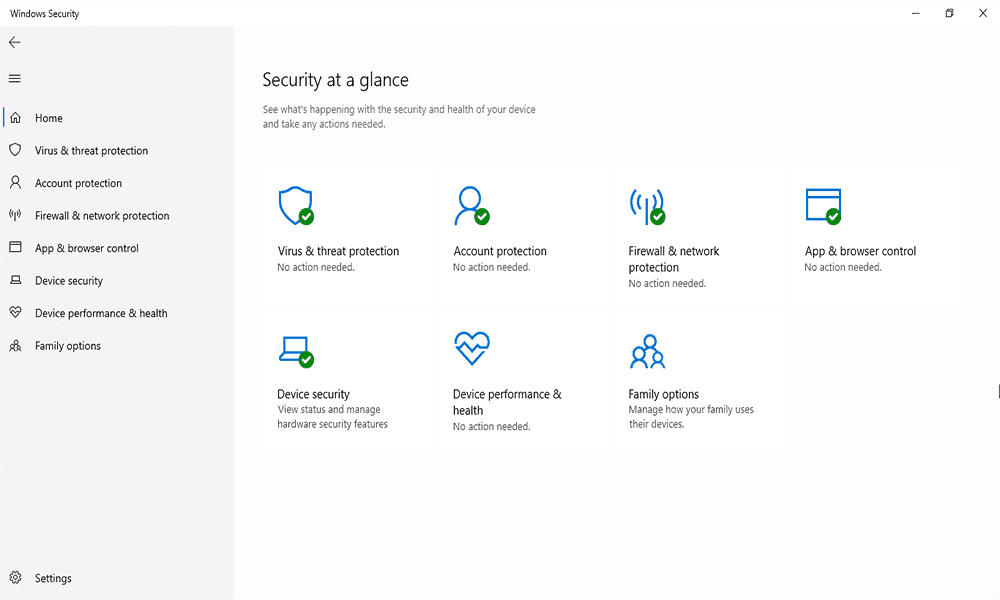
The “security at a glance” section gives you an immediate overview of your Windows Defender protection. Clicking any of these blocks, like “virus and threat detection,” will take you to the settings area for that feature.
There are no extensive lists of complicated features, and Windows Defender explains any unclear options. Once you’re off the main area, you can navigate from the left side bar, much like Bitdefender.
Windows Defender activates by default when you start running Windows, unless you have another antivirus installed. If you install another antivirus, Windows Defender will disable some of its services and give way to the other provider to prevent any conflict.
All in all, Windows Defender is friendly to use. It’ll prompt you when it needs a decision about something or if there’s a problem, but it’ll otherwise work in the background.
Which Is More User-Friendly: Bitdefender or Windows Defender?
Bitdefender is more user-friendly than Windows Defender, with a superior dashboard design and easier access to scanning features. The easy-access dashboard on Bitdefender is a little better, though, especially as you can customize it. Additionally, it offers an immediate scanning option. For those reasons, Bitdefender narrowly wins this round.
Round Three Winner: Bitdefender
Which Provides Better Protection: Bitdefender or Windows Defender?
Bitdefender and Windows Defender provide comparable protection levels, with both scoring similarly in recent security tests. We’re using the reports from three security testing firms to see which service is better at protecting you, and whether it’ll slow your PC in the process.
What Protection Does Bitdefender Offer?
In AV-TEST’s May-June 2019 testing of Bitdefender, there was a slight dip in it’s previous scores from March-April, dropping to 97.1 percent for overall malware protection. It’s overall protection score also dropped, from 6 to 5.5.
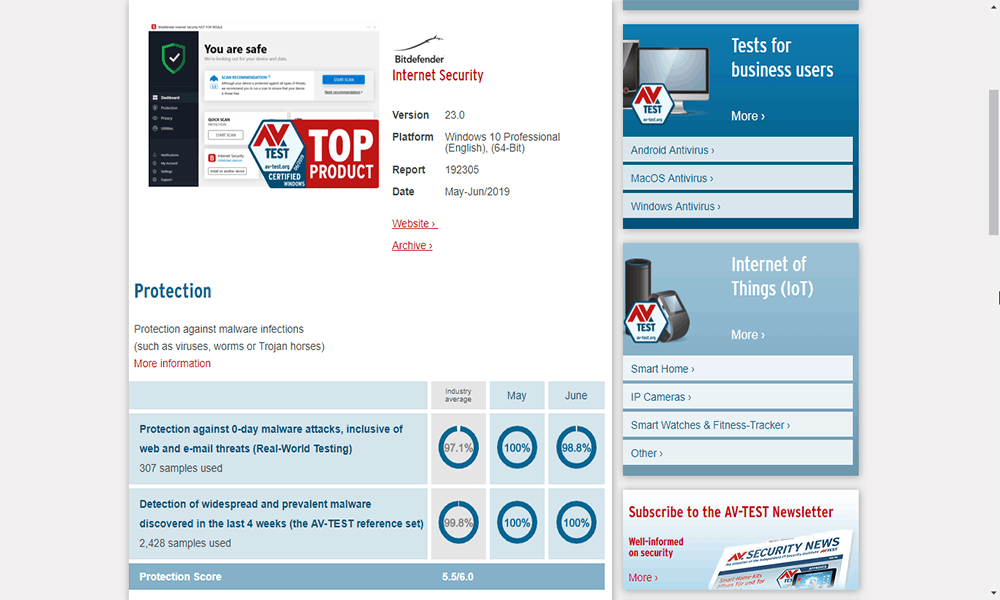
This dip in protection scores is disappointing, and there was also a drop in performance percentages (from 14 to 19 percent), although the overall performance score stayed the same at 6.
Bitdefender scored better with testing from AV-Comparatives’ February-May protection tests. Bitdefender blocked 751 threats at a rate of 99.9 percent overall — enough to gain AV-Comparatives’ highest Advanced+ score for protection.
It also received the Advanced+ score for performance testing in April 2019, although it was 11 out of 15 in a comparison against other antivirus software, based on impact scores. This puts it on par with antivirus software, like Trend Micro Antivirus, as our Trend Micro Antivirus review can further explain.
MRG-Effitas testing had impeccable results for Bitdefender, however. Out of 339 threats, Bitdefender detected all 339 in its Q1 2019 full spectrum testing, gaining its top-tier Level 1 Certified award — matching Avira (see our Avira vs Bitdefender comparison or our Avira review for more details).
What Protection Does Windows Defender Offer?
Windows Defender had an identical percentage score to Bitdefender in AV-TEST’s May-June 2019 testing at 97.1 percent, but had an overall protection score of 6, trumping Bitdefender’s 5.5 score. It also held this score from March-April 2019, where it also received a 6 out of 6.
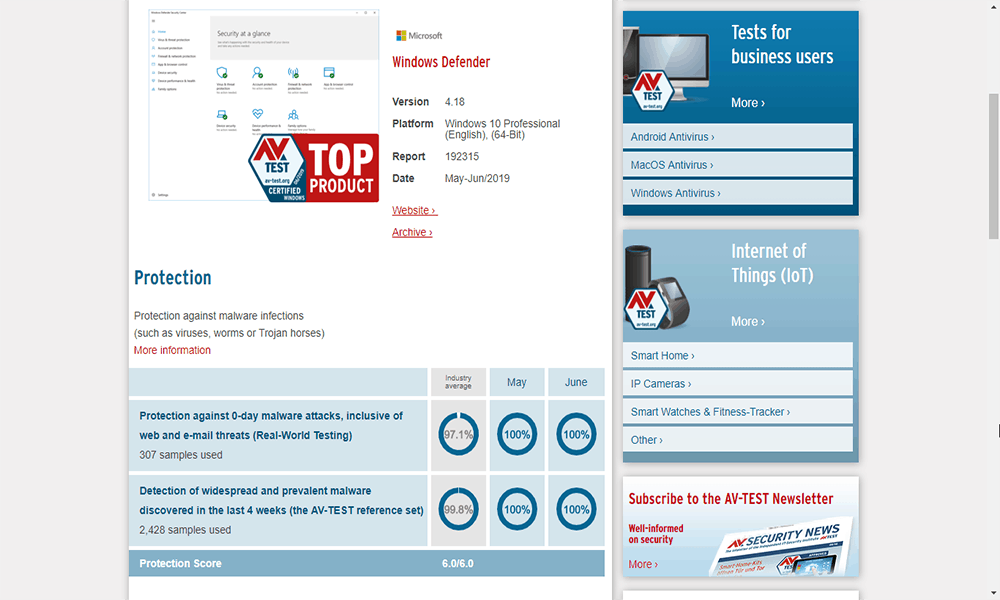
The AV-TEST scores mean that it recognized Windows Defender as one of the best antivirus software for home users on Windows, alongside Kaspersky, Norton and F-Secure.
Windows Defender did quite well in AV-Comparatives’ February-May 2019 test, blocking 749 threats at a rate of 99.8 percent, only 0.1 percent lower than Bitdefender’s score. More worryingly, though, was the sheer number of false positives Windows Defender detected — 74 versus two for Bitdefender.
This means that Windows Defender earned a lower “Advanced” award, but AV-Comparatives specifically notes that this lower score is on the back of these false positives.
MRG-Effitas was kinder to Microsoft, awarding it the same Level 1 Certified score that Bitdefender received in its Q1 2019 testing. Out of the same 339 samples, Windows Defender automatically blocked them all.
Which Offers Superior Protection Performance?
Both antivirus solutions offer impressive protection performance, with recent tests showing an identical malware detection rate of 97.1 percent. Windows Defender is competing hard with some outstanding performance scores, but so many false positives from AV-Comparatives shows that there’s still some work in perfecting Microsoft’s detection systems.
Given the variety in scores on both sides, it’s a draw for Bitdefender and Microsoft here.
Round Four Winner: Draw
What Support Options Do Bitdefender and Windows Defender Offer?
When something goes wrong, you’ll want the best support you can get for your antivirus. With that in mind, we’re testing customer support from both Microsoft and Bitdefender in this section.
What Support Does Bitdefender Offer?
Bitdefender doesn’t scrimp on its support options. You can phone one of 16 different support lines in different countries around the globe, you can send an email, or you can speak to somebody on live chat.
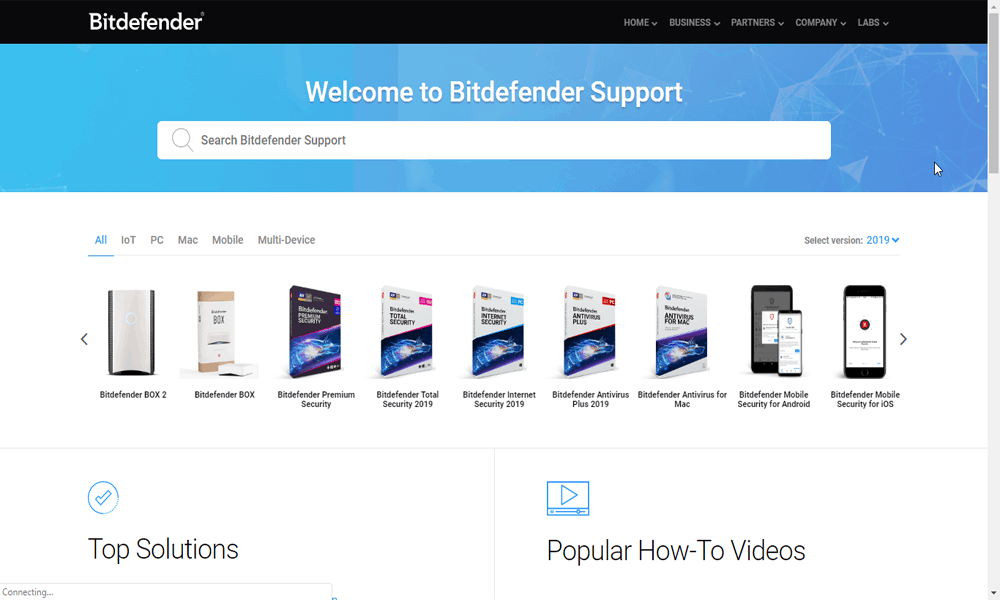
Bitdefender offers 24/7 support for customers, but you’re free to take advantage of its extensive knowledgebase as an alternative, with FAQs and instruction guides to help you through more obvious problems.
There’s also a community forum with sections in English and other languages covering different Bitdefender products and common issues.
What Support Does Windows Defender Offer?
Given that Bitdefender is a paid product, it’s fair to say that you’re paying for premium customer service. Windows Defender is free, so there’s a little less offered.
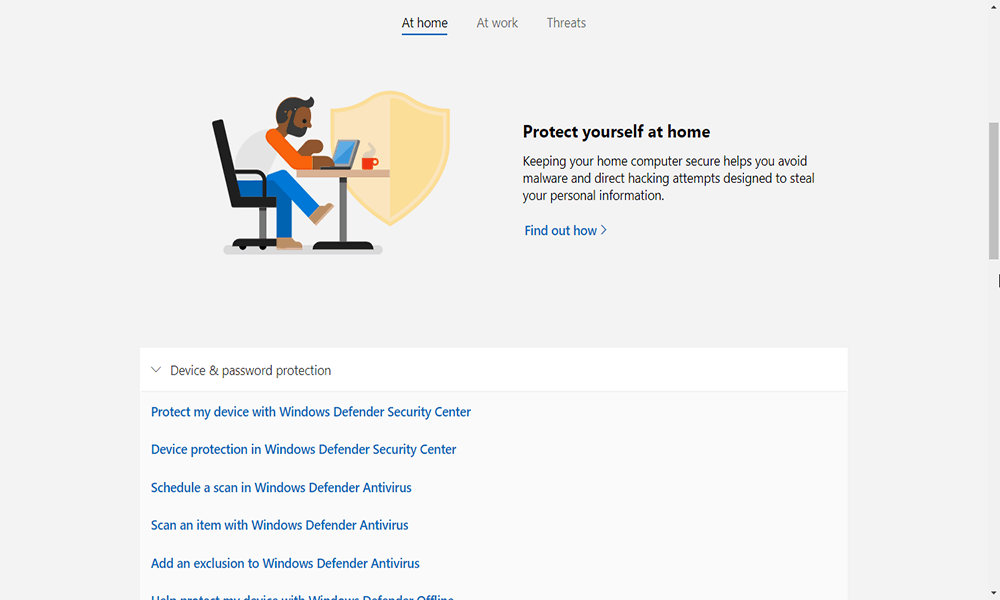
There is a community “answers” forum, where you can ask questions about Windows Defender, but this forum is for general Windows users. There’s also helpful guides and articles on how to keep your device up-to-date and work through some common issues.
If you need support, you can purchase Windows Premium Technical Support, which costs $49 per year for Windows phone and online support.
There’s also the “get help” app — included as part of Windows — that lets you speak to a support agent or the virtual chatbot, which can help guide you to obvious answers. Given the sheer number of Windows users, however, it’s likely you’ll have to pay for support if you need critical help.
Which Provides Better Customer Support?
Bitdefender provides better customer support with 24/7 phone, email, and live chat options compared to Windows Defender’s community forums. If you want the same level of support, you’ll have to pay Microsoft for the privilege. Given the $49.99 cost, you might as well end up buying Bitdefender anyway.
Round Five Winner: Bitdefender
Final Thoughts
Windows Defender is the default antivirus on Windows machines, so it’s not unfair to make a comparison between it and an alternative, like Bitdefender. Microsoft has done well to turn what used to be a very basic protection suite into one of the best, at least according to AV-TEST.
For all the positives, though, Windows Defender just isn’t premium antivirus protection. Bitdefender offers you more features and a slightly easier client to use, as well as far better customer support.
Winner: Bitdefender
That’s why Bitdefender won’t be knocked off it’s crown as our favourite antivirus suite, but you might find one of the alternatives in our antivirus articles section to be better suited to your needs. There, you’ll find in-depth comparisons such as Bitdefender vs Trend Micro.
If you need to disable your antivirus for a short period, read this guide on how to turn off antivirus.
Do you use Bitdefender, or are you leaving things up to Microsoft? Let us know what you think in the comments section below. As always, thanks for reading.