NordLocker Review
NordLocker is a cloud storage service by Nord Security, the same company that runs NordVPN. In this NordLocker review, I'll go over its features, pricing and security.

— Last Updated: 2026-07-13T11:43:26+00:00 Facts checked by Simona Ivanovski
Key Takeaways: What Is NordLocker & Is It Good to Use?
- NordLocker is a simple, secure cloud storage service with client-side encryption on all plans.
- Compared to other cloud storage services, NordLocker lacks certain useful features, such as collaboration and document-viewing tools.
- For better value, you can bundle NordLocker with other Nord apps, such as NordVPN.
Top Use Cases for NordLocker
- Strong security: NordLocker’s client-side encryption means your files are encrypted before they’re uploaded. No one will be able to see your files but you.
- Cheap long-term storage: NordLocker’s annual plans are good if you need basic cloud storage for a year.
- Nord security ecosystem: Nord’s security bundles come with NordLocker, NordVPN and other internet tools.
NordLocker is a very simple cloud storage service by Nord Security, the owners of NordVPN. It’s one of the best cloud storage options for security, with client-side encryption across all storage. Unfortunately, it doesn’t allow for collaboration or document viewing, its monthly plans are expensive, and it doesn’t have a macOS app.
I go over the positives and negatives in this NordLocker review and recommend more feature-rich alternatives.
-
09/25/2022 Facts checked
Updated review to reflect NordLocker’s change from encryption software to cloud storage.
-
06/27/2023 Facts checked
We updated the review to reflect NordLocker’s improvements and ran new speed tests.
-
02/07/2026 Facts checked
We rewrote this review and updated it with new testing results and installation processes.
What Is NordLocker & Who Is It For?
NordLocker initially launched as an encryption service but has since transitioned to encrypted cloud storage. It remains focused on security but doesn’t offer standard cloud storage features such as collaboration or file previews. It’s a good fit for those who are already part of or are interested in the Nord ecosystem, as its app bundles offer the best value.
- Release date: Nov. 13, 2019
- Developer: Nord Security
- Platforms: PC, mobile, browsers
- Operating systems: Windows, Android, iOS, Chrome, Firefox, Edge, Safari
- Notable features: Client-side encryption
- Pricing: free 3GB,$6.99 per month for 2TB
NordLocker’s Background & Reputation
NordLocker, which boasts strong client-side encryption, has not suffered any data breaches.
10,000+ Trust Our Free Cloud Storage Tips. Join Today!

- Demystify cloud storage terminology and key concepts in plain language
- Discover easy-to-implement techniques to securely backup and sync your data across devices
- Learn money-saving strategies to optimize your cloud storage costs and usage
NordLocker’s parent company, Nord Security, also owns NordVPN, one of our top VPN services. Nord Security has always been dedicated to strong security, and one blemish on its record is that NordVPN had a server breach in 2018 — however, because it has a no-logs policy and uses RAM-based servers, there was no information to leak.
The Cloudwards Expert Opinion
 The Cloudwards Expert Opinion
I can’t personally recommend NordLocker, as it’s an incredibly barebones service for the price. The main selling point is its client-side encryption, but other cloud storage options offer this as well, along with collaboration and file-viewing features. However, you can try NordLocker for free with 3GB of storage; for the best value with NordLocker, I suggest the annual 2TB plan for $6.99 per month.
NordLocker Pros & Cons
Features: What Can NordLocker Do?
NordLocker offers no additional cloud storage features beyond file storage and sharing. While it does implement file storage well, with client-side encryption across the entire storage space, you may want more functionality.
For instance, if you need to collaborate on files and folders or preview files, you’ll be better off choosing a cloud storage provider for collaboration.
Where Does NordLocker Store Your Data?
Surprisingly, NordLocker is less than transparent about where it stores your data. I expect better from the same company that runs NordVPN, which is more forthcoming with that information.
NordLocker likely uses the same server locations as NordVPN. This means your data could be stored in the U.S., the U.K. or the EU. However, there’s no way to change your server location, and there’s no guarantee of GDPR coverage for non-EU users.
Client-Side Encryption
NordLocker’s main selling point is its client-side encryption; all the files you upload are encrypted locally before they leave your device.
This client-side encryption means that even if NordLocker’s servers are seized, no one will be able to decrypt your files. It also means that if you lose your recovery key (which acts like a master password to access your account if you forget your password), you’ll also lose all access to any saved files, as the service won’t be able to recover them for you.
NordLocker Features Overview
| Features |  |
|---|---|
| Sync Folder | |
| Block-Level Sync | |
| Selective Sync | |
| Bandwidth management | |
| Sync Any Folder | |
| File Link Sharing | |
| Link Passwords | |
| Link Expiry Dates | |
| Folder Sharing | |
| Folder Permissions | |
| Link Download Limits | |
| Upload Links | |
| File Previews | |
| Edit Files | |
| In-App Collaboration | |
| Office Online | |
| Google Docs | |
| Notes App | |
| Media Playback | |
| Mobile Apps | |
| Deleted File Retention | |
| Versioning | |
| WebDAV | |
| At-Rest Encryption | |
| In-Transit Encryption | |
| Encryption Protocol | AES-256, xChaCha20-Poly1305, Ed25519 |
| Client-Side Encryption | |
| Two-Factor Authentication | |
| Server Location | US |
| 24/7 Support | |
| Live Chat Support | |
| Telephone Support | |
| Email Support | |
| User Forum | |
| Knowledgebase | |
| Free Plan |
Hands-On Testing: How User-Friendly Is NordLocker?
NordLocker is one of the more basic cloud storage services. The user interface on its browser client is uncluttered, and I didn’t have any problems uploading, downloading or sharing files. The platform does lose some points for how it handles file sharing, though — I’ll go into more detail on that later on.
How to Download & Install NordLocker
You can access NordLocker in the browser client, but you’ll need to download the app if you want to sync files. Follow the steps below to get started with NordLocker and access the app.
- Open the NordLocker Website
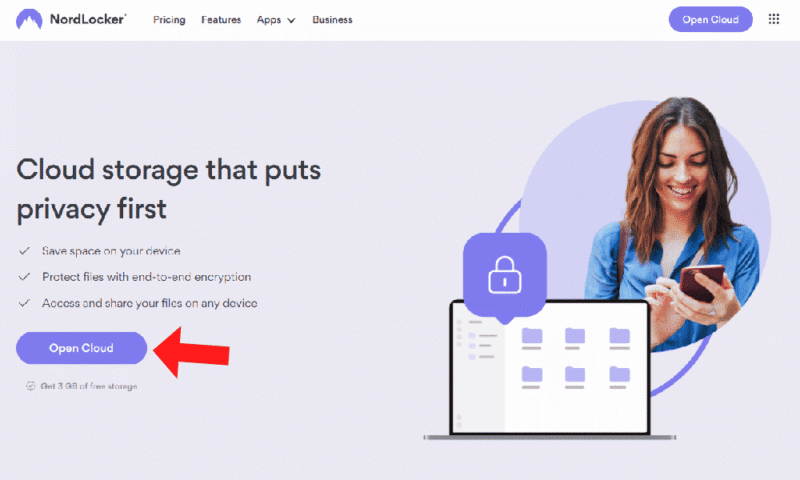
Navigate to the NordLocker website and select “open cloud.”
- Sign Up for NordLocker
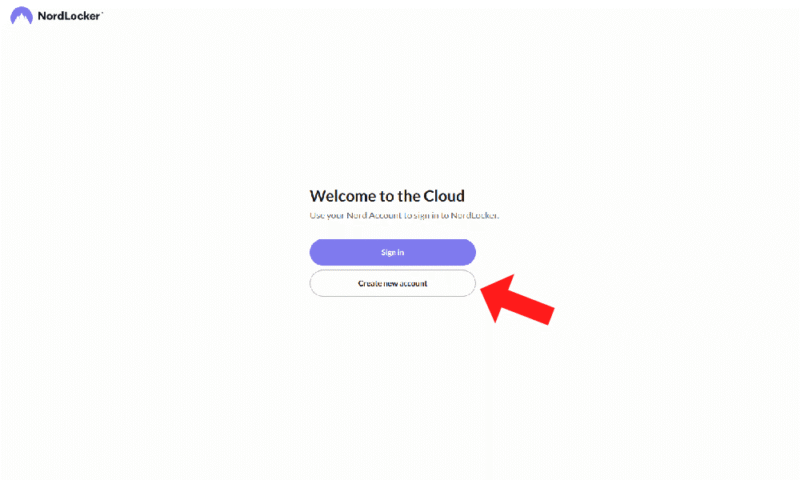
When prompted, sign in or create a new account with NordLocker. If you already have a Nord account, you can use the same login details here.
- Download the NordLocker App
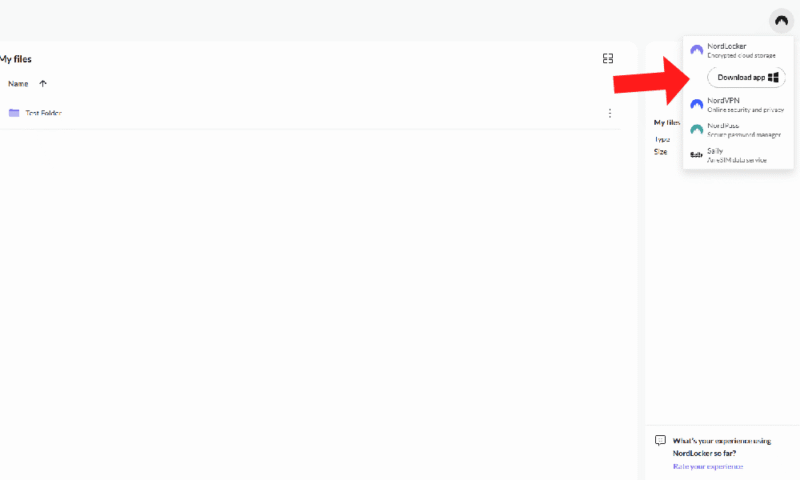
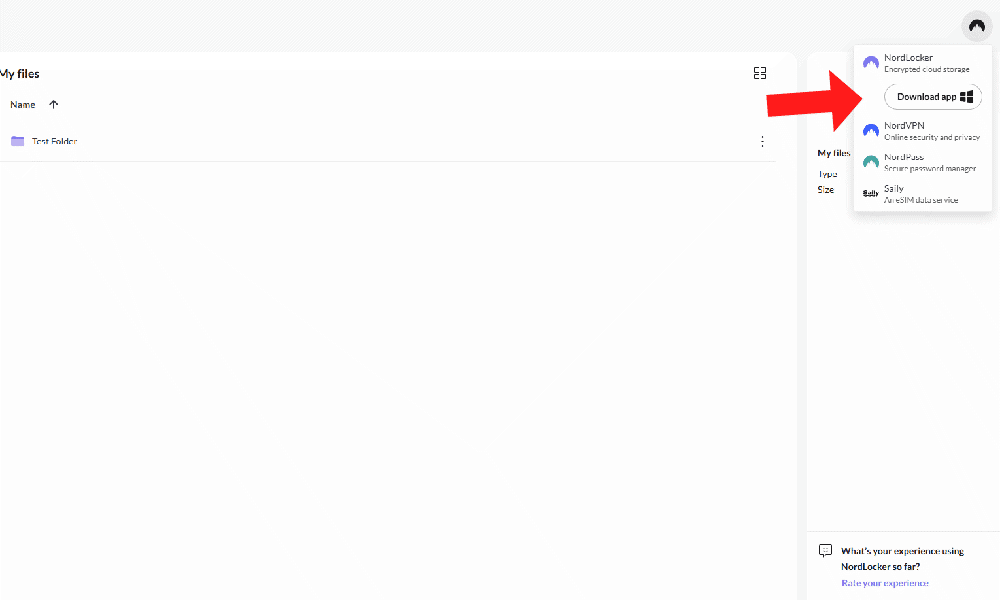
Once you’ve logged in to the cloud storage space via browser, you can download the app. Go to the top right of the page, select the NordLocker logo and click “download app.”


How to Set Up & Use NordLocker
Once you’ve downloaded NordLocker, you can install it, sync your files and upload and share files.
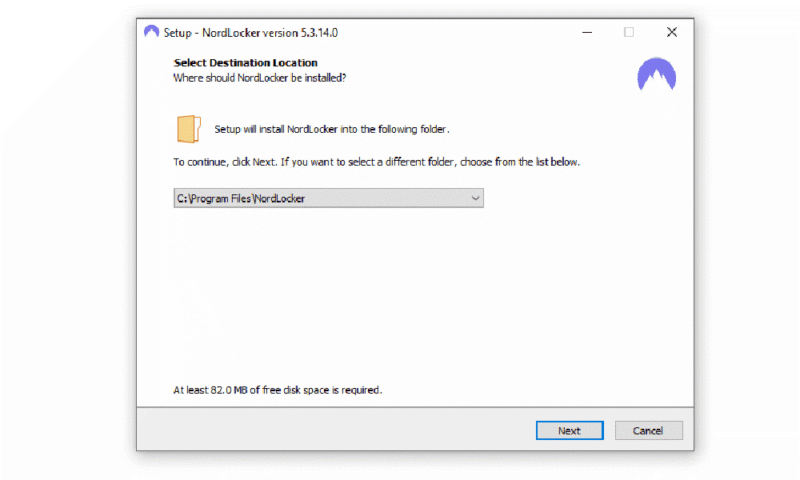
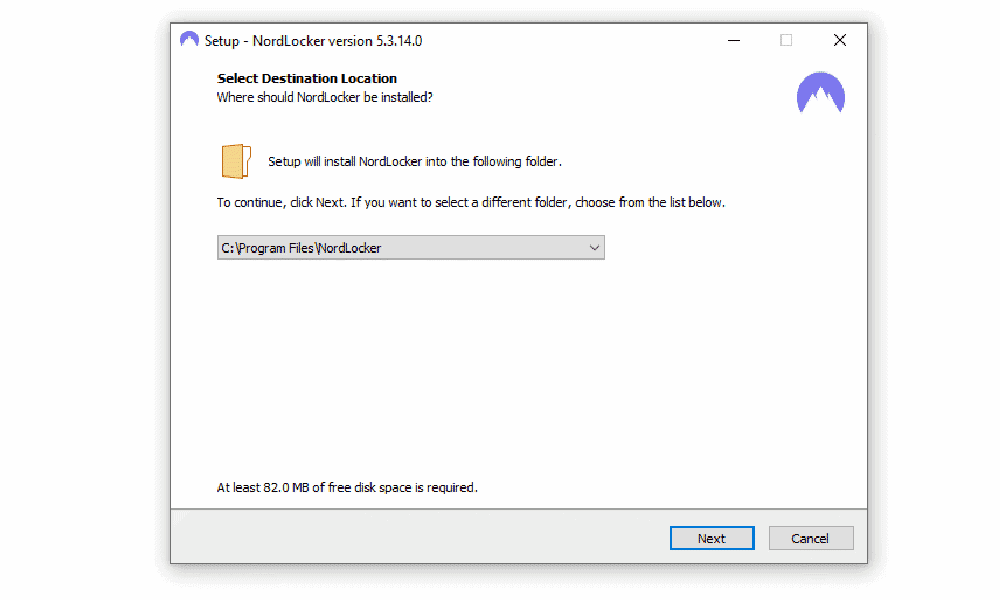
- Begin the NordLocker Setup
Choose where you want NordLocker installed. This process adds a new folder to your file browser, which will allow you to sync files.
- Log In to the NordLocker App
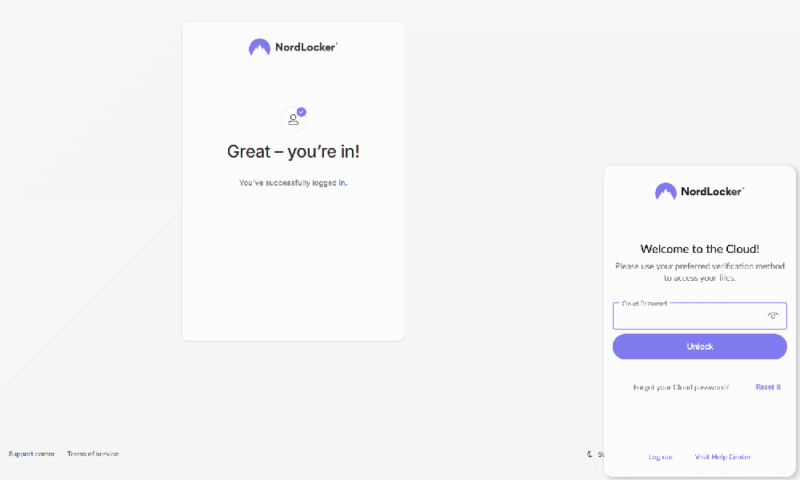
To log in to the NordLocker app, you’ll be redirected to a new browser tab to enter your email and password. Once you’ve done that, enter your password in the app to sign in.
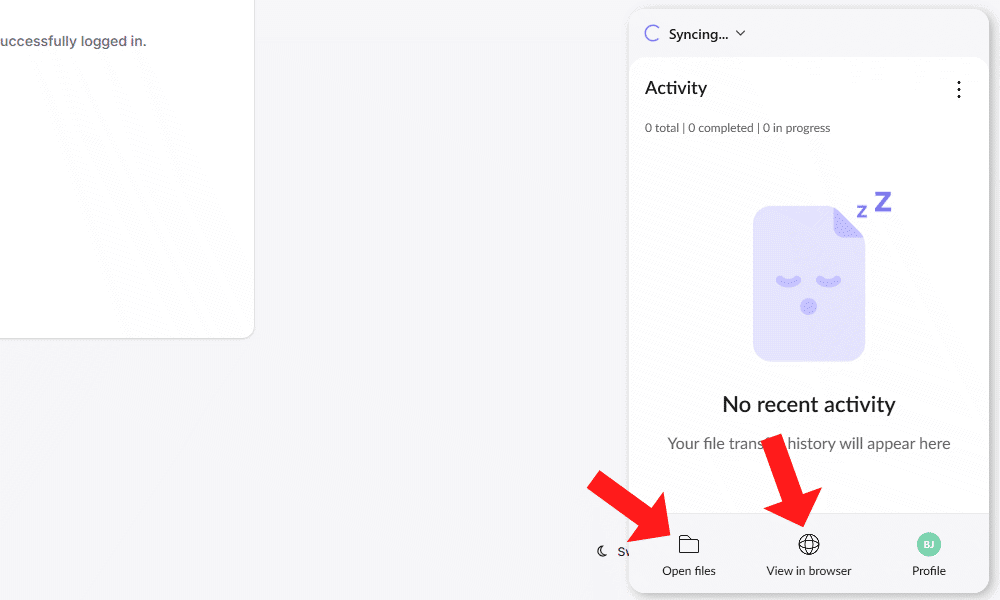
- Set Up File Sync
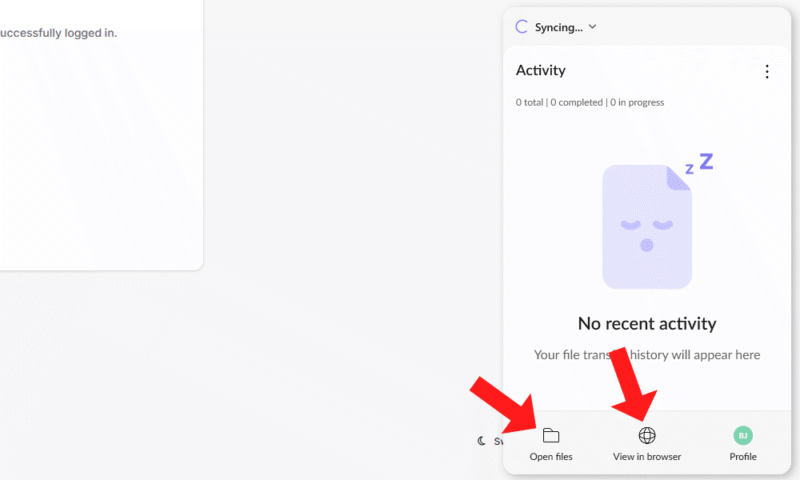
To set up file sync, choose “open files” for the NordLocker synced folder. Alternatively, you can open the browser client to upload and download files there.
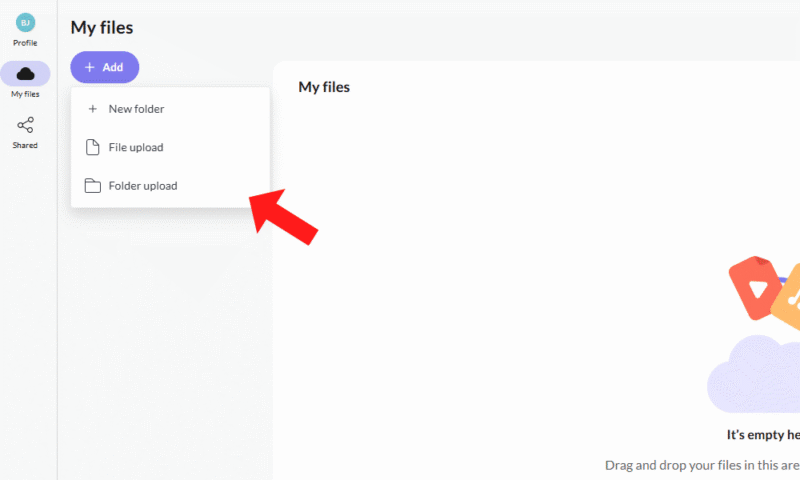
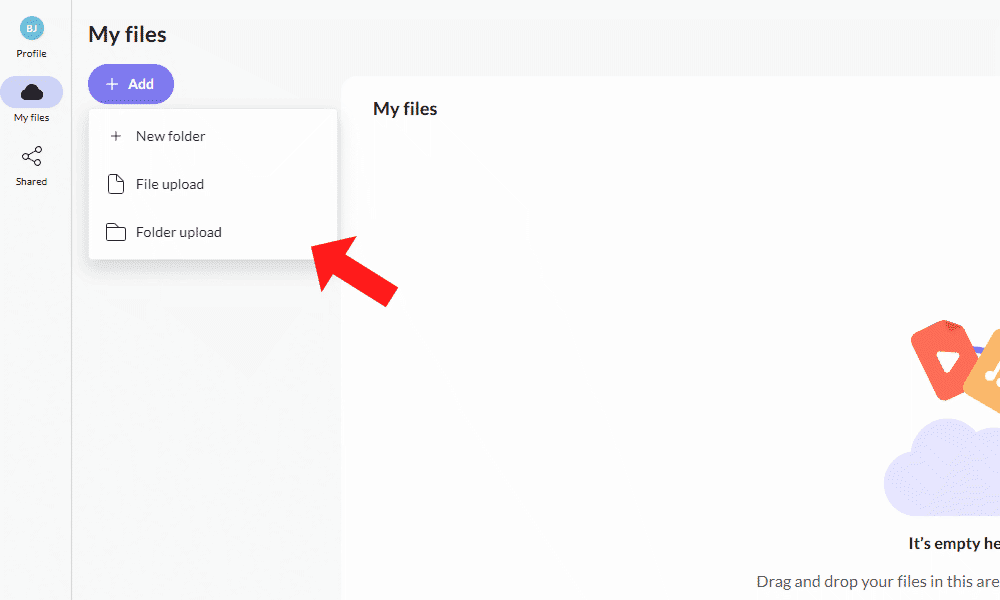
- Upload Your Files
Drag and drop your files into the NordLocker interface to upload them, either to the synced folder in your documents or via the web client.

NordLocker on Desktop: Windows Only
Using NordLocker in a browser and on desktop is similar to other cloud storage platforms. You can drag and drop files to upload or download, and share files from the browser client. The Nordlocker desktop app is useful if you need to set up automatic file sync, but you can also work straight from the browser if you prefer. Unfortunately, there’s no macOS or Linux apps.
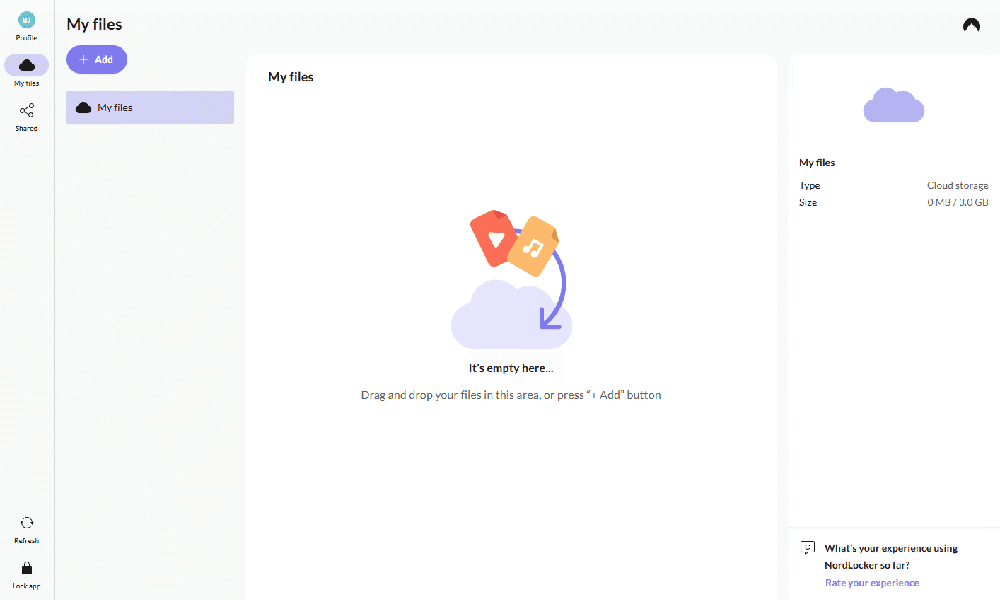
to that of other cloud storage platforms.
NordLocker on Mobile: Android & iOS Apps
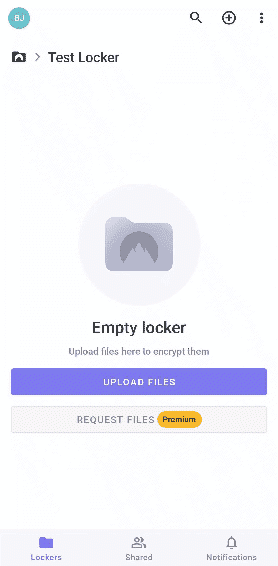
NordLocker’s app for mobile devices is functionally the same as for desktop, with the minor difference of calling folders “lockers.” Once created, these lockers will sync to the desktop app, and you can see any folder you create in the mobile app as well.
NordLocker Pricing: How Much Does NordLocker Cost?
NordLocker is one of the more expensive monthly cloud storage options; it’s much more cost-effective to opt for an annual plan. If you need other security apps, consider a NordVPN Complete or Prime plan for even better value. These plans come bundled with NordLocker and Nord Security’s other apps for less than the price of NordLocker on its own.
- 3GB
- 3GB
- 500GB
- 500GB
- 2000GB
- 2TB
- 2TB
NordLocker Free Cloud Storage Plan
NordLocker has a 3GB free plan; compared to other client-side encryption services, it’s more generous than Internxt’s 1GB free storage, though less than Sync.com’s 5GB free storage.
As a bonus, you can sign up for a free NordLocker plan anonymously, with no credit card details required. Free plans include client-side encryption and multi-factor authentication (MFA), so even your most sensitive files will be secure.
Pricing Plan Breakdown
NordLocker offers two premium plans, both of which are available monthly or annually. Annual plans offer significant discounts, which is fortunate since the monthly option is incredibly expensive.
The only difference between plans is the file size limit: 500GB or 2TB. The 2TB plan costs $6.99 per month for the first year on annual billing ($83.88 for a year), but the price jumps to $19.99 per month with monthly billing. Annual pricing upon renewal after the first year costs $14.99 per month ($179.88 for a year).
To see how NordLocker compares to alternatives, read our breakdown of the cheapest cloud storage services.
Does NordLocker Have a Business Plan?
There is no dedicated NordLocker business or team plan. Unfortunately, NordLocker’s file-sharing capabilities are incredibly basic, which may be a dealbreaker for teams that need real-time collaboration.
If you’re looking for an option more suited to collaborating with others, check out our list of the best cloud storage services for businesses.
Speed: How Fast Is NordLocker?
The upload and download speeds are acceptable when taking encryption into account. NordLocker isn’t the fastest service we’ve tested, but it has cut down on its average times by about a minute since our last round of testing.
The service still has room for improvement, though. Take a look at our list of the fastest cloud service providers for comparison.
NordLocker Speed Test Results
File Sharing & Syncing: How Does NordLocker Handle Files
NordLocker has a very simple file-sharing system, but there are no collaboration tools. It’s an acceptable option if you just need a place to store your files and use basic file-sharing features. However, keep in mind that cheaper alternatives are available.
File-Sharing Options
You can share files by choosing a specific NordLocker user (either free users or users with a paid NordLocker account) or by sharing a secure link. I found sharing via link to be easiest. However, neither option lets you set custom permissions, change the link expiration date or create your own link password, as NordLocker generates these automatically.
Premium users can create file requests for others to upload files. This works via link and is also automatically password-protected. You can share folders as well, but I found the interface to be a little confusing. NordLocker allows you to share the main (root) folder, but not individual folders nestled within the root folder.
File-Syncing Options
NordLocker allows you to sync files with its desktop or mobile app. It’s one of the slower services for file syncing, though, as it doesn’t use block-level sync. This means each file is re-uploaded in its entirety even when only minor changes are made. It does not offer file versioning.
Security: Is NordLocker Safe?
In addition to client-side encryption, NordLocker offers multi-factor authentication, a manual and timed storage lock that secures your account, and a recovery key if you forget your password.
NordLocker Security Features
I break down NordLocker’s security features below:
- MFA: Set up MFA through an authenticator app or via a physical security key or device passkey. Both of these options are highly secure forms of MFA.
- Storage lock: You can set an automatic log-out time of five minutes, 30 minutes or an hour, or manually lock your storage.
- Recovery key: Your recovery key lets you sign back in to your account in the event that you forget your password.
Detailed Security Analysis: Encryption & Cloud Security
| At Rest | AES-256, ECC |
|---|---|
| In Transit | E2EE |
NordLocker uses end-to-end AES-256 and ECC encryption across its storage, as well as XChaCha20 for your secret key. These are the strongest encryption standards available.
Privacy: Is NordLocker Private?
Although NordLocker’s client-side encryption keeps your files safe and private, the privacy of your usage of the app is less secure.
NordLocker Privacy Policy
NordLocker’s privacy policy details the personal data it collects and how it uses that data. It collects information on app diagnostics, anonymized app usage statistics, device information (e.g. browser type, operating system version), file storage information for syncing purposes (e.g. when a file is added, edited, or deleted), and file-sharing and link logs (e.g. IP address, operating system, session ID, NordLocker version used, and more).
Another issue is with how NordLocker applies its privacy regulations. While users in Europe benefit from the GDPR, these rights aren’t officially extended to other NordLocker users outside of Europe — though this is not uncommon among cloud storage providers.
Anonymous Usage Data
Another thing to note is NordLocker’s collection of anonymous usage data. By default, your usage data is sent to Nord so it can process and improve its applications. While the data is anonymous and you can switch off data collection, it would be nice if it weren’t enabled by default.
Customer Support: How Good Is NordLocker’s Support?
NordLocker has live chat, an email form and a help center. I was disappointed with NordLocker’s support during previous rounds of testing. However, it has since improved with the addition of a NordLocker-specific live chat and the removal of premium-only priority support.
Live Chat Support Speed & Quality
I was happy with the quality of the support I received from NordLocker’s live chat. Once I gave the support bot my name and email, I was quickly transferred to a support agent, who answered my question.
NordLocker vs Other Cloud Storage Services
NordLocker has good security, but it is severely lacking in other areas. Some alternatives that have similar security standards with extra features include the following:



Community Feedback: NordLocker Reviews on Reddit & Social Media
NordLocker doesn’t have much positive community feedback. Although users acknowledge its safety, they also point out its slow speeds (though in our testing it has improved) and its struggles with file uploads. Other common complaints mention the poor quality of the service compared to the more well-known NordVPN.
The Verdict: Is NordLocker Worth It?
While NordLocker does have potential as an add-on to Nord Security’s NordVPN, it has too many issues for me to recommend as a standalone product. Unless you’re happy with NordLocker’s free 3GB storage, the paid plans are expensive for what you get, especially compared to other cloud storage options with similar security features.
Have you tried NordLocker? How do you feel about the sparse feature set? Is there a cloud storage service you like more? Let me know in the comments, and thank you for reading.
FAQ: NordLocker Cloud Storage Solution Review
Yes, NordLocker is secure, with client-side AES 256-bit encryption applied to its storage space. You can also enable MFA and use a recovery key for more security.
NordLocker’s 2TB plan costs $19.99 per month, making it one of the more expensive cloud storage options on a monthly plan. Its annual plan is cheaper, at $6.99 per month for the first year.
NordLocker has a free 3GB plan, which includes client-side encryption, MFA and basic file sharing. You can even sign up without providing credit card details.
NordVPN is a VPN that secures your online browsing, while NordLocker is a cloud storage provider. Nord Security owns both NordLocker and NordVPN.