Best Free Password Manager: 4 Top Secure Options & Reviews
Securing your logins and sensitive files doesn’t have to cost an arm and a leg. Try one of the best free password managers and protect your credentials without spending a dime.


Written by Kate Hawkins (Editor, Writer)
Reviewed by Valentina Bravo (Managing Editor)
Facts checked by Eugenie Tiu (Editorial Assistant)
Last Updated:
All our content is written fully by humans; we do not publish AI writing. Learn more here.
Key Takeaways: These Are the Best Free Password Manager Apps
- Proton Pass — Best secure free plan, with unlimited device syncing and strong privacy under Swiss jurisdiction. Sign up for the free plan, or you can also try the Proton Unlimited plan for a comprehensive security suite.
- Bitwarden — Best free password manager for Chrome, with unlimited password storage and device syncing. Try it for free, or opt for the Premium plan for just $1.65 per month.
- NordPass — Best free password manager with modern encryption and a polished interface. Get the free plan or upgrade to the Premium plan for $1.39 per month.
- LastPass — Best free password manager for beginners, with an intuitive interface. Get its free plan or opt for the Premium plan for $3 per month.
Facts & Expert Analysis About Password Security:
- Free doesn’t mean unsafe, but the unknown might. Established password management companies use strong encryption and zero-knowledge architecture, while obscure “vault” apps often don’t explain how they protect your data.
- Having unlimited devices matters for real-world security. If your free password manager doesn’t sync everywhere, you’re more likely to reuse passwords or fall back on insecure storage.
- Client-side comes with responsibility. Since providers can’t access your vault, losing your master password without a recovery key usually results in permanent data loss.
Choosing the best free password manager can dramatically improve your credential security without adding another subscription to your list. In this guide, I look at the best password managers with 100% free plans and compare their features so you can choose the option that’s right for you.
-
11/05/2022 Facts checked
Rewrote the review; updated ordering of services, prices and overall justifications. Removed RememBear, as the service will be discontinued July 18, 2023.
-
06/20/2024 Facts checked
Rewritten to include current information about features, pricing and company news.
-
03/28/2026 Facts checked
We’ve updated our provider ranking with new hands-on testing results and improved testing methodology.
Cloudwards’ Choice: Proton Pass
 Cloudwards’ Choice: Proton Pass
Proton Pass is my top pick for the best free password manager, with unlimited device syncing and strong client-side encryption. Its free plan doesn’t feel restrictive or gimmicky; it’s just practical, secure password management. Try Proton Pass for free, or get the Unlimited plan with a 30-day money-back guarantee.
What Are the 4 Best Free Password Managers?
| Provider Type | Free Plan Device Limit | Encryption | Password Sharing | 2FA Options | Passkey Support |
|---|---|---|---|---|---|
 | Unlimited | AES-256-GCM* | Vault sharing with up to two others | Authenticator app | |
 | Unlimited | AES-256 | Share with one user + Bitwarden Send | Authenticator app, email | |
 | One | XChaCha20 | No | Authenticator app | |
 | One device type (desktop or mobile) | AES-256 | Basic sharing | Authenticator app | |
1. Proton Pass — Best Free Plan for Security

Proton Pass stands out because its free plan doesn’t feel restrictive. You can sync across unlimited devices, store unlimited passwords and use vaults for secure password sharing. It covers the essentials for everyday password management with no arbitrary caps.
Security-wise, Proton Pass uses strong, client-side encryption. This means the contents of your vaults aren’t visible to the company, since all stored passwords and files are encrypted before they leave your device. I also like that it supports passkeys and integrates smoothly with the wider Proton ecosystem, which reinforces its dedication to complete privacy.
Proton Pass Hands-On Testing
I found Proton Pass easy to navigate in day-to-day use, with a browser extension that feels fast and uncluttered. Autofill worked reliably across Chrome and Firefox during my tests, and the password generator made it simple to create long, complex credentials without endlessly tweaking settings.
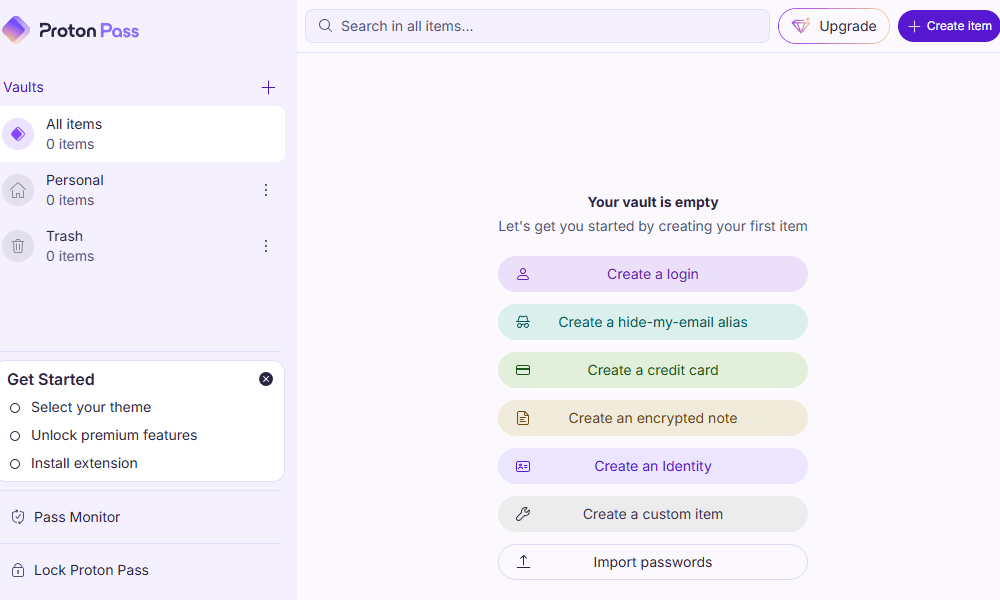
The service feels lightweight and stable, which is exactly what I want from a free password manager. Plus, I wasn’t bombarded with constant nudges to upgrade to a paid plan; free really does mean free, with no pressure to make a purchase.
Proton Pass Pricing & Value
Proton Pass has one of the most generous free plans available, and that alone makes it easy to recommend Proton Pass. Paid tiers unlock advanced sharing and extra security features, but most users can comfortably stick with the free plan.
That said, if you’re looking for a comprehensive security ecosystem, it’s worth trying the Proton Ultimate plan. It comes with the password manager, a VPN, secure email, Proton Drive and a calendar, all in one bundle. For a more detailed look at the service, read our Proton Pass review.
More plans
- Includes Pass, Mail, Calendar, VPN & Drive
- Price is per user, 3 users minimum
- Price is per user, 3 users minimum
- Price is per user, 3 users minimum
2. Bitwarden — Best Free Password Manager for Chrome

Bitwarden is a flexible free password manager that’s great for Chrome users. The free plan includes unlimited password storage and syncing across unlimited devices, making it a practical choice for password management across desktop and mobile devices.
It also stands out for its open-source development model. The codebase is publicly available and regularly audited for vulnerabilities. Combined with AES-256 encryption and secure sharing through Bitwarden Send, the service offers a high level of transparency if you care about security credentials and privacy.
Bitwarden Hands-On Testing
I was impressed by Bitwarden’s Chrome extension during testing. It handled autofill smoothly and detected login fields promptly. The password generator is simple but effective, with customizable settings that let you create passwords up to 128 characters long. You can also generate passphrases, usernames and email aliases.
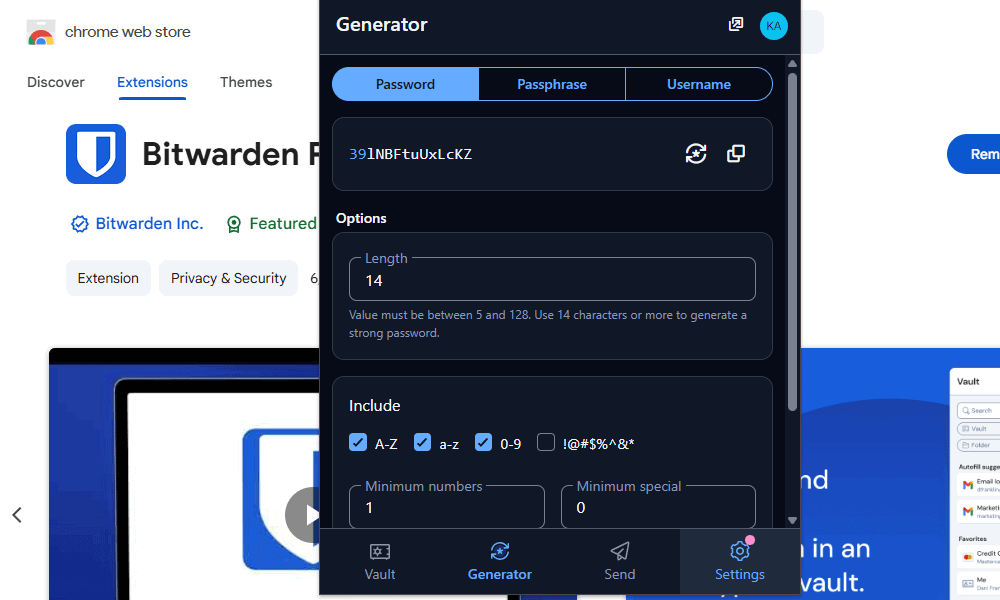
I explored Bitwarden Send as well, which lets you securely share passwords, text or files through an encrypted link. It’s straightforward and makes it easy to share sensitive information without exposing your vault credentials.
Bitwarden Pricing & Value
Bitwarden’s free plan is generous considering its unlimited passwords and device syncing. However, its Premium tier is incredibly affordable, at just $1.65 per month for a year-long plan. This includes a built-in authenticator, emergency access and priority support. Read our Bitwarden review for more details.
- Unlimited storage, Multi-device sync, 2FA
- 1GB of encrypted file storage, Additional 2FA options, Password health reports, Priority customer service
- Billed annually, Six accounts
More plans
- Billed annually,Per user, includes all premium features
- Per user, includes all premium features and families plan for all users,
3. NordPass — Best Password Manager for Modern Encryption

NordPass focuses on modern cryptography, using XChaCha20 instead of the usual AES-256. XChaCha20 is a newer algorithm, designed to provide strong protection while boosting efficiency across devices.
Beyond encryption, NordPass has useful tools like a password generator, passkey support and features that help identify weak or reused credentials. The biggest drawback is the free plan’s single-device limit, making it a less flexible option than competitors that have unlimited syncing.
NordPass Hands-On Testing
During my tests, NordPass felt polished and easy to navigate. Importing passwords from other sources was quick, and the vault layout made it simple for me to organize my logins and secure notes.
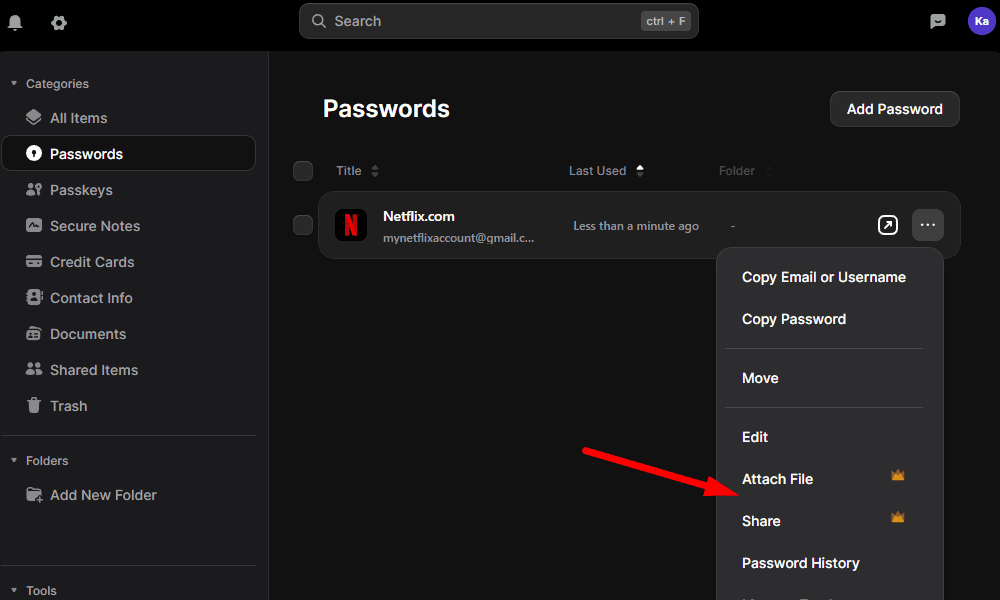
Autofill worked reliably across the sites I tested, and the password generator created strong credentials that I could tweak to suit my preferences. However, I was disappointed to find no sharing options with the free plan; sharing is available only with an upgrade to Premium.
NordPass Pricing & Value
NordPass is functional on its free tier, with unlimited password, passkey, note and file storage. However, the best value is on the paid tiers. Upgrading removes device restrictions and unlocks secure sharing, emergency access and password health tools. Try the Premium plan for 30 days risk-free, or read our NordPass review for more information.
- *Renewal price for the 1-year plan is $35.88; and $80.73 for the 2-year plan.
- *Renewal price for the 1-year plan is $71.88; and $143.76 for the 2-year plan.
More plans
- *Teams is for 10 user pack only. Price is for 10 users.
- *Business & Enterprise starts from 5 users. The price is for 5 users already.
- *Business & Enterprise starts from 5 users. The price is for 5 users already.
4. LastPass — Best Free Password Manager for Beginners

LastPass is a very popular password manager, largely because of its straightforward interface and beginner-friendly setup. The app makes it easy to generate passwords, import and store credentials, and review your password health using its built-in security dashboard.
However, the free plan comes with a significant limitation: You must choose one device type — either mobile or desktop — and you can’t switch. Plus, LastPass has had several high-profile security incidents. Although encrypted vault data remained protected, this does raise concerns about the platform’s overall security practices.
LastPass Hands-On Testing
I found LastPass easy to set up and start using; it took just a few minutes to add the extension to my browser and import passwords. LastPass detected login fields quickly, and the password generator produced complex login details without needing too many adjustments.
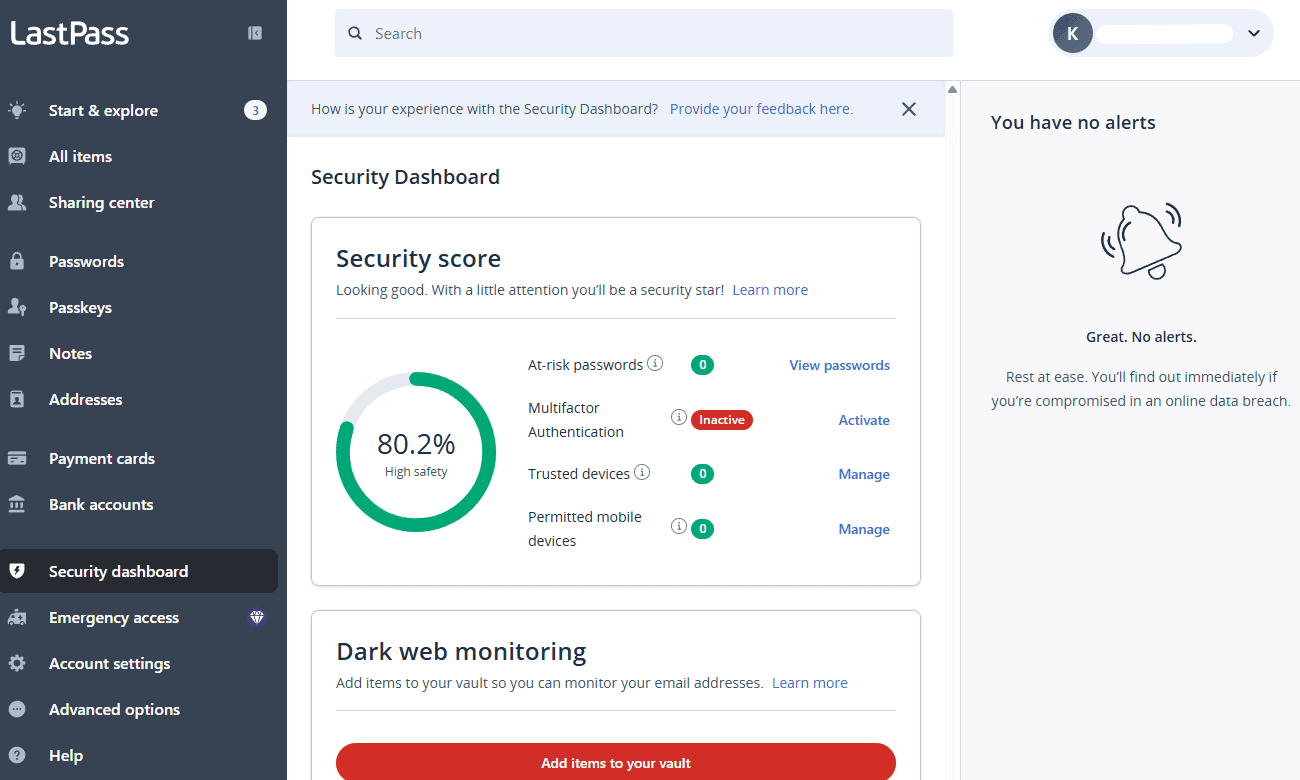
The mobile app also felt intuitive, with clear navigation and a well-designed vault. However, the device-type restriction was frustrating when I wanted to save passwords on both my mobile and my desktop and couldn’t. While I appreciate that it’s a way to nudge users to upgrade, it feels unnecessary when competitors restrict free users based on number of logins rather than device type.
LastPass Pricing & Value
LastPass’ free plan works well if you want to secure your passwords on only one device, but most users will find that limitation annoying. Upgrading to the Premium plan ($3 per month) removes those restrictions and unlocks extra security tools, but it’s a pricey upgrade. For a deeper look, check out our LastPass review.
- Unlimited storage
- Priority support One-to-many sharing Application autofill Multi-device sync
- Protection for six users Family dashboard Unlimited shared folders Multi-device sync
More plans
- Price per user Admin dashboard 5-50 users Standard reporting Private vault for every user Multi-device sync
- Price per user Includes all Teams features Unlimited users 3 SSO apps with MFA LastPass Families for employees
- Price per user; Everything in Business, plus: SaaS Monitoring Unlimited number of single sign-on (SSO) apps Advanced multifactor authentication (MFA) capabilities
Can You Use a Free Password Manager App for Password Storage?
Yes, you can safely use a free password manager to store your passwords, as long as you choose a reputable provider. Established services like Proton Pass and Bitwarden use strong encryption to protect your stored credentials, making them far safer than in your notes apps or spreadsheets.
Free vs Paid Password Managers: What Do You Miss?
While free password managers cover essentials like storage, encryption and autofill, paid plans add convenience and advanced security tools. These can include emergency access, hardware security key support, password health reports and advanced password sharing for families or teams.
What Is the Best Free Password Manager for iPhone and Mac?
For Apple users, iCloud Keychain is a secure built-in option. However, Proton Pass is the best free password manager for iPhone and Mac if you need secure password storage across both Apple and non-Apple devices.
Methodology: How Did We Test the Best Password Managers?
To find the best free password managers, I tested each service based on the following criteria:
- Security: I analyzed encryption protocols like AES-256 and XChaCha20, and I checked whether the providers offer tools like data breach scanning or password health reports.
- Usability: I tested import functionality, password generators and autofill, as well as how simple it was to navigate the interface across browsers and devices.
- Free plan limitations: I looked for restrictions like password limits, device caps or features locked behind premium upgrades.
- Features: I evaluated extra tools like passkey support, secure note storage and compatibility with third-party authenticator apps.
- Privacy: I reviewed each provider’s privacy policy to confirm that they follow a client-side encryption approach.
How Do You Use a Password Manager for Password Sharing?
You can use a password manager to share your passwords and other sensitive information without providing access to your whole vault. Not all free plans support this, so check to see if your password manager offers it.
- Select the password login or secure item you want to share.
- Click the share option in the password manager.
- Enter the recipient’s email address.
- Choose permission levels, like view-only or full access.
Note that some password managers allow sharing only between user accounts rather than via external email addresses.
Why Are Password Health Reports and Data Breach Scanning Important?
Password health reports and data breach scanning are important because they identify weak, reused or compromised passwords before attackers can exploit them.
Many password managers monitor known breach databases and alert you if your credentials appear in leaked datasets. This helps you quickly identify and update vulnerable accounts, improving your overall password security.
What Happens If You Forget Your Master Password?
If you forget your master password, most password managers cannot recover your vault due to client-side encryption. This means the provider cannot reset or access your data. Some services offer recovery options, like a recovery key or an emergency access contact, but you must set these up when you configure your account.
Final Thoughts
A free password manager is one of the easiest ways to improve your online security at no cost to you. Proton Pass stands out to me as the best free option, with unlimited device syncing, strong encryption and a practical feature set that doesn’t relentlessly push you to upgrade.
Which password manager do you use? Have you tried any of the options above? Did I miss a provider you think deserves a spot on the list? Let me know in the comments, and thank you for reading.
FAQ: Free Password Manager Apps
Yes, reputable free password managers are safe, since they use strong, client-side encryption to protect your credentials from unauthorized access.
Proton Pass is the best free password manager because it offers unlimited device syncing, strong encryption and reliable password storage without restrictive limits.
Yes, many password managers offer business plans with tools like team password sharing, access controls and centralized security management.
Yes, Google Password Manager is generally safe, and it integrates well with Chrome and Android. However, it lacks the advanced security tools found in dedicated password managers.