How to Create a Strong Password: Tips for Ultimate Security in 2026
In this guide, you’ll learn how to create a strong password and discover the best password managers for that purpose.



Written by Wisdom Sablah (Writer)
Reviewed by Kate Hawkins (Editor, Writer)
Facts checked by Simona Ivanovski (Fact-Checker, Formatter)
Last Updated:
All our content is written fully by humans; we do not publish AI writing. Learn more here.
Key Takeaways: These Are the Best Password Managers for Strong Password Generation
- Proton Pass — A privacy-first password manager with a fast, intuitive password generator that creates secure passwords and passphrases with minimal setup. Try Proton Pass’ free plan or get the one-year plan for $2.99 per month.
- NordPass — An easy-to-use password manager with a customizable generator and XChaCha20 client-side encryption. Try NordPass from $1.39 per month.
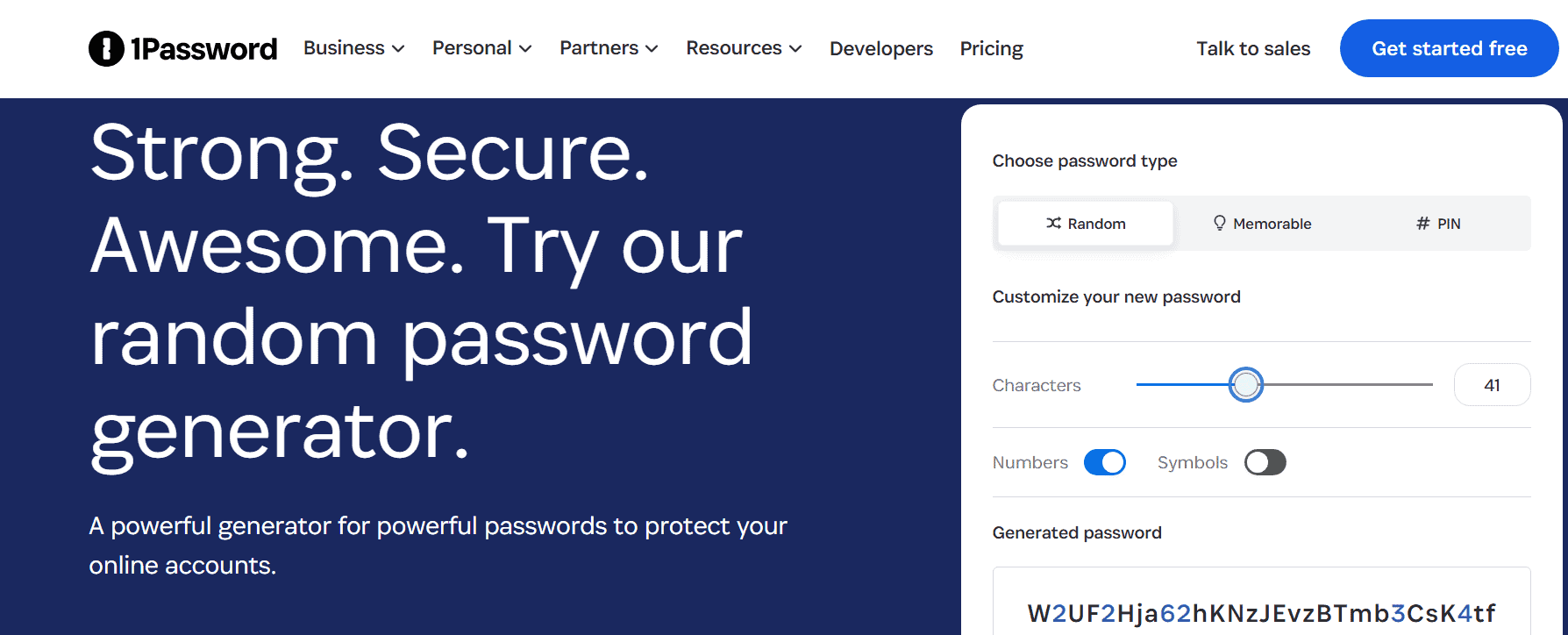
- 1Password — Offers one of the most advanced generators available, with support for passwords up to 100 characters long. Get 1Password’s one-year plan for $2.99 per month.
Facts & Expert Analysis: How to Create a Strong Password
- Password length matters most: A strong password should be at least 12 characters long, according to the NIST password guidelines. At 100 billion guesses per second, it would take a computer more than 500 years to guess all the possible combinations of 15 lowercase letters.
- Human-generated passwords are often weak: We tend to create passwords using common patterns like names, birthdays or events. A hacker can exploit such passwords using dictionary and pattern-based attacks, which is why random-password generators are a better option.
- Password reuse: To easily remember passwords, many people use the same or similar passwords across multiple accounts. However, if hackers get access to one password, they could compromise many of your online accounts. Always use unique passwords for different accounts.
Your password is often the only barrier standing between your personal data and a cybercriminal. Yet millions of people still rely on weak, predictable passwords — or worse, reuse the same one across multiple accounts. In this article, I’ll show you how to create a strong password that’s difficult for any threat actor to guess.
I’ll take you through a step-by-step mnemonic password creation guide and share password creation tips. Keep an eye out for the sections on the best password managers and how to securely share passwords with others. To give you a sneak peek, Proton Pass, the best password manager, offers excellent password generation and sharing features, even with its free plan.
-
05/01/2022 Facts checked
Rewrote the article and elaborated on good password practices.
-
03/01/2024 Facts checked
Updated to contain new information that will keep your data and personal info secure.
-
04/14/2026 Facts checked
We rewrote this article with a revised structure, new rankings and new insights.
-
10/14/2026 Facts checked
We’ve updated our provider order, adding NordPass based on our most recent testing.
What Are the Best Password Creation Tips?
Strong passwords are built on three core principles: length, randomness and uniqueness. While many people still rely on familiar words or predictable patterns, modern cyberattacks are designed to exploit exactly those habits. Brute-force tools and dictionary attacks can crack weak passwords in seconds, especially if they follow common formats.
What Are the Best Password Creation Practices?
Follow the best practices detailed below to significantly reduce the risk of account compromise and protect your sensitive data.
- Use long passwords: Aim for at least 12 to 16 characters. Longer passwords significantly increase resistance to brute-force attacks.
- Use a unique password for every account: If attackers breach one account, they can exploit the same credentials to access other accounts that use the same password, possibly your email, banking or social media accounts.
- Use a secure password manager: A password manager generates, stores and autofills complex passwords in an encrypted vault, eliminating the need to remember them yourself.
- Never reuse account credentials: Reusing passwords exposes you to credential-stuffing attacks, where hackers take leaked credentials from one site and attempt to log in to your other accounts.
- Avoid using personal information: Passwords that include your name, birthday, phone number or publicly available information are easy for attackers to guess or uncover via social engineering.
- Enable multi-factor authentication (MFA): MFA provides an additional security layer beyond your password, often requiring a one-time code, biometric verification or a hardware token.
Good and Bad Password Examples
Strong passwords are long, random and unpredictable, while weak ones rely on common words or patterns.
An example of a bad password is a predictable string like “Password123!,” while an example of a good password is a high-entropy, long string such as “T#4qL9z!pW2@cNx.”
Bad Password Examples:
- Password123!
- qwerty2024
- JohnDoe123
- iloveyou
- admin123
Good Password Examples:
- T#4qL9z!pW2@cNx
- 9$Lm@2Pq!xZ7#rT
- Jd#8!Lm2@Qp$91
- !LvY0u#7$TqX
- A$d9Qw!2Lp#Z
Should You Use a Password Generator?
Yes, you should use a password generator (try our tool), as they can create highly random and complex passwords that are difficult to predict. Password generators use algorithms to create unpredictable combinations of uppercase and lowercase letters, numbers and special characters. This helps protect against automated dictionary and brute-force attacks.
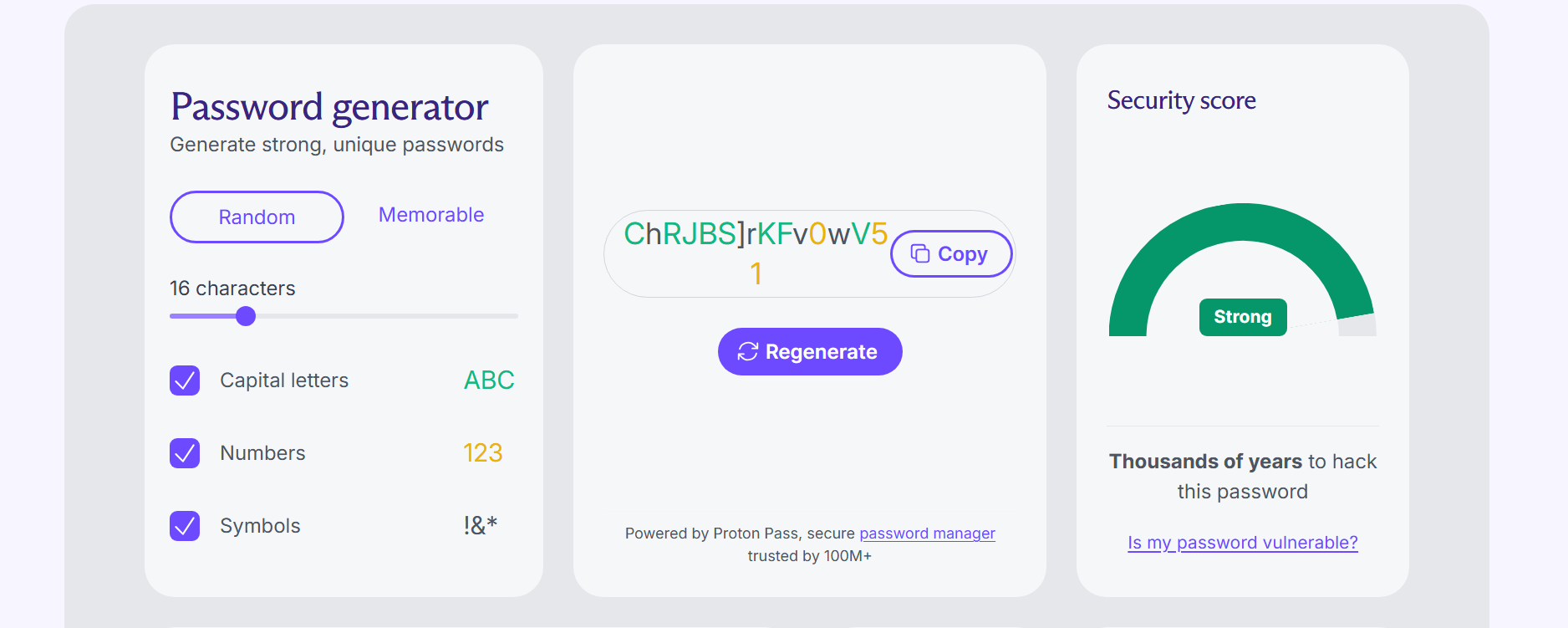
Another major advantage is convenience. Instead of spending time trying to invent strong passwords, you can generate a secure one in seconds and store it safely using a password manager like Proton Pass. This allows you to use long, unique passwords for every account without needing to memorize them.
How Do You Create a Strong Password You Can Remember?
One method of creating a memorable password is by taking the first letters of a sentence or lyrics you know well and strategically injecting unique symbols and numbers. This method balances memorability with strength. Instead of trying to remember random characters, you build a password from something meaningful to you but obscure to others.
The key advantage here is unpredictability. While the base sentence is meaningful to you, the final password is not easily traceable because it’s compressed, altered and enhanced with symbols. In cybersecurity terms, you’re increasing entropy (randomness and complexity) without sacrificing memorability.
- Select a Memorable Sentence
Choose a personal phrase, lyric or sentence that only you would easily recall. One example is, “I started my business in 2025 with 150 dollars.”
- Extract the First Letters and Keep the Numbers
Take the first letter of each word to form a base string: ISMBI2025W150D.
- Capitalize Strategically
Capitalize some letters to increase complexity. For example, you can capitalize the first and last letters and the letter between the numbers: Ismbi2025W150D.
- Insert Unique Symbols and Numbers
Replace certain letters or add symbols to strengthen the password. For example, you can replace every “I” with “!” and add “@” before the last letter: !smb!2025W150@D.
Why Does This Method Work?
- Length without effort: Full sentences help naturally produce longer passwords, which are harder to crack.
- Built-in complexity: Mixing uppercase and lowercase letters, numbers and symbols happens organically during the password creation process.
- Personal recall advantage: You don’t have to memorize the password itself since you can easily remember the original sentence.
- Resistance to common attacks: Because the structure is unique, it avoids dictionary and pattern-based attacks.
What Are the Best Password Managers?
Based on my testing and experience, the best password managers are Proton Pass, NordPass and 1Password. These top picks combine excellent security, privacy and usability.


How Do You Securely Share Passwords With Family and Colleagues?
The safest way to share passwords is to use the secure sharing or “vault” feature within a trusted password manager. This feature allows you to share access securely without ever revealing the actual password. The recipient can use the login but may not see the underlying credential, depending on the permissions you set.
Other alternatives, including SMS, email or chat apps, are highly risky. These channels can be intercepted, accessed on compromised devices or stored without encryption. Once a password is exposed this way, you lose control over who can access it and for how long.
Beyond basic sharing, many password managers also include emergency access. This feature allows you to designate a trusted person such as a spouse or family member to request access to your vault in an emergency.
The step-by-step guide below goes over the process of setting up secure password sharing. I’ll use Proton Pass as the example, but similar steps apply to other providers as well.
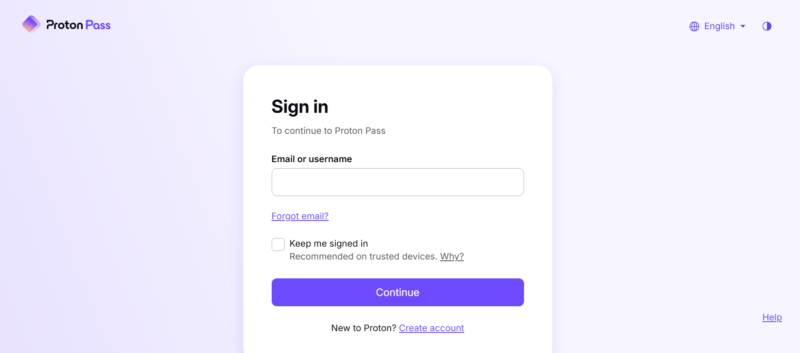
- Log In to Your Proton Pass Account
Log in to Proton Pass on your device using your email address and password.
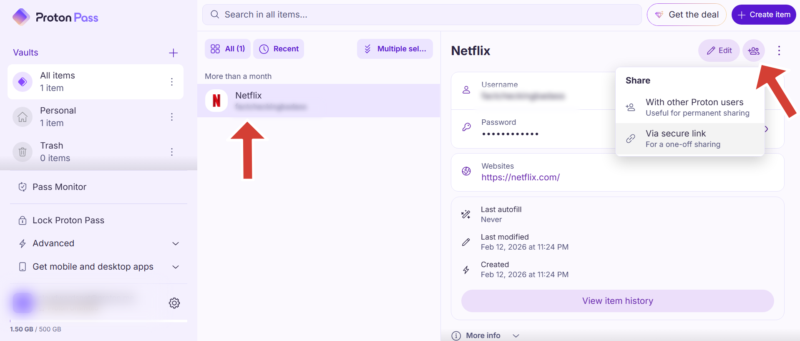
- Choose the Item You Want to Share
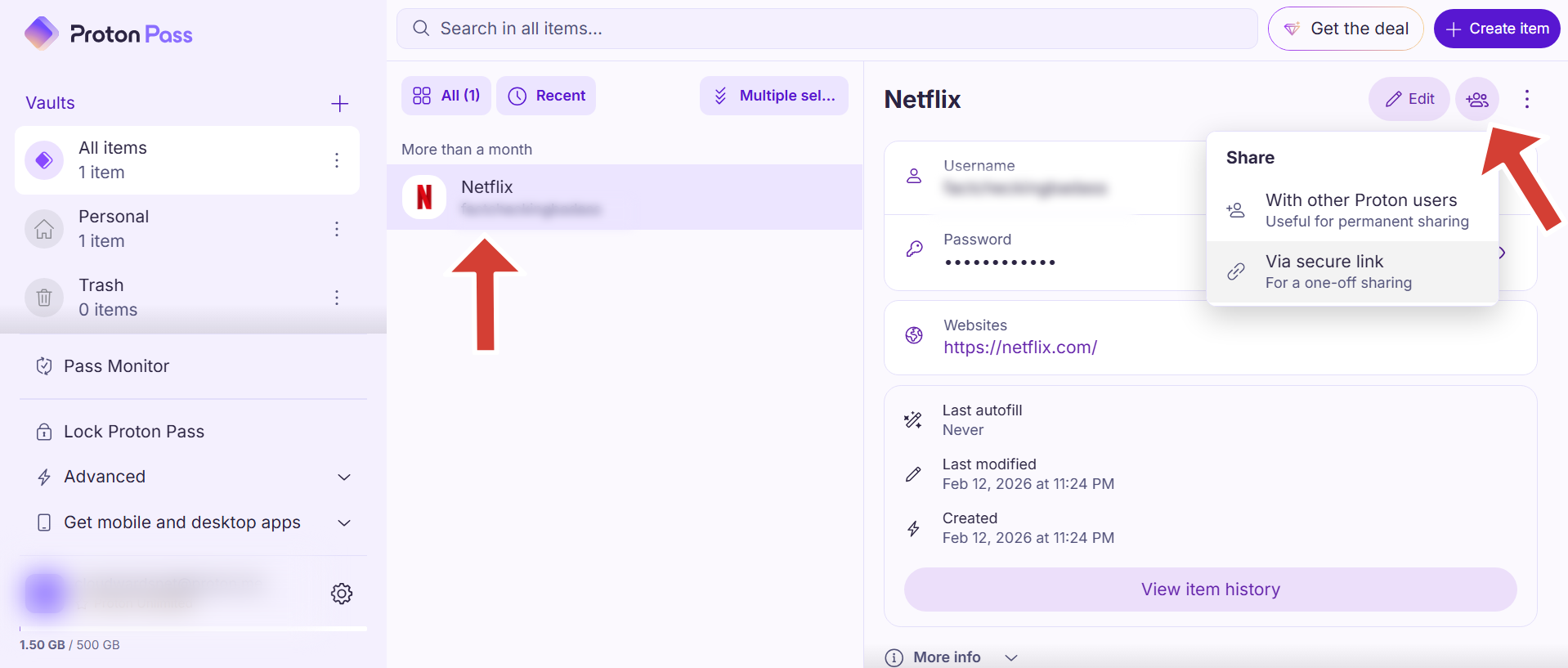
Select the password you want to share and click on the sharing tab on the right-hand side of your screen.
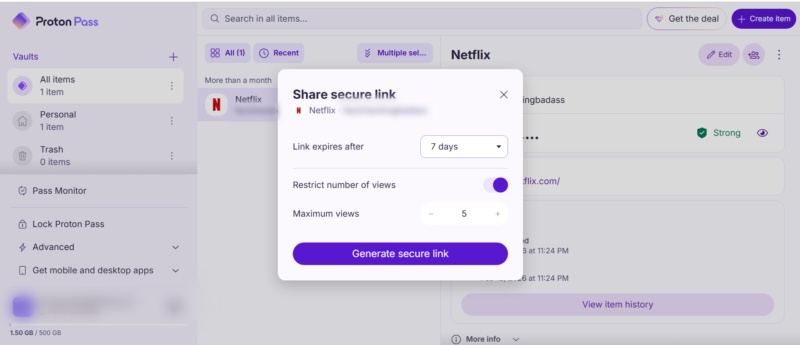
- Select a Sharing Option
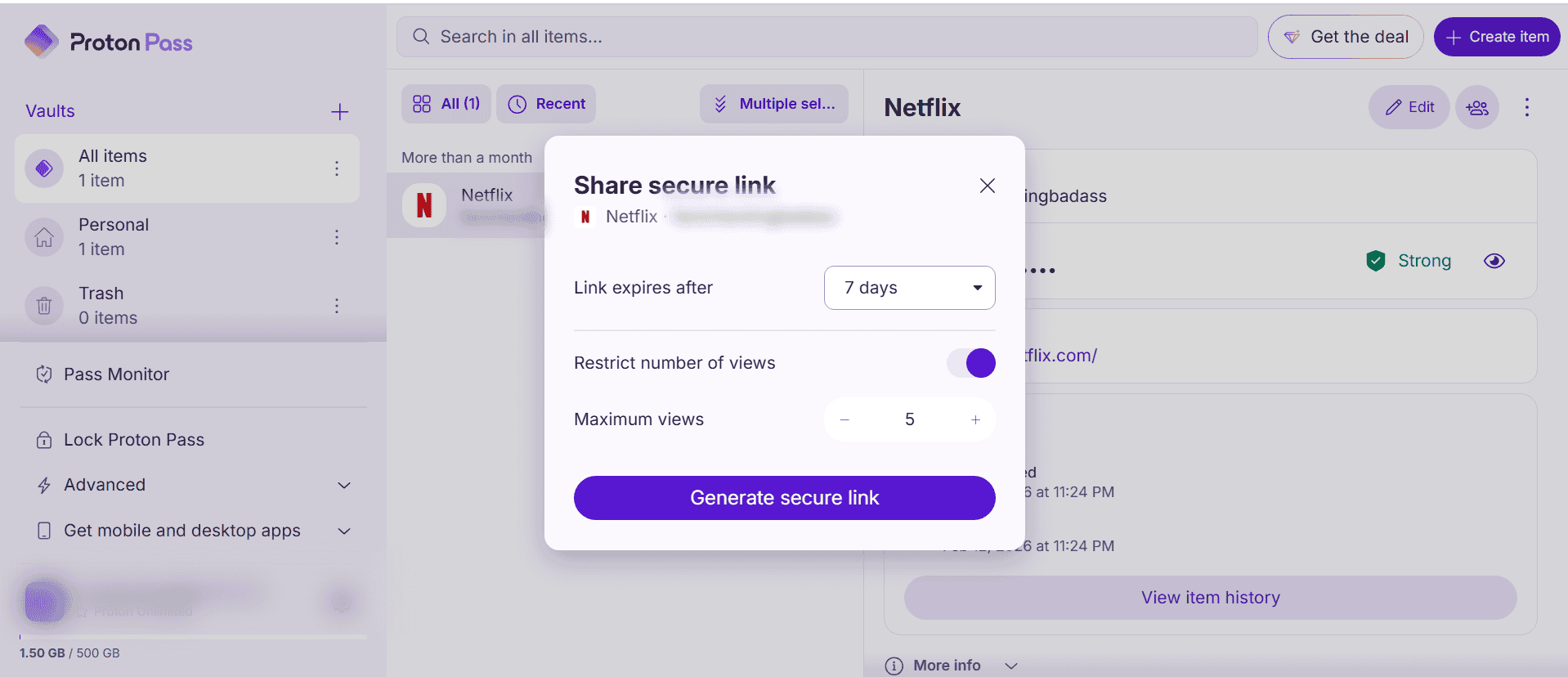
You have the option to share with other Proton Pass users via email or with non-Proton users through a secure link. You can set the link to expire after up to 30 days and restrict the number of views.
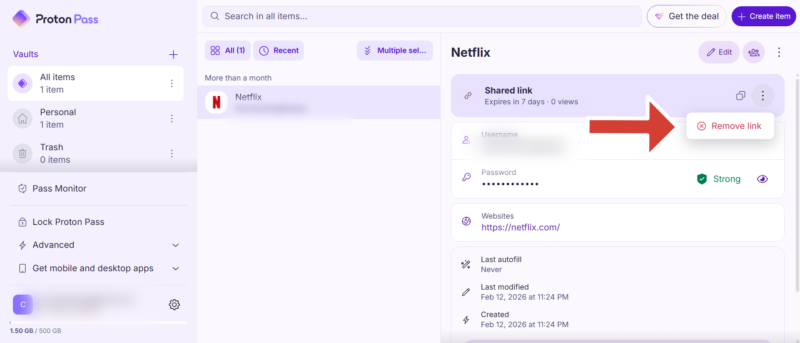
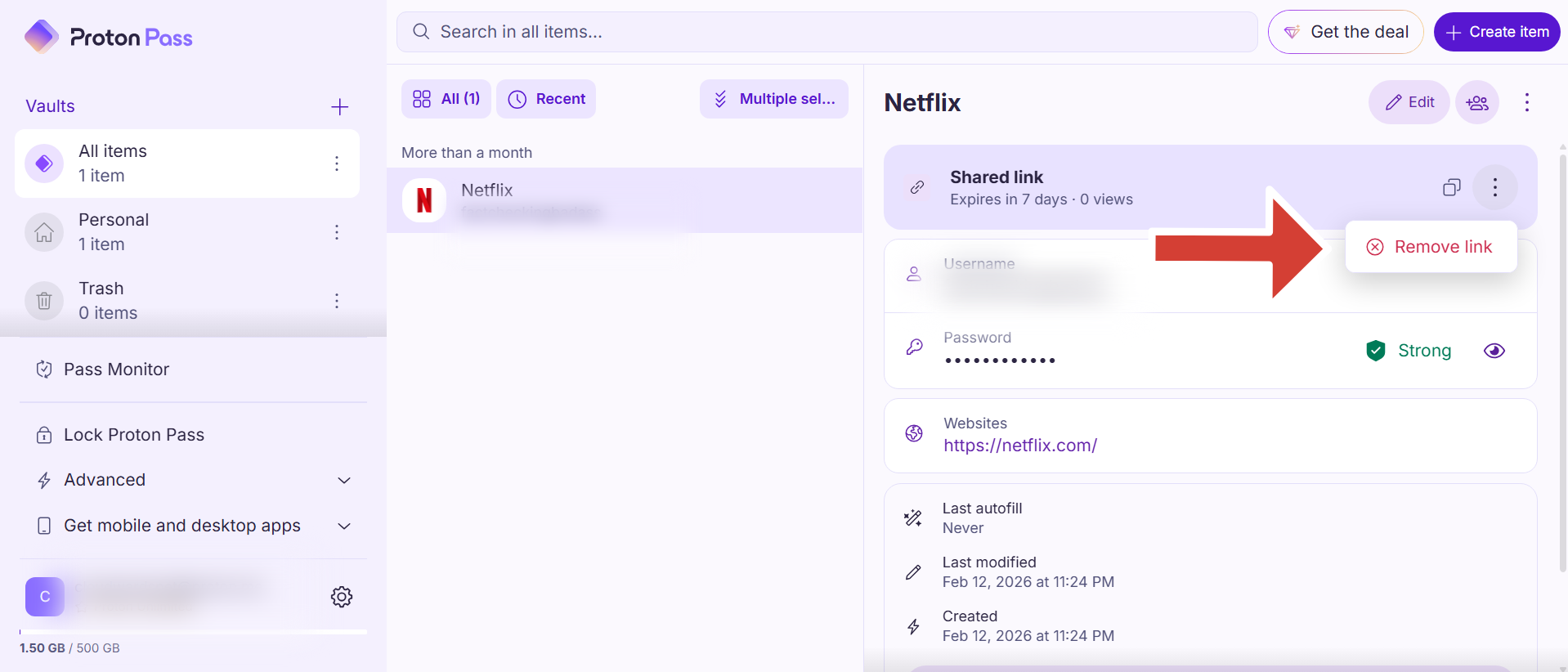
- Remove the Link or Revoke Access
You can stop sharing a link by removing it or revoking access for specific users.

Final Thoughts
A strong password should be at least 12 characters long and include a complex blend of letters, symbols and numbers. A smart way to create strong passwords is to pick the first letter of a memorable phrase and mix it up with symbols and numbers. However, instead of manually creating passwords, I recommend using a password generator with a good password manager, like Proton Pass.
Have you ever suffered a data breach? Which tip in this article was the most helpful to you? Which password generator do you think produces the strongest passwords? Share your thoughts and experiences in the comment section below. As always, thanks for reading.
FAQ: Tips on How to Create a Strong Password
A strong password is long, random and unique, such as a combination of letters and symbols like T#4qL9z!pW2@cNx or a passphrase like BlueHorse!Runs@Midnight2026.
The 8-4 rule suggests using at least eight characters in a mix of four types: uppercase letters, lowercase letters, numbers and symbols. However, modern guidelines recommend going beyond these numbers with longer passwords or passphrases.
The best way to generate a very strong password is to use a password generator like the one in Proton Pass. It creates long, random and unique passwords instantly and stores them securely so you don’t have to remember them.