Best AI Tools for Project Management: Top 5 in 2026
In this article, I compile a list of the five best AI tools for project management so you can make the smartest choice for your team's needs.



Written by Sofia Oliber (Writer)
Reviewed by Kate Hawkins (Editor, Writer)
Facts checked by Simona Ivanovski (Fact-Checker, Formatter)
Last Updated:
All our content is written fully by humans; we do not publish AI writing. Learn more here.
Key Takeaways: This Is the Best AI-Powered Project Management Software
- monday.com — Best overall for automation and scalability. Monday AI is on the Standard plan or above; you can test the Standard plan for free for 14 days.
- ClickUp — Best for custom workflows, with an integrated AI writing tool. Its AI features are on the Unlimited plan or above; try ClickUp with a 30-day money-back guarantee.
- Asana — Best for structured collaboration. Its AI features are available on the Starter plan or above; try Standard for free for 14 days.
- Notion — Best flexible workspace with an AI content generator tool. Test these AI functionalities from the Business plan or above with a 30-day free trial.
- Trello — Best simple and visual tool with AI functionalities. AI features are available on the Premium plan; try it for 14 days with the free trial.
Facts & Expert Analysis About AI Project Management Tools:
- AI adoption is growing fast: Employees are three times more likely to use generative AI than their leaders expect, according to a 2025 report.1
- Professionals prefer chatting with AI: Over 60% of professionals would rather use conversational AI tools like ChatGPT than integrated AI tools. Luckily, project management tools are starting to include AI chatbots in their user experience.2
- AI usage can impact professions: Over 90% of people believe AI will impact their profession. It’s important to start catching up now.3
Managing multiple projects at the same time can be overwhelming, even if you’re using a powerful project management tool. The best AI tools for project management can come in handy for minimizing manual work and enhancing productivity.
If you’re still familiarizing yourself with these kinds of tools, take a look at our ranking of the best project management software for an overview of the top choices.
Cloudwards’ Choice: monday.com
 Cloudwards' Choice: monday.com
I’ve tested dozens of project management apps, but I haven’t found any quite like monday.com. It combines great design with well-balanced features, and its AI can automate workflows, handle complex tasks and even interpret team sentiment. Try monday.com risk-free with its 30-day money-back guarantee.
Why AI Project Management Isn’t What You Think It Is
AI project management isn’t about handing over projects to an algorithm; it’s a smart layer that enhances the tools you already use. Most platforms now offer workflow automation, summaries and other agent-style features that speed up routine tasks. What matters is how well each service implements these tools, which is what I focused on during my testing.
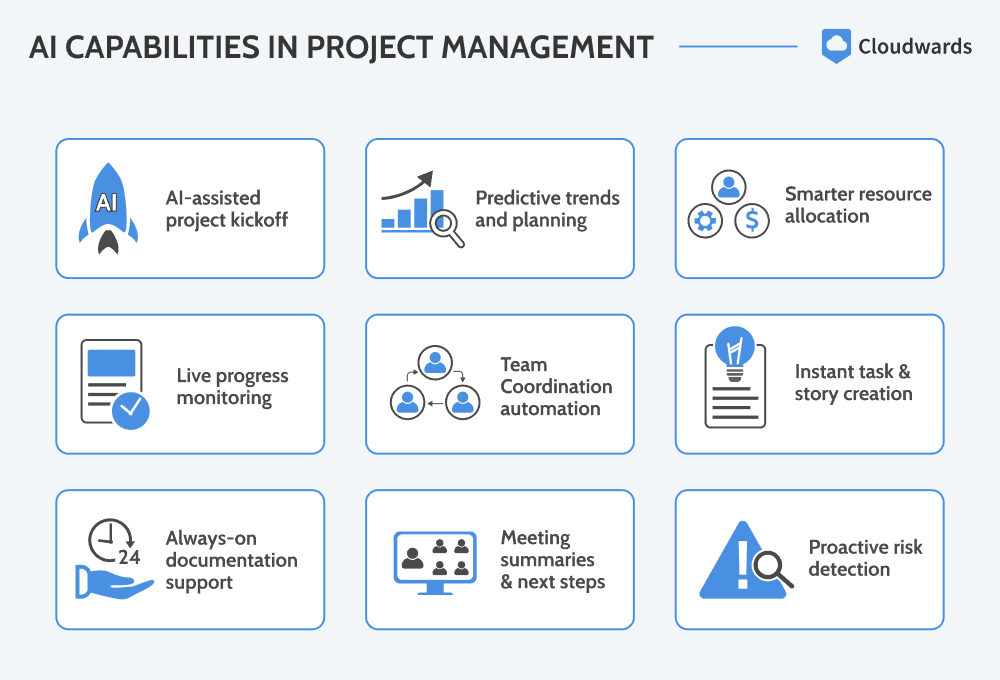
How Artificial Intelligence Will Transform Project Management
AI will change how teams plan and organize their projects, even if they’re not familiar with project management techniques. AI can handle predictive analysis, automate repetitive work and even act as a personal assistant. Project management isn’t going anywhere, but how it functions will shift as teams adapt to these new capabilities.
Avoid Costly Project Management Mistakes – Get Free Tips Today!

- Discover 10 fundamentals of project management
- Understand step-by-step plans for PM execution
- Learn tips to avoid 5 common mistakes by beginners
Benefits of AI in Project Management
AI can simplify and enhance project managers’ work in many ways. For example, you could use monday.com’s task generator or ClickUp’s automatic summarization for your projects. Your team’s needs will ultimately determine which tool you choose.
- Time saved: Users can save time with automations like auto-assigning follow-ups after a task is marked as done.
- Second opinion: Use AI smart chats to ask for reviews, improve messages or suggest additions.
- Task management made easy: AI can create tasks from scratch using notes, emails and even simple conversations.
- Optimized reports: Use AI in reports for quality insights, optimized resource allocation or better forecasting.
The Best AI Project Management Software Compared
Most modern project management tools include AI. Below is a quick comparison of my top five picks:
| Tool: | Cheapest AI Plan | Pricing* | Best For | AI Features | Limitations |
|---|---|---|---|---|---|
 | Standard plan; Basic plan includes free AI trial | $12 per month (one-year plan) | Strong automation features | Automations, power-ups, AI blocks for translation, categorization & more | Advanced features require technical setup |
 | Unlimited plan | $7 per month (one-year plan) | Customized & flexible workflows | Writing assistant, image creator, researcher, meeting notetaker & more | Complex design |
 | Starter plan | $10.99 per month (one-year plan) | Straightforward team collaboration | Campaign management, strategic planning, tracking, scheduling tools & more | Limited AI credits for lower-tier paid plans |
 | Business plan; Free plan includes AI trial | $20 per month (one-year plan) | Flexible teams, startups or individuals | AI chatbot, writing assistant, meeting notes & more | Tricky UI |
 | Premium plan | $10 per month (one-year plan) | Teams looking for simplicity | Atlassian Intelligence for content generation, brainstorming ideas, shortening content & more | Basic dashboard tools |
Hands-On Testing
ClickUp offers more views and deeper AI features, while monday.com strikes a better balance between automation and usability. The other tools also performed well during testing, demonstrating polished interfaces and solid, professional feature sets.
Feature Comparison Overview
ClickUp offers more views and deeper AI features, while monday.com strikes a better balance between automation and usability. The other tools also performed well during testing, demonstrating polished interfaces and solid, professional feature sets.
| Tool: | View Types | Time Tracking | Custom Fields | Dashboards | Real-Time Collab |
|---|---|---|---|---|---|
| 5: kanban boards, timeline, calendar, map, chart | Yes, from Pro plan onwards | Yes, from Basic plan onwards | Yes, for boards & portfolios | Yes, unlimited messages |
| 19: list, board, calendar, team, Gantt & more | Yes, from Unlimited plan onwards | Yes, from Unlimited plan onwards | Yes | Comments, tags & in-app video recording |
| 10: project overview, list, board, notes, Gantt & more | Yes, from Advanced plan onwards | Yes, from Starter plan onwards | Yes, for boards & portfolios | Yes |
| 6: table, board, list, timeline, calendar, gallery | Not included | Yes, from premade options | Yes, through templates | Yes |
| 8: kanban, dashboard, map, timeline & more | Not included | Yes, from Standard plan onwards | Yes | Yes |
Platform & Administration
Our top two options, monday.com and ClickUp, lead in permissions and scalability, while Notion and Trello are the best project management tools for small teams, thanks to their flexibility and file size limits. Asana stands out for its structured team collaboration services.
| Tool: | Mobile App | Storage | File Management | Permissions |
|---|---|---|---|---|
| | 500MB to 100GB | “Files” column & tabs | Multi-level & advanced permissions |
| | 60MB to unlimited | Search, dependencies & documents | Custom permissions settings |
| | Unlimited, up to 100MB per file | File attachments & sharing | Advanced permissions management |
| | Unlimited, up to 5GB per file | Embedded files & databases | Granular database permissions |
| | Unlimited, up to 10MB per file | User roles & approvals | Organization-wide permissions |
Integration & Automations
ClickUp and monday.com offer the strongest integrations and automation options. The other tools cover the essentials and can support teams of almost any size.
| Tool: | Integration Count | Top Integrations | Native vs 3rd-Party | Automations |
|---|---|---|---|---|
| More than 200 | Slack, Google, Adobe | Hybrid | Multi-level & advanced permissions |
| More than 1,000 | Zoom, GitHub, HubSpot | Hybrid | Custom permissions settings |
| More than 100 | Dropbox, Google Drive | Mostly 3rd-party integrations | Advanced permissions management |
| More than 50 | Slack, Google, Figma | Hybrid | Granular database permissions |
| More than 200 | Confluence, Clockify, Firefox | Hybrid | Organization-wide permissions |
Usability & Performance Assessment
Even if you find AI tools a bit overwhelming, all of these platforms are easy to learn, thanks to their flexibility and user-friendly designs. Even so, monday.com and Trello stand out as the simplest tools to use.
| Tool: | Learning Curve | Interface Design | Mobile Experience | Customer Support |
|---|---|---|---|---|
| Easy | Intuitive & flexible | Good (80% parity) | 24/7 chat & live webinars |
| Intermediate | Intuitive & modern | Excellent (90% parity) | Phone, chat & email |
| Easy-intermediate | Polished & structured | Excellent (90% parity) | 24/7 support |
| Intermediate | Extra flexible | Good (75% parity) | Premium for paid plans |
| Easy | Minimalist | Excellent (90% parity) | 24/7 support |
Best Project Management Tools With AI Features
All of the previous tools integrate AI, but not in the same way. Some focus on automation and predictive assistance, while others prioritize content generation or workflow optimization. Below, I’ll break down each of them and analyse their specific AI applications.
1. monday.com — Best AI Project Management Software
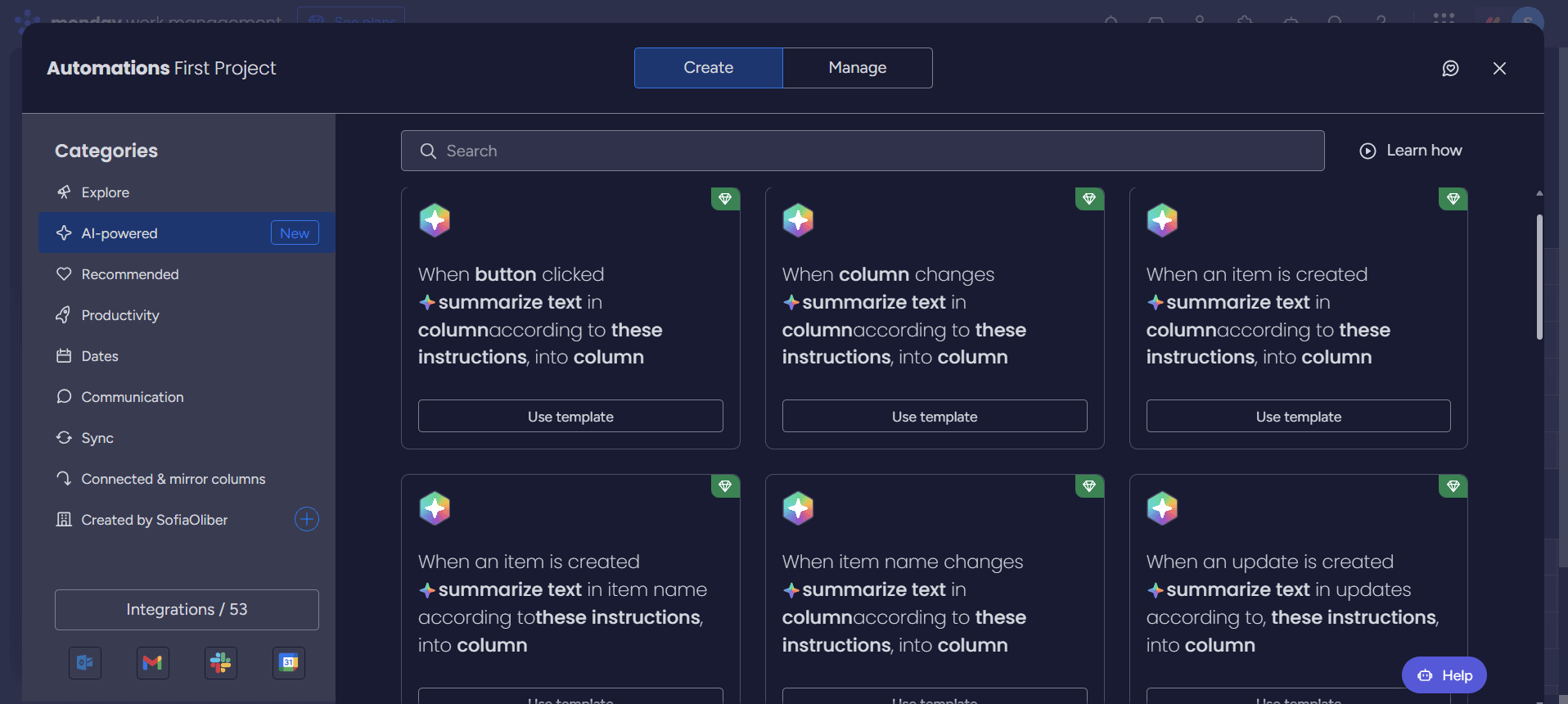
monday.com stands out not just for its professional feature set but also for its visual, intuitive design. This combination makes it a reliable choice for any team size and style.
What Makes monday.com Special
monday.com’s AI assistant can extract information from files, translate text and help with tasks like automation setup, summaries, email drafts and task assignments. Based on my tests, even new users can start using these AI tools with little guidance.
When to Choose monday.com
Choose monday.com if you feel like you need stronger features. monday.com’s AI features become available on the Standard plan, costing $12 per user per month annually, which means it might be pricier than some competitors, but it includes a more complete set of professional tools. You can get started today with monday.com’s 14-day free trial, or learn more about the software in our full monday.com review.
- Maximum users: 2
- Minimum users: 3; All prices per user
- Minimum users: 3; All prices per user
More plans
- Minimum users: 3; All prices per user
- Enterprise-level features.
2. ClickUp — AI Project Management Tool for Adaptive Workflows
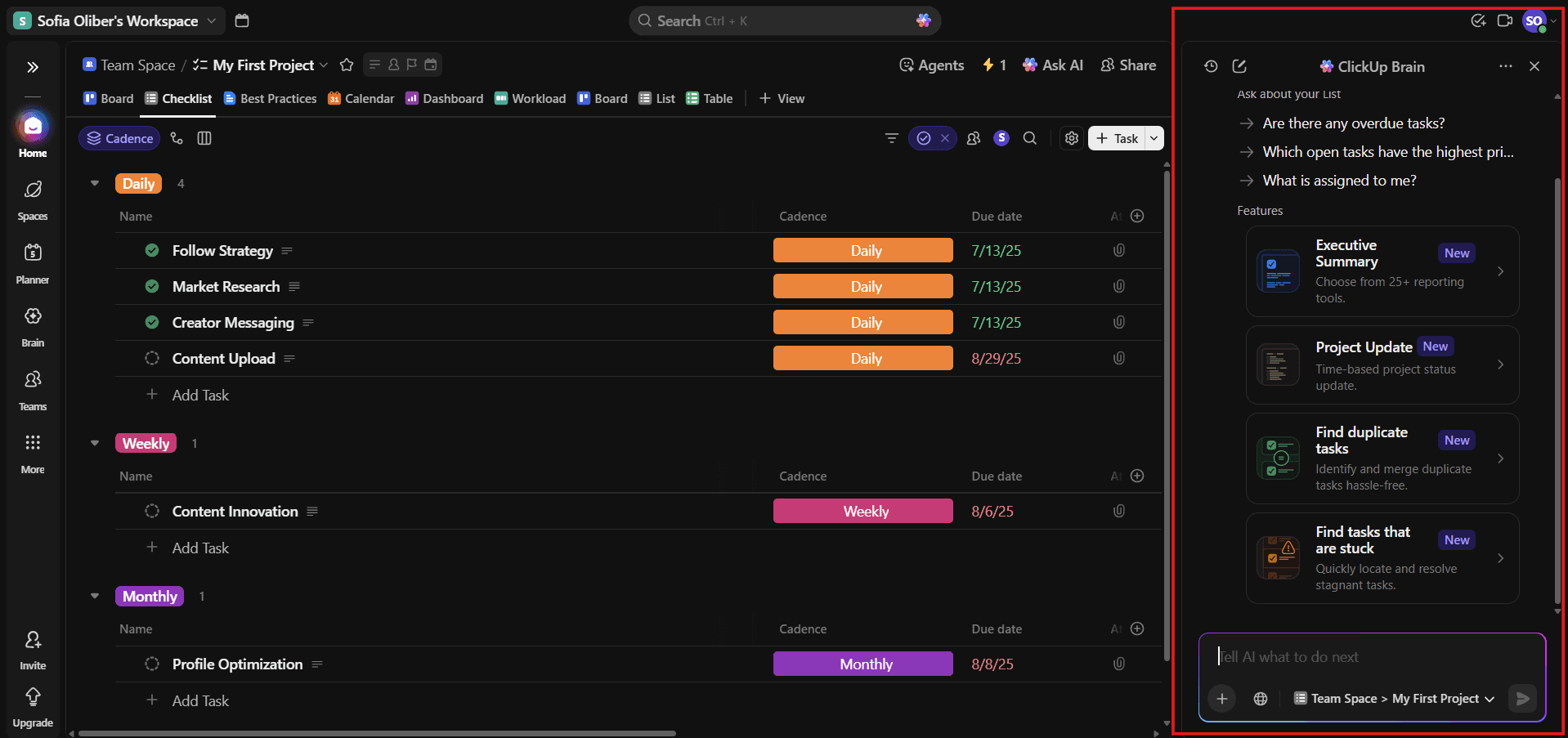
ClickUp has one of the best free project management plans on the market, featuring a great set of core functionalities. It’s a reasonably priced, robust tool, making it a great choice for beginners.
What Makes ClickUp Special
ClickUp seamlessly integrates AI functionalities across boards, templates and tasks. It’s a powerful platform and presents a learning curve, but users can rely on the chatbot to master it.
When to Choose ClickUp
If your team needs flexibility to customize AI workflows, ClickUp is an excellent option. However, it’s not as easy to master as other programs due to its high-level features. AI capabilities are available from the Unlimited plan onwards and you can try this plan today for free for 14 days or read our ClickUp review to learn more.
- Basic functionality with some limitations
- All prices per user
- All prices per user
3. Asana — Collaborative AI Software for Project Management
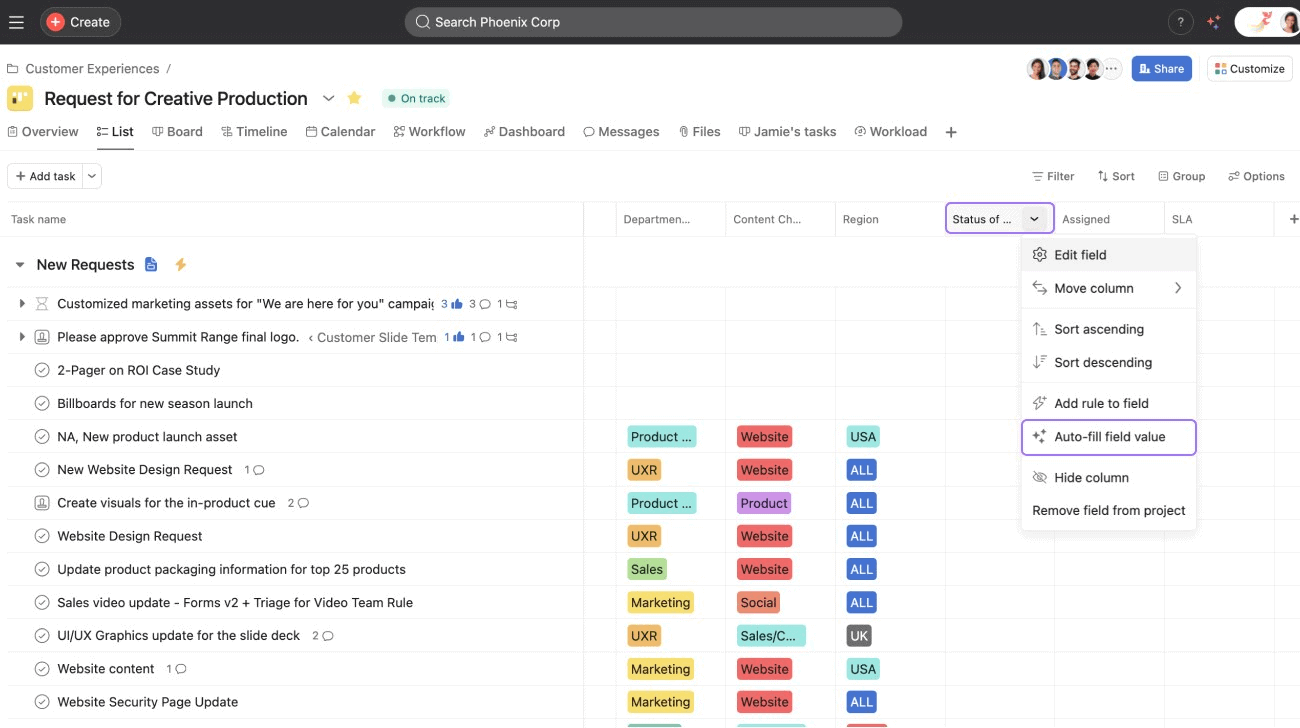
Asana is a great choice for streamlining projects with multiple channels due to its painless user interface. Additionally, Asana includes a useful set of AI-powered tools, such as the AI Studio, which can draft content and summarize discussions.
What Makes Asana Special
Asana’s AI can build a workflow for you with a single command. While other software may offer a similar experience, it’s generally more disjointed. Having the option to merge your entire workflow into a single function is very convenient.
When to Choose Asana
If your team needs to organize tasks and projects in a simple yet powerful system, Asana is a good choice. AI functionalities start in the Standard plan onwards, which costs $10.99 per user per month. You can try the Standard plan for free for 14 days, or read our Asana review for more information.
- Up to 10 users
- Price is per user. unlimited users, expanded features
- Price is per user. unlimited users, even more features
- Custom pricing, advanced security features
4. Notion — AI Project Management Tool for Flexibility
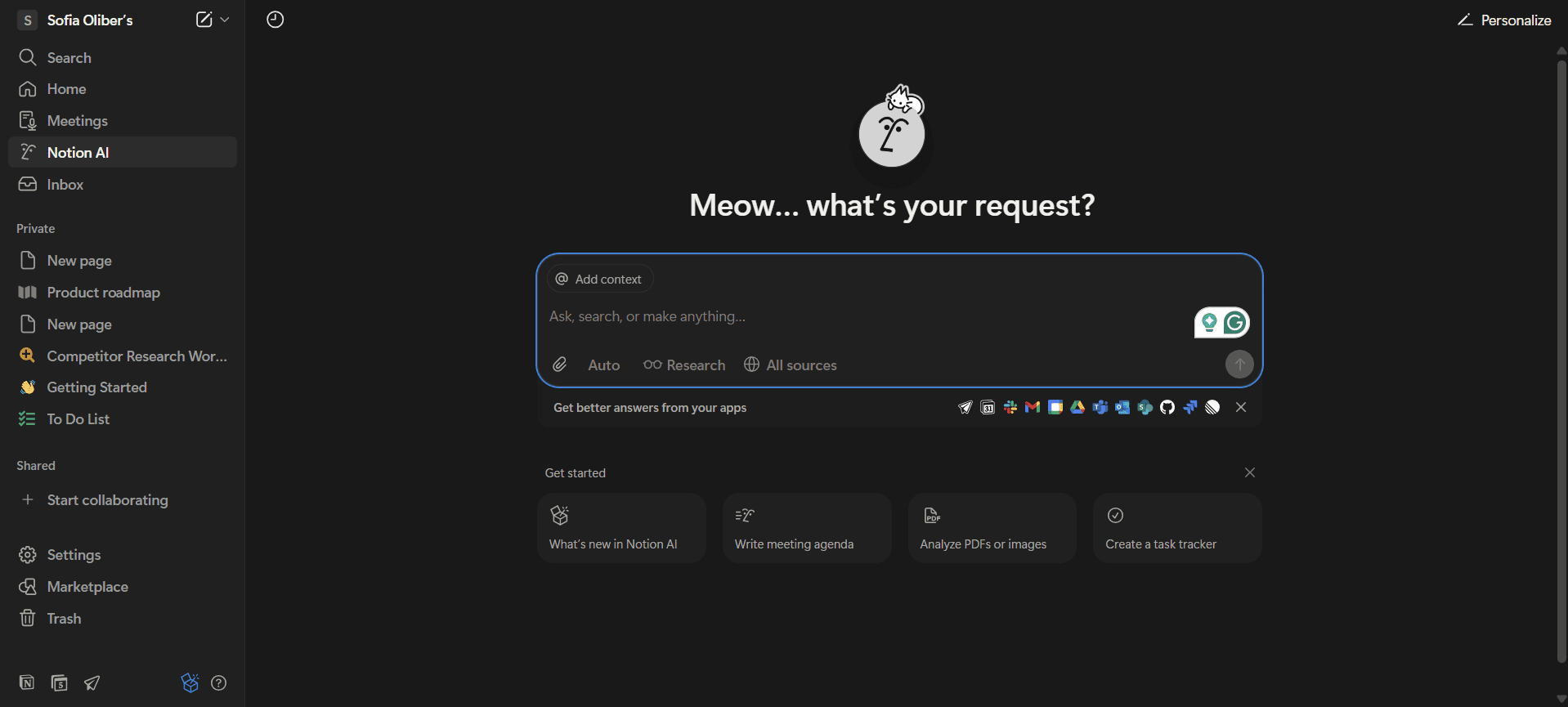
Notion is one of the most flexible project management tools available, but that flexibility comes with a steeper learning curve. It’s easy to overlook many of the platform’s features.
What Makes Notion Special
Notion is a great option for teams still figuring out how to structure project workflows. The customization options make it simple to shape new projects, and the AI assistant can help with tasks like drafting content and organizing information in your workspace.
When to Choose Notion
If your projects are a blend of tasks, documents and approval chains, Notion is a solid place to start. The Business plan costs $20 per month and includes an AI-powered assistant. Try Business with a 14-day free trial today, or learn more in our full Notion review.
- 1 user only, Up to five guests, 5MB file upload limit
- 1 user only, Unlimited guests, Unlimited file uploads, Version history
- Unlimited users, Unlocks workspace, User permission settings
- Advanced security features
5. Trello — Simple AI Tool for Project Management
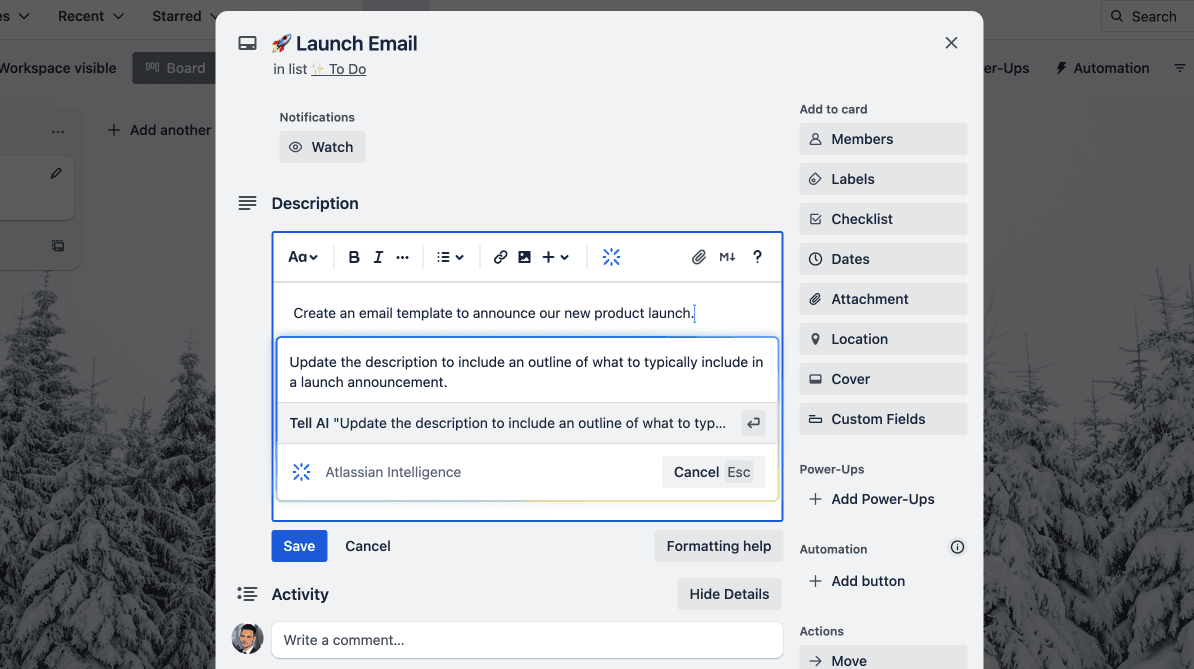
Trello is refreshing when you need to bring order to chaotic projects. Its simple layout makes it easy to see what’s happening and where tasks need to go next.
What Makes Trello Special
Trello delivers a straightforward experience that includes useful options like automations, integrations and a growing set of AI tools for drafting card text or organizing task details. It works best for simple projects with clear task hierarchies.
When to Choose Trello
Choose Trello if you’re new to project management or if you’re looking for the best project management software for solopreneurs. It’s not as flexible as Notion, but its Premium plan offers AI options starting at $10 per user per month. Try Premium free for 14 days, or learn more in our Trello review.
Methodology: Our Testing Framework & How to Choose the Best AI Project Management Tool
AI is still new on many of these platforms, but they’ve all made meaningful progress with integrating it. While testing the software, I focused on core features like automations, task management and AI chatbots.
Final Thoughts: AI Project Management Tools
Project management platforms will continue to expand their AI capabilities, but AI won’t replace project managers any time soon. Instead, it’ll make workflows more efficient. monday.com is my top choice for project management software because it blends strong AI tools, capable features and an intuitive design.
Are you planning to include AI in your workflows? Have you tried any of these tools? What did you think of them? Let me know in the comments, and thanks for reading.
FAQ: AI-Powered Project Management Tools
Yes, you can use AI to automate tasks, generate reports and assist with organizing project workflows.
The best tool for project managers is monday.com. It combines advanced features with an intuitive interface and scalability.
Yes, ChatGPT can help with project management. It can draft briefs, suggest actions and design workflows. It is not a project management tool, though.

