Best Workload Management Tool in 2026
The right workload management tool can turn scattered tasks into structured workflows that boost productivity and resource utilization. In this article, I recommend the best options so you can make an informed choice.


Written by Mehak Siddiqui (Writer)
Reviewed by Kate Hawkins (Editor, Writer)
Facts checked by Eugenie Tiu (Editorial Assistant)
Last Updated:
All our content is written fully by humans; we do not publish AI writing. Learn more here.
Key Takeaways: These Are the Best Workload Management Tools
- monday.com — Best workload management software for most teams. Get a 14-day free trial of the Pro plan.
- ClickUp — Affordable all-in-one task management software. Get the Business plan with a 30-day money-back guarantee.
- Asana — Structured resource management tool designed for cross-functional teams. Sign up for a free trial of the Advanced plan.
- Wrike — Advanced workload-planning software for large teams. Start a 14-day free trial of the Business plan.
- Jira — Workload management software for Agile and technical teams. Get a 30-day free trial of the Premium plan.
Facts & Expert Analysis About Proper Workload Management
- Workload is a leading source of stress: More than 50% of employees report workload as the main cause of work stress.1 This makes workload management important to preventing burnout and streamlining resource planning.
- Data-driven decisions matter: Accurate workload data can make it easier to plan projects and allocate resources efficiently.
- Balanced teams function better: Fair workloads can boost team morale and ownership, leading to enhanced collaboration and productivity.
Workload management tools provide insights into each team member’s capacity and task priorities. They’re vital for managing complex projects and ensuring fair workload distribution. The great news is that most of the best project management tools include workload management features. I’ll help you choose the right one for your needs.
Cloudwards’ Choice: monday.com
 Cloudwards' Choice: monday.com
monday.com is the clear winner because it strikes a balance between powerful workload planning and an interface that feels enjoyable to use. It’s easy to see if any team members are overloaded so you can make adjustments and improve team efficiency. Try monday.com’s Pro plan with a 14-day free trial.
Why You Need a Tool for Workload Management
The right workload management tool makes it easy to keep track of who is doing what and when. Without a dedicated system, teams risk uneven workloads, missed deadlines, burnout and inefficient use of time. Workload-tracking software helps you balance resources, plan future projects, spot bottlenecks and adapt quickly as priorities change.
The 5 Best Workload Management Tools Compared
The table below provides an overview of my top choices for a quick comparison.
| Tool: | Free Plan | Best Price* | Best For | USP | Limitations |
|---|---|---|---|---|---|
 | Yes, up to 2 members | $9 per month (one-year plan) | Small to mid-sized teams | Intuitive interface, visual layout | Expensive for large teams |
 | Yes, unlimited users | $7 per month (one-year plan) | Teams with complex workflows | All-in-one workspace, unlimited customization | Takes time to set up |
 | Yes, up to 2 users | $10.99 per month (one-year plan) | Cross-functional teams | User-friendly interface | Advanced features available only on higher tiers |
 | Yes, unlimited users | $10 per month (one-month plan) | Larger teams | Strong time-tracking features | Interface feels complex |
 | Yes, up to 10 users | $9.05 per month (one-month plan) | Agile & technical teams | Built-in Agile boards & backlog | Steep learning curve |
Hands-On Testing
I spent some time managing workloads on each tool to see how they performed. The sections below summarize my findings.
Avoid Costly Project Management Mistakes – Get Free Tips Today!

- Discover 10 fundamentals of project management
- Understand step-by-step plans for PM execution
- Learn tips to avoid 5 common mistakes by beginners
Feature Comparison Overview
All of these platforms have solid task management features that can aid in project success and progress tracking.
| Tool: | View Types | Time Tracking | Custom Fields | Dashboards | Real-Time Collab |
|---|---|---|---|---|---|
| 12: list, board, timeline, calendar, etc. | Yes (Pro plan) | |||
| 16: board, timeline, Gantt, map, etc. | Yes (limited on lower tiers) | |||
| 9: board, list, calendar, etc. | Yes (Advanced plan) | |||
| 9: table, board, list, calendar, Gantt, chart, etc. | Yes (Business plan) | |||
| 7: list, matrix, board, timeline, calendar, backlog, summary | Yes |
Platform & Administration
All tools offer similar options but vary in terms of file storage capacities. Higher-tier plans have additional storage and more granular permissions.
| Tool: | Apps | Storage | File Management | Permissions |
|---|---|---|---|---|
| Web | 500MB-1000GB | File column, gallery view, versioning, uploads from cloud drives | Board, dashboard, workspace & account level |
| Web | 60MB-unlimited | Attachments, integrations with cloud drives | Folder, list & space level |
| Web | Unlimited (100MB max per file) | Attach/upload files to tasks & comments, integration with cloud drives | User permissions, app controls |
| Web | 2GB-50GB per user | Upload files from local/computer, Box, Dropbox, Google Drive, etc.; file versioning | Access roles: full, editor, limited, read-only; custom roles on Pinnacle & Apex plans |
| Web | 2GB-unlimited | File uploads, integration with cloud storage, file versioning | User roles & groups, project permissions, global permissions |
Integration & Automations
All of these workload management tools can automate repetitive tasks and connect with other tools through native and third-party integrations.
| Tool: | Integration Count | Top Integrations | Native vs 3rd-Party | Automation Features |
|---|---|---|---|---|
| 200+ | Slack, Gmail, Outlook, Jira, Dropbox | Both native & third-party integrations | Workflow builder with triggers & actions (e.g., auto-notify, auto-create items) |
| 1,000+ | Slack, GitHub, Google Sheets, Zapier | Both native & third-party integrations | Custom integrations/API plus drag & drop automation of tasks & triggers |
| 200+ native integrations & thousands via Zapier | Slack, Google Drive, Microsoft Teams, Figma | Mostly third-party | “Rules” to automate tasks (e.g., when task complete → trigger action) |
| Thousands via Wrike Integrate | Google Drive, Zoom, GitHub, Jira | Mostly third-party | Powerful workflow automation, AI assistance, status-based triggers & approvals |
| 2,000+ | GitHub, Slack, Microsoft Teams, Jenkins | Mostly third-party | “Automation for Jira” rules (triggers, conditions, actions), plus support for third-party automation platforms like Zapier & ScriptRunner |
Usability & Performance Assessment
Each tool differs in its user experience and learning curve, which are essential factors to consider when making a choice.
| Tool: | Learning Curve | Interface Design | Mobile Experience | Customer Support |
|---|---|---|---|---|
| Easy | Visual, color-coded, intuitive | Very good | 24/7 chat, extensive docs |
| Intermediate | Modern & highly customizable | Good | Chat, email support |
| Easy-intermediate | Structured & intuitive | Good | Community, live chat |
| Intermediate-difficult | Flexible but complex | Good | Email, live sessions, community forum |
| Difficult | Flexible but dense | Good but limited | Documentation, community forum, paid support plan |
Best Workload Management Tools
After testing dozens of project management tools, I shortlisted five that are especially good at managing team members’ workloads and project tasks in one place.
1. monday.com — Overall Best Workload Management Tool
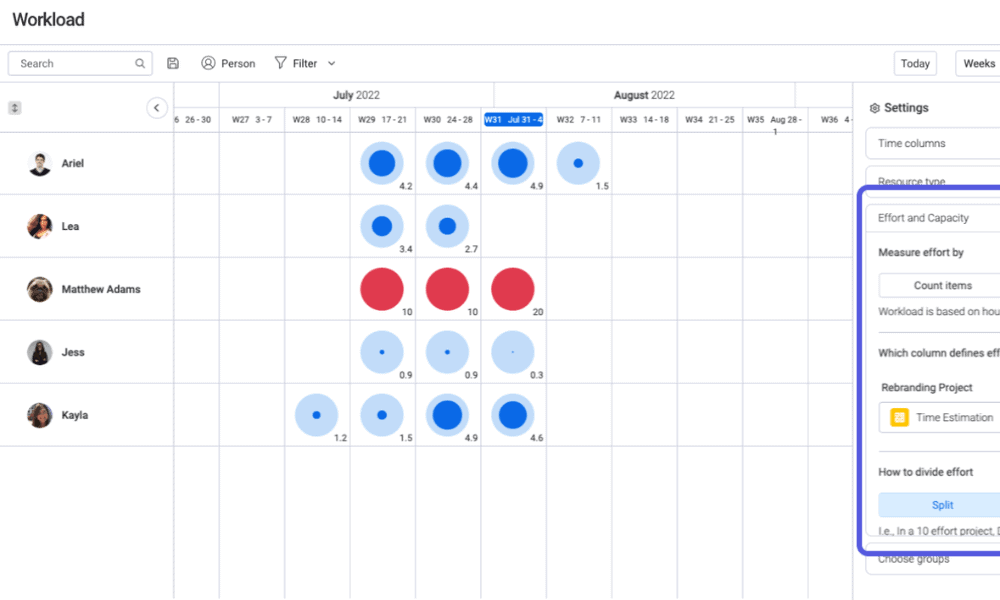
monday.com has comprehensive project management features, as detailed in our monday.com review. Its customizable “workloads” widget lets you visualize every team member’s actual workload to easily monitor resource availability and performance.
What Makes monday.com Special
I love monday.com for its visual, color-coded interface that makes workload management easy for the entire team. You can set it up quickly and use different views to track progress and balance workloads.
When to Choose monday.com
I recommend monday.com for small to mid-sized teams that need an easy workload management tool with strong collaboration features. Start a 14-day free trial of the Pro plan.
- Maximum users: 2
- Minimum users: 3; All prices per user
- Minimum users: 3; All prices per user
More plans
- Minimum users: 3; All prices per user
- Enterprise-level features.
2. ClickUp — Highly Customizable Workload Management Software
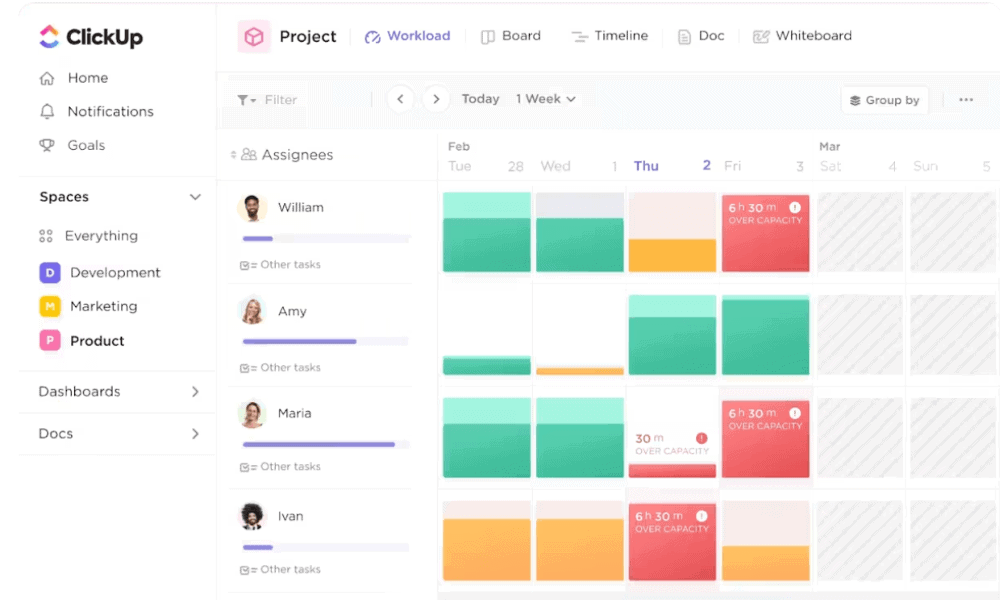
ClickUp is a highly customizable workload management platform. It offers a workload view for an instant overview of your team’s tasks, availability and current workload status. You can read about the platform in our detailed ClickUp review.
What Makes ClickUp Special
ClickUp shines with its customizability: You can tailor the workspace to your exact processes. For instance, you can set up custom workflows and use the workload view to visualize team capacity and balance resource allocation over time.
When to Choose ClickUp
Opt for ClickUp if you want an all-in-one workspace at an affordable price. Although ClickUp has a generous free plan, advanced workload management features are available only with the Business plan and up. Try the Business plan with a 30-day money-back guarantee.
- Basic functionality with some limitations
- All prices per user
- All prices per user
3. Asana — Best for Time Management
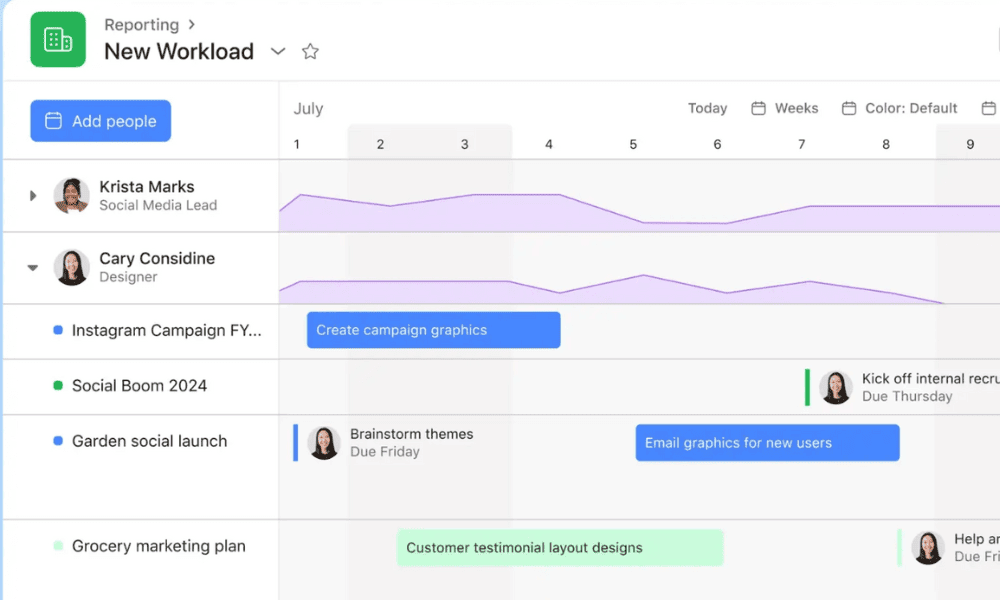
Asana combines task organization and real-time workload views. It also has easy-to-use time tracking for measuring team members’ work hours. Read our Asana review for further details.
What Makes Asana Special
Asana’s workload views provide clear visual snapshots of team capacity. The Advanced plan has native time-tracking features, while lower tiers support this functionality through integrations with popular time-tracking tools.
When to Choose Asana
Choose Asana when you need a tool that ties time management directly into workload planning. This helps you visualize team performance and capacity across projects. If you sign up Asana, you can get a free trial of the Advanced plan.
- Up to 10 users
- Price is per user. unlimited users, expanded features
- Price is per user. unlimited users, even more features
- Custom pricing, advanced security features
4. Wrike — Best Team Workload Management Tool
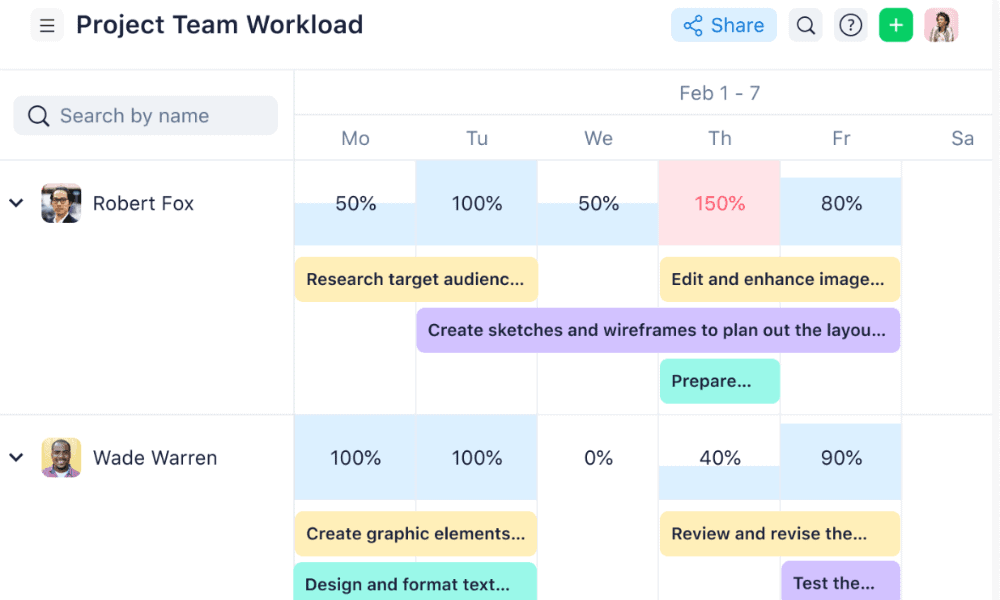
Wrike offers comprehensive workload management capabilities with real-time views of team capacity, task allocation and project progress. Visual tools like workload charts, a resource view, timelines and dashboards provide useful insights for all team members.
What Makes Wrike Special
Wrike has powerful workload charts that let you assess team members’ commitments across projects and adjust assignments based on capacity. Flexible grouping and display options make it easy to spot overloads or gaps at a glance. Learn more in our Wrike review.
When to Choose Wrike
The breadth of features within Wrike makes it ideal for larger teams managing multiple projects. Its rich visualization and resource allocation tools help teams prevent burnout and meet project deadlines. You can try out the Business plan with a 14-day free trial.
- Unlimited users. Basic features.
- Price is per user. Plans for 5, 10 and 15 users.
- Price is per user. No monthly option. Plans for 5 to 200 users.
More plans
- For large teams; Enterprise-grade security and scalability; Plans for 5 to an unlimited number of users.
- For teams with complex work needs; Advanced tools and analytics for complex work; 5 to unlimited users
5. Jira — Workload Management Tool for Agile and Technical Teams
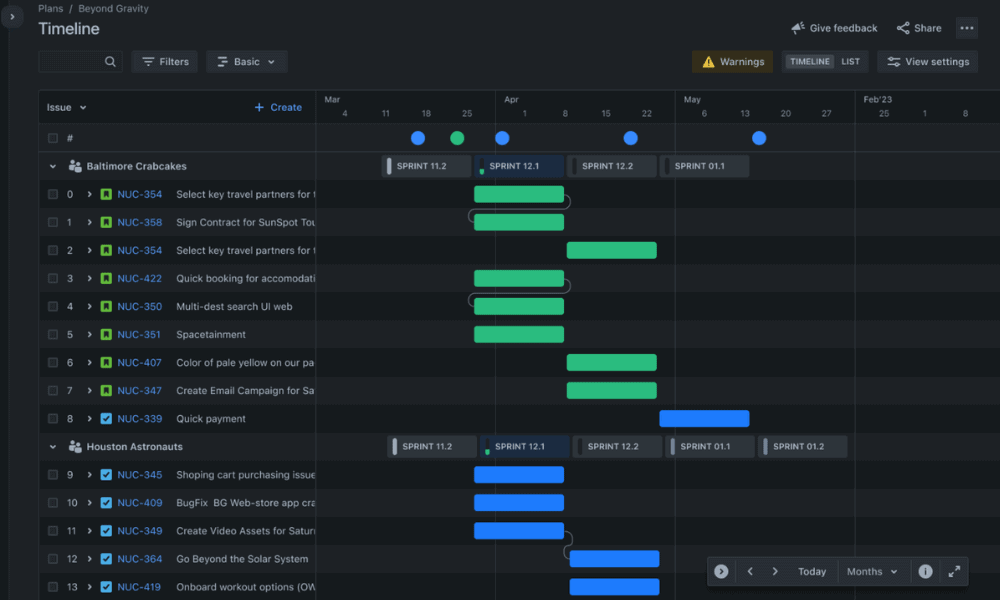
Jira is a powerful project management software solution for technical teams. It combines task backlog management, sprint-planning, release-tracking and workload-planning tools that help teams thrive in Agile work environments. For more details, read our Jira review.
What Makes Jira Special
This tool is built for dev teams working with scrum and kanban boards, sprint backlogs and configurable workflows. Jira’s “advanced roadmaps” feature lets you plan across multiple projects, allocate work by sprint or team, and monitor capacity on timelines.
When to Choose Jira
Jira is the go-to if your team follows Agile or iterative development. It has powerful tools for tracking issues, dependencies and releases alongside capacity management. Get a 30-day free trial of Jira’s Premium plan.
- Max. 10 users. unlimited boards, reports and insights; backlog; basic roadmaps; 2GB of storage; community support
- Monthly pricing starts from 11 users, pricing changes based on the number of users. Monthly pricing changes with teams over 110. Annual pricing shown is for 1-10 users
- Monthly pricing starts from 11 users, pricing changes based on the number of users. Monthly pricing changes with teams over 114. Annual pricing shown is for 1-10 users
- Enterprise plan pricing is available when you enter 801 or more users above; User tier: 801 – 1,000
Methodology: Our Testing Framework & How You Choose
I tested dozens of popular workload management tools using real-world use cases to try out and compare different features, as described below.
Final Thoughts
There are many workload management tools that can help your team stay focused, plan efficiently and achieve project outcomes. monday.com stands out thanks to its intuitive design and powerful workload views. I recommend the Pro plan, which you can try free for 14 days.
Have you used any of the tools I mentioned? What’s the biggest workload challenge your team struggles with? Which specific features are you looking for? Please share your thoughts in the comments below, and thanks for reading this article.
FAQ: Workload Management System
A workload management tool keeps teams on track by showing who is responsible for what and how much capacity each person has. This helps prevent overload and missed deadlines.
Top workload management tools usually include task and project tracking, workload or capacity views, time tracking and multiple planning views, such as timelines or boards.
You should consider your team’s size and specific workflows. Look for a tool that matches your needs with features like workload visibility, time-tracking and collaboration tools, ease of use and a price that fits your budget.