Best Project Management Software With Invoicing: Top Platforms for Project Billing in 2026
This article presents the best project management platforms with invoicing that can help you manage project financials and workflows in one place to ensure accuracy and save time.



Written by Mehak Siddiqui (Writer)
Reviewed by Kate Hawkins (Editor, Writer)
Facts checked by Simona Ivanovski (Fact-Checker, Formatter)
Last Updated:
All our content is written fully by humans; we do not publish AI writing. Learn more here.
Key Takeaways: These Are the Best Project Management Tools for Invoicing
- Wrike — Full-featured project management software with integrated time tracking and timesheets for invoicing. Start a 14-day free trial of the Business plan.
- Zoho Projects — Budget-friendly project management tool with invoicing automation. Get a 15-day free trial of the Premium plan.
- Scoro — Comprehensive project-billing software for service teams. Try the Growth plan free for 14 days.
- monday.com — User-friendly project management tool with integrated invoicing functionality. Get a 14-day free trial of the Standard plan.
- ClickUp — Customizable software with invoicing capabilities. Try the Business plan with a 30-day money-back guarantee.
Facts & Expert Analysis About Project Management Invoicing Software:
- Most project management solutions don’t offer native invoicing: Instead, you can integrate them with invoicing tools to automate billing workflows.
- Time tracking is the backbone of accurate invoicing: Without reliable time data, even the best invoicing system can lead to errors or disputes.
- Retainers and fixed pricing are becoming more common: If your business has moved beyond hourly billing, flexible project management and invoicing software can better meet your needs.
When you use separate software to handle project delivery and billing, it can lead to additional manual work, errors and possibly delayed payments. To solve this, I’ve rounded up the best project management software with invoicing to bridge task tracking, time records and billing into unified workflows.
I conducted a data-driven comparison of the top project management tools to shortlist the best invoicing solutions for different business needs.
Cloudwards’ Choice: Wrike
 Cloudwards' Choice: Wrike
Wrike is my top recommendation because it seamlessly connects project management workflows with invoicing tasks. It’s ideal for teams of all sizes, from freelancers to enterprises managing complex projects and large-scale financials. Start a 14-day free trial of Wrike’s Business plan.
The Best Invoicing Project Management Tools Compared
| PM Tool: | Free Plan | Pricing* | Best For | USP | Limitations |
|---|---|---|---|---|---|
 | Unlimited users | $10 | Mid-sized to large teams, agencies, enterprises | Advanced project control with strong time tracking & reporting | Steep learning curve |
 | 5 users | $4 | Small businesses, freelancers | Affordable, seamless integration with Zoho Invoice ecosystem | Limited advanced reporting features |
 | No | $19.90 | Service teams, consultancies, agencies | All-in-one with native invoicing & financial management | Expensive and complex for small teams |
 | 2 users | $9 | Visual teams, marketing, startups | Highly visual workflows with powerful automation | Pricey for large teams |
 | Unlimited users | $7 | Startups, freelancers, flexible teams | Extremely customizable all-in-one workspace | Overwhelming for new users |
Methodology: Lab Data & Hands-On Testing
My testing methodology involved evaluating each tool based on real-world use cases, core project management capabilities and invoicing functionality. The analysis focuses on key factors like pricing, features, usability, integrations and billing workflows.
Feature Comparison Overview
Wrike and Zoho Projects perform well with built-in time tracking and budgeting, while Scoro fully integrates projects, budgets, time tracking and invoicing into a single system. Tools like monday.com and ClickUp excel in task management but require integrations with other software for invoice generation.
| Tool: | View Types | Time Tracking | Custom Fields | Dashboards | Real-Time Collab |
|---|---|---|---|---|---|
| List, board, Gantt, calendar, table | | | | |
| List, kanban, Gantt, calendar, milestone | | | | |
| List, Gantt, calendar, dashboard, reports | | | | |
| Table, board, timeline, calendar, Gantt, workload, etc. | * | | | |
| List, board, Gantt, calendar, mind map, timeline, docs, etc. | ** | | | |
*Limited on lower tiers
Platform & Administration
Most tools offer role-based access and user management, but the depth of control varies. Platforms like Wrike and ClickUp offer highly granular permissions across projects, folders and tasks, while solutions like Zoho Projects keep things simple for ease of use.
| Tool: | Apps | Storage | File Manager | Permissions |
|---|---|---|---|---|
| | 2GB-50GB per user | Centralized file storage in tasks, folders & cprojects; version control & proofing | Granular roles (full, editor, limited, read-only) with sharing controls for internal/external users |
| | 5GB-15GB per user | Document management system with file sharing, versioning & attachments | Role-based permission sets with detailed control over user access & actions |
| | 1GB-10GB per user | File storage linked to projects, tasks & client records | Role-based permissions with strong control over financial & project data visibility |
| | 5GB-unlimited | File uploads attached to boards, tasks & updates; basic versioning | Board-level permissions (view/edit/owner) & workspace-level access controls |
| | 60MB-unlimited | Docs, file attachments & cloud integrations (Google Drive, etc.); strong document collaboration | Highly customizable permissions (guest access, role-based permissions, granular sharing at task/list level) |
Integration & Automations
All recommended tools provide strong integration and automation capabilities to streamline project execution and billing workflows.
| Tool: | Integration Count | Top Integrations | Native vs Third-Party | Automation Features |
|---|---|---|---|---|
| Over 400 native integrations | Google Drive, Slack, Microsoft Teams, Zoom, Salesforce | Mix of native & third-party (Zapier, Integrately) | Advanced workflow automation, custom triggers, approvals |
| Hundreds | Zoho Invoice, Zoho CRM, Books, Google Drive, Dropbox, GitHub | Strong native ecosystem & third-party apps | Blueprint automation, task rules, workflow automation |
| Hundreds | QuickBooks, Xero, Google Workspace, Zapier | Native & third-party | Business workflow automation (quotes > invoices, billing flows) |
| Over 200 | Slack, Google Workspace, Zoom, Salesforce, Stripe | Native & third-party | Strong no-code automation (if-this-then-that rules, templates) |
| Over 1,000 | Slack, Google Drive, GitHub, Zapier, Make | Native & third-party | Highly customizable automations, triggers & conditions |
Usability & Performance Assessment
The tools I assessed have diverse interfaces, but all provide a great user experience and helpful support in case of technical issues.
| Tool: | Learning Curve | Interface Design | Mobile Experience | Support |
|---|---|---|---|---|
| Intermediate-difficult | Dense | Good, but not as smooth as desktop | Strong (enterprise-level support, knowledgebase, training) |
| Easy-intermediate | Simple but less modern | Good, but could be better | Good (ticketing, docs, Zoho ecosystem support) |
| Intermediate-difficult | Clean but less visual | Decent, but limited compared to desktop | Strong (dedicated onboarding & support for businesses) |
| Easy | Highly visual, modern, user-friendly | Excellent, smooth, user-friendly | Good (chat, knowledgebase, community) |
| Intermediate | Flexible but complex | Good, but less powerful than desktop | Good (docs, chat, community, email support) |
5 Best Project Management Tools With Invoicing
I tested dozens of tools to shortlist five that offer the best project management features and invoicing support for teams.
Avoid Costly Project Management Mistakes – Get Free Tips Today!

- Discover 10 fundamentals of project management
- Understand step-by-step plans for PM execution
- Learn tips to avoid 5 common mistakes by beginners
1. Wrike — Full-Featured Project Management Software With Easy Invoicing
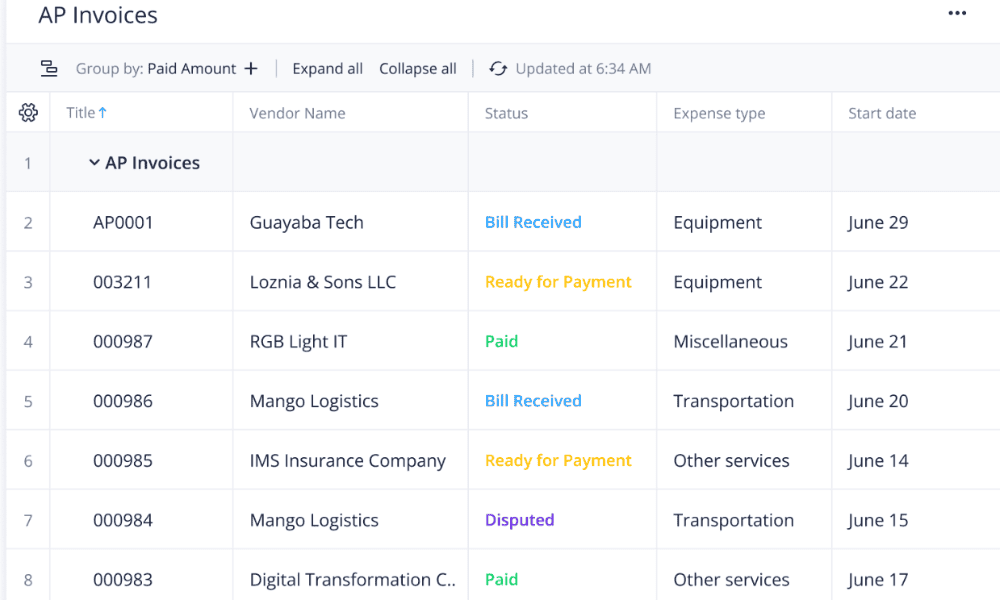
Wrike is a powerful project management tool that doesn’t include native invoicing but supports it through integrations with accounting software. I found it particularly useful for teams that rely on detailed time tracking and reporting to bill clients accurately.
For example, a marketing agency can assign tasks, track billable hours across campaigns and monitor real-time budget usage. Once the work is complete, tracked hours can be exported to tools like QuickBooks to generate invoices, ensuring clients are billed accurately without manual data entry. Read our Wrike review to learn more.
When to Choose Wrike
I recommend Wrike for teams of all sizes across industries such as marketing agencies, IT service firms or consulting companies. Its invoicing features can handle complex, multistep projects and detailed reporting to ensure transparency and accurate billing without relying on manual spreadsheets. Try Wrike’s Business plan free for 14 days.
- Unlimited users. Basic features.
- Price is per user. Plans for 5, 10 and 15 users.
- Price is per user. No monthly option. Plans for 5 to 200 users.
More plans
- For large teams; Enterprise-grade security and scalability; Plans for 5 to an unlimited number of users.
- For teams with complex work needs; Advanced tools and analytics for complex work; 5 to unlimited users
2. Zoho Projects — Affordable Project Management Tool With Invoicing Automation
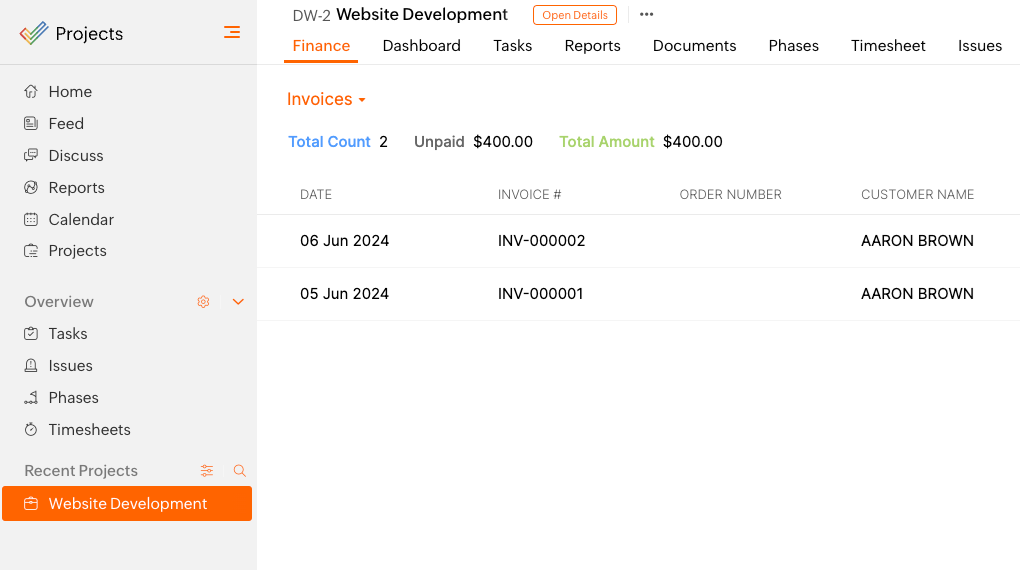
Zoho Projects is a cost-effective project management solution designed to work seamlessly within the Zoho ecosystem. It integrates with Zoho Invoice, allowing users to automate billing workflows without needing complex or expensive third-party invoicing tools.You can track tasks, log billable hours and automatically sync data with Zoho Invoice to generate client invoices. It also includes tax calculations, support for goods and services tax (GST) and value-added tax (VAT), and payment reminders. Read more in our Zoho Projects review.
When to Choose Zoho Projects
Choose Zoho Projects if you want a budget-friendly tool with reliable automated invoicing, especially if you’re already using the Zoho ecosystem. It’s ideal for freelancers, startups and small businesses that need straightforward project tracking and billing without complexity. Try the Premium plan free for 15 days.
3. Scoro — Best Invoicing Software for Service Teams
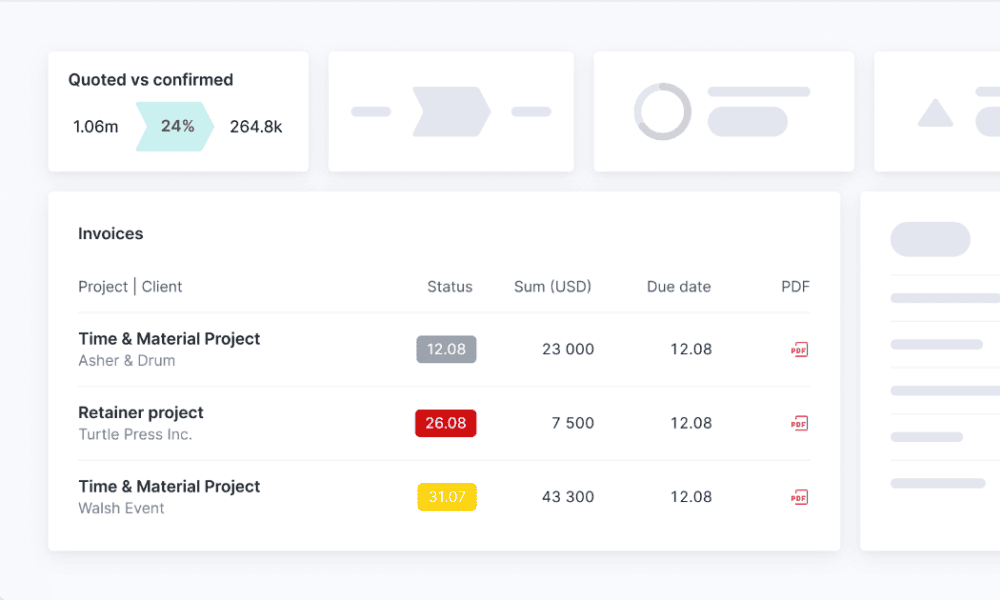
Scoro is designed specifically for service-based businesses. Its strongest feature is the end-to-end “quote-to-cash” workflow with native invoicing. You can create a quote, turn it into a project, track time and expenses, and generate invoices all in one place.
It also supports multiple billing models, including retainer, time-based billing and fixed-fee projects. Read our Scoro review to learn more.
When to Choose Scoro
Choose Scoro if invoicing and financial control are central to your business and you can invest some time in learning the software. I recommend it for consulting firms, agencies, IT services and other service teams that handle multiple clients and complex billing models. Get a 14-day free trial of the Growth plan.
- Price per user/month; Projects, Calendars, Task list & task board, Gantt chart & dependencies, Contacts & customers, Quotes, Bills, invoices & receipts, Dashboards, Default labor cost, Detailed work reports
- Price per user/month; Everything in Core, plus: Project budgets & templates, Quoted vs Actual table, Retainer management, Recurring tasks, Billable time, Role-based labor cost, Time off, Multiple currencies, Triggers & actions, Detailed financial reports
- Price per user/month; Everything in Growth, plus: Planner, Timesheet, Task matrix, Price lists, Cost and profit forecast, Revenue recognition & forecast, Sales pipeline & report, Team performance report, Individual time allocation, Supplier management
- Everything in Performance, plus: Company budgets & forecasts, Time locking, Approval flows, WIP report, Multi-account reporting, Periodization of invoice lines, Single sign-on, User provisioning, FTP integration
4. monday.com — Visual Project Management Software With Invoicing Integration
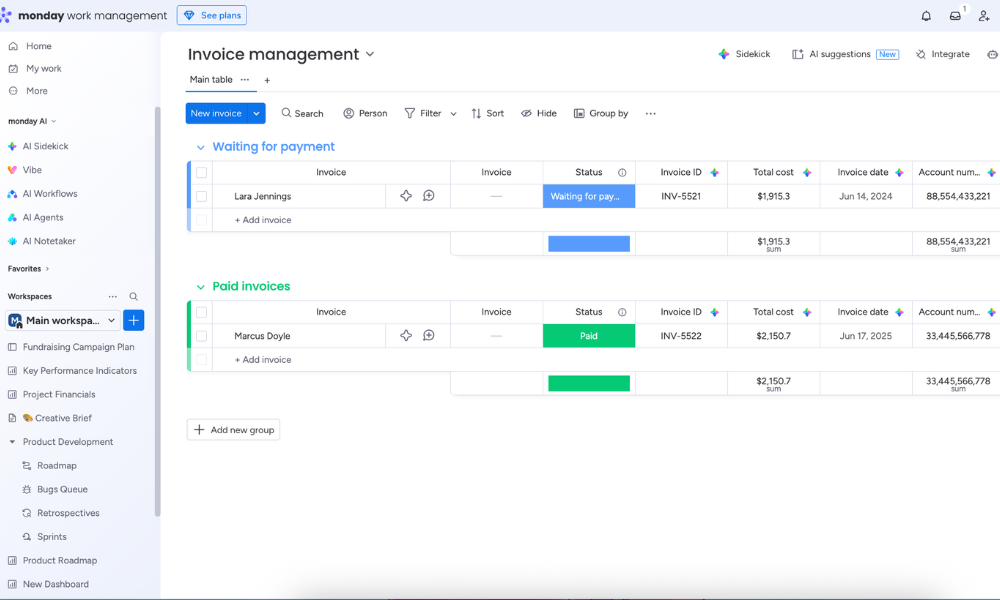
monday.com is a visual project management platform designed to simplify workflows and collaboration, as detailed in our monday.com review. Teams can build boards that track project progress, budgets, timelines and billing stages in a way that’s easy to understand at a glance.
For example, a creative agency can establish a workflow that automatically triggers an integration with tools like QuickBooks or Stripe to generate and send an invoice once a project is finished.
When to Choose monday.com
Choose monday.com if you want a visual project management solution with flexible workflows and are comfortable handling invoicing through integrations. It works well for marketing teams, startups and creative businesses that need to manage multiple clients and projects in a simple and transparent way. Try the Standard plan free for 14 days.
- Maximum users: 2
- Minimum users: 3; All prices per user
- Minimum users: 3; All prices per user
More plans
- Minimum users: 3; All prices per user
- Enterprise-level features.
5. ClickUp — Highly Customizable Project Management Software With Invoicing Functionalities
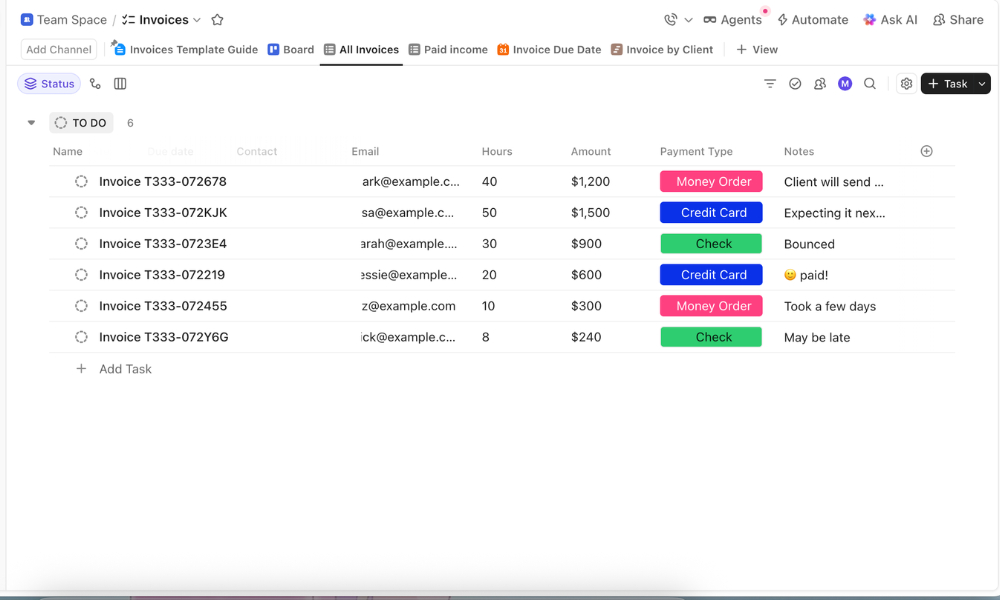
ClickUp is an all-in-one project management platform known for its customizability. You can design custom invoicing workflows using task structures, fields (like hourly rates or payment status) and automation.
While ClickUp doesn’t offer fully native invoicing, it does provide invoicing functionality through templates, time tracking and integrations. Learn more about its features in our detailed ClickUp review.
When to Choose ClickUp
Opt for ClickUp if you want maximum flexibility in managing projects and billing. Although it lacks a native billing system, it supports invoicing through easy-to-use templates and third-party integrations. ClickUp is useful for freelancers, startups and agencies with unique or variable workflows. Get the Business plan with a 30-day money-back guarantee.
- Basic functionality with some limitations
- All prices per user
- All prices per user
How to Choose the Right Invoicing Project Management Software
It’s crucial to consider your team’s specific workflow and requirements when choosing software. I discuss some of the features to look for below.
Beyond Hourly Rates: Managing Retainers and Fixed-Price Projects
Not all client work fits neatly into hourly billing. Many businesses depend on retainers for predictable, ongoing work or fixed-price projects with a defined scope. The right project management software should support these models by helping you track value delivered rather than just time spent.
For retainers, the goal is consistency and long-term client relationships, while fixed-price contracts demand tighter control over scope, timelines and costs. Choosing software that supports both models ensures you can remain flexible in how you price your work without losing visibility or profitability.
| Billing Model: | Best For | Key Feature Needed |
|---|---|---|
| Retainers | Marketing agencies, social media managers, consultants, SEO specialists, design teams | Recurring invoices, allocation of monthly hours/deliverables, usage tracking, client reporting dashboards, automated reminders |
| Fixed price | Freelancers, creative professionals, web developers, product teams, consultants | Project-budgeting tools, task and milestone tracking, estimated vs actual cost comparison, time tracking |
| Hybrid* | Agencies handling ongoing work plus one-off projects, studios, consulting firms | Flexible billing structures, ability to switch between billing types, combined reporting, multi-project financial tracking |
Essential Tax Compliance and Payment Security Features
An invoice is an important financial document that needs to be accurate and easy to produce. Therefore, it’s helpful if your invoicing software can handle tax rules, regional compliance (such as GST in India or VAT calculations elsewhere) and secure payment processing.
Moreover, if the tool collects payments directly, it needs to meet the Payment Card Industry Data Security Standard (PCI DSS) to protect sensitive financial data and prevent fraud. Therefore, compliance and security are non-negotiable features to look for.
Common Pitfalls When Integrating Projects and Billing
Project management software needs to be correctly set up and integrated with the billing and invoicing process to streamline operations and improve cash flow. Without the right structure, you can face several pitfalls:
- Disconnected tools: Using separate systems without proper integration leads to manual data entry, revenue leakage and missed billable work.
- Inconsistent time tracking: If team members don’t log time accurately or consistently, clients may be undercharged and corrections may be time-consuming.
- Scope creep without tracking: Extra work that isn’t logged or flagged as billable often goes unbilled, reducing profitability.
- Lack of automation: Failing to automate recurring invoices or having to send reminders can increase admin effort and delay payments.
Final Thoughts
If you’re looking for versatile project management software with invoicing, Wrike is a strong choice because it combines advanced project management with accurate time tracking and reliable invoicing integrations. To decide whether Wrike is right for you, try the Business plan free for 14 days.
Do you need fully native invoicing, or are integrations enough? Are you billing hourly, on retainers or based on fixed projects? How important is automation in your workflow? Let me know in the comments, and thank you for reading.
FAQ: Project Management Software With Invoicing
The best invoicing software depends on your needs. Project management tools like Wrike and Zoho Projects are ideal for combining task tracking with built-in billing and financial management.
Project managers are usually involved in tracking billable work and approving costs, but the finance or accounting team may handle creation of the actual invoices, especially in larger organizations.
ChatGPT can generate invoice templates and calculations based on your input, but it doesn’t process payments or send invoices. For full invoicing workflows, you’ll still need dedicated tools like Wrike, Zoho Projects or Scoro.

