Onerep Review
In the crowded and competitive data removal industry, Onerep offers a hands-off approach, doing all the heavy lifting for you. As you’ll see in this Onerep review, it excels in several areas and comes up short in others.

— Last Updated: 2026-05-04T14:23:09+00:00 Facts checked by Simona Ivanovski
Key Takeaways: What Is Onerep & Is It Good to Use?
- Onerep is a data removal service that scans the internet for your personally identifiable information (PII) and sends removal requests on your behalf.
- Onerep covers more than 300 data brokers and people-search sites, but it doesn’t have quite as much reach as some of its top competitors.
- Onerep has a five-day free trial period, so you can take it for a spin risk-free.
Top Use Cases for Onerep:
- Only in America: Onerep supports U.S. customers only. If you want or need international coverage for data brokers or people-search sites, you’ll have to look elsewhere.
- Can’t doxx this: Onerep is a good choice if you’ve been the victim of online doxxing or stalking. It can help remove your PII, making repeat incidents less likely in the future.
- Keep it in the family: Onerep family plans cover up to six users. It’s one of the only data removal services to cover that many people on a single plan, making it a great option for larger families that want to keep their online PII in check.
If you’re online (and let’s be honest, who isn’t?), your personally identifiable information (PII) is floating around on the internet. That’s where the best data removal services come in.
These services, including Onerep, scan for and remove personal data from people-search sites and data brokers. In this Onerep review, I’ll see what the service offers and determine whether it’s worth subscribing to.
-
05/04/2026 Facts checked
We rewrote this article using data from recent testing.
Onerep at a Glance
If you’re skimming this article and just want the highlights of what Onerep is all about, check out the table below.
| Features |  |
|---|---|
| Number of Data Brokers Covered | 310 |
| Types of Brokers Covered | People Search |
| Geographic Coverage | USA |
| Automated Removal Requests | |
| Ongoing Monitoring & Re-removal | |
| Official Data Broker List Published | |
| Dark Web Monitoring | |
| Custom Removal Requests | |
| Removes Data from Google Searches | |
| Personal Information Dashboard | |
| Provides Regular Progress Reports | |
| Time for Initial Scan Completion | A few minutes |
| Average Time for First Removals | Up to 2 weeks |
| Estimated Full Removal Cycle Time | 3-4 months |
| Clarity of Removal Evidence | 5 |
| Process Type | Automated |
| Onboarding Process Simplicity | 5 |
| Dashboard Intuitiveness | 4 |
| Mobile App Availability | |
| Account Cancellation Process | Easy |
| Free Trial Offered | 5 days |
| Money-Back Guarantee | 30 days |
| Couples / Family Plan Available | |
| Accepted Payment Methods | Credit Card, Google Pay |
| Two-Factor Authentication (2FA) | SMS |
| Data Encryption Standard | AES 256-bit |
| PII Required for Signup | Full Name, Email, Address, DOB, Phone Number |
| Privacy Policy Transparency | 5 |
| Sells User Data | |
| Company Jurisdiction | US |
| CCPA/CPRA Compliant | |
| GDPR Compliant | |
| Clear Explanation of Methods | |
| 24/7 Support | |
| Dedicated Support Agent | |
| Help Center / Knowledge Base Quality | 4 |
| Support Tickets | |
| Email Support | |
| Chat Support | |
| Phone Support |
What Is Onerep & Who Is It Best For?
Onerep is an automated data removal service that scans data brokers and people-search sites for your personal information. The free trial makes it great for anyone interested in trying out one of these services. Onerep’s hands-off approach will appeal to many; however, it is available only for people located in the United States.
The most important detail to mention about Onerep is that its founder and CEO, Dimitry Shelest, also founded several people-search sites — the exact type of site from which Onerep removes data.
Dimitry addressed this curious conflict in 2024 and insisted that there’s no crossover between Onerep and these sites. However, he also stated that Onerep advertises on data broker sites in certain situations, and he still has an ownership stake in Newbur, Inc.
The Cloudwards Expert Opinion
 The Cloudwards Expert Opinion
Onerep is a capable option in the crowded field of data removal sites, landing in the middle of the pack in terms of price and features. Onerep is a good choice for U.S.-only customers, and it publishes the names of the data brokers that its plans cover. In addition, users don’t have to sign any forms or grant power of attorney, which not everyone is comfortable doing.
Onerep Pros & Cons
Features & How Does Onerep Work?
Onerep’s features are straightforward and include what you would expect from a data removal service. The main service is automated data removal: Once you provide all the information you’re comfortable with sharing, Onerep gets to work finding and removing your data. It also publishes a list of the data brokers it targets.
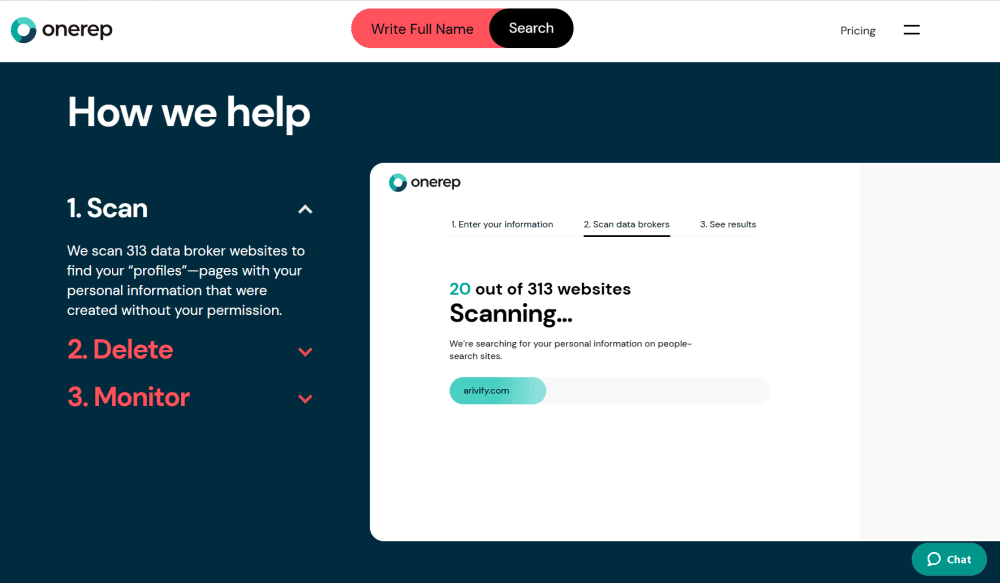
for and remove your personal information.
What Types of Data Can Onerep Remove?
Onerep focuses on removing the following types of PII to help increase your online privacy:
- Name
- Home address
- Date of birth
- Phone numbers
- Email addresses
- Gender
- Race
- Ethnicity
- Family data
- Education
- Employment history
Automated Data Removal
Automated data removal is probably the most important feature, as it provides a hands-off approach. Once you get your account up and running, Onerep does the heavy lifting for you, working with data brokers and people-search sites to remove your data. You don’t have to do anything unless you want to.
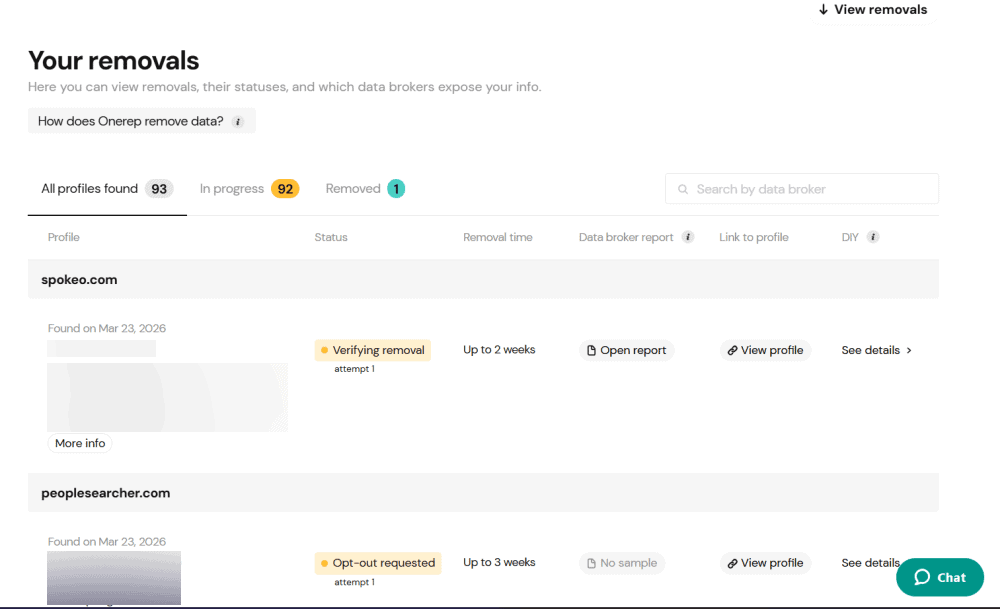
your personal information for you.
Custom Data Removal
If you are proactive and find your personal data on a site that Onerep hasn’t identified, you can submit the information to Onerep and they’ll work on your behalf to remove your data. Note that this feature is available only on Pro plans. There’s no guarantee that it will work, but it’s nice to have the option.
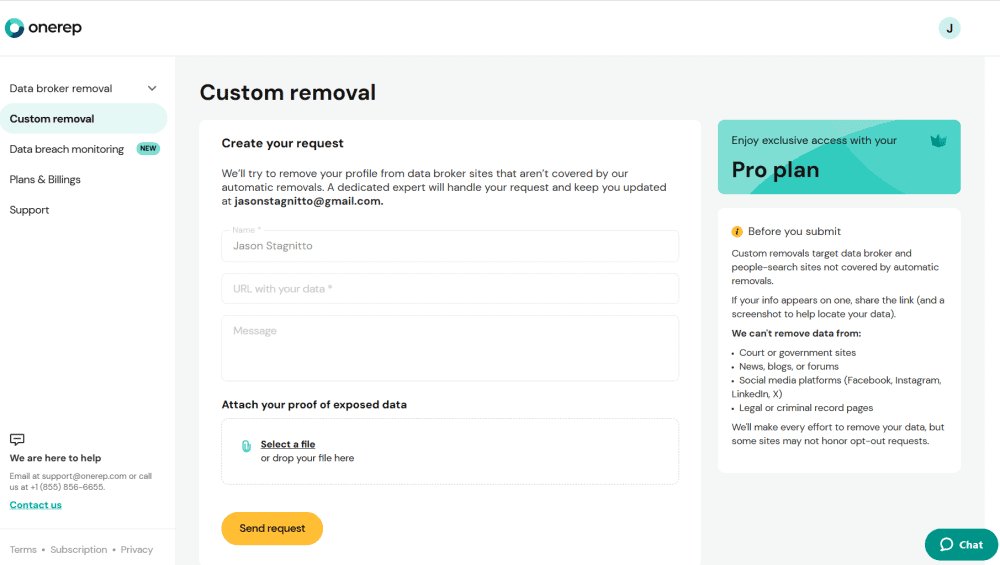
Progress Report
The main dashboard provides information about the automated removal process. It’s clearly marked with categories like “sites identified,” “removals in progress” and “removals completed.” You get a detailed breakdown of each site that has your data. If you want to be proactive, you also can take steps to manually remove your data.
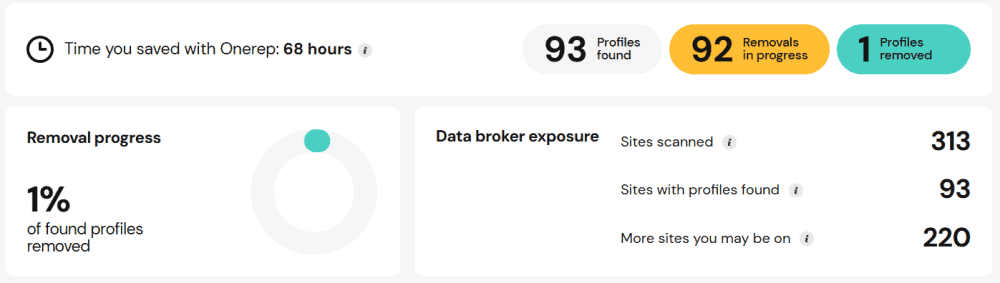
has successfully removed your personal details.
Data Breach Monitoring
The data breach–monitoring feature looks for any evidence of a data breach tied to your email addresses. It’s a nice tool, but Onerep doesn’t resolve the issue for you — it’s purely informational. A “learn more” button offers advice on changing your password and using two-factor authentication (2FA). This is handy considering how often data breaches occur.
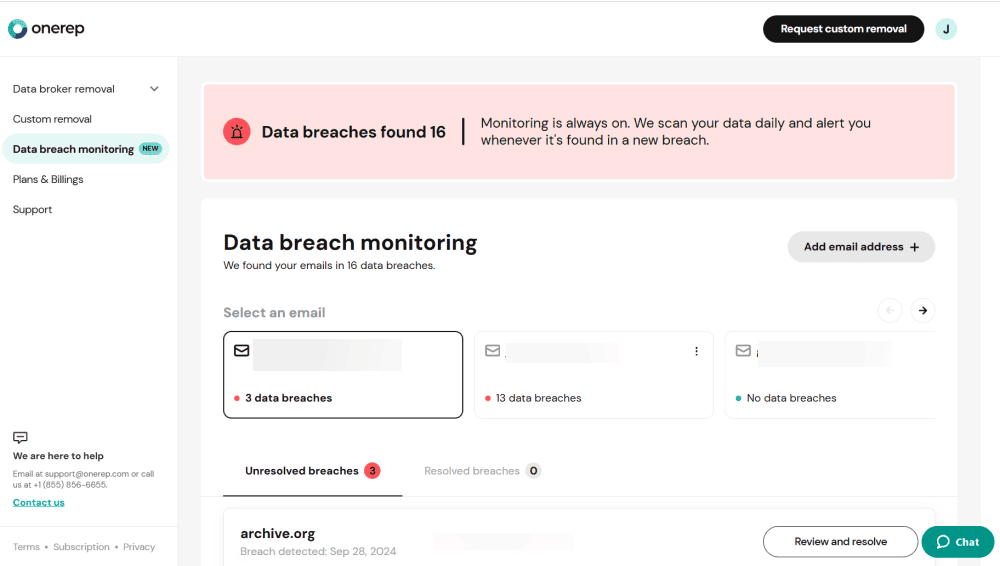
for any potential data breaches.
Cost: How Much Is Onerep?
Onerep finds itself firmly in the middle of the pack when it comes to affordability and pricing. It’s not the most expensive option, and it offers both individual and family plans. Paid plans start at $8.33 per month for one person if you sign up for a year. Still, if affordability is your top decision driver as an individual, DeleteMe and Incogni are cheaper.
For families of up to six people, Onerep’s family plan provides the best value. Better still, any group of six qualifies for the family plan — you just need consent to add people to the plan. Competitors like Incogni, DeleteMe and Aura cover fewer users on their family plans.
- Plan includes up to 6 people
- Plan includes up to 6 people
Hands-On Testing & Performance: What Is Onerep Like to Use?
Onerep is easy to use. As an automated service, Onerep requires you to do almost nothing. After the first scan, which took only a couple of minutes, my dashboard began to populate with data brokers and people-search sites that had my information.
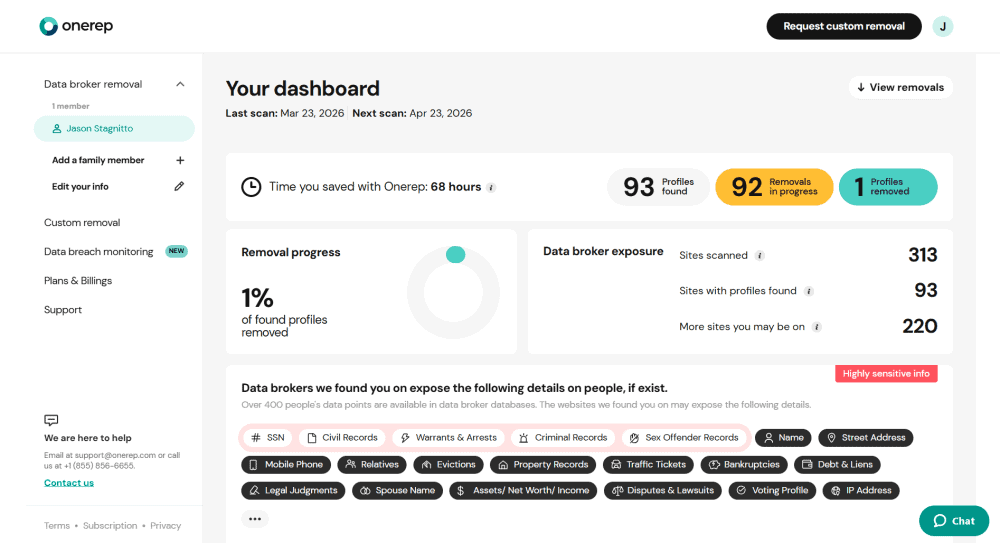
The dashboard breaks down the different types of data that brokers can expose, such as IP addresses, property records or social media accounts.
It’s a bit misleading, though: At first glance, it seems like Onerep is displaying the types of personal data it found for you specifically. That’s not necessarily the case, though; the categories represent the information found for users in general. I don’t love the initial alarm bells this sets off.
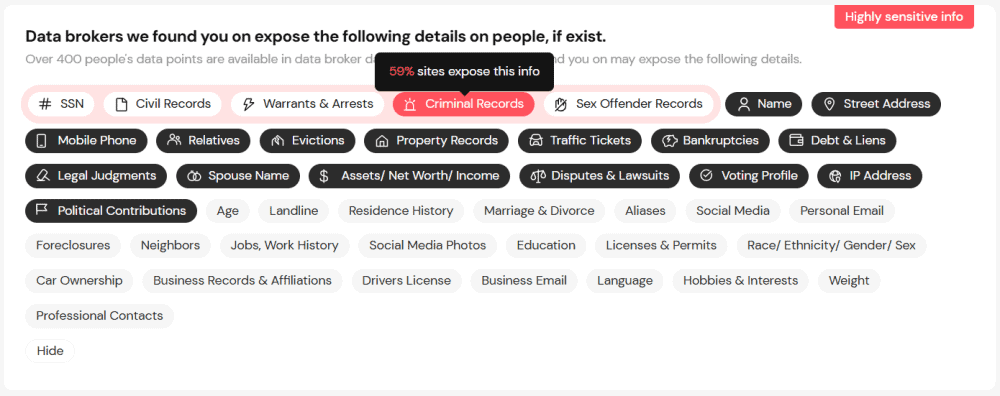
information that data broker websites expose.
Each category indicates the percentage of sites that expose that type of information — for example, 92% for street addresses. It would be nice to be able to filter data brokers by category, but unfortunately, you can’t. When hundreds of sites have your data, having the option to sort them can come in handy.
My final gripe is that Onerep does not have a mobile app; it is web only.
How to Get Set Up With Onerep
It’s easy to get set up with Onerep. All you need to do is select a plan and follow the prompts to activate the five-day free trial.
- Select a Plan
Choose a plan that works best for you. All of them come with a five-day free trial.
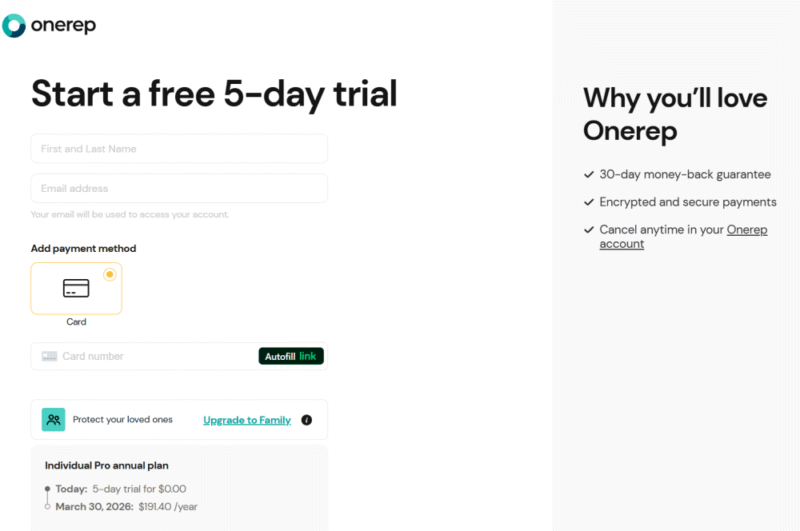
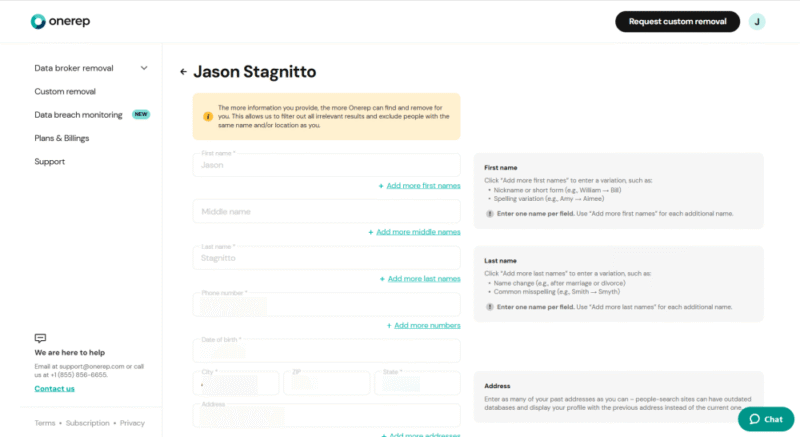
- Enter Your Information
Once you create an account, you’ll need to enter your personal information. Certain details are required, but not all. You can always edit this information later.
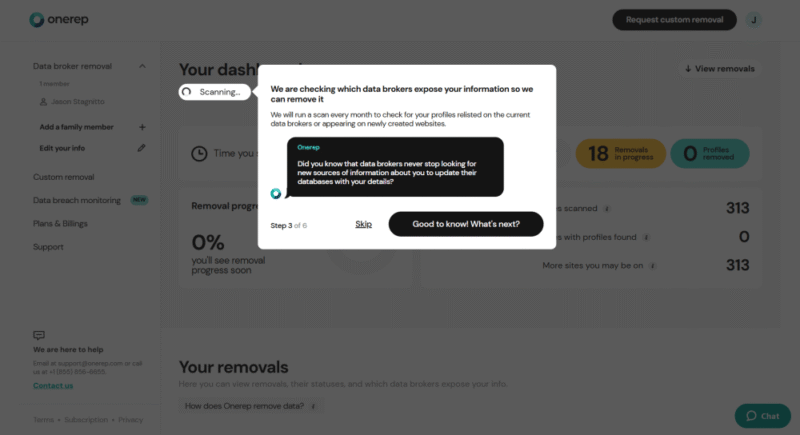
- View Your Dashboard
Once you’ve entered your details and the first scan is complete, you can view the results and progress on your dashboard.

Onerep Customer Support
Onerep’s customer support is one of the best parts of having an account. It’s difficult to overstate the importance of having multiple avenues to find help when you need it. You have access to 24/7 support via chat, email, website FAQs, a help desk and a phone number. However, the help articles are a bit limited in scope.
I was impressed with the responsiveness of the customer support. When I used the email address to ask questions, I didn’t have to wait one to two business days; I received an answer within an hour. Onerep has one of the fastest and most responsive customer service systems I’ve tested in my time at Cloudwards for any type of software.
Security: Is Onerep Safe & Private?
Onerep uses AES 256-bit and TLS/SSL encryption protocols. You’d never know it by looking at the website, though, as this information is conspicuously absent. I had to reach out to customer service to confirm it. It’s odd that Onerep is secretive about its encryption when nearly every other cloud-based product highlights this information.
The only security information you’ll find on Onerep’s website is about its SOC 2 Type 2 compliance. This means that an independent auditor confirmed that Onerep’s security controls are implemented correctly and function as expected.
Onerep’s Privacy Policy
Onerep’s privacy policy is easy to read and understand, which is saying something if you’ve ever spent time reading one. By nature, Onerep collects and shares your data — it’s how it’s able to send PII removal requests for you. The privacy policy, however, does state that Onerep uses your personal data for marketing and advertisements, which is not ideal.
My Methodology: How I Tested Onerep
There’s really only one way to test a service like Onerep: sign up and sit back while it does the work for you. As with most of these services, you provide as much information as you’re comfortable with, which is what I did. Once Onerep has that data, it performs an initial scan.
You’ll need to be patient, as it can take up to two months to see results.
I also tested the customer service options and assessed the responses, read through the privacy policy and familiarized myself with the dashboard and the information it provides. The more time I spent testing Onerep, the more comfortable I felt using the service and interacting with the app.
Other Personal Data Removal Services: Onerep Competitors
Onerep competes in a crowded space and faces some stiff competition. Other noteworthy services include:



The Verdict: Is Onerep Worth It?
Onerep is worth trying since it offers a five-day free trial. You won’t see significant results in that time frame, though, since most of the removal process takes about two weeks. However, it will give you a feel for the service. I consider Onerep to be on par with competitors, but there are cheaper options if budget is a concern.
Taking advantage of Onerep’s free trial is better than not using a data removal service at all. Let me know which service you like best in the comments below. Thanks for reading.
FAQ: Is Onerep Legit?
Onerep is cheaper than DeleteMe, but DeleteMe covers more brokers.
Incogni is the best overall data removal service. However, Optery is the best option if you want a free account, provided you don’t mind doing the legwork yourself.
Yes, Onerep costs money. Plans start at around $8 per month, but a five-day free trial is available to test out the service.
