Optery Review
In this Optery review, I take a deep dive into the service to see if it’s worth your time and money. I also cover the major differences between the free and paid plans. You might be surprised by how much you can accomplish with each one.

— Last Updated: 2026-05-03T12:03:44+00:00 Facts checked by Eugenie Tiu
Key Takeaways: What Is Optery & Is It Good to Use?
- Optery searches for your personal data from a list of people-search sites and data brokers.
- Optery submits automated data removal requests; you can submit custom requests with the highest-tier plan.
- Optery is good to use for anyone who wants to learn which entities have their personal data and reassert control over their data.
Top Use Cases for Optery:
- Identity theft victims: If you’ve been a victim of identity theft, Optery is a great way to monitor your personal data exposure.
- Privacy-focused individuals: Optery can help minimize your personal data exposure and increase data security.
- DIYers: A free Optery account provides all the information you need to submit opt-out requests to any site that has your personal information.
Your personal data is being bought and sold online, often without you even knowing it. Optery is one of the best data removal services to help with this. It sends requests to people-search sites and data brokers to remove your personal data. In this Optery review, I take a look at how it works, what it offers and who it’s best for.
First things first: You can use Optery’s free plan to search the internet for your personal data and learn which sites have your information. If nothing else, simply having this information is valuable.
Optery at a Glance
Optery searches for your personal data from a list of people-search sites and data brokers, and sends them removal requests.
| Features |  |
|---|---|
| Number of Data Brokers Covered | 1225 |
| Types of Brokers Covered | People Search, Marketing, Financial |
| Geographic Coverage | USA, Canada |
| Automated Removal Requests | |
| Ongoing Monitoring & Re-removal | |
| Official Data Broker List Published | |
| Dark Web Monitoring | |
| Custom Removal Requests | |
| Removes Data from Google Searches | |
| Personal Information Dashboard | |
| Provides Regular Progress Reports | |
| Time for Initial Scan Completion | 30 minutes |
| Average Time for First Removals | 1-2 weeks |
| Estimated Full Removal Cycle Time | 30 |
| Clarity of Removal Evidence | 4 |
| Process Type | Automated and Custom |
| Onboarding Process Simplicity | Very simple |
| Dashboard Intuitiveness | Highly intuitive |
| Mobile App Availability | Android & iOS |
| Account Cancellation Process | Easy |
| Free Trial Offered | |
| Money-Back Guarantee | 30 days |
| Couples / Family Plan Available | Yes, but each member needs an account |
| Accepted Payment Methods | Credit Card |
| Two-Factor Authentication (2FA) | Authenticator App |
| Data Encryption Standard | AES-256 |
| PII Required for Signup | Full Name, DOB |
| Privacy Policy Transparency | 4 |
| Sells User Data | |
| Company Jurisdiction | USA |
| CCPA/CPRA Compliant | |
| GDPR Compliant | |
| Clear Explanation of Methods | |
| 24/7 Support | |
| Dedicated Support Agent | |
| Help Center / Knowledge Base Quality | 4 |
| Support Tickets | |
| Email Support | |
| Chat Support | |
| Phone Support |
What Is Optery & Who Is It Best For?
Optery is a data removal provider that searches for your personal information from a list of people-search and data broker sites. With a paid account, Optery submits automated data removal requests and is ideal for anyone concerned with personal data exposure online. Optery’s free plan is great for anyone who prefers to conduct data removal themselves.
Reputation: Is Optery Legit?
Yes, Optery is legit. It works as advertised to remove as much of your personal data as it can from people-search sites and data brokers.
The Cloudwards Expert Opinion
 The Cloudwards Expert Opinion
I found Optery to be an easy-to-use data removal service. It’s great if you’re concerned about your personal data online — and who isn’t? Optery isn’t as comprehensive a service as alternatives like Aura, and it is still relatively new. However, I recommend giving the free plan a go, especially if it’s your first time using a data removal service.
Optery Pros & Cons
Features: How Does Optery Work?
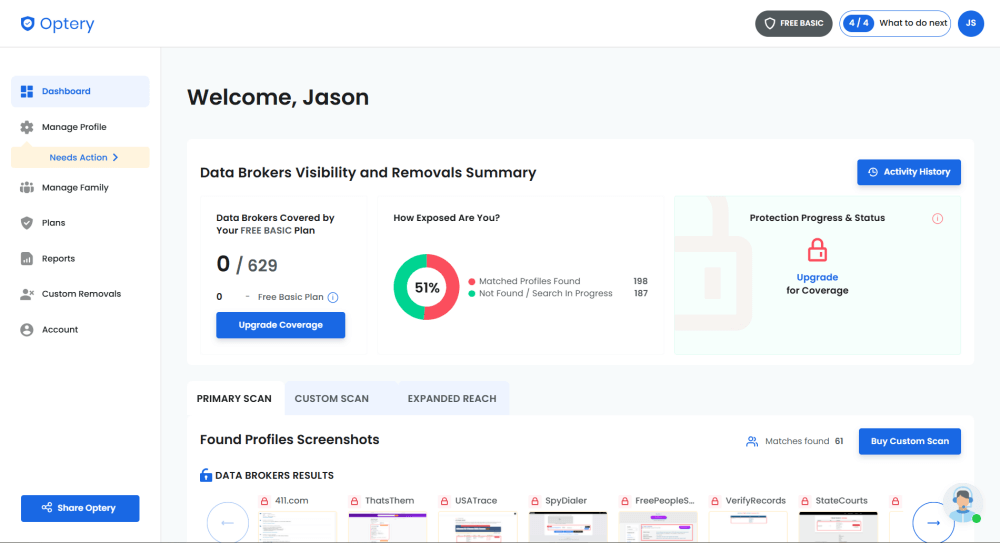
focusing on your private information.
Data removal is Optery’s main goal, and in that sense, it’s a very capable service. It has one of the most comprehensive data removal lists around and supports custom removal requests. I also like the detailed information that appeared on my dashboard after the initial scan.
How Does Optery Remove Your Data From the Web?
Optery removes your data from the web by taking the information you provide and searching the web for it. The more you include, the better it works. You’ll see a list of sites on your account where Optery found your data. If you paid for a plan, Optery will automatically send removal requests. Optery also provides a progress report so you can see how much data it scrubs and how quickly.
Optery is primarily focused on reducing your online personal data exposure. However, like any other data removal service, Optery can’t remove your data completely from the internet.
What Types of Data Can Optery Remove?
Optery can remove personal information like your name, address, phone number and email from search sites and data brokers. It can also remove more sensitive information, such as your date of birth or even property ownership records. However, Optery doesn’t include the dark web or social media sites. Below is a list of the types of data Optery searches for:
- Name
- Address
- Date of birth
- Phone number
- Previous address(es)
- Property ownership
Key Optery Features
Optery has a standard set of features that are similar across the data removal industry. Nothing about Optery is extraordinary or groundbreaking, but what it does, it does well.
Exposure Report
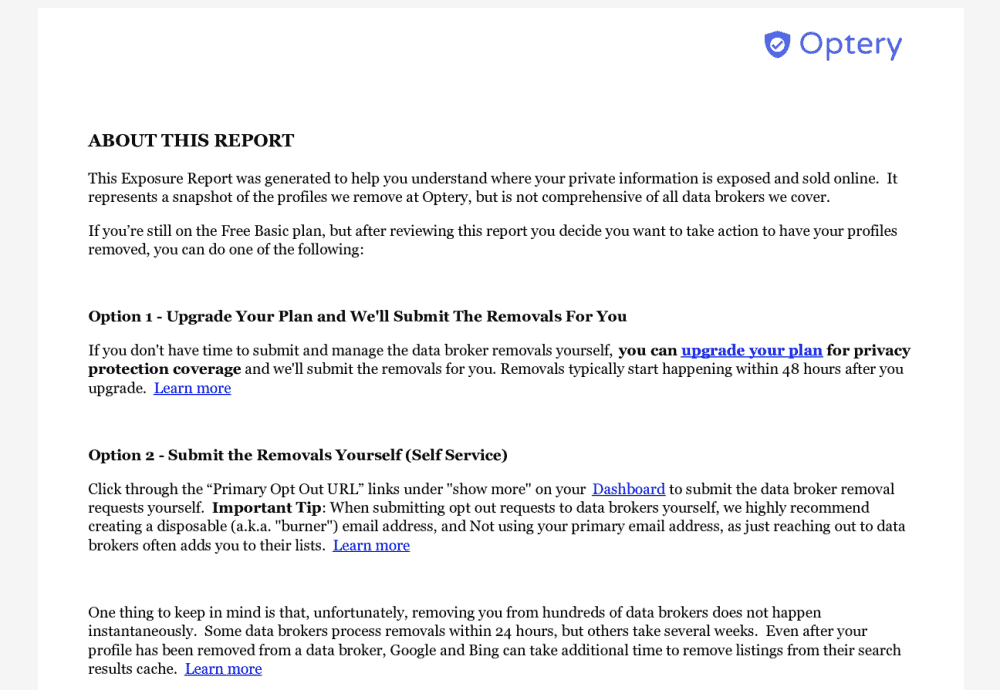
The exposure report is the most important result of both the initial scan and any subsequent scans. It provides more detailed information about the list of sites that may be exposing your data.
With the exposure report, you can conduct a painstaking self-removal of your data. Each data broker or site listed in the exposure report has a clickable link. Alternatively, Optery will take care of this for you if you have a paid plan. The exposure report runs every three months for free users and every month for paid users.
Data Removal
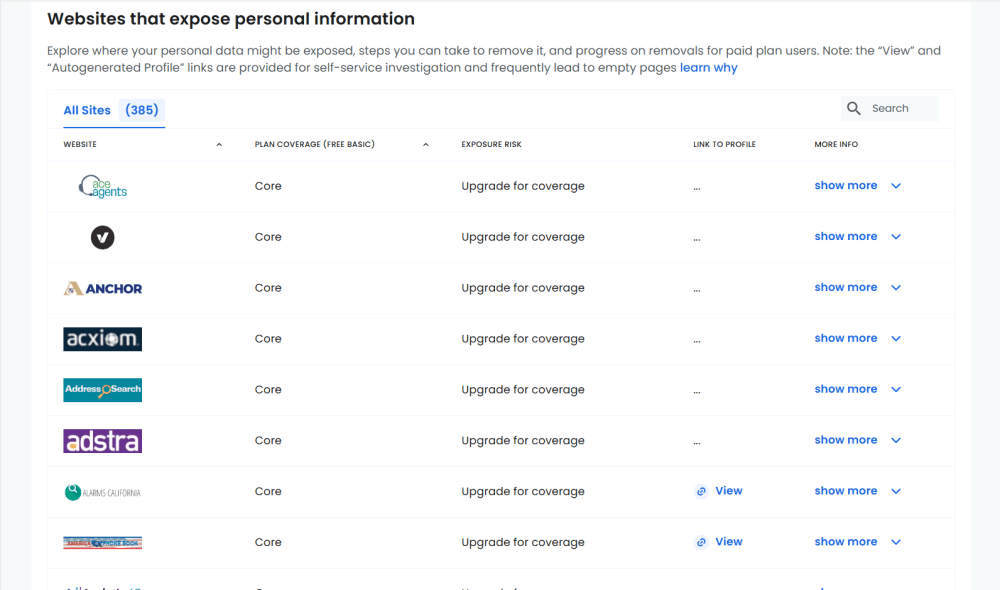
sites that have your personal information.
With a paid plan, Optery sends data removal requests automatically without you having to do anything. The more expensive the plan, the more potential sites to which Optery submits removal requests.
Optery is one of the few data removal services I’ve seen that lists each and every site or data broker that has access to your personal information.
Hands-On Testing & Performance: What Is Optery Like to Use?
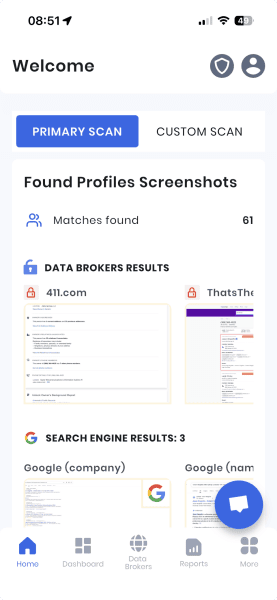
To put it simply, Optery is as easy to use as it gets. The process is mostly hands-off once you set up your account, and you’ll interact primarily with the dashboard. Despite the amount of data Optery provides, especially after the initial scan, I never found it to be cluttered or confusing.
The long list of results did feel overwhelming at first. However, the more time I spent with the results, the more sense the app made. I like how it separates data brokers, Google search results and websites into their own sections.
How to Get Set Up With Optery
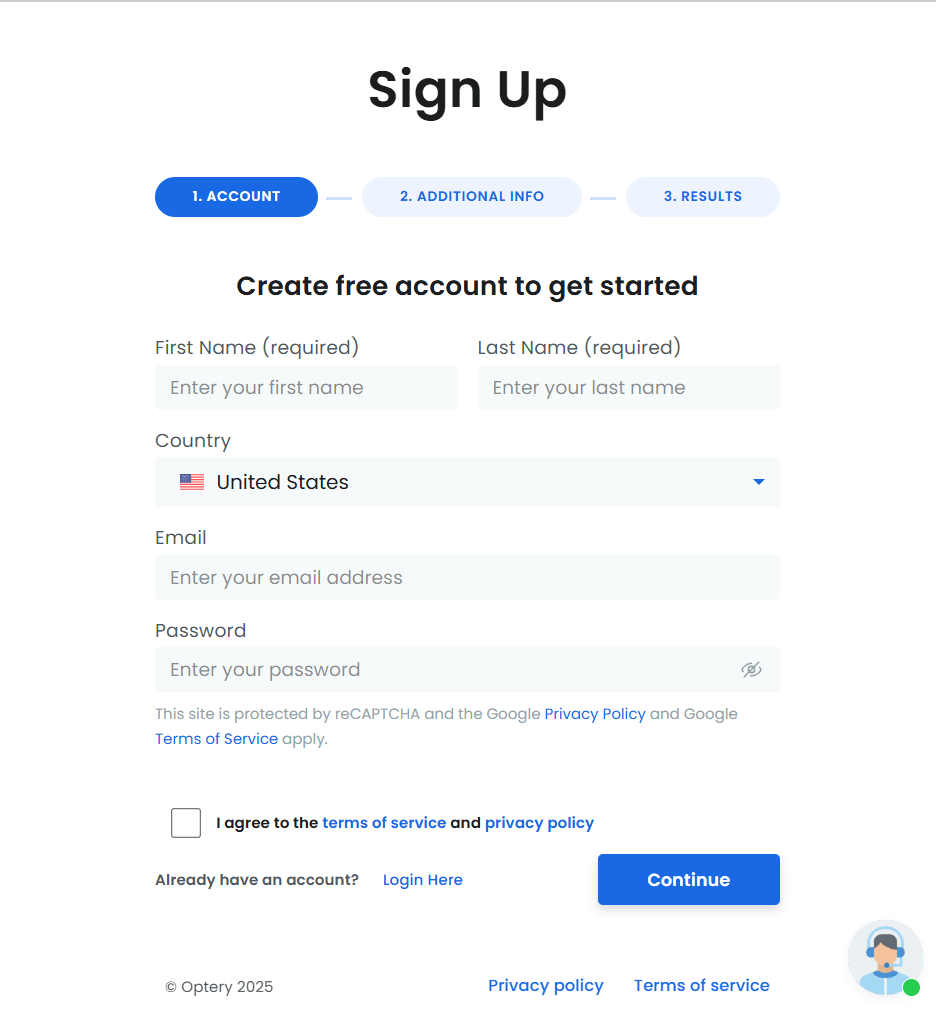
The first step to getting set up with Optery is to create an account. I highly recommend starting with the free option, even if you know you want a paid subscription.
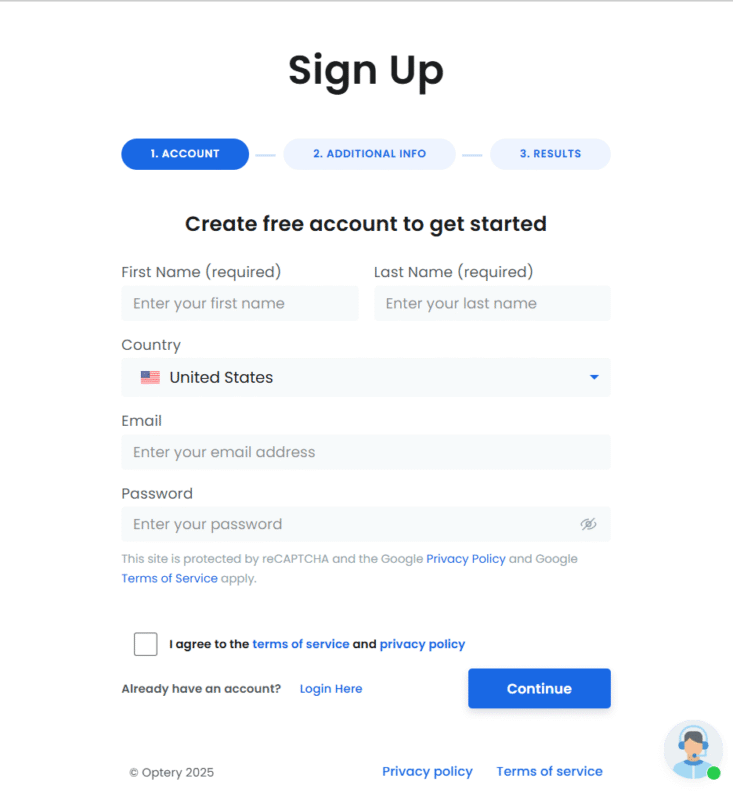
- Set Up Your Account
On the account page, choose the Basic plan and then fill out the information. Start with the minimum information necessary — you can add more later.
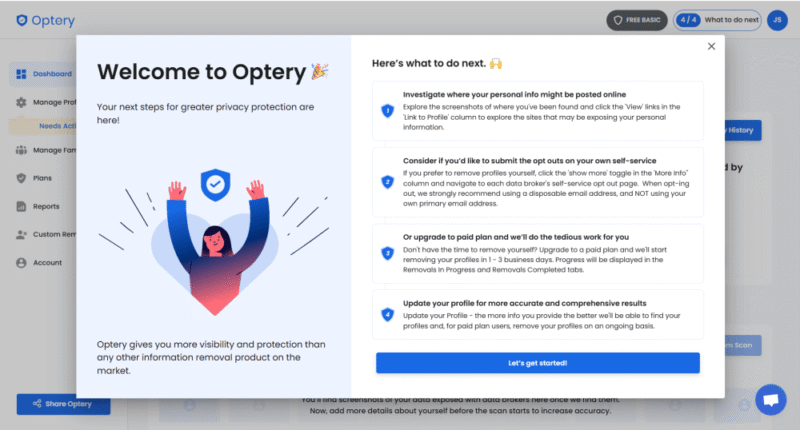
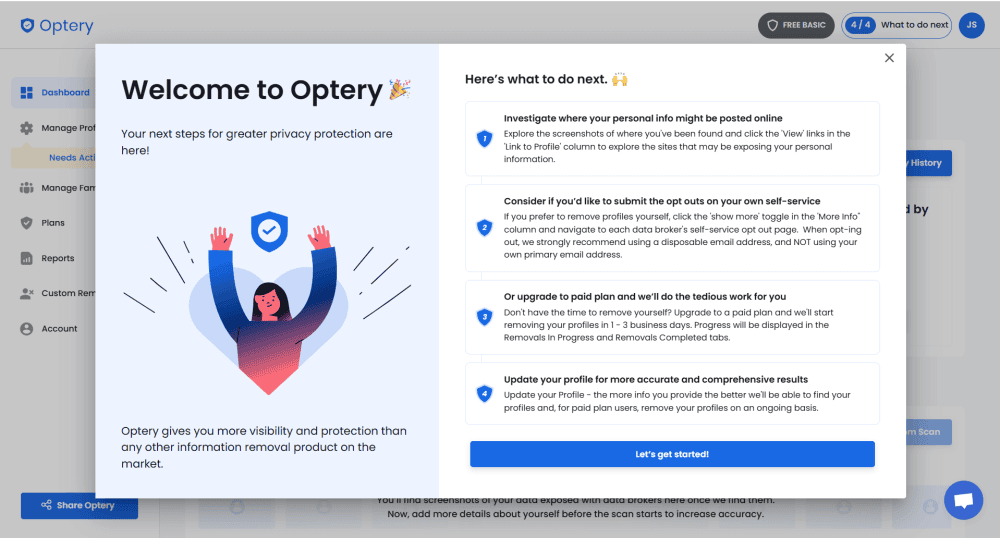
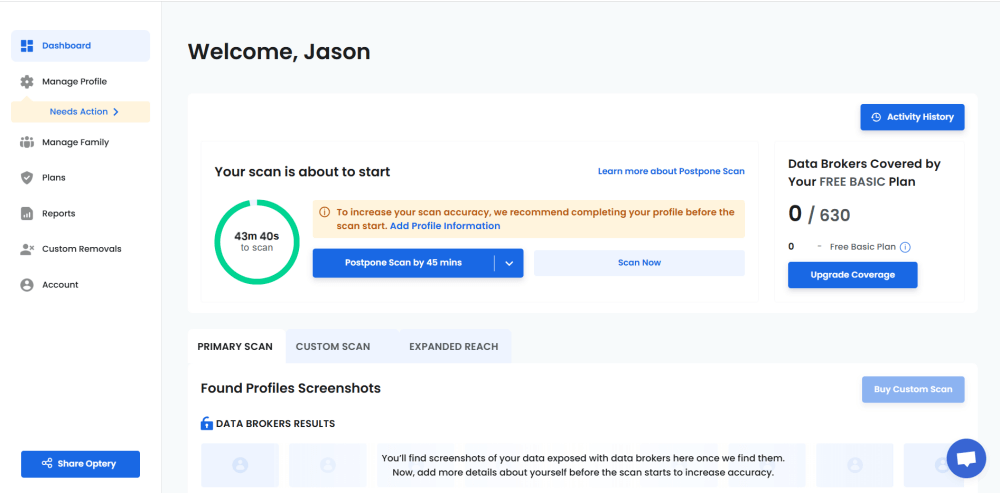
- Explore the Dashboard
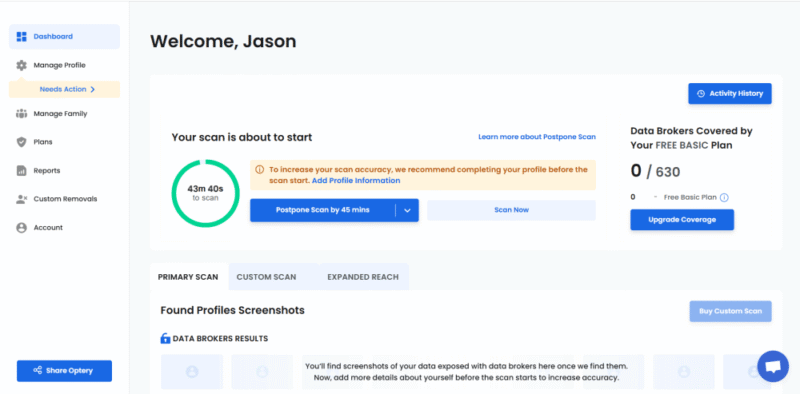
Once you’re finished with the setup process, check out the dashboard. You’ll see the first scan begin. This should take only a couple of minutes to complete, but some results may take longer to show up.
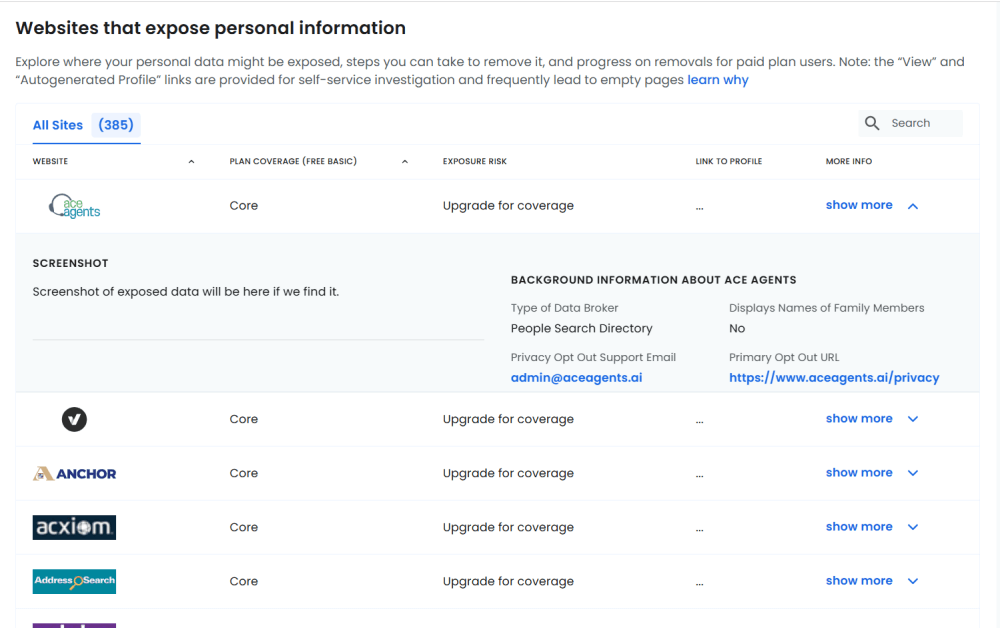
- Review the Scan Results
Once the scan is complete, check out the results. Review the data brokers, Google results and other websites that have your data.
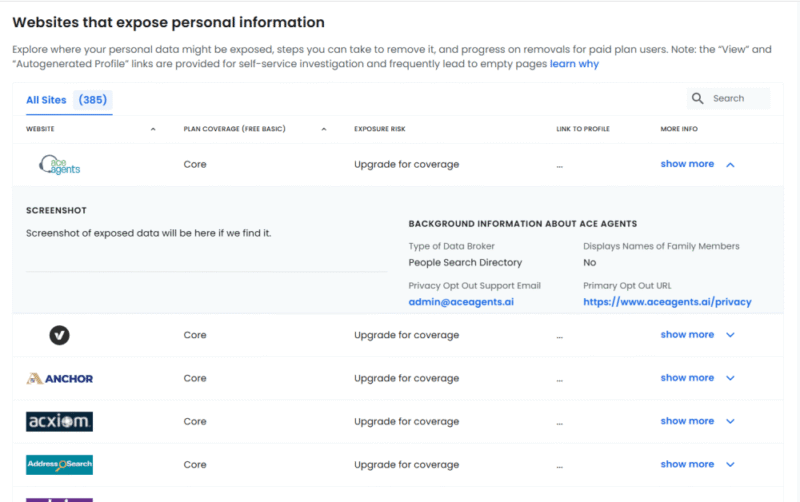
- Remove Your Data
Click on any of the sites from the results and follow the process to remove your data. This is the self-removal process; paid plans have automated removal.
Optery Customer Support
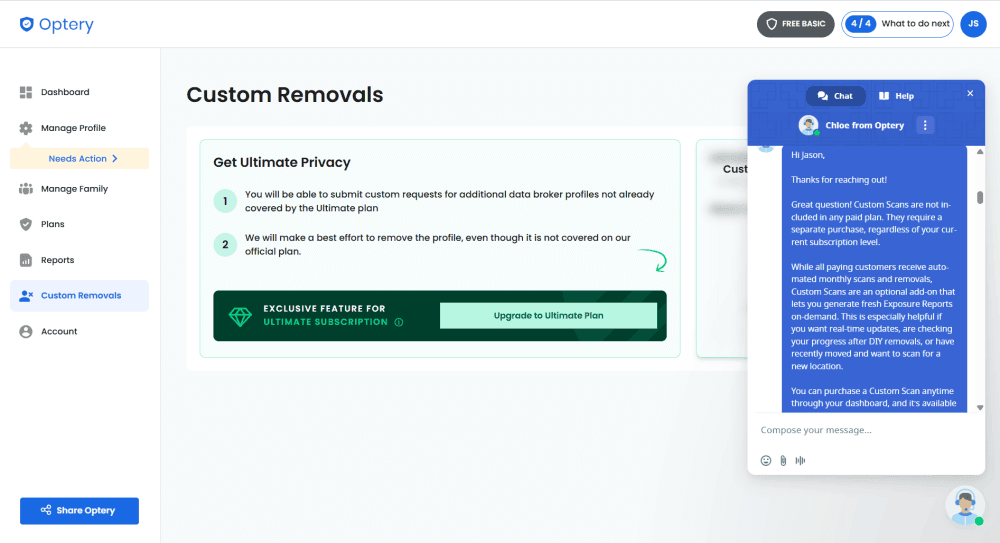
Optery offers several methods to access support. It has a rich database of FAQs to search through, with plenty of details and information. You can also click on different categories or conduct a keyword search. If none of those methods help solve your problem, you can use the chat feature or send an email to the Optery customer support team.
I found the chat feature to be especially useful. The responses are AI-generated at first, and it starts by asking about your account and peddling a paid subscription if you have a free account. However, once I was in the chat itself, I was connected with a real person, who was able to answer my question. Plus, Optery sent a transcript to my email address.
Cost: How Much Is Optery?
Optery offers plenty of bang for your buck. For $3.25 per month on an annual plan or $3.99 for the month-to-month option, you get a detailed window into your data exposure and the knowledge that Optery will remove your data for you.
Perhaps the most annoying aspect of the subscription model is that many data brokers and sites are locked behind higher tiers. Additional niceties with paid plans include unlimited name variations and past address removal. The Ultimate plan includes custom requests.
Businesses have access to a free option with 10 names, and paid plans starting at $5 per month.
Optery’s Free Basic Plan
The Free Basic plan is one of the best ways to familiarize yourself with Optery. If you are a determined individual who’s patient enough to carry out the manual opt-out process for each and every site, the Free Basic plan is perfect. It won’t have all the features of a paid plan, of course, but you still get a ton of information about who has your data.
More plans
- 10 members
- Additional names start at $5 per user, with volume discounts
- Additional names start at $30 per user, with volume discounts
- Minimum of 100 licenses
Security: Is Optery Safe & Private?
Optery’s infrastructure runs on Amazon Web Services, which could be a positive or a negative, depending on your perspective. On the plus side, it uses the TLS v1.3 protocol to protect data transfers and AES 256-bit encryption to secure your personal data at rest. You can further protect access to your account with multi-factor authentication.
It may go without saying, but Optery has access to your account data and password, as accounts are not zero-knowledge. However, Optery operates using a “least-privilege” approach, meaning employees who have access to your data are limited and have only enough information to perform their job functions.
Optery’s Privacy Policy
One of the best parts about Optery’s privacy policy is that it is not too long. Even better, it’s not loaded with technical or legal jargon. However, the most important detail outlined in Optery’s privacy policy is that it does not sell or rent your information, and it makes it explicitly clear that the company is not a data broker.
Optery focuses on your data privacy rights, and it honors the California Consumer Privacy Act, the California Privacy Rights Act and the Canadian Personal Information Protection and Electronic Documents Act.
My Methodology
Aside from the initial account setup, most of my testing involved sitting back and waiting for the initial scan to populate my dashboard. Once that information arrived, I interacted with many of the data brokers listed as having my information. Since I used the free version, I navigated to the various sites myself to see how complicated self-removal was.
The exposure report Optery provided was a more detailed version of what I saw on the dashboard. I like that a link was provided for each data broker so I could navigate right to the site I needed to conduct a self-removal. Although self-removal is a tedious process, not having to search for each broker’s data removal page helped streamline the process.
Other Data Removal Services: Optery Competitors
Optery faces some stiff competition. One of the alternatives below may be a better fit for you, depending on your needs.



The Verdict: Is Optery Worth It?
If you are concerned about how exposed your personal data is online — and I can assure you, some of your data is indeed exposed — then yes, Optery is worth it. Even if you just stick to a free account, you’ll have everything you need to take control of your personal data online.
Buying and selling personal data is big business, and a service like Optery can help you regain some control. Let me know in the comment section below if you use Optery or another similar service. Thanks for reading.
FAQ: Removing Personal Data With Optery
Yes, Optery actually works. It regularly scans and sends automated removal requests to hundreds of people-search and data broker sites.
Optery’s pros include its ease of use, transparency about the sites it works with and automated removal process. Some of the cons include needing to submit personal data on yet another site, which Optery then sends to other sites to check for your information.
Yes, you should give Optery power of attorney (POA). Power of attorney is limited, so Optery can only do so much. However, with POA, Optery is less likely to be rejected due to being a third party making a removal request on your behalf.
The average time to start seeing successful removal of your personal data is anywhere from one week to 30 days.