The Best Project Budgeting Software in 2026
Efficient budgeting is a cornerstone of project success. In this article, I break down the best project budgeting software to help you track project expenses and avoid budget overruns.



Written by Mehak Siddiqui (Writer)
Reviewed by Kate Hawkins (Editor, Writer)
Facts checked by Simona Ivanovski (Fact-Checker, Formatter)
Last Updated:
All our content is written fully by humans; we do not publish AI writing. Learn more here.
Key Takeaways: These are the Best Project Budget Management Tools
- monday.com — Best overall budgeting software for teams of all sizes. Get the Standard plan with a 30-day money-back guarantee.
- ClickUp — Highly customizable all-in-one workspace. Get the Business plan with a 30-day money-back guarantee.
- Asana — Structured budgeting software. Sign up for a free trial of the Advanced plan.
- Wrike — Best enterprise-grade financial management software. Get a custom quote for the Pinnacle plan.
- Zoho Projects — Affordable project budgeting software. Get a 15-day free trial of the Premium or Enterprise plan.
- Smartsheet — Powerful spreadsheet-style budgeting software. Start a 30-day free trial of the Business plan.
Facts & Expert Analysis About Budgeting Software for Business
- Spreadsheets don’t scale well: Spreadsheets are traditionally used for expense management, but they’re prone to errors and lack real-time collaboration. It’s smarter to choose a modern tool that doesn’t have such limitations.
- Better reporting supports decision-making: Clear insights and budget reports help managers prioritize resources and adjust strategy according to changing needs.
- Scalability matters: As teams grow, budgeting tools must handle multiple projects, portfolios and stakeholders without added complexity or exorbitant costs.
Project budgets can quickly spiral out of control without the right systems in place. Fortunately, you don’t need complex spreadsheets or expensive accounting software. I’ve found the best project budgeting software that can help you plan and monitor spending in real time.
Many of these tools are among the best project management software, letting you manage all aspects of your workflow centrally. You can link budgets directly to the work being done, improve visibility for all stakeholders and make informed decisions.
Cloudwards’ Choice: monday.com
 Cloudwards' Choice: monday.com
monday.com is my top choice because of its simple yet powerful budgeting features. You get real-time budget tracking, visual dashboards and automated alerts on the same boards where tasks, timelines and team communication live. Information is streamlined for clear visibility and planning. You can try the Standard plan with a 30-day free trial.
What Is Project Budgeting Software?
Project budgeting software helps teams plan, track and control project costs all in one place. It lets you set budgets, estimate costs and monitor actual spending in real time. Live dashboards, alerts and reports make it easier to track finances and keep projects moving forward. Moreover, stakeholders gain clear visibility into how money is being spent.
The 6 Best Project Budget Tracking Tools Compared
| PM Tool: | Free Plan | Starting Price* | Best For | USP | Limitations |
|---|---|---|---|---|---|
 | Yes, up to 2 members | $12 per month (one-year plan) | Small to mid-sized teams | Intuitive interface, visual layout | Expensive for large teams |
 | Yes, unlimited users | $7 per month (one-year plan) | Teams with complex workflows | All-in-one workspace, unlimited customization | Takes time to set up |
 | Yes, up to 2 users | $10.99 per month (one-year plan) | Cross-functional teams | User-friendly interface | Advanced features available only on higher tiers |
 | Yes, unlimited users | $10 per month (one-month plan) | Larger teams | Strong time-tracking features | Interface feels complex |
 | Yes up to 5 users | $4 per month (one-year plan) | Small to mid-sized teams | Cheap & user-friendly, tight integration with Zoho ecosystem | Limited advanced reporting tools |
 | No | $9 per month (one-year plan) | Data-heavy & enterprise teams | Spreadsheet-style planning with powerful dashboards & automation | Complex interface |
Hands-On Testing Results
Here’s how these project budgeting software compare in features, platform and administration, integrations and automations, and usability and performance.
Avoid Costly Project Management Mistakes – Get Free Tips Today!

- Discover 10 fundamentals of project management
- Understand step-by-step plans for PM execution
- Learn tips to avoid 5 common mistakes by beginners
Feature Comparison Overview
| Tool: | View Types | Time Tracking | Custom Fields | Dashboards | Real-Time Collab |
|---|---|---|---|---|---|
| 12: list, board, timeline, calendar, etc. | Yes (Pro plan) | | | |
| 17: board, timeline, Gantt, map, etc. | Yes (limited on lower tiers) | | | |
| 9: board, list, calendar, etc. | Yes (Advanced plan) | | | |
| 9: table, board, list, calendar, Gantt, chart | Yes (Business plan) | | | |
| 5: list, kanban, Gantt, plain, classic task views | Yes (Premium plan) | | | |
| 5: grid/table, Gantt, board, calendar, timeline | Yes (Business plan) | | | |
Platform & Administration
| Tool: | Apps | Storage | File Management | Permissions |
|---|---|---|---|---|
| Web | 500MB-1000GB | File column, gallery view, versioning, uploads from cloud drives | Board, dashboard, workspace & account level |
| Web | 60MB-unlimited | Attachments, integrations with cloud drives | Folder, list & space level |
| Web | Unlimited (100MB max per file) | Attach/upload files to tasks & comments, integration with cloud drives | User permissions, app controls |
| Web | 2GB-50GB per user | Upload files from local/computer, Box, Dropbox, Google Drive, etc.; file versioning | Access roles: full, editor, limited, read-only; custom roles on Enterprise plans |
| Web | 5GB-150GB per user | Attach files to tasks and milestones, integrated with Zoho Docs & cloud drives | Project, task & role-based permissions |
| Web | 20GB-unlimited | File attachments on rows & sheets, version history, cloud drive links | Sheet-level, workspace & admin controls |
Integration & Automations
| Tool: | Integration Count | Top Integrations | Native vs 3rd-Party | Automation Features |
|---|---|---|---|---|
| 200+ | Slack, Gmail, Outlook, Jira, Dropbox | Native & 3rd-party | Workflow builder with triggers & actions (e.g., auto-notify, auto-create items) |
| 1,000+ | Slack, GitHub, Google Sheets, Zapier | Native & 3rd-party | Custom integrations/API & drag-and-drop automation of tasks & triggers |
| 200+ native integrations & thousands via Zapier | Slack, Google Drive, Microsoft Teams, Figma | Mostly third-party | “Rules” to automate tasks (e.g., when tasks complete → trigger action) |
| Thousands through Wrike Integrate | Google Drive, Zoom, GitHub, Jira | Mostly third-party | Powerful workflow automation, AI assistance, status-based triggers & approvals |
| 300+ | Zoho CRM, Zoho Desk, Google Workspace, Microsoft Office 365 | Mostly native (via Zoho ecosystem), with some third-party | Workflow automation (task alerts, status updates, reminders) |
| 100+ | Slack, Microsoft Teams, Salesforce, Jira, Google Workspace | Native & 3rd-party | Automated workflows (alerts, approvals, updates, triggers) |
Usability & Performance Assessment
| Tool: | Learning Curve | Interface Design | Mobile Experience | Customer Support |
|---|---|---|---|---|
| Easy | Visual, color-coded, intuitive | Very good | 24/7 chat, extensive docs |
| Intermediate | Modern & highly customizable | Good | Chat, email support |
| Easy-intermediate | Structured & intuitive | Good | Community, paid support |
| Intermediate-difficult | Flexible but complex | Good | Email, community forum |
| Easy-intermediate | Functional, business-focused | Good | Email, phone, knowledgebase |
| Difficult | Spreadsheet-style, data-driven | Good | Email, phone, training resources |
Best Project Budget Management Tools
After extensive testing, I’ve shortlisted the top project management tools to create accurate budgets, estimate future costs, visualize project progress and oversee financial health.
1. monday.com — Best Overall Budgeting Software for Teams of All Sizes
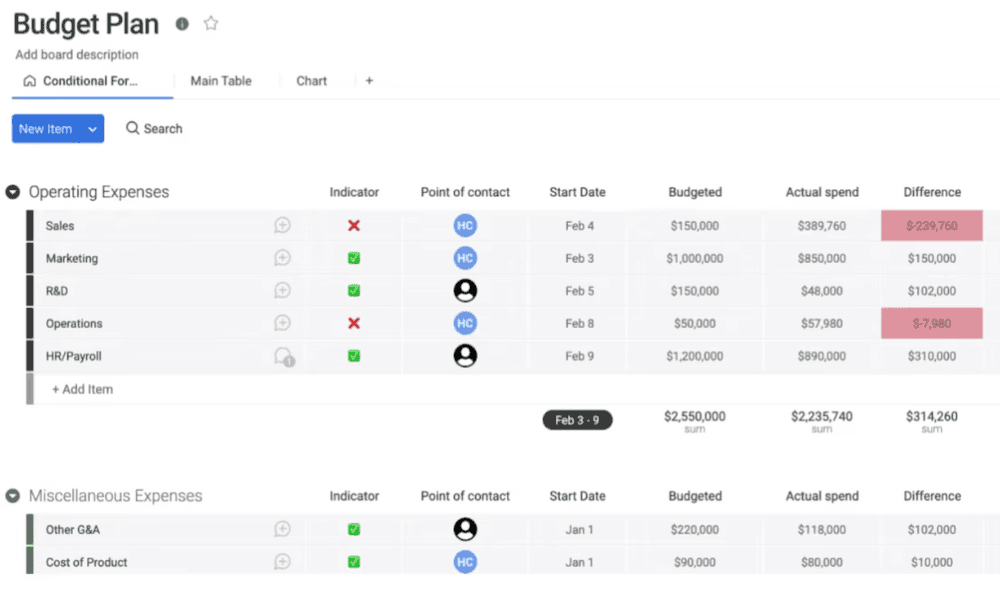
monday.com offers comprehensive project management features, as detailed in our monday.com review. You can build custom boards with “numbers” and “formula” columns that let you log estimates and actual spend side by side. Visual dashboards provide metrics at a glance, and you can easily customize prebuilt templates.
When to Choose monday.com
Choose monday.com if you want an easy-to-use budget and work management platform. It scales well and has robust integration capabilities to connect with other software you may use. Try the Standard plan with a 30-day money-back guarantee.
- Maximum users: 2
- Minimum users: 3; All prices per user
- Minimum users: 3; All prices per user
More plans
- Minimum users: 3; All prices per user
- Enterprise-level features.
2. ClickUp — Highly Customizable Expense-Tracking Software
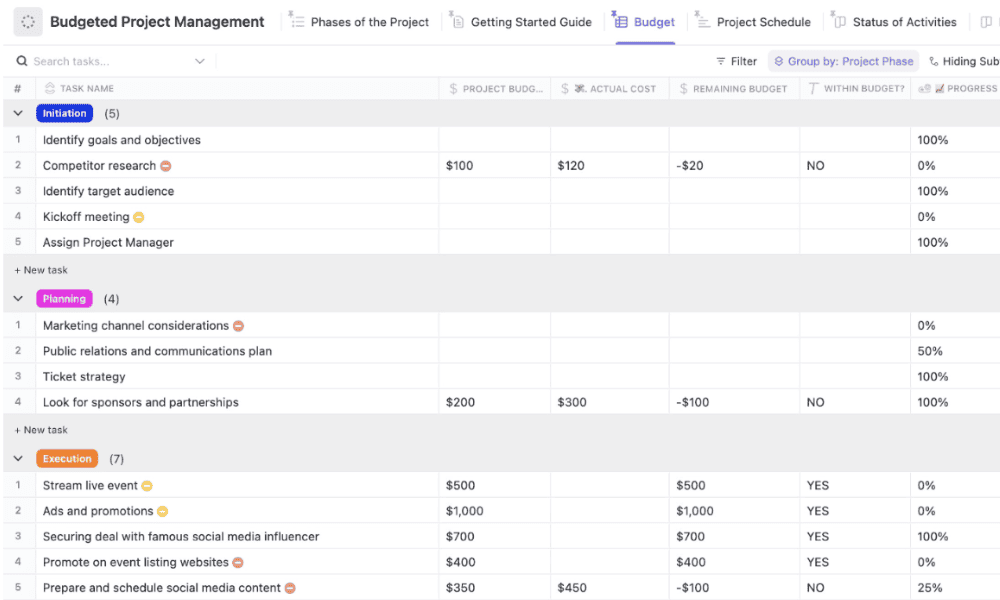
ClickUp lets you customize every aspect of the project budgeting process and has handy templates. You can generate detailed reports to track complex projects. However, it presents a bit of a learning curve for new users. Read more in our ClickUp review.
When to Choose ClickUp
Choose ClickUp if your team needs an adaptable tool that can grow with evolving budgeting needs. I recommend the Business plan, which is built to handle complex financial and operational data. Try the Business plan risk-free with a 30-day money-back guarantee.
- Basic functionality with some limitations
- All prices per user
- All prices per user
3. Asana — Structured Budgeting Software for Business Needs
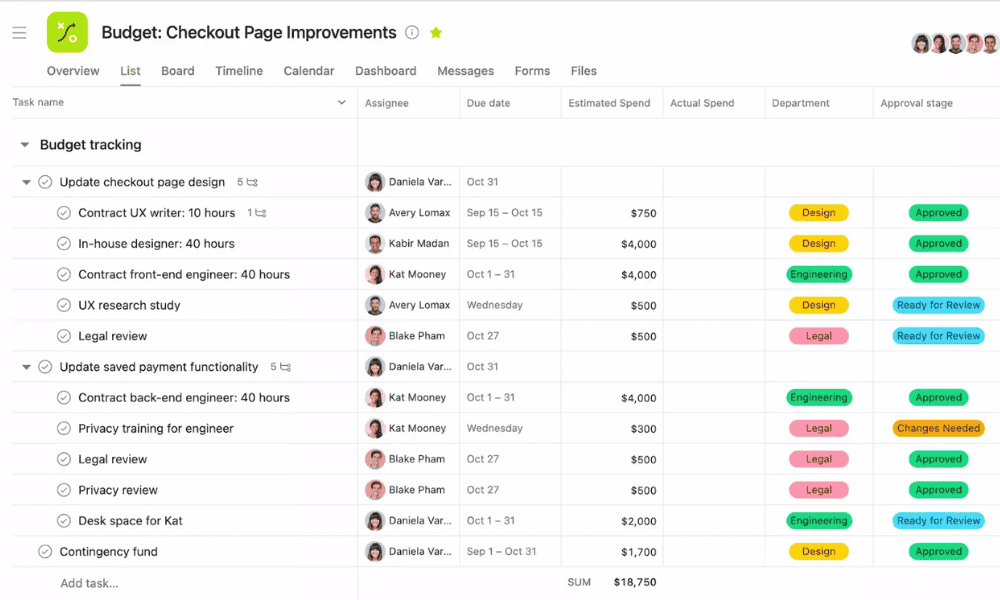
Asana supports seamless budgeting and work tracking. You can use custom fields and formulas to track estimated vs actual spend and combine these with budget templates to plan and monitor costs within your project boards. Read our Asana review for more details.
When to Choose Asana
Asana is a great choice for small to mid-sized teams that want to connect budgeting to structured task and project workflows. Unfortunately, it lacks advanced financial reporting, so it may not suit larger organizations. Try Asana’s Advanced plan for free.
- Up to 10 users
- Price is per user. unlimited users, expanded features
- Price is per user. unlimited users, even more features
- Custom pricing, advanced security features
4. Wrike — Best Enterprise-Grade Project Financial Management Software
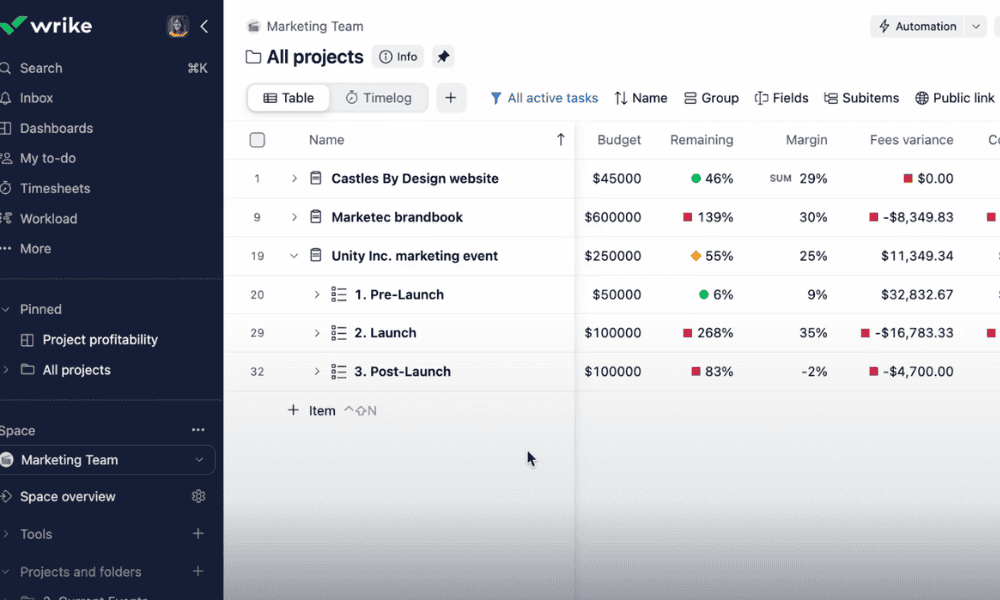
Wrike combines detailed budget tracking with broad project portfolio control and resource planning. It lets you track project finances, build a risk-response strategy and improve financial forecasting. That said, it is quite complex and can be pricey.
Read our Wrike review for more details.
When to Choose Wrike
Choose Wrike if your organization needs enterprise-level financial oversight and project control all under one roof. You’ll need to spring for the Pinnacle plan for its budgeting features, which has custom pricing.
- Unlimited users. Basic features.
- Price is per user. Plans for 5, 10 and 15 users.
- Price is per user. No monthly option. Plans for 5 to 200 users.
More plans
- For large teams; Enterprise-grade security and scalability; Plans for 5 to an unlimited number of users.
- For teams with complex work needs; Advanced tools and analytics for complex work; 5 to unlimited users
5. Zoho Projects — Affordable Project Budgeting Software
Zoho Projects is affordable project management software for financial tracking. You can set budgets based on hours, fixed costs, project phases or tasks, and then track planned vs actual costs as work progresses. Learn more in our Zoho Projects review.
When to Choose Zoho Projects
Opt for Zoho Projects if you already use other Zoho apps or are on a tight budget. However, bear in mind that it has limited advanced budgeting tools, so it may not suit complex needs. Start a free trial of the Premium or Enterprise plan to see if it has the right budgeting features for you.
6. Smartsheet — Powerful Spreadsheet-Style Budgeting Software
Smartsheet lets you build live spreadsheets where planned vs actual spend is tracked dynamically. Its ability to link sheets, automate workflows and pull data from multiple projects makes it feel like an upgraded Excel. Read more in our Smartsheet review.
When to Choose Smartsheet
Opt for Smartsheet if you prefer working in grids and want to transform traditional budget trackers into live, connected financial dashboards that update automatically as project data changes. It’s powerful but complex for new users.
Test Smartsheet’s budgeting features with a 30-day free trial of the Business plan.
- Prices per user, Max 10 users Basic features, 20GB file storage
- Prices per user, Three user minimum, Unlimited free users, Expanded features, 300GB file storage
- Advanced features
How to Choose the Best Project Budgeting Tool for Your Needs
When choosing the right tool for your needs, consider the criteria outlined below.
Final Thoughts
There are several powerful budgeting tools on the market, but monday.com stands out as the top choice thanks to its balance of comprehensive features and ease of use for teams of all sizes. If you’re curious to see how it works, the Standard plan is a great place to start. You can try it with a 30-day money-back guarantee.
Have you used any of the tools mentioned in this guide? What matters most to you when choosing project budgeting software? Do you have any questions I haven’t addressed? Share your thoughts in the comments. Thank you for reading.
FAQ: The Best Project Budget Management Software
My top recommendations are monday.com, ClickUp and Asana. They combine budget tracking with task management, making it easy to link costs to work, collaborate across teams and monitor spending in real time.
For businesses, the 50/30/20 rule is a budgeting framework that advises allocating 50% of finances for core operating costs, 30% for growth and discretionary spending and 20% for savings and risk management.
Yes, Microsoft Project can be used for budgeting, but it has a steep learning curve and is often complex and expensive. That’s why I recommend more intuitive tools like monday.com and ClickUp for ease of use and better value.

