Copilot vs Gemini: AI Assistant Comparison 2026
I compared Copilot vs Gemini, exploring features, pricing, integrations and real-world use cases for individuals and businesses. Discover how Microsoft Copilot stands out for structured workflows and productivity, while Google Gemini offers flexibility and collaboration.


Written by Kevin Kiruri (Writer)
Reviewed by Kate Hawkins (Editor, Writer)
Facts checked by Eugenie Tiu (Editorial Assistant)
Last Updated:
All our content is written fully by humans; we do not publish AI writing. Learn more here.
For businesses, the Copilot vs Gemini debate is about which AI assistant fits your existing tools and improves productivity without disrupting workflows. Both platforms offer AI assistants that can analyze data, generate images and support code generation. Learn more about their ecosystems in our Google Workspace vs Microsoft 365 review.
Microsoft Copilot is tightly integrated with Microsoft apps like Word, Excel and Teams; try it risk-free with a one-month free trial. Google Workspace subscribers benefit from Gemini’s deep integration with Google Docs, Slides and Drive, and it also offers a one-month free trial.
Cloudwards’ Choice: Microsoft Copilot Is the Winner
After extensively testing both AI chatbots, I believe Microsoft Copilot edges ahead for most business users. This is primarily due to its mature integration across the Microsoft suite and superior workflow automation capabilities. However, Gemini has the edge over Copilot in other functionalities, so read on to see which is more important for your business needs.
Which Is Better for Businesses: Microsoft Copilot vs Google Gemini?
While Microsoft Copilot takes the top spot for enterprise integration, the choice between Copilot and Gemini depends on your organization’s infrastructure and workflow requirements. If your organization runs on Microsoft apps, Copilot is the best choice; if it runs on Google Workspace, Gemini is ideal.
Who Is Copilot For?
- Microsoft 365–centric enterprises: Organizations that rely heavily on Microsoft will benefit most from Copilot because it integrates directly into Word, Excel, Outlook and Teams.
- Finance, operations and data-driven teams: Copilot excels at helping users analyze data in Excel, generate formulas, identify trends and produce structured summaries.
- Development teams using Microsoft and Github tools: Businesses using Github Copilot for coding will appreciate the extended coding support and code generation capabilities within the same ecosystem.
Who Is Gemini For?
- Google Workspace–native teams: Organizations that use Google Workspace apps will benefit most from Gemini since it naturally fits into the Google ecosystem.
- Research-heavy roles and fast-moving startups: Teams that depend on real-time information can take advantage of Gemini’s integration with Google Search, Google Maps and services like Google Hotels for contextual data.
- Developers and technical teams building AI-driven products: Teams that want direct access to AI models through the Gemini API or that need structured coding support via Gemini Code Assist will find Gemini especially helpful.
Our Detailed Comparison Methodology
My evaluation of Microsoft Copilot and Google Gemini involved rigorous hands-on testing using more than 30 diverse prompts designed to simulate real business workflows. I tested each AI chatbot under identical conditions to measure reasoning depth, response latency, retrieval accuracy, integration flexibility and data analysis capabilities.
The Types of Prompts We Used
To evaluate Copilot vs Gemini fairly, I tested both tools across a range of real business scenarios rather than simple one-line questions. The goal was to measure AI quality, consistency and usefulness across everyday tasks.
- Business document analysis and summarization: I uploaded lengthy documents to test how effectively each AI chatbot could extract key insights and summarize complex information.
- Code generation and debugging experience: I submitted coding prompts across multiple programming languages to evaluate code generation capabilities for business applications.
- Real-time information retrieval and research: I asked questions involving more up-to-date information than what the AI’s training data included. This tested Copilot’s integration with Bing Search versus Gemini’s connection to Google Search. I then evaluated which AI chatbot delivered more accurate, current and properly cited information.
- Multimodal tasks and image generation: I compared how well Gemini and Copilot handled image generation, created images for business use and managed multimodal workflows.
Gemini vs Copilot: Comparison at a Glance
| Feature | Microsoft Copilot | Google Gemini |
|---|---|---|
| Premium plan pricing & value for money | $18 per user per month, billed annually (Business); $30 per user per month, billed annually (Enterprise); $99.99 per user per year (Individual) | $7.99 per month (Google AI Plus), $19.99 per month (Google AI Pro), $249.99 per month (Google AI Ultra) |
| Free version? | | |
| Best for | Enterprise workflows integrated with Microsoft 365 apps | Google Workspace users |
| Coding capabilities | Strong coding support through GitHub Copilot integration | Gemini Code Assist with IDE extensions, Gemini CLI and Jules Agent for autonomous coding tasks included in Pro/Ultra plans |
| Workflow integration | Natively integrates with Microsoft and Office apps | Native across Google Workspace apps |
| Real-time web search | Integrated with Bing Search for contextual answers | Deep Google Search integration for current information |
| Image generation | Available in Copilot with DALL-E 3 integration | Nano Banana Pro image generation included in Google AI Pro |
| Document analysis limits | Limited by 128,000-token context window | Can analyze up to 1,500 pages of text in a single session with a 1 million-token context window |
| Storage | No additional storage beyond the existing Microsoft 365 plan allotments | 2TB cloud storage with Google AI Pro plan, 30TB with Google AI Ultra plan |
| Business intelligence & data analysis | Advanced Excel analysis and Power BI integration pull insights from SharePoint, Teams meetings and email threads | NotebookLM Plus for research synthesis, Deep Research for multi-page reports, enhanced data analysis in Sheets with formula generation |
| Integration with cloud platforms | Strong alignment with Azure and Microsoft enterprise stack | Deep integration with Google’s ecosystem and Google Cloud |
Microsoft Copilot vs Google Gemini: Similarities
Microsoft Copilot and Google Gemini have a strong foundation. Both use advanced AI models based on large language models to streamline business tasks through conversational AI assistants integrated into productivity software.
Feature Sets
Both Gemini and Copilot promise extensive productivity boosters, including document drafting, email composition, spreadsheet analysis, presentation creation and meeting summarization across their respective ecosystems. They offer conversational AI interfaces that remember context within sessions and adapt to user preferences over time.
The platforms share features like natural language understanding, multi-turn conversations with chat history, creative writing support, advanced data analysis for business intelligence and plugin architectures to enable extension beyond native capabilities.
Pricing and Value for Money
Both Gemini and Copilot offer tiered subscription plans. However, the free tier has limited feature access, offering simple creative tasks like writing emails and summarizing content. Premium plans unlock more advanced features as your needs grow.
For individuals, the two platforms offer similar pricing, making the choice less about cost and more about usability. Copilot is better for structured, data-heavy environments, while Gemini shines with its flexible, collaborative settings within the Google suite.
Microsoft Copilot Pricing
| Plan: | Tier | Storage | Billed Monthly and Annually |
|---|---|---|---|
| Free plan | Free | 5GB (Comes with a Microsoft account) | $0 per month, $0 per year |
| Individual | Microsoft 365 Personal | 1TB | $9.99 per month, $99.99 per year |
| Microsoft 365 Family | Up to 6TB (1TB per person) | $12.99 per month, $129.99 per year | |
| Microsoft 365 Premium | Up to 6TB (1TB per person) | $19.99 per month, $199.99 per year | |
| Business | Microsoft 365 Copilot Business | 1TB per user | $25.20 per user per month, $18 per user per month |
| Enterprise | Microsoft 365 Copilot | From 1TB per user (Depends on company’s underlying license) | $30 per user per month |
Google Gemini Pricing
| Google AI Plan: | Storage | Cost (Billed Monthly) |
|---|---|---|
| Free | 15GB* | $0 |
| Google AI Plus | 200GB | $7.99 per month |
| Google AI Pro | 2TB | $19.99 per month |
| Google AI Ultra | 30TB | $124.99 per month |
Ease of Use
Both platforms are designed to feel native within their ecosystems. Copilot integrates directly into the Microsoft suite, minimizing disruption for users already familiar with Microsoft apps. Gemini is similarly embedded within Google Workspace apps, allowing for easy transition between drafting, research and collaboration.
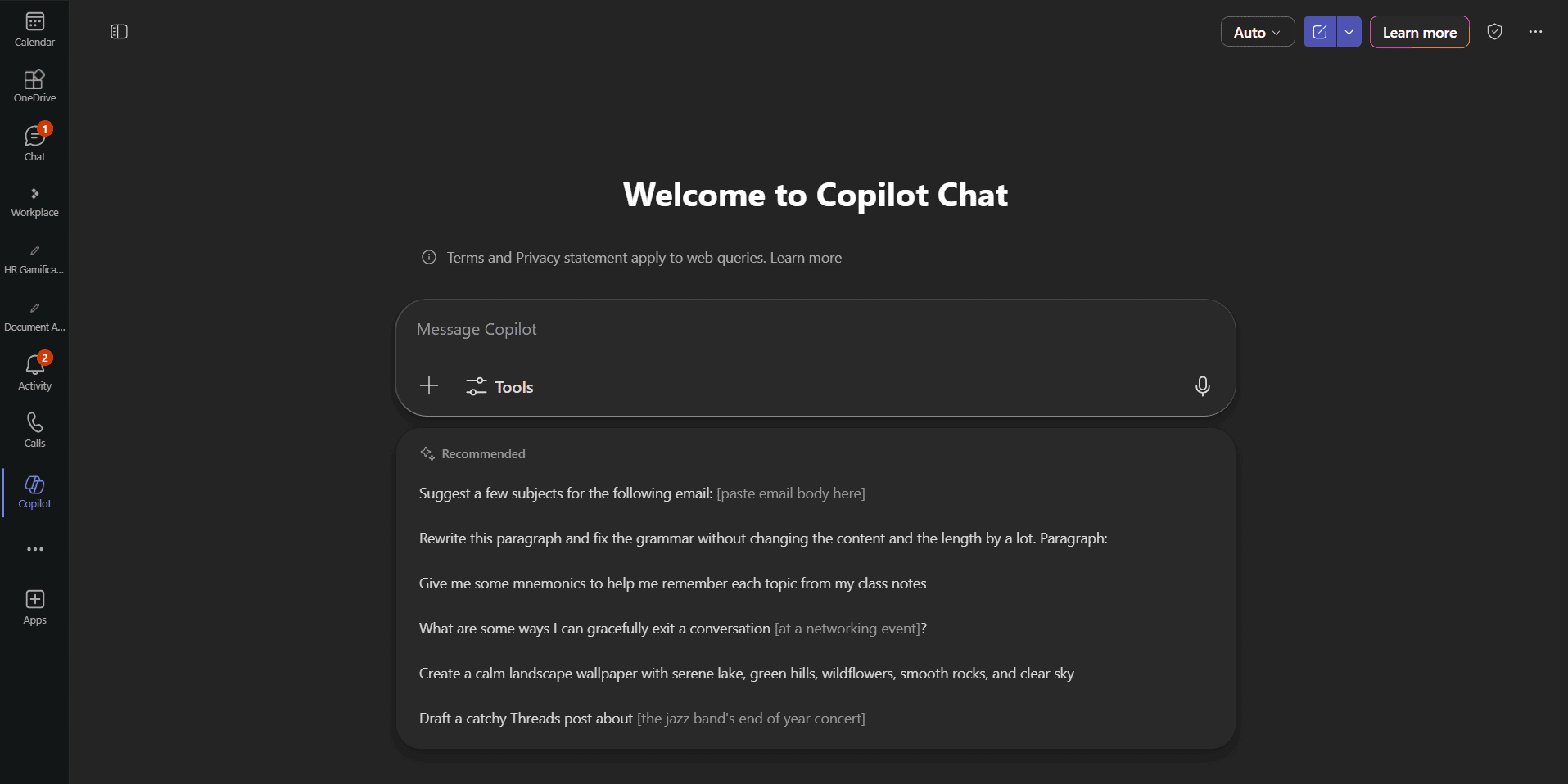
Given that both tools operate within software that employees already use, onboarding tends to be straightforward. User preferences typically determine which one feels more intuitive, as both prioritize conversational AI experiences and accessible prompt interfaces.
Summarization
Copilot can be context-aware about previously discussed work data, providing detailed responses to prompts like “Summarize the document I was working on yesterday” or “What are the key action items from my last five emails?” It does this by leveraging Microsoft Graph to access organizational content across SharePoint, Teams and email threads.
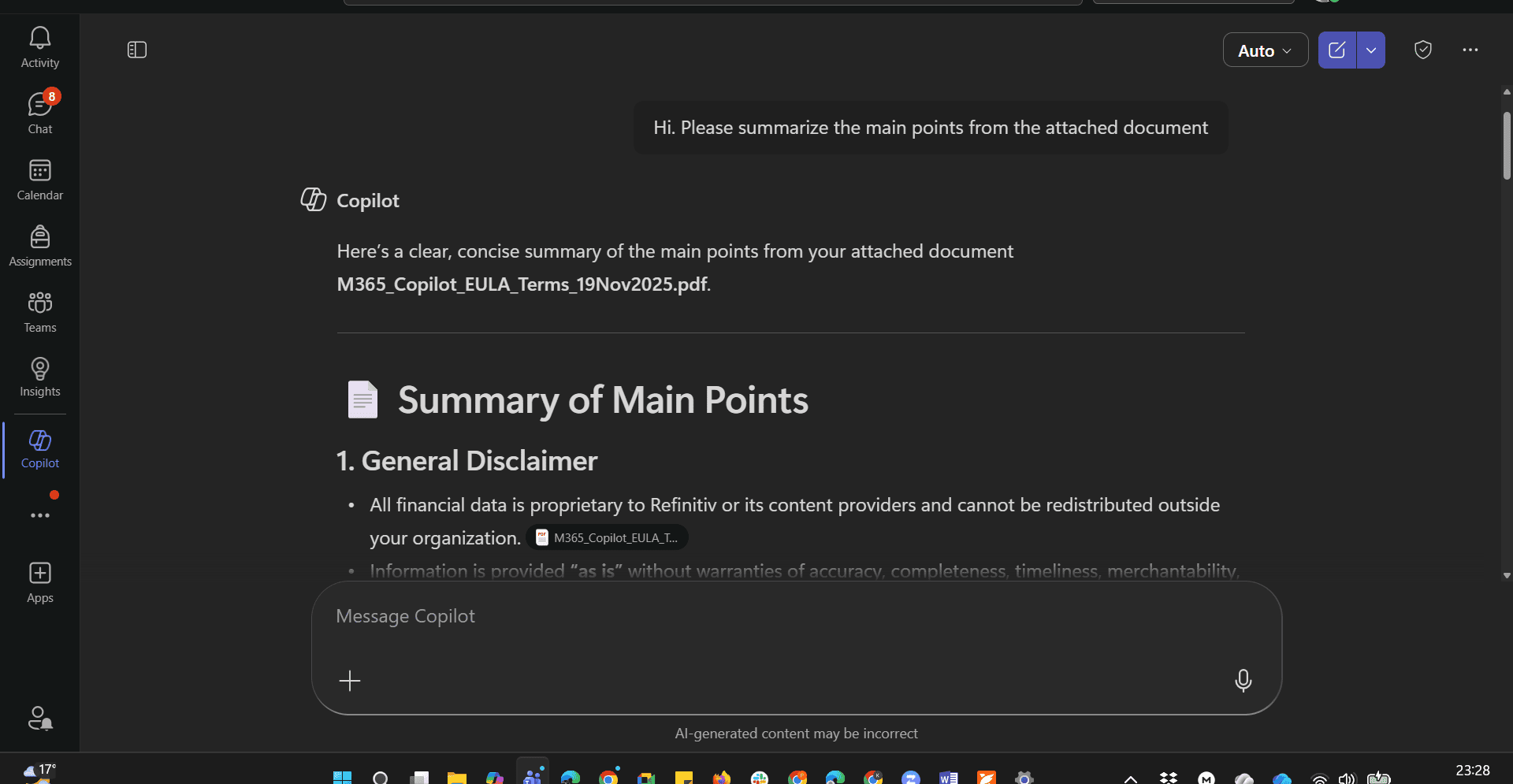
Gemini also delivers strong summarization across Google Docs and Gmail, using Google context to securely search through connected Google Workspace apps like past emails and saved files when needed.
During testing, both tools handled long-form documents effectively and produced concise bullet points and executive summaries. Although I noticed slight stylistic differences, the overall AI quality for summarization tasks was strong on both sides.
Coding Ability
Coding is another shared capability. Copilot connects with GitHub Copilot, offering structured code generation and in-line suggestions for developers. Gemini Code Assist provides similar coding functionality through the Gemini API.
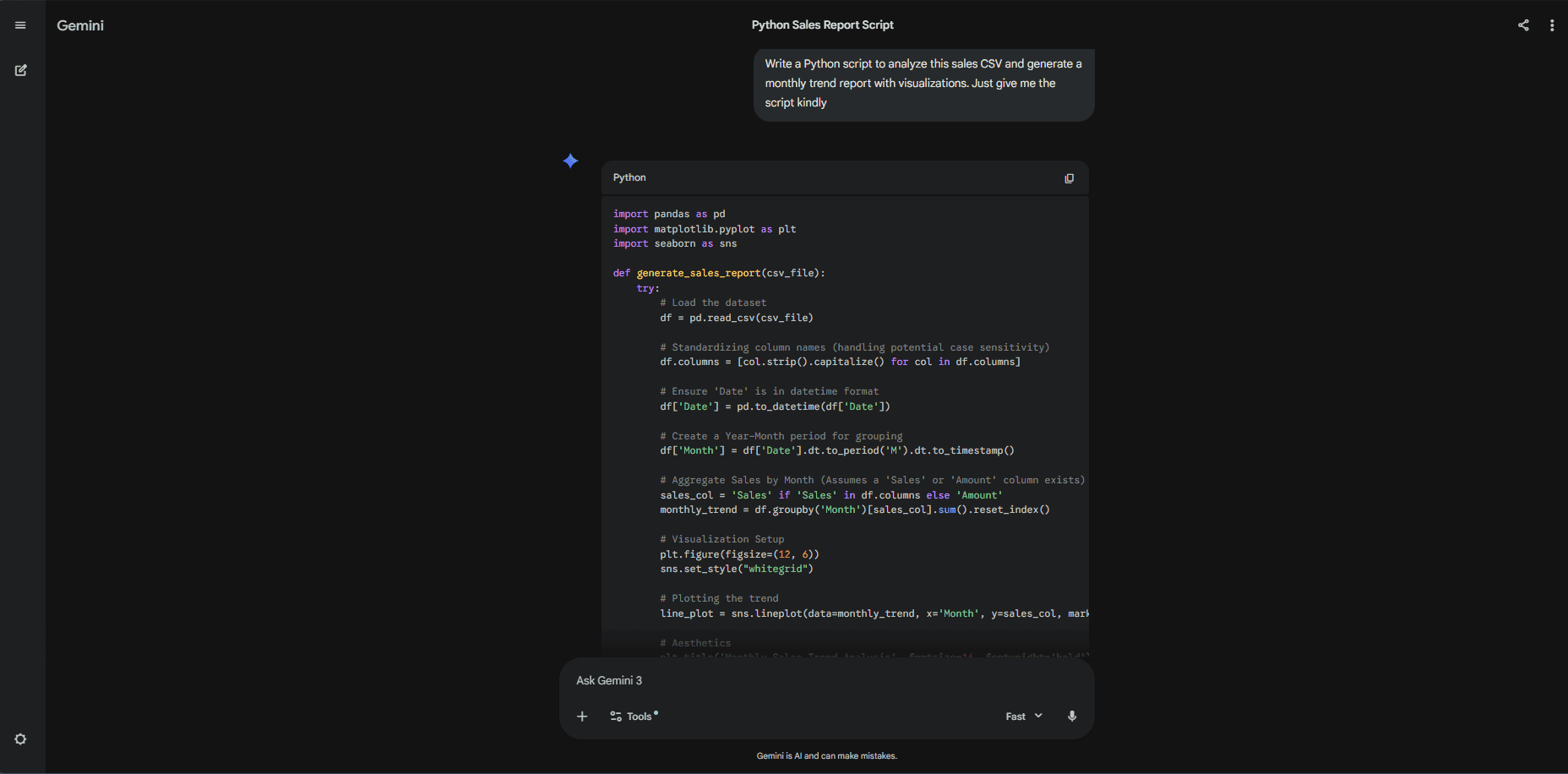
Both platforms support multiple programming languages and assist with debugging, refactoring and documentation. Although their integrations differ depending on the development environment, each one delivers meaningful coding assistance beyond simple text-based prompts.
Collaboration Features
Collaboration is central to both offerings. Copilot enhances collaboration in Teams by summarizing discussions, identifying action items and generating follow-up drafts. Gemini supports collaboration in Google Workspace by assisting with scheduling, shared document editing, presentation building and file management in Google Drive.
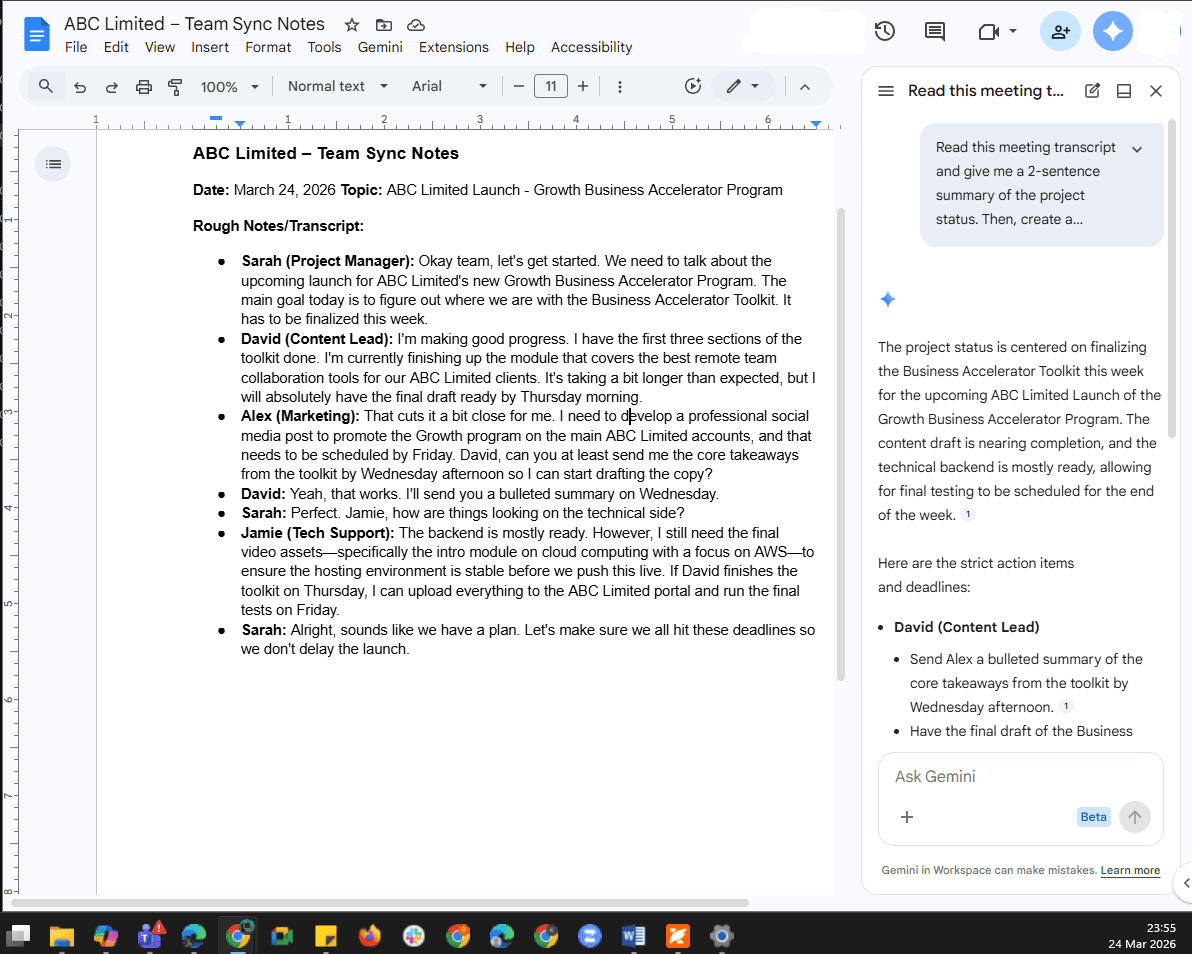
Beyond basic collaboration, both tools help teams stay organized and on track. If someone misses a meeting or joins a project late, they can read past chats, check emails and view document changes. This ensures everyone stays on the same page without forcing other team members to pause their work.
Google Gemini vs Microsoft Copilot: Differences
While Gemini and Copilot share fundamental conversational capabilities, their divergent approaches to image generation, web search integration, customization platforms and enterprise security create meaningful distinctions for business users.
Image Generation
Both Microsoft Copilot and Google Gemini offer built-in image generation tools that are useful for creative tasks like marketing content and social media graphics. Users can create images without needing design experience by using a single prompt. This makes both platforms useful for beginners and professionals alike.
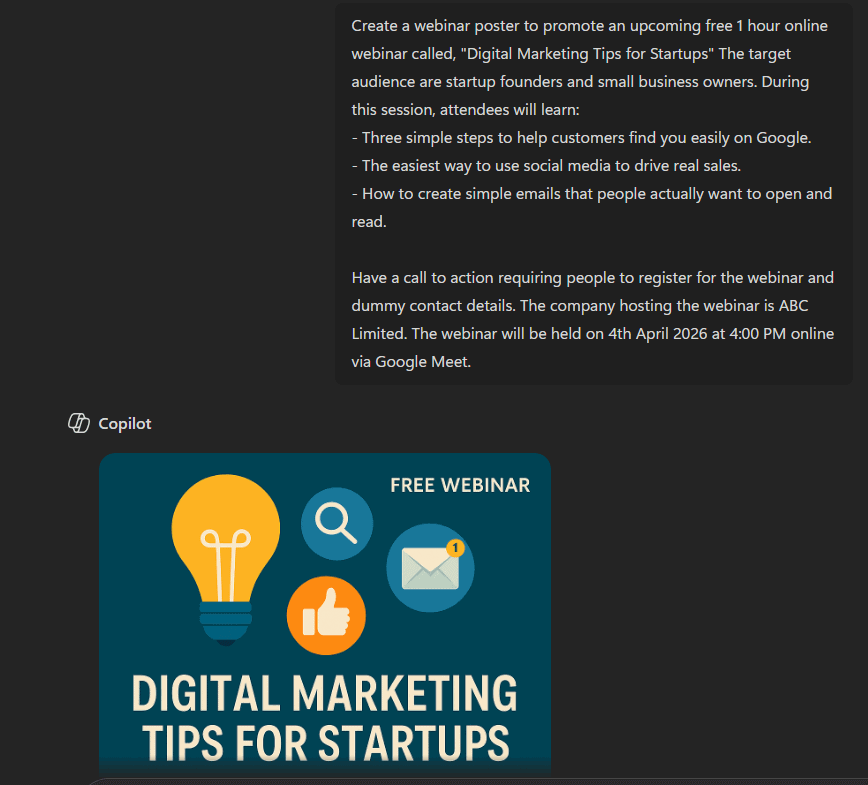
Microsoft Copilot uses DALL-E to deliver structured and polished visuals that fit into business workflows, especially within tools supported by Copilot Pro.
In contrast, Gemini uses Imagen for image generation, focusing more on creativity and flexibility. Powered by a strong AI model and the Gemini LLM, it offers a more dynamic and exploratory image generation experience.
Real-Time Web Search
One of the clearest differences between Gemini and Copilot is search grounding. Copilot integrates with Bing Search, providing cited results in its responses. This makes it useful for research tasks, competitor analysis and business decisions that require references.
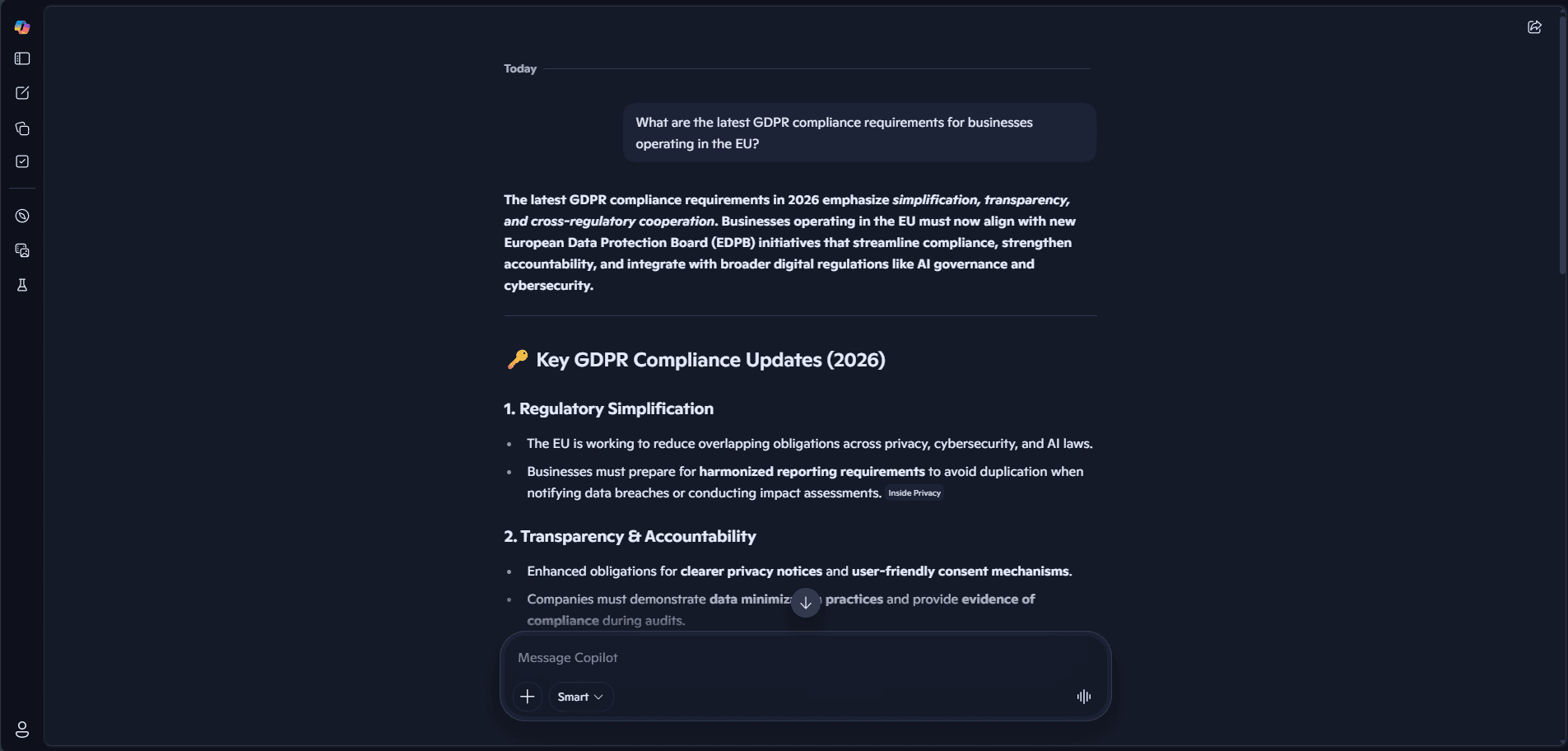
and reliable references.
Gemini connects with Google Search, providing strong real-time web results and up-to-date information. By using Google’s massive search engine, Gemini can deeply understand the context of what you’re looking for, making it useful for finding relevant answers to broad questions or new topics.
Content Creation and Creative Writing Ability
Copilot can create first drafts and build on existing content in Outlook and Word, as well as turn Word docs into PowerPoints with speaker notes. In Gmail, Gemini can help users draft emails for outreach or help refine drafts to be clearer and more concise. Similar assistance is available in Google Docs.
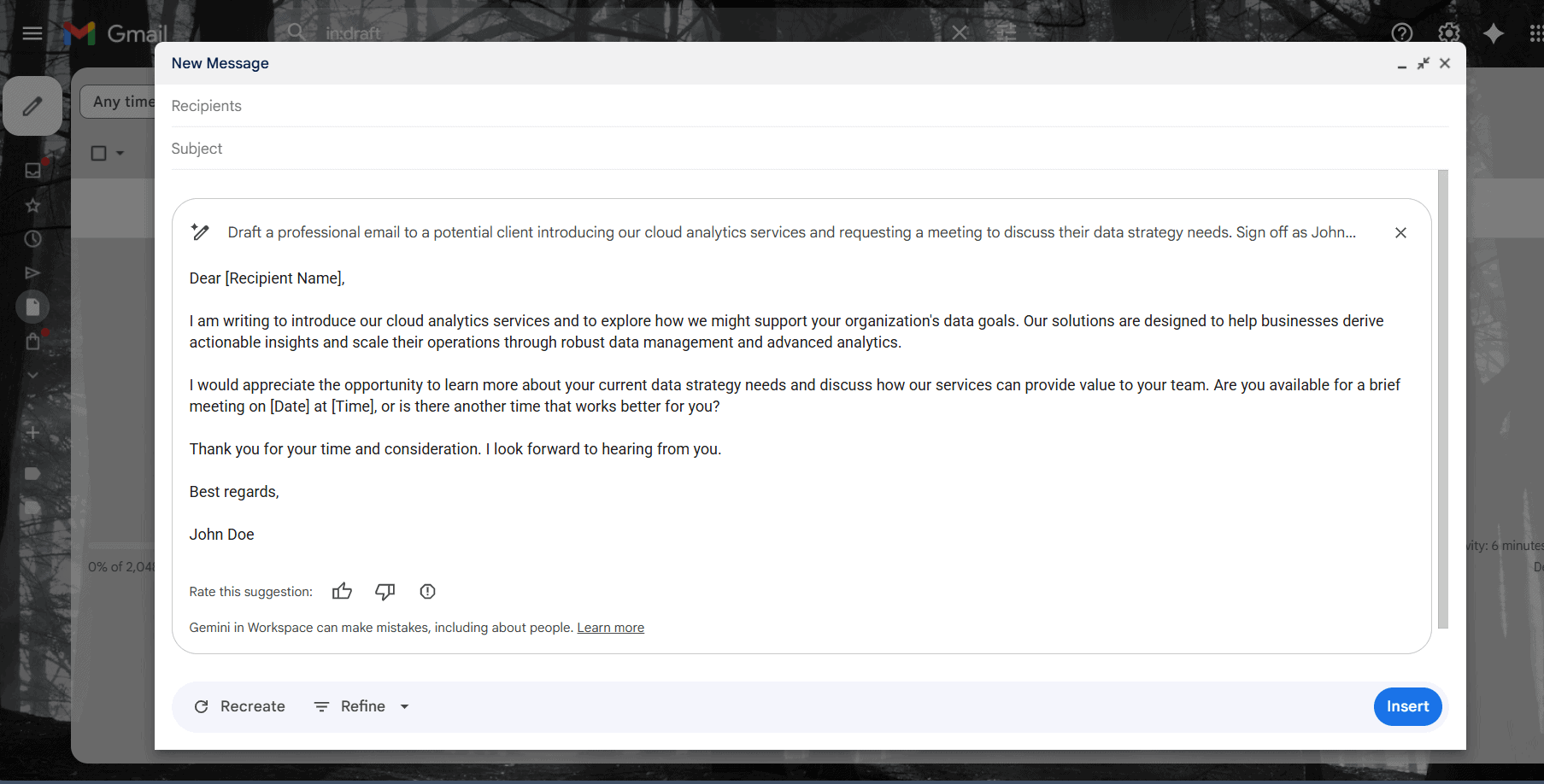
The platforms approach creative writing differently based on their integration philosophies. Copilot embeds deeply within document creation workflows across Office apps, while Gemini provides side-panel assistance that complements rather than replaces native Google application interfaces.
File Analysis
Gemini supports most file types, including PDFs, DOCXs, PPTs, images and spreadsheets with embedded charts, allowing uploads of up to 10 files simultaneously. Video files can be as large as 2GB, while other file types are capped at 100MB.
Copilot in Microsoft 365 handles Word, Excel and PowerPoint documents well. However, working with multi-file uploads, images or PDFs is less intuitive unless you’re using specific apps. This shows that Copilot has limitations when handling mixed content or multitasking across file types.
Each platform’s file analysis capabilities reflect its design philosophy. Gemini operates as a universal file processor, accepting diverse formats through its standalone interface. Copilot excels at analyzing files within the context of their native Microsoft apps, leveraging application-specific features for deeper insights.
Integration Capabilities
Copilot is embedded deeply in the Microsoft 365 ecosystem. For companies that work within the Microsoft 365 suite, integration feels natural and comprehensive across communication, productivity and cloud services.
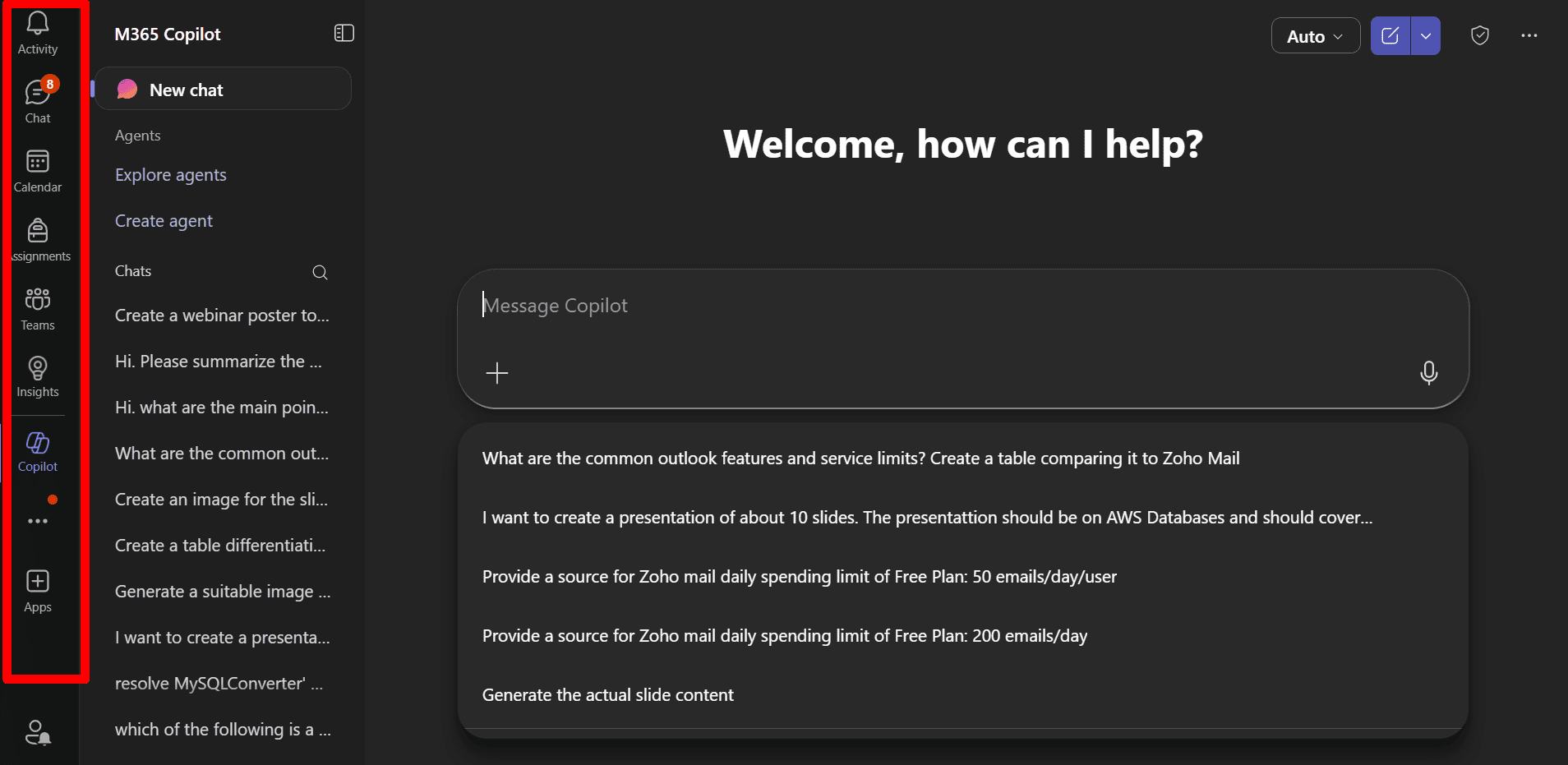
Gemini integrates with the Google Workspace ecosystem in apps like Docs, Gmail and Drive. It also connects to Google Cloud services. The integration will have a more seamless feel for users who mainly work in Google Workspace.
Security and Compliance
Both platforms provide enterprise-grade security to protect private data. Microsoft uses its strict Purview and EntraID systems to automatically apply your company’s existing security rules. As a result, Copilot keeps your data secure and does not expose private files to unauthorized users.
Google takes a more streamlined approach to compliance. It relies on broader cloud protocols to manage privacy and security across its range of workplace tools. Admins maintain strict control over access, but the system feels much more flexible and web-native.
Customization
Copilot customization centers around Microsoft’s developer ecosystem, APIs and enterprise workflow extensions. Companies can build custom Copilots aligned with internal systems and business data.
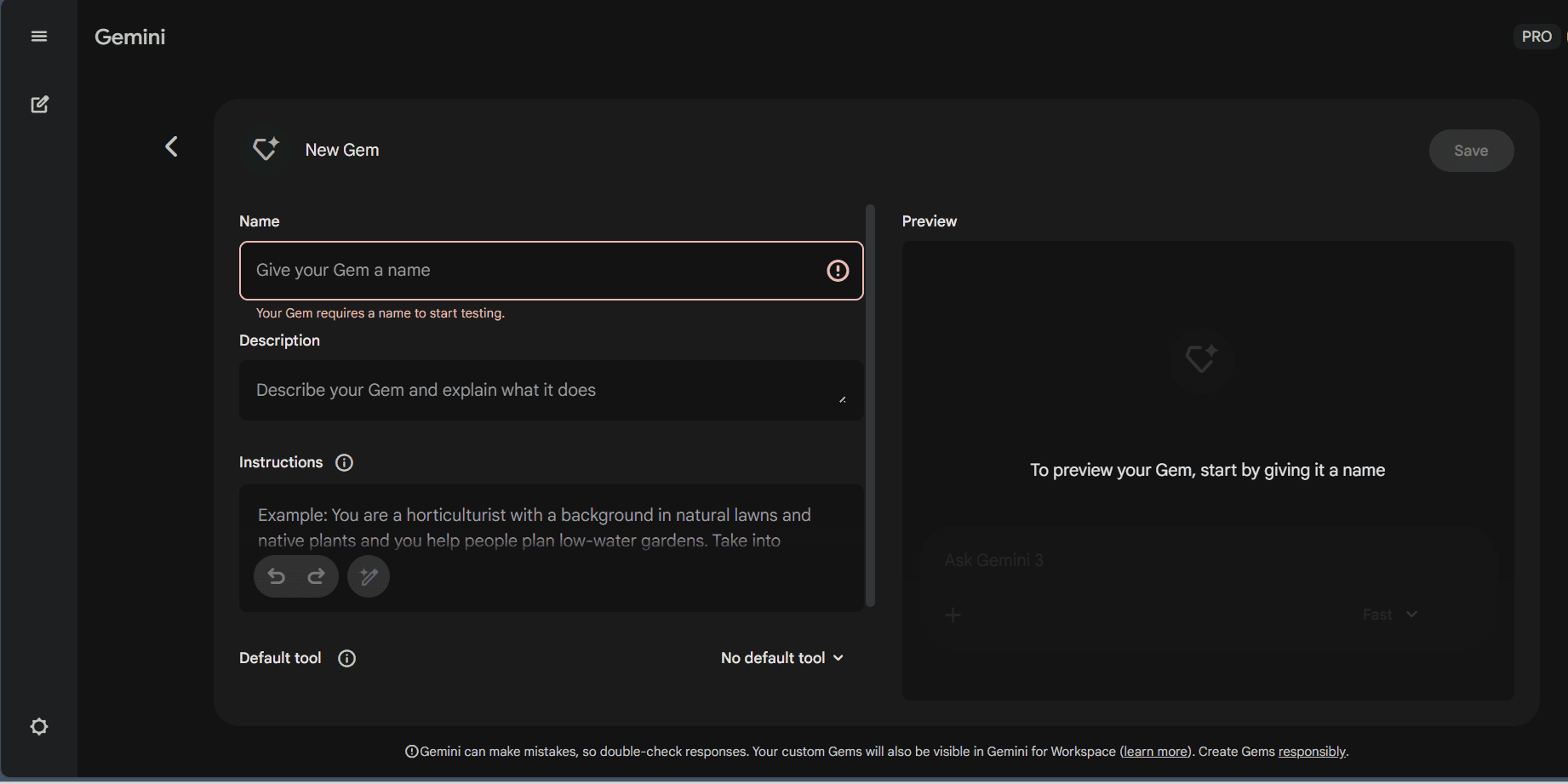
Google Gemini offers customization through its unique “gems” feature. This allows you to create custom Gemini versions tailored to specific tasks or workflows, enabling users to build reusable AI personas that respond consistently based on predefined instructions instead of repeating prompts.
The Verdict: Why We Think Copilot Wins Overall
After extensively testing both platforms, I consider Microsoft Copilot as the overall winner for modern businesses. Its deep integration with Microsoft 365 tools makes it highly practical for everyday work. It assists with tasks such as document creation and data analysis, leading to higher productivity and better workflow efficiency.
One of Copilot’s biggest strengths is how it naturally fits into tools people already use, such as Word, Excel and Teams. Instead of switching between apps, users can work and get AI assistance all in one place, saving time for teams handling large volumes of data and communication.
If you want to test these benefits for yourself, Microsoft Copilot’s premium plans offer strong value. A 30-day free trial is available for users to test the software’s capabilities risk-free.
How Do Businesses Use AI Assistants in the Real World?
Modern businesses use AI chatbots like Google Gemini and Microsoft Copilot for much more than simply finding answers to questions. These models can enhance productivity in the workplace, leading to greater efficiency and revenue.
- Summarization and action item extraction: Organizations can use Copilot to summarize long email threads and produce clear recaps from Teams meetings. Gemini can also summarize email threads in Gmail, making them easier to understand.
- Document creation: Companies use AI assistants like Gemini and Copilot to draft reports, emails and proposals, reducing the time spent on repetitive writing tasks.
- Coding and development workflows: Development teams use GitHub Copilot and Gemini Code Assist for code generation and support. These AI tools can write code, debug it and help with system design, reducing software delivery time and development errors.
- Data analysis and business intelligence extraction: Businesses like restaurants often struggle to understand customer feedback at scale. Organizations can use Copilot or Gemini to analyze millions of reviews in seconds and identify customer sentiments and themes.
Infobip, a global communications company, rolled out Microsoft Copilot to its 3,500 employees to speed up daily work. Teams use the AI to summarize partner meetings, extract action items and create custom AI assistants for routine workflows. This reduces the time spent analyzing, allowing teams to make faster and more efficient business decisions.
Mercedes-Benz uses Gemini in its business via Vertex AI to power its MBUX virtual assistant. This enables natural conversations and personalized guidance for drivers. By connecting to Google Maps, it provides real-time navigation details and updates, enhancing the digital experience and giving drivers accurate information when they need it.
What Does the Future Look Like for Gemini & Copilot?
The AI chatbot landscape is likely to shift from reactive assistants responding to individual prompts to autonomous, conversational AI agents capable of executing complex, multi-step workflows without continuous human oversight.
Microsoft 365 Copilot is embedding agentic capabilities directly into its suite, bringing multi-model intelligence and new experiences like Cowork (powered by Anthropic’s Claude) to everyday tasks and workflows. Gemini is becoming Google’s default AI layer, replacing Google Assistant and extending across cars, smartwatches and phones.
Both of these services realize that businesses no longer want tools that merely draft emails or generate reports; they want models that understand organizational context, delegate tasks to sub-agents, and have the ability to deliver completed work rather than suggestions requiring human intervention.
If You Want to Consider Other Services, Check Out…
FAQ: Google’s Gemini vs Microsoft’s Copilot
There is no single best AI tool; It all comes down to your needs. Gemini excels at creative writing, workflows in Google Workspace and real-time insights powered by Google Search. Copilot excels in structured business workflows, especially within the Microsoft suite.
No, Microsoft Copilot does not use Google Gemini. The platforms operate on completely different AI models from competing companies.
There is no single tool that is universally better than Gemini. However, alternatives like ChatGPT and Claude may outperform it in certain areas. For example, ChatGPT is highly versatile for advanced data analysis and general-purpose use, while Claude is known for powerful document analysis, long-form responses and coding.
Yes. Gemini 2.5 Pro is as good as ChatGPT, though they excel in different areas. Gemini models handle complex logic, longer chains of thought, multi-step coding tasks, code reviews and explanations of technical decisions. ChatGPT is best suited for human-like conversations and creative writing. The better choice depends on the use case.
Facts and Expert Analysis Sources:
- Our next-generation model: Gemini 1.5
- Microsoft Copilot context window: token limits, memory policy, and 2025 rules.
- Google Gemini vs Microsoft Copilot in Action: From Docs to Code
- Microsoft 365 Copilot vs. Google Gemini & Slack AI: What Every Business Leader Needs to Know
- Microsoft CoPilot vs. Google Gemini: Which AI Agent is Right for You?

